Can You Use A Hotspot When There Is No Service Available
Can you use a hotspot when there is no service? The short answer is no — a mobile hotspot needs a cellular connection to share internet. However, there are workarounds and tricks that can help you stay connected even in areas with weak or no signal. This guide covers everything you need to know about portable hotspot use without service, including tips, alternatives, and common mistakes to avoid.
Have you ever been in a dead zone and desperately needed internet access? You grab your phone, turn on the mobile hotspot, and… nothing happens. No connection. No internet. Just that frustrating “No Service” message staring back at you.
This situation happens more often than you might think. Whether you are hiking in the mountains, driving through a rural area, or stuck in a basement with zero cell tower reach, the question remains the same. Can you use a hotspot when there is no service? The answer is not as simple as yes or no. Let us break it all down.
Key Takeaways
- A hotspot cannot work without any cellular service: it relies on a live network connection to provide internet access.
- Weak signal is different from no service: even one bar might let you use a hotspot in emergencies.
- Airplane mode toggling and hotspot settings reset often fix temporary connectivity issues.
- Offline hotspot features let you share a saved Wi-Fi network without a live data connection.
- Portable Wi-Fi devices and satellite options offer alternatives when cellular coverage is absent.
- Your data plan and signal strength directly affect hotspot performance and reliability.
- Common mistakes like ignoring airplane mode or outdated settings cause most hotspot failures.
📑 Table of Contents
- How a Hotspot Actually Works
- Can You Use a Hotspot When There Is No Service?
- Common Scenarios When You Have No Service
- Tips to Improve Hotspot Performance in Low-Signal Areas
- Alternative Ways to Get Internet Without Cellular Service
- Common Mistakes That Cause Hotspot Failures
- When to Consider a Dedicated Hotspot Device
- Conclusion
How a Hotspot Actually Works
Before we dive into the “no service” scenario, it helps to understand what a Wi-Fi hotspot actually does. A hotspot is not a magic internet box. It is a bridge. Your phone connects to a cellular network, and then it shares that connection with other devices through Wi-Fi.
Think of it like a water pipe. The cellular network is the main water supply. The hotspot is the pipe that distributes water to your laptop, tablet, or another phone. If there is no water supply, the pipe cannot deliver anything.
The Role of Cellular Data
Every time you turn on a personal hotspot, your phone uses mobile data to fetch internet content. It then broadcasts that content over a local Wi-Fi network. This process is called tethering or Wi-Fi tethering. Without an active data plan and a live network connection, the hotspot has nothing to share.
Here is a simple breakdown of how it works:
- Your phone connects to a nearby cell tower.
- The cell tower routes your request through the internet.
- Your phone receives the data and broadcasts it as a Wi-Fi signal.
- Other devices connect to your phone’s Wi-Fi and access the internet.
Every single step depends on that first connection to the cell tower. No tower connection means the whole chain stops.
What “No Service” Really Means
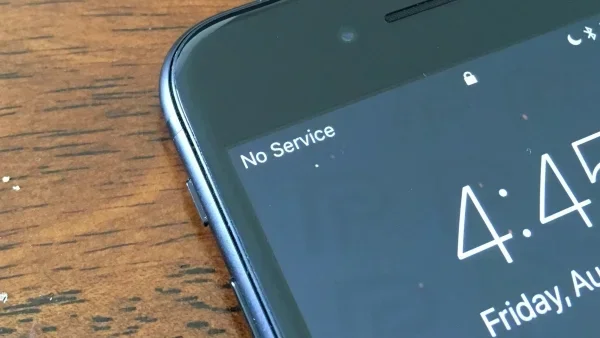
When your phone shows “No Service” or “Suspended,” it means your device cannot communicate with any cell tower in range. This could happen for several reasons:
- You are too far from any coverage area.
- There is a network outage in your region.
- Your SIM card is not detected or activated.
- Airplane mode is turned on accidentally.
- Your carrier has suspended your account.
In all these cases, your phone cannot access cellular data. And without cellular data, your mobile hotspot will not work.
Can You Use a Hotspot When There Is No Service?
Let us answer the big question directly. Can you use a hotspot when there is no service? Technically, no. A hotspot requires a live network connection to function. Without service, there is no data source to share.
But wait. There are some nuances worth exploring. Not all “no service” situations are exactly the same.
Weak Signal vs. No Service
There is a big difference between a weak signal and no service at all. If you have one bar of signal, your signal strength is low but present. In this case, a hotspot might still work — slowly, maybe, but it could work.
True “no service” means zero bars. Your phone has completely lost contact with every available cell tower. In this scenario, a portable hotspot will not produce any internet connection.
What Happens When You Try
If you try to enable a mobile hotspot with no service, here is what typically happens:
- The hotspot toggle turns on, but no devices can connect.
- Connected devices show “Connected” but have no internet access.
- Your phone displays a warning that hotspot cannot be enabled due to network issues.
- The Wi-Fi network name appears, but it provides no data.
So even though the hotspot feature turns on, it serves no real purpose without a live data connection.
Common Scenarios When You Have No Service
Understanding when you lose service helps you prepare. Here are the most common situations where no service hits and what it means for your hotspot.
Rural and Remote Areas
Rural areas often lack nearby cell towers. If you live on a farm or visit a remote cabin, you might be outside the coverage area entirely. In these spots, a mobile hotspot will not work unless you have a satellite backup or a signal booster.
Indoor Dead Zones
Basements, parking garages, and thick concrete buildings can block cellular signals. You might have full service on the street but zero service inside. This is a common connectivity issue that catches people off guard.
Network Outages
Sometimes the problem is not your phone. Carriers experience network outages due to storms, equipment failures, or maintenance. During an outage, even people with strong signal strength lose service. A hotspot will not work during these periods either.
Traveling Abroad Without Roaming
If you travel internationally and do not have roaming enabled, your phone may show no service. Without a roaming agreement with local carriers, your data plan cannot connect to foreign cell towers. Your hotspot will be useless in this case.
Tips to Improve Hotspot Performance in Low-Signal Areas
Even when you have some signal — just not enough — there are steps you can take to get the most out of your Wi-Fi hotspot. These tips can make a real difference.
Toggle Airplane Mode
This is the oldest trick in the book, and it works. Turning on airplane mode for 10 seconds and then turning it off forces your phone to reconnect to the nearest cell tower. Sometimes this simple reset is all it takes to restore a weak connection.
Restart Your Hotspot Settings
Go to your hotspot settings and turn the feature off completely. Wait a few seconds, then turn it back on. This refreshes the connection and can resolve temporary connectivity issues.
Change Your Hotspot Band
Most phones let you choose between 2.4 GHz and 5 GHz bands for your hotspot. The 2.4 GHz band travels farther and penetrates walls better. If you are in a low-signal area, switching to 2.4 GHz can help maintain a connection for devices further away.
Use a Signal Booster or External Antenna
If you frequently deal with poor coverage areas, consider investing in a signal booster. These devices amplify weak cellular signals and can dramatically improve your hotspot performance. Some external antenna solutions plug directly into your phone or hotspot device.
Keep Your Phone Charged
Running a hotspot drains battery fast. When your battery gets low, your phone may throttle performance to conserve power. This can weaken your already fragile signal. Keep your phone plugged in when using a hotspot in low-signal zones.
Quick Tips for Better Hotspot Performance
- Always update your phone’s network settings before relying on a hotspot.
- Place your phone near a window or higher ground to improve signal strength.
- Limit the number of connected devices to reduce bandwidth strain.
- Check your data plan to ensure you have enough data remaining.
- Use a portable hotspot device instead of phone tethering for better range.
Alternative Ways to Get Internet Without Cellular Service
If you regularly find yourself in areas with no cellular service, you have options beyond relying on a standard mobile hotspot. These alternatives can keep you connected when the network fails.
Portable Wi-Fi Devices
Dedicated portable Wi-Fi devices (also called mobile routers) work similarly to phone hotspots but often have better antennas and stronger signals. Some models support multiple SIM cards or even Wi-Fi tethering from other sources.
Satellite Internet Options
Satellite internet has come a long way. Services like Starlink offer coverage almost anywhere on Earth. While not as portable as a phone hotspot, satellite options are excellent for remote areas where cell towers cannot reach.
Offline Hotspot Sharing
Here is an interesting workaround. Some phones allow you to share a saved Wi-Fi network through your hotspot even without an active data connection. This does not give you internet access, but it does let other devices connect to a known network automatically when they enter range. This is useful in scenarios where you want to pre-configure devices for later use.
Download Content for Offline Use
When you do have service, download maps, documents, videos, and other content for offline use. This way, you do not need a live internet connection when you are in a no service zone. It is not the same as having a working hotspot, but it keeps you productive.
Common Mistakes That Cause Hotspot Failures
Many people assume their hotspot is broken when it actually is not. Here are the most common mistakes that lead to confusion and frustration.
Ignoring Airplane Mode
The number one cause of “no service” issues is accidentally enabled airplane mode. Always check this first before troubleshooting anything else. A simple toggle fixes this problem every time.
Not Checking Your Data Plan
Even if you have signal, your hotspot will not work if you have exceeded your data plan limit or if your plan does not include hotspot tethering. Contact your carrier to verify your plan supports mobile hotspot usage.
Using Outdated Software
Old software can cause connectivity issues and prevent your hotspot from functioning properly. Always keep your phone updated to the latest operating system version.
Overheating Your Device
Running a hotspot generates heat. If your phone overheats, it may disable the hotspot feature to protect itself. Let your phone cool down and try again.
Forgetting to Set Up the Hotspot Correctly
It sounds obvious, but many people skip the setup steps. Make sure your hotspot name and password are correctly configured. Also verify that the “Allow others to join” toggle is turned on in your settings.
Expert Insight
Network engineers often say that 80% of hotspot issues come down to three things: airplane mode, data limits, and outdated software. Before you dig deeper into troubleshooting, check these three items first. It will save you a lot of time and frustration.
When to Consider a Dedicated Hotspot Device
If you live or work in an area with unreliable cellular coverage, a dedicated portable hotspot device might be worth the investment. These devices are built specifically for mobile data sharing and often outperform phone-based hotspots.
Dedicated devices like the Verizon Jetpack or AT&T Nighthawk come with stronger antennas and better battery life. They also support more simultaneous connections than most phones. If you rely on a Wi-Fi hotspot for work or travel, these devices provide a more stable experience.
Keep in mind that these devices still need cellular service to function. They cannot create internet from nothing. But they do a better job of capturing weak signals and maintaining a steady internet connection in borderline coverage areas.
Here is a quick comparison of phone hotspots versus dedicated devices:
- Phone hotspot: Convenient, no extra cost, but drains battery fast and has limited range.
- Dedicated hotspot: Better battery, stronger signal, more device connections, but requires a separate data plan and extra hardware cost.
Your choice depends on how often you need a hotspot and how critical a reliable internet connection is for you.
Conclusion
So, can you use a hotspot when there is no service? The honest answer is no. A mobile hotspot needs a live cellular connection to share internet. Without service, there is simply nothing to share.
But knowing this opens the door to smarter solutions. You can prepare for low-signal areas, carry backup devices, download offline content, and troubleshoot common issues before they ruin your day. Understanding how your portable hotspot works puts you in control of your connectivity.
Next time you find yourself in a dead zone, you will know exactly what is happening and what you can do about it. Stay prepared, stay connected, and never let a weak signal catch you off guard again.
Frequently Asked Questions
Can a hotspot work without a data plan?
No, a mobile hotspot requires an active data plan to function. Without a data plan, your phone cannot access cellular data, and the hotspot has nothing to share with connected devices.
Why does my hotspot show connected but no internet?
This usually means your phone has a weak or unstable cellular signal. Your device connects to the hotspot Wi-Fi network, but the phone cannot fetch data from the internet. Try toggling airplane mode or moving to a location with better signal strength.
Can I use a hotspot in airplane mode?
No, airplane mode disables all wireless connections including cellular data. You must turn off airplane mode to use a hotspot. If airplane mode is on, your phone cannot connect to any cell tower or broadcast a Wi-Fi hotspot signal.
Does hotspot use a lot of battery?
Yes, running a Wi-Fi hotspot drains your battery significantly. The phone is constantly transmitting data and maintaining a Wi-Fi broadcast. If you rely on a hotspot often, consider using a dedicated portable hotspot device with a larger battery.
Can I share my hotspot with multiple devices?
Most phones allow 5 to 10 devices to connect to a personal hotspot at the same time. However, adding more devices reduces speed and increases battery drain. For more connections, a dedicated mobile hotspot router is a better choice.
What is the difference between tethering and a hotspot?
Tethering is the general term for sharing your phone’s internet connection. A Wi-Fi hotspot is a type of tethering that broadcasts a Wi-Fi network. USB tethering and Bluetooth tethering are other forms. All of them require an active cellular data connection to work.
=== CONCLUSION ===
Can you use a hotspot when there is no service? No — but now you know exactly why, and you know what to do about it. A mobile hotspot depends entirely on a live connection to a cell tower. Without that connection, there is no internet to share.
The good news is that understanding this limitation helps you plan better. You can carry a signal booster, download offline content, invest in a dedicated portable hotspot device, or simply know when to wait for service to return. These small steps make a big difference when you need connectivity most.
Keep these tips in mind, share them with friends who struggle with spotty coverage, and take control of your internet connection no matter where you are.