Do Smart TVs Have Coaxial Input Find Out Everything
Do smart TVs have coaxial input? The answer depends on the model and brand. Many modern smart TVs have dropped the coaxial port in favor of HDMI and USB connections. However, some models still include coaxial inputs, especially for cable TV and antenna setups. Understanding your TV’s input options helps you set up your home entertainment system correctly.
Do smart TVs have coaxial input? This is a question many people ask when they are setting up their living room or upgrading their home entertainment system. The short answer is that it depends on the TV model, brand, and year of manufacture. Some smart TVs still come with coaxial ports, while others have moved away from them completely.
In this guide, we will walk you through everything you need to know about coaxial inputs on smart TVs. You will learn which TVs still have them, how to connect coaxial cables, and what alternatives exist if your TV does not have a coaxial port. Whether you are a tech beginner or a seasoned home theater enthusiast, this article covers it all.
## What Is a Coaxial Input and Why Does It Matter
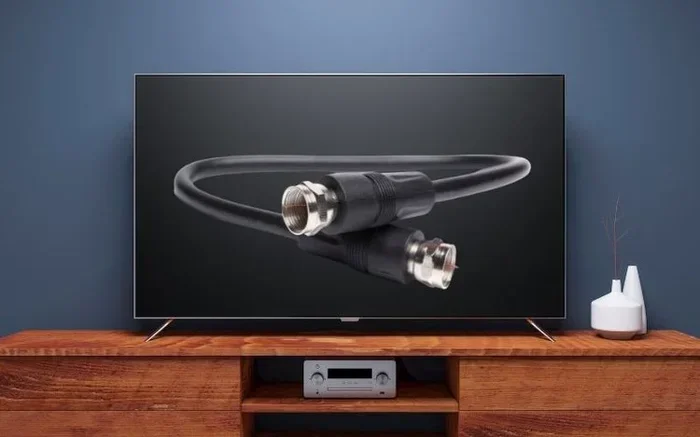
A coaxial input is a round cable port found on the back or side of a television. It carries audio and video signals through a single cable. The connector is usually called an F-connector or RF (radio frequency) jack.
Coaxial cables have been around for decades. They were the standard way to connect cable boxes, satellite dishes, and antennas to TVs. The cable has a copper center surrounded by shielding and insulation. This design helps protect the signal from interference.
Coaxial inputs matter because they provide a direct connection to cable TV services and antenna signals. Many people still rely on cable television for their entertainment needs. Without a coaxial port, you may need extra equipment to receive those signals.
Some cable providers still use coaxial infrastructure in homes. This means your wall outlet likely has a coaxial connection. If your TV does not have a coaxial input, you will need a converter box or a cable box to bridge the gap.
## Do Modern Smart TVs Still Include Coaxial Ports
The trend in TV manufacturing has shifted away from coaxial inputs. Most high-end smart TVs from brands like Samsung, LG, and Sony no longer include coaxial ports. They focus on HDMI, USB, and wireless connections instead.
However, this does not mean all smart TVs have removed coaxial inputs. Some mid-range and budget-friendly models still include them. Certain TVs designed for cable TV households may keep the coaxial port as a standard feature.
Here is a quick breakdown of what to expect:
- Premium smart TVs (2020 and newer): Usually no coaxial input. These TVs focus on HDMI 2.1, eARC, and smart features.
- Mid-range smart TVs: Some models still include coaxial inputs, especially those aimed at cable users.
- Budget and older smart TVs: More likely to have coaxial ports as a standard input option.
- TVs with built-in tuners: Often include coaxial inputs to receive over-the-air signals directly.
If you are shopping for a new smart TV, check the specifications carefully. Look for terms like “RF input” or “coaxial” in the port list. Do not assume every smart TV has one.
## How to Connect Coaxial Cable to Your Smart TV
Connecting a coaxial cable to your smart TV is straightforward if your TV has the port. Follow these steps to get started.
First, locate the coaxial input on your TV. It is usually labeled “ANT IN” or “CABLE IN” on the back panel. The port looks like a small round opening with a threaded center pin.
Next, take your coaxial cable and screw it into the TV port. Turn the connector clockwise until it feels snug. Do not overtighten, as this can damage the port.
Then, connect the other end of the cable to your cable box, antenna, or wall outlet. Secure that connection the same way.
Finally, go to your TV settings and select the correct input source. Use your remote to switch to the antenna or cable input. Your TV should now display channels or a cable menu.
Quick tip: If you experience signal issues, check all connections. A loose coaxial cable can cause pixelation or no signal at all.
### Using a Coaxial-to-HDMI Converter
What if your smart TV does not have a coaxial input? You can still use coaxial signals with a converter box. A coaxial-to-HDMI converter takes the RF signal and transforms it into an HDMI output.
These converters are affordable and easy to find online. You connect the coaxial cable to the converter, then run an HDMI cable from the converter to your TV. This setup works great for people who want to use older cable equipment with modern TVs.
Some cable boxes already have HDMI outputs built in. In that case, you may not need a separate converter. Check with your cable provider to see what equipment they offer.
## Coaxial vs Other TV Input Options
Smart TVs today offer many input options beyond coaxial. Understanding how coaxial compares to other connections helps you choose the best setup for your needs.
### Coaxial vs HDMI
HDMI is the most common input on modern smart TVs. It delivers high-definition video and audio through a single cable. HDMI supports resolutions up to 4K and even 8K on newer cables.
Coaxial cables, on the other hand, typically carry standard-definition or enhanced-definition signals. They do not support the same high-resolution capabilities as HDMI. For the best picture quality, HDMI is the clear winner.
However, coaxial connections are still reliable for basic cable TV and antenna signals. They provide a stable connection with minimal setup. If you only need standard cable channels, coaxial works just fine.
### Coaxial vs Optical Audio
Optical audio cables carry sound only. They do not transmit video. Coaxial cables carry both audio and video in one connection. This makes coaxial more convenient for basic TV setups.
### Coaxial vs USB
USB ports on smart TVs serve a different purpose. They are mainly for connecting USB drives, streaming sticks, or charging devices. You cannot use a USB port to receive cable or antenna signals directly.
### Comparison Table
- Coaxial: Carries audio and video, supports cable and antenna, standard definition to enhanced definition
- HDMI: Carries audio and video, supports 4K/8K, the modern standard for smart TVs
- Optical: Carries audio only, used for soundbars and audio systems
- USB: Carries data and power, used for media playback and device charging
## What to Do If Your Smart TV Lacks a Coaxial Port
Finding out your smart TV does not have a coaxial input can be frustrating. But do not worry. You have several options to still enjoy cable TV and antenna channels.
### Option 1: Use a Cable Box or Streaming Device
Most cable providers give you a set-top box with HDMI output. Simply connect the cable box to your TV using an HDMI cable. This is the easiest solution for cable TV users.
Streaming devices like Roku, Amazon Fire Stick, or Apple TV also offer great alternatives. These devices plug into your TV’s HDMI port and give you access to live TV apps. Many of them support cable TV streaming services now.
### Option 2: Use a Coaxial-to-HDMI Converter
As mentioned earlier, a converter box can bridge the gap between coaxial signals and HDMI inputs. This is a budget-friendly option that works well for most setups.
### Option 3: Use a Digital Antenna with a USB Tuner
Some USB TV tuners allow you to connect an antenna to your smart TV through a USB port. These tuners receive over-the-air signals and display them on your TV. This is a great option for cord-cutters who want free local channels.
### Option 4: Check for Built-in Tuners
Many smart TVs have built-in digital tuners. These tuners can receive over-the-air signals through an antenna connected to the coaxial port. If your TV lacks a coaxial port, it may also lack a built-in tuner. Check your TV’s manual or specifications to confirm.
## Common Mistakes People Make With Coaxial Connections
Setting up a coaxial connection seems simple, but mistakes happen. Here are some common errors to avoid.
### Not Checking for a Tuner
Some people buy a coaxial cable and plug it in without checking if their TV has a tuner. A tuner is what allows your TV to process the coaxial signal. Without one, you will see no channels even with a perfect connection.
### Using the Wrong Cable Type
Not all coaxial cables are the same. Standard RG-6 cables work best for most TV setups. Using a low-quality or damaged cable can cause signal loss. Always inspect your cable before connecting it.
### Forgetting to Rescan Channels
After connecting a coaxial cable, you need to rescan for channels. Go to your TV’s channel setup menu and run an automatic scan. This tells your TV to find all available channels on the new input.
### Over-Tightening the Connector
Screwing the coaxial connector too tight can strip the threads or damage the port. Hand-tighten the connector until snug, then give it a quarter turn with pliers if needed. Never force it.
## Expert Insights on Coaxial Inputs and Smart TV Setup
Technology experts agree that the shift away from coaxial inputs is part of a broader trend toward digital connectivity. HDMI has become the universal standard for audio and video transmission. Wireless technologies like Bluetooth and Wi-Fi have also reduced the need for physical ports.
However, coaxial cables still play an important role in certain setups. Rural areas with antenna-based TV reception often rely on coaxial connections. Older neighborhoods with existing coaxial infrastructure also benefit from keeping this option available.
If you are setting up a home entertainment system, consider your needs carefully. If you primarily stream content, you may not need a coaxial input at all. If you rely on cable TV or antenna signals, look for a TV that includes a coaxial port or plan for a converter box.
Pro tip: When in doubt, contact your TV manufacturer or check the user manual online. The specifications section will list every input and port available on your specific model.
## Key Takeaways
Key Takeaways
- Not all smart TVs include coaxial inputs: Many newer models have removed them entirely.
- Coaxial ports are still common on older and mid-range TVs: They remain popular for cable and antenna connections.
- You can use adapters to connect coaxial cables to modern TVs: HDMI converters bridge the gap easily.
- Smart TVs offer multiple input options: HDMI, USB, optical, and wireless connections replace many traditional ports.
- Check your TV’s back panel before purchasing: Knowing your input options saves time and money.
- Coaxial connections still deliver solid signal quality: They remain reliable for cable and satellite TV.
Key Takeaways
- Do smart TVs have coaxial input? Some do, but many modern models have removed them in favor of HDMI and wireless options.
- Check your TV’s specifications before buying: Look for coaxial or RF input listings in the port details.
- Converters are your best friend: Coaxial-to-HDMI converters let you use coaxial signals on any smart TV.
- Coaxial connections remain reliable: They still work well for cable TV and antenna setups.
- Avoid common setup mistakes: Check for tuners, use quality cables, and always rescan channels after connecting.
- Your setup depends on your needs: Streamers may not need coaxial, while cable users should plan accordingly.
## Frequently Asked Questions
Can I watch cable TV on a smart TV without a coaxial input?
Yes, you can. Use your cable provider’s set-top box and connect it to your TV via HDMI. Alternatively, use a coaxial-to-HDMI converter to bring the coaxial signal into your TV through an HDMI port.
Do all smart TVs have built-in tuners for coaxial signals?
No, not all smart TVs include built-in tuners. Check your TV’s specifications to confirm. If your TV lacks a tuner, you will need an external tuner or a cable box to process coaxial signals.
Can I use a coaxial cable to connect a streaming device?
No, streaming devices like Roku or Fire Stick use HDMI connections. Coaxial cables carry antenna or cable TV signals. You cannot use them to connect streaming devices directly to your TV.
Is coaxial better than HDMI for picture quality?
No, HDMI is superior for picture quality. HDMI supports 4K and even 8K resolutions, while coaxial typically carries standard or enhanced definition signals. Use HDMI whenever possible for the best viewing experience.
What type of coaxial cable should I use for my TV?
Use an RG-6 coaxial cable for most TV setups. It is the standard cable for television signals and provides good shielding against interference. Avoid using thin or damaged cables for best results.
Can I connect an antenna to my smart TV without a coaxial input?
Yes, you can use a USB TV tuner or a coaxial-to-HDMI converter. A USB tuner plugs into your TV’s USB port and accepts an antenna connection. A converter box changes the coaxial signal to HDMI, which your TV can display.
## Conclusion
So, do smart TVs have coaxial input? The answer is not a simple yes or no. It depends on the TV model, brand, and what you need from your setup. Some smart TVs still include coaxial ports, especially for cable and antenna users. Many modern models have moved on to HDMI and wireless-only connections.
Understanding your TV’s input options is the first step to a great home entertainment setup. Whether you use coaxial, HDMI, or streaming devices, the right connection makes all the difference.
If your TV does not have a coaxial port, do not worry. Converters, cable boxes, and USB tuners offer easy solutions. You can still enjoy all your favorite channels and content without a coaxial input on your TV.
Take the time to check your TV’s specifications, plan your connections, and enjoy your viewing experience. The right setup brings your favorite shows and movies to life in the best possible way.
Frequently Asked Questions
What is Do Smart Tvs Have Coaxial Input?
Do Smart Tvs Have Coaxial Input is an important topic with many practical applications.