Do I Need My Own Router With Sonic Internet Equipment
Do I need my own router with Sonic? The answer depends on your internet plan, home size, and what features you want. Sonic provides a gateway device with its service, but many users choose to bring their own wireless router for better Wi-Fi coverage and network performance. This guide breaks down everything you need to know about router compatibility with Sonic broadband connection and helps you decide if own equipment is worth it.
Let’s face it. Internet setup can feel confusing. You sign up for Sonic internet, and suddenly you are staring at a box of equipment wondering what to do with it. One question comes up again and again: do I need my own router with Sonic?
The short answer is no, you do not have to. Sonic gives you a gateway device when you sign up for their service. But the longer answer is more interesting. Lots of people find that bringing their own wireless router makes a big difference. It can improve your Wi-Fi coverage, boost network performance, and give you more control over your home network. This guide walks you through everything you need to know.
Whether you are a casual streamer or a work-from-home pro, your router matters. It shapes how fast your broadband connection feels. It decides how well your devices talk to each other. And it affects your daily internet experience more than most people realize. So let us dig into whether you should stick with Sonic’s gear or switch to own equipment.
Key Takeaways
- Sonic provides a gateway device: You do not have to buy a router, but the included gear may not meet your needs.
- Own routers offer better coverage: A dedicated wireless router can improve Wi-Fi coverage in larger homes.
- Compatibility matters: Not all routers work well with Sonic’s gateway device and broadband connection setup.
- Setup is straightforward: Switching to your own router takes about 15 to 30 minutes.
- Cost savings are possible: Owning your gear can save money over time compared to renting from Sonic.
- Advanced features come with own gear: Better network settings, parental controls, and Ethernet connection options.
- Common mistakes hurt performance: Avoid placing routers near walls and metal objects for best results.
📑 Table of Contents
What Is Sonic Internet and How Does It Work?
Before we talk about routers, it helps to understand what Sonic is and how it delivers internet to your home. Sonic is an internet provider based in California. They offer both fiber optic and DSL broadband connection options. Their fiber service, called Sonic Fiber, delivers some of the fastest speeds available in their coverage areas.
Understanding Sonic’s Service Plans
Sonic offers several plans to fit different needs. Their fiber plans can reach speeds up to 10 Gbps in some areas. DSL plans offer slower but still reliable speeds for lighter users. Your plan affects what kind of equipment you need. A heavy user who streams 4K video and works from home needs much more from their network setup than someone who just checks email.
Here is a quick look at what Sonic offers:
- Sonic Fiber: Symmetrical upload and download speeds, up to 10 Gbps.
- Sonic DSL: Lower speeds, typically up to 100 Mbps download.
- Sonic Wireless: Fixed wireless internet for areas without fiber or DSL.
How Sonic Delivers Internet to Your Home
Sonic Fiber uses a fiber optic cable that runs directly to your home. This is called FTTH, or fiber to the home. The signal travels as light, which means incredibly fast speeds and low latency. DSL plans use existing phone lines to deliver internet. Wireless plans use a fixed antenna to connect to Sonic’s network.
No matter which plan you have, the internet signal needs a device to translate it for your home gadgets. That is where the gateway device comes in. Sonic provides this device when you sign up. But is it enough? That is what most people really want to know.
Does Sonic Provide a Router With Your Service?
Yes, Sonic includes a gateway device with every internet plan. This device combines a modem and a router into one box. It connects to the internet source and then broadcasts a wireless signal to your devices. So technically, you do not need a separate router.
What Equipment Comes With Sonic Internet
When you sign up for Sonic, you receive a gateway device. This is often a Sonic-branded unit. It handles both the modem function and the router function. The device connects to the wall outlet, whether that is a fiber terminal or a phone line. Then it creates a wireless network for your home.
The Sonic gateway includes built-in Wi-Fi. It also has Ethernet ports for wired connections. For many households, this is all you need. The device works well for basic browsing, streaming, and video calls. But it has limitations, especially in larger homes or setups with many devices.
The Sonic Gateway Device Explained
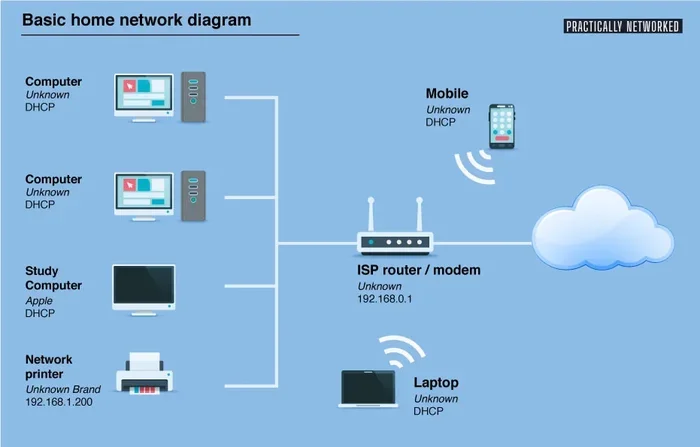
The Sonic gateway is a two-in-one device. The modem part talks to Sonic’s network and brings the internet signal into your home. The router part takes that signal and shares it with your phones, laptops, smart TVs, and other gadgets.
Here is what the Sonic gateway typically offers:
- Built-in Wi-Fi for wireless devices.
- Ethernet ports for wired connections.
- Basic parental controls.
- Guest network support.
- Limited range compared to standalone routers.
The gateway works fine for small apartments and condos. But if you live in a larger house with thick walls or multiple floors, the Wi-Fi coverage may fall short. This is the number one reason people start asking if they need their own router.
Why You Might Want Your Own Router With Sonic
There are several good reasons to bring your own wireless router to a Sonic setup. Let us look at the biggest ones.
Better Wi-Fi Coverage and Range
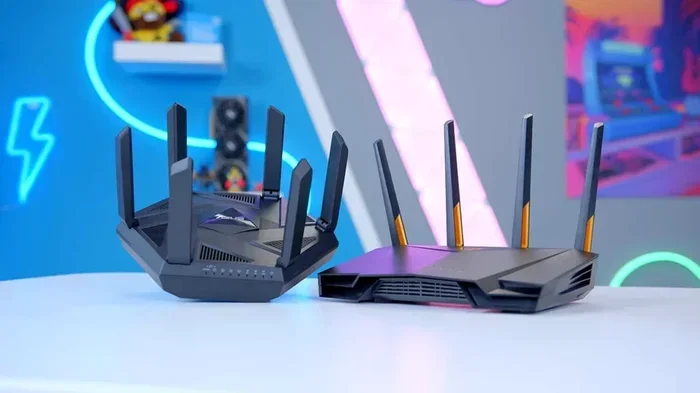
The Sonic gateway is designed to be compact and simple. It is not built to push a strong signal through multiple rooms. If your home has dead zones, a better router can fix that. A standalone router with stronger antennas can reach farther and punch through walls more effectively.
For example, imagine you live in a two-story house. The Sonic gateway sits in the living room on the first floor. Your bedroom on the second floor gets a weak signal. A dedicated wireless router placed in a central location can solve this problem easily.
More Control Over Your Network Settings
Sonic’s gateway gives you basic settings. You can change the network name and password. But that is about it. A router you own gives you much more control. You can set up network settings like Quality of Service, which prioritizes traffic for specific devices. You can create VLANs for smart home devices. You can adjust channel settings to reduce interference.
These features matter for power users. If you work from home and need a stable connection for video calls, you will appreciate the extra control. If you are a gamer, you will love the ability to prioritize gaming traffic.
Advanced Features for Power Users
Modern routers come packed with features that the Sonic gateway simply cannot match. Many networking gear options now include built-in mesh systems, parental controls with screen time limits, and security features like WPA3 encryption.
Some routers even offer built-in antivirus and ad blocking. These features protect every device on your home network without needing extra software. For families with kids, this is a huge benefit.
How to Set Up Your Own Router With Sonic Equipment
Switching to your own router is easier than you think. You do not need to be a tech expert. Here is how to do it step by step.
Step-by-Step Setup Process
First, check that your router is compatible with Sonic. Look for routers that support bridge mode or IP passthrough. This mode lets the Sonic gateway handle the internet connection while your router handles the Wi-Fi. It is the best setup for most users.
Next, connect your router. Plug an Ethernet cable from one of the Sonic gateway’s LAN ports into the WAN port on your new router. Power on the router and wait for it to start up. Open a web browser and go to your router’s admin page to configure it.
Here is the setup in a nutshell:
- Enable bridge mode on the Sonic gateway.
- Connect the gateway to your router with an Ethernet cable.
- Power on the router and wait for it to boot.
- Log into the router’s admin panel.
- Set up your Wi-Fi name and password.
- Test your internet speed and connection.
Quick Tips for Smooth Installation
Place your router in a central location. Keep it away from walls and metal objects. Elevate it on a shelf for better signal spread. Avoid putting it near microwaves or baby monitors, as these can cause interference.
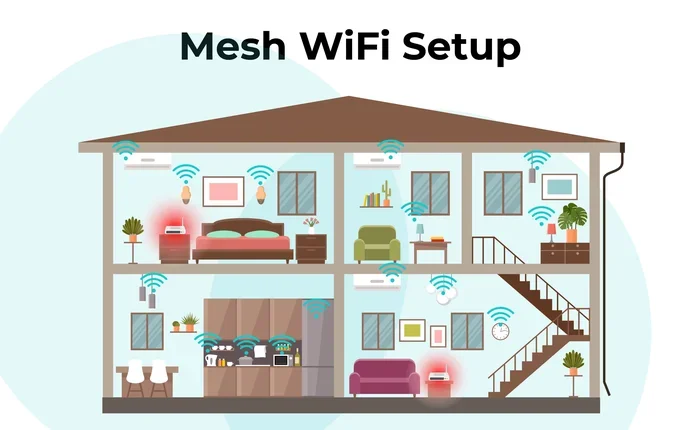
If you have a large home, consider a mesh router system. Mesh systems use multiple nodes to spread Wi-Fi coverage evenly throughout your house. They are easy to set up and manage through a phone app.
Common Mistakes to Avoid
One big mistake is not enabling bridge mode. If you do not do this, you get double NAT, which can cause problems with gaming, VPNs, and some apps. Another mistake is placing the router in a closet or behind furniture. Walls and obstacles block the signal and weaken your broadband connection.
Also, do not buy a router that is too powerful for your needs. If you live in a small apartment, a massive gaming router is overkill. Match your router to your home size and usage habits.
Sonic Router vs. Own Router: Which Is Better?
This is the big question. Let us compare the Sonic gateway to a standalone router side by side.
Comparison Table
| Feature | Sonic Gateway | Own Router |
|---|---|---|
| Wi-Fi Range | Basic, limited | Better, stronger signal |
| Speed Handling | Good for most plans | Excellent for fast plans |
| Customization | Limited | Full control over settings |
| Price | Included with service | One-time purchase |
| Advanced Features | Few | Many, including mesh and security |
| Ease of Setup | Very easy | Easy, takes 15-30 minutes |
| Rental Cost | May include monthly fee | No recurring cost |
Expert Insights
Networking experts generally agree that bringing your own router improves performance in most cases. The Sonic gateway is fine for light users and small spaces. But anyone who streams a lot, works from home, or has many smart devices will benefit from a dedicated wireless router.
According to networking professionals, the biggest advantage of own gear is longevity. Sonic may replace their gateway every few years. But a quality router you own can last five to seven years or more. Over time, this can save you money and give you a better experience.
Final Thoughts on Router Choices for Sonic Users
So, do you need your own router with Sonic? It depends on your situation. If you live in a small space, use the internet lightly, and have no coverage problems, the Sonic gateway is probably fine. You can save the money and skip the hassle.
But if you want better Wi-Fi coverage, faster internet speed, and more control over your home network, then yes, getting your own router is a smart move. It is not complicated to set up, and the benefits are real. You will notice the difference in every device you use.
Think about your needs. Consider your home size, the number of devices you use, and what you do online. Then pick a router that fits. Whether you go with a simple model or a high-end mesh system, bringing your own networking gear gives you more power and better performance.
The bottom line is this: Sonic gives you a working setup out of the box. But taking control of your network setup with your own router puts you in the driver’s seat. You get faster speeds, better range, and a more reliable broadband connection. For many users, that is well worth the small effort it takes to make the switch.
Frequently Asked Questions
Can I use any router with Sonic internet?
Most routers work with Sonic, but you should check for compatibility before buying. Look for routers that support bridge mode or IP passthrough. This ensures the Sonic gateway handles the internet connection while your router manages the Wi-Fi. Check Sonic’s website or contact their support for a list of recommended routers.
Do I have to pay extra if I use my own router with Sonic?
No, you do not have to pay extra. Sonic charges a monthly fee for their gateway device in some plans. Switching to your own router can help you avoid that rental fee. You pay for the router once, and it is yours to keep.
Will my internet speed improve with my own router?
It depends on your current setup and plan. If the Sonic gateway is limiting your speeds, a better router can help you reach your full plan speed. A strong wireless router can also reduce lag and improve performance for multiple devices at once.
What is bridge mode on a Sonic gateway?
Bridge mode turns off the router function on the Sonic gateway. It lets the gateway pass the internet signal to your own router without creating a conflict. This is the recommended setup when you bring your own router to a Sonic connection. It prevents double NAT issues and gives you the best performance.
How do I know if my Sonic gateway is working properly?
Check the lights on the gateway device. A solid green light usually means everything is working. If you see blinking red or no lights at all, there may be a connection issue. You can also test your internet speed at speedtest.net to see if you are getting the speeds your plan promises.
Is Sonic Fiber better than DSL for router performance?
Yes, Sonic Fiber offers faster and more stable speeds than DSL. Fiber uses light signals, which means less interference and lower latency. A good router performs best on fiber because it can handle the higher speeds and more connected devices without breaking a sweat.
=== CONCLUSION ===
The question of do I need my own router with Sonic comes down to your needs and your home. Sonic’s gateway device works well for basic internet use. It gets the job done for casual browsing and light streaming. But if you want more from your internet, bringing your own wireless router is the way to go.
You get better Wi-Fi coverage, faster network performance, and full control over your home network. The setup is simple, and the long-term savings are real. Whether you choose a budget-friendly option or a premium mesh system, your internet experience will improve.
Take a look at your current setup. Think about where you use the internet most in your home. Consider how many devices are connected at once. Then make the choice that fits your life best. With the right router, your Sonic broadband connection will feel faster, stronger, and more reliable than ever before.