Do I Need A Projector Screen For A Projector Setup
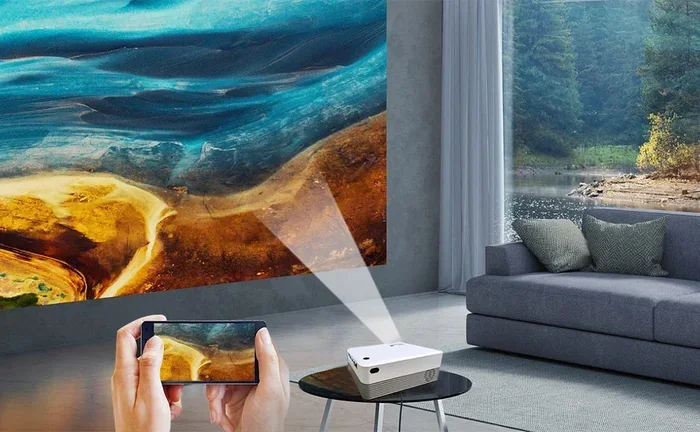
You don’t always need a dedicated projector screen to enjoy big-screen visuals. A projector setup can work on a white wall, a bedsheet, or even a specialized projection surface you already own. This guide covers every option so you can decide what works best for your viewing experience and budget.
So you just got a projector, and now you are wondering if you actually need a projector screen. Maybe you are setting up a home theater, or maybe you just want to watch movies on the side of your house. Either way, the question is the same: do you really need to buy a dedicated screen?
The short answer is no. You do not need a projector screen to use a projector. But the longer answer is that a screen can make a big difference in your viewing experience. In this guide, we will walk through every option you have. We will cover what works, what does not, and how to get the best picture no matter what surface you use.
Whether you are a casual movie watcher or a serious home theater fan, this article will help you decide. We will look at wall alternatives, screen types, setup tips, and common mistakes to avoid. By the end, you will know exactly what you need for your projector setup.
Key Takeaways
- Projector screens are not mandatory: You can use a plain white wall, a bedsheet, or even a blackout curtain as a projection surface.
- Screen material matters: A proper projection surface improves brightness, contrast, and overall image quality compared to a rough wall.
- Ambient light control is key: The room’s lighting affects your viewing experience more than whether you use a screen or not.
- Portable screens are affordable: You can get a decent portable screen for under $50, making it easy to set up anywhere.
- Screen size and aspect ratio: Matching your screen size to your projector’s native resolution gives the sharpest picture.
- DIY alternatives work in a pinch: A stretched bedsheet or a painted wall can serve as a temporary display surface.
📑 Table of Contents
- Why a Projector Screen Helps
- Can You Use a Wall Instead of a Screen?
- Types of Projector Screens You Can Choose
- How Room Lighting Affects Your Screen Choice
- Projector Placement and Screen Size
- Common Mistakes People Make with Projector Screens
- When You Really Do Need a Projector Screen
- Final Thoughts
Why a Projector Screen Helps
A projector screen is not just a piece of fabric. It is designed to reflect light in a way that makes your picture look its best. When you project onto a regular wall, the surface absorbs some of the light. This can make your image look dull or faded.
The Science Behind Screen Surfaces
Projector screens use special coatings that bounce light back toward the viewers. This is called gain. A higher gain means more light comes back to your eyes. A plain white wall has a lower gain than a proper screen. That means the picture on a wall will often look dimmer.
Here is what a good screen gives you:
- Better contrast: Blacks look deeper and colors pop more.
- Improved brightness: The image stays vivid even in brighter rooms.
- Uniform surface: No bumps, paint textures, or shadows messing up the picture.
- Wider viewing angles: People sitting off to the side still see a clear image.
That said, none of this means you must buy a screen right away. A white wall works fine for casual use. You just need to know what you are trading off.
Can You Use a Wall Instead of a Screen?
Yes, you can project onto a wall. Many people do this every day without any problems. But the results depend on a few key factors. Let us break them down.
What Kind of Wall Works Best
Not all walls are equal when it comes to projection surfaces. Here is what to look for:
- Flat and smooth walls: These give the most even picture. Bumps and textures create distortions.
- White or light-colored walls: Dark walls absorb too much light. A white wall reflects more of the projector’s output back at you.
- Matte finish walls: Glossy paint creates glare and hot spots. A matte finish scatters light more evenly.
If your wall is painted a dark color, you can always repaint it white temporarily. Some people even use a large white bedsheet stretched on a frame. This works surprisingly well for a quick setup.
One thing to watch out for: outlets, light switches, and wall textures can show up on the projected image. You want to project onto the cleanest section of wall you can find. Also, if you are using a projector as a tv for regular viewing, a wall will get old fast. The image quality just will not match what a screen delivers.
Types of Projector Screens You Can Choose
If you decide a screen is worth it, you have plenty of options. Not all screens are the same, and the right one depends on your space and needs.
Fixed Frame Screens
A fixed frame screen is the most common type for home theaters. It mounts to the wall and stays in place permanently. These screens offer the flattest surface, which means the sharpest picture. They come in different sizes, usually from 80 inches to 150 inches or more.
Fixed screens are great if you have a dedicated home theater room. They look clean and professional. The downside is they are not portable. Once it is on the wall, it stays there.
Portable and Retractable Screens
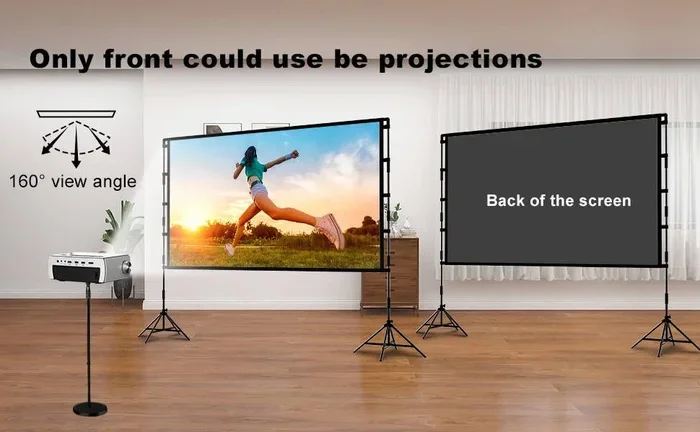
A portable screen is perfect if you want flexibility. These fold up into a carrying case and set up in seconds. You can use them indoors or outdoors. Many people bring them to backyard movie nights or set them up in a garage for gaming.
Retractable screens pull down from a ceiling or wall mount. They are a nice middle ground. You can roll them up when you are not using them and pull them down when it is movie time.
DIY Screen Options
On a budget? You can build your own projection surface. Here are some popular DIY ideas:
- White bedsheet: Hang it on a wall or stretch it on a frame. It works, but wrinkles can affect the image.
- Painted wall: Use special projector screen paint on a section of wall. This creates a smooth, dedicated surface.
- Blackout curtain: A white blackout curtain stretched tight makes a decent screen. It is easy to find and affordable.
- White shower curtain: This is a quick hack that works in a pinch. The image will not be perfect, but it is functional.
If you want a quick fix, check out our guide on using a black sheet as a projector screen. It covers a creative alternative that some projector users prefer for certain setups.
How Room Lighting Affects Your Screen Choice
This is the factor most people overlook. The amount of ambient light in your room changes everything about how your projector performs. And it directly affects whether you need a screen or not.
Dark Rooms
In a dark room, you do not need a fancy screen. A white wall or a basic white sheet will give you a great picture. The lack of competing light means the projector’s output shines through clearly. This is why basement home theaters work so well with minimal setups.
Bright Rooms
In a bright room, a good screen becomes much more important. Ambient light washes out the projected image. A high-gain screen reflects more light back to the viewers, helping the picture stay visible. Without a screen, a bright room will make your image look washed out and pale.
Some people use ambient light rejecting (ALR) screens. These are designed to bounce away ambient light while reflecting the projector’s light back. They are expensive but very effective. If you are setting up in a living room with windows, an ALR screen can be a game changer.
Quick Tips for Managing Light
- Close blinds or curtains to block sunlight during movie time.
- Use dimmable LED lights instead of bright overhead fixtures.
- Position the projector so the beam does not hit a shiny surface.
- Turn off or move away from light sources behind the screen.
Projector Placement and Screen Size
Getting the right screen size and projector placement is crucial for a great viewing experience. If you set things up wrong, even the best screen will not help.
Understanding Throw Distance
Throw distance is how far the projector sits from the screen. Every projector has a different throw ratio. Short-throw projectors can create a large image from just a few feet away. Long-throw projectors need more space.
Before you buy a screen, measure the distance between your projector and the wall or screen location. Make sure the projector can fill the screen size at that distance. You do not want to buy a 120-inch screen only to find your projector can only make a 80-inch image from where you plan to place it.
Matching Screen Aspect Ratio
Most projectors output a 16:9 or 16:10 aspect ratio. Your screen should match this. If you use a screen with a different ratio, you will get black bars on the sides or top and bottom of the image. This ruins the experience and wastes part of your screen.
For gaming or movies, 16:9 is the standard. For some business or presentation uses, 16:10 or 4:3 might be better. Always check your projector’s native resolution and aspect ratio before choosing a screen size.
Proper projector mounting also matters. A projector hanging from the ceiling at the right height will project a perfectly aligned image. A projector sitting on a wobbly table might create a skewed picture that no screen can fix.
Common Mistakes People Make with Projector Screens
Even experienced projector users make mistakes. Here are the most common ones and how to avoid them.
- Choosing the wrong screen size: Too small and you lose immersion. Too large and the image gets dim and pixelated. Match the screen to your projector’s capabilities.
- Ignoring the gain rating: A higher gain screen is brighter but has a narrower viewing angle. A lower gain screen is more forgiving for off-center viewers. Pick based on your room layout.
- Not leveling the screen: A crooked screen makes the whole setup look amateur. Take the time to mount it perfectly level.
- Forgetting about cable management: Power cables, HDMI cables, and projector mounts all need to be organized. Loose cables are a tripping hazard and look messy.
- Using the wrong surface: A glossy wall or a colored surface will distort colors and brightness. Always use a matte white surface for the best results.
- Skipping projector settings: Many projectors have picture modes that are not optimized for screens. Adjust brightness, contrast, and color settings for your specific setup.
If you are connecting your projector to other devices, you might want to check out our guide on using HDMI for video and Bluetooth for audio to get the best sound and picture from your setup.
When You Really Do Need a Projector Screen
There are times when a dedicated screen is the right call. Here is when you should seriously consider buying one:
- You watch movies or TV regularly: If you use your projector several times a week, a screen will upgrade the experience dramatically.
- You have a bright room: As we covered, ambient light demands a high-quality screen to keep the image visible.
- You care about image quality: If you notice dull colors or poor contrast on a wall, a proper screen will fix that.
- You are hosting movie nights: A screen looks professional and gives your guests a better experience.
- You use your projector for gaming: Gamers need sharp, bright images. A screen makes a noticeable difference in detail and clarity.
For casual use like a one-time presentation or an occasional movie, a wall or sheet works just fine. But if you are investing in a good projector, a matching screen is worth the extra cost.
On the setup side, if you are wondering about positioning, you might also find our article on putting a projector on a shelf helpful for optimizing your placement and getting the best image on any surface.
Final Thoughts
So do you need a projector screen for your projector setup? The honest answer is: it depends on how often you use it and what kind of experience you want. For occasional use, a white wall or a bedsheet will do the job. For regular movie nights or gaming sessions, a proper screen makes a noticeable difference in image quality and overall viewing experience.
Start with what you have. Try projecting onto your wall first. If you are happy with the results, save your money. If the picture looks dull or washed out, it is time to invest in a screen. You do not need to spend a fortune either. Even an affordable portable screen can transform your setup.
The most important thing is to enjoy your projector. Do not let the question of screens stop you from setting up and watching. Get the projector working first, and then upgrade your surface as needed. That is the smartest way to build a projector setup that you will love for years to come.
Frequently Asked Questions
Can I use a white bedsheet as a projector screen?
Yes, a white bedsheet works as a temporary projector screen. Stretch it tight to reduce wrinkles, and hang it on a smooth wall or frame. The image quality will not match a dedicated screen, but it is a solid budget option for casual viewing.
What is the best color wall for projecting onto?
A flat white or light gray matte wall is the best surface for projecting. Dark walls absorb too much light and make the image dim. Glossy or colored walls distort colors and create hot spots. A clean, smooth, white matte wall gives the most accurate picture.
Does a projector screen improve picture quality?
Yes, a projector screen improves picture quality significantly. Screens have special coatings that reflect light more efficiently than a regular wall. This means better brightness, deeper blacks, more vivid colors, and a sharper overall image. The difference is especially noticeable in bright rooms.
How big should my projector screen be?
Your screen size should match your projector’s capabilities and your room size. Measure the throw distance between your projector and the screen wall. Most projectors work best with a screen between 80 and 120 inches. Always check your projector’s manual for the recommended screen size at your specific distance.
Can I use a projector screen outdoors?
Yes, you can use a portable projector screen outdoors. Portable screens are lightweight and easy to set up in yards or patios. For the best results, project after sunset or in a shaded area. Ambient sunlight will wash out the image, so darker conditions work much better for outdoor viewing.
Do I need a special wall paint for a projector screen?
You do not need special paint, but projector screen paint can improve results. Standard matte white paint works fine for most setups. Projector screen paint has a more uniform surface and higher gain, which means a brighter and more even picture. It is an option if you want a dedicated wall space for your projector.