Do I Have To Buy A Router From ATT For Home Internet
Do I have to buy a router from ATT? The short answer is no. You have the freedom to rent equipment from AT&T or use your own compatible device. Buying an AT&T router can save you money over time, but renting offers convenience and support. This guide breaks down every option so you can make the best decision for your home internet setup.
If you just signed up for AT&T internet, you might be wondering about one thing. Do I have to buy a router from ATT? The answer might surprise you. You actually have several options, and none of them force you into a single path. AT&T gives you the flexibility to rent, buy, or even bring your own device. Let us walk through every choice so you can pick what works best for your home.
Choosing the right equipment affects your internet speed, Wi-Fi coverage, and monthly bills. Many people do not realize they have options until they see their first bill. That is why understanding what is available matters. Buying a router from ATT is just one path, and it is not always the best one. This article covers everything you need to know.
Key Takeaways
- You are not required to buy a router from ATT: AT&T gives you the choice to rent or use your own equipment.
- Renting costs add up over time: Monthly rental fees can reach $100 or more per year.
- Buying your own router can save money: A one-time purchase often pays for itself within 12 to 18 months.
- AT&T offers gateway devices: These combine modem and router functions in one unit for convenience.
- Compatibility matters: Not every router works with AT&T internet, especially fiber and DSL connections.
- Return policies exist: You can return AT&T equipment if you decide to switch to your own device.
- Your internet speed depends on your router: A better router can unlock faster Wi-Fi speeds.
📑 Table of Contents
- What Equipment Does AT&T Provide?
- Do I Have to Buy a Router From ATT?
- Renting vs. Buying: A Cost Comparison
- Using Your Own Router With AT&T Internet
- When Does It Make Sense to Buy From AT&T?
- Common Mistakes People Make With AT&T Equipment
- Expert Tips for Saving Money on AT&T Internet Equipment
- What Happens If You Cancel AT&T Service?
- Final Thoughts
What Equipment Does AT&T Provide?
AT&T supplies specific devices for their internet plans. These devices handle the job of connecting your home to the internet and broadcasting Wi-Fi. The type of equipment depends on your AT&T internet plan and technology.
AT&T Gateway Devices
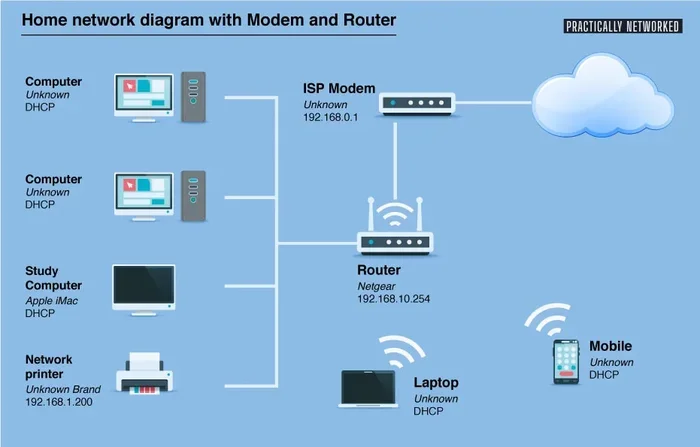
Most AT&T internet plans use a gateway device. A gateway is a combo unit that works as both a modem and a router. It receives the internet signal and spreads it wirelessly around your home. AT&T calls these devices different names depending on the plan.
For fiber internet, AT&T uses the AT&T Fiber Gateway. This device supports Wi-Fi 6 technology and handles speeds up to 5 Gbps. For DSL internet, AT&T provides a AT&T DSL modem router. These older devices work well for basic browsing but may struggle with heavy usage.
AT&T also offers a separate modem and router setup in some cases. This gives you more control over your wireless network. But for most customers, the gateway is the standard choice.
AT&T Smart Home Manager
AT&T markets its gateway as the Smart Home Manager. This is the brand name for their WiFi router equipment. The Smart Home Manager 5G and Smart Home Manager 6 are the latest models. They support mesh networking, which helps cover larger homes with strong Wi-Fi signals.
These devices include features like parental controls, guest networks, and device prioritization. AT&T bundles all of this into one box. The convenience is real, but the rental fees add up fast.
Do I Have to Buy a Router From ATT?
Here is the most important part. No, you do not have to buy a router from ATT. AT&T does not force you to purchase their equipment. You have three real options, and each one is valid. Let us break them down so you can see the full picture.
Option 1: Rent AT&T Equipment
Renting is the default choice for most AT&T customers. When you sign up for internet, AT&T ships you a gateway device. You pay a monthly rental fee instead of a large upfront cost. This option is simple and requires zero setup knowledge.
AT&T handles all repairs and replacements. If your device stops working, they send a new one. You also get access to AT&T customer support for any equipment issues. For people who want a hassle-free experience, renting makes sense.
But there is a catch. The AT&T monthly equipment fee can range from $10 to $15 per month. Over a few years, that adds up to hundreds of dollars. Many customers do not realize they are paying for the same device twice.
Option 2: Buy AT&T Equipment
You can also choose to purchase AT&T equipment outright. This means paying the full price for the gateway or router upfront. Once you own the device, you stop paying the monthly rental fee.
Buying from AT&T is not always the cheapest route. Their retail prices for gateway devices can be higher than third-party alternatives. However, owning the equipment gives you full control. You can customize settings, update firmware, and keep the device as long as you want.
If you plan to stay with AT&T for many years, buying can save you money. Do I have to buy a router from ATT? You do not have to, but buying is a smart move if you value long-term savings.
Option 3: Use Your Own Router
This is the option most people overlook. You can use a third-party router with AT&T internet. This means buying your own compatible device and connecting it to the AT&T gateway. Many tech-savvy users prefer this route because they get better performance and features.
Using your own router gives you access to advanced Wi-Fi standards. You can choose Wi-Fi 6E or Wi-Fi 7 routers that outperform AT&T’s gateway devices. Brands like ASUS, Netgear, TP-Link, and Linksys offer excellent options.
The only requirement is compatibility. Not every router works with AT&T’s network setup. You need to make sure your router supports bridge mode or IP passthrough. We will cover this in more detail later.
Renting vs. Buying: A Cost Comparison
Money is the biggest factor for most people. Let us look at the real costs of renting versus buying AT&T equipment. The numbers might change how you think about your options.
| Factor | Renting from AT&T | Buying from AT&T | Using Your Own Router |
|---|---|---|---|
| Upfront Cost | $0 | $100-$200 | $80-$300 |
| Monthly Fee | $10-$15 | $0 | $0 |
| Annual Cost | $120-$180 | $0 | $0 |
| Device Ownership | No | Yes | Yes |
| AT&T Support | Yes | Limited | No |
| Upgrade Flexibility | Easy | Moderate | Full |
| Long-Term Savings | Low | Moderate | High |
The table makes the comparison clear. Renting is easy but expensive over time. Buying an AT&T router saves you from monthly fees. Using your own router gives you the most control and the best long-term value.
Let us do the math. If you rent for three years at $12 per month, you pay $432. A $150 router purchase pays for itself in just over a year. After that, you save money every single month. That is a strong argument for owning your equipment.
Using Your Own Router With AT&T Internet
Bringing your own router is a great option, but it requires some setup. AT&T internet uses a technology called IP passthrough or bridge mode. This allows your personal router to handle all the Wi-Fi duties while the AT&T gateway acts as a simple modem.
How to Set Up Your Own Router
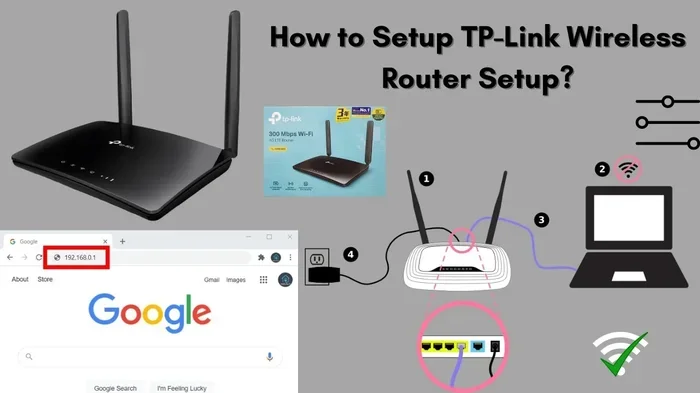
Setting up your own router with AT&T is straightforward. Here is what you need to do step by step:
- Connect your AT&T gateway to the wall jack or fiber terminal.
- Plug an Ethernet cable from the gateway into your personal router.
- Log into the AT&T gateway admin page at 10.0.0.1.
- Navigate to the firewall settings.
- Enable IP Passthrough or Bridge Mode.
- Set the gateway to DMZ mode if passthrough is not available.
- Configure your personal router with your Wi-Fi name and password.
Once you complete these steps, your own router takes over. The AT&T gateway still provides the internet connection, but your router handles all the Wi-Fi broadcasting and network management.
Best Routers Compatible With AT&T Internet
Not every router works well with AT&T. You need a device that supports bridge mode and can handle your internet speed tier. Here are some of the best options:
- ASUS RT-AX86U: A powerful Wi-Fi 6 router with excellent range and speed.
- Netgear Nighthawk R7000: A popular choice for AT&T DSL and fiber users.
- TP-Link Archer AX73: An affordable Wi-Fi 6 router that delivers solid performance.
- Linksys Velop MX5300: A mesh system ideal for larger homes with many devices.
- ASUS RT-AXE7800: Supports Wi-Fi 6E for the fastest wireless speeds available.
Before buying any router, check that it matches your AT&T internet speed. If you have a 1 Gbps plan, you need a router that can handle those speeds without bottlenecks.
When Does It Make Sense to Buy From AT&T?
Buying from AT&T is not always a bad idea. There are specific situations where it makes sense. Let us look at when purchasing AT&T equipment is the right call.
You Want Zero Hassle
If you are not tech-savvy, buying from AT&T removes the guesswork. You plug in the device and it works. AT&T configures everything for you. You also get direct support from AT&T if anything goes wrong. For people who value simplicity over savings, this is a solid choice.
You Are on a Short-Term Lease
If you rent your home or plan to move soon, buying equipment is not ideal. You would need to return AT&T devices when you leave. In that case, renting makes more sense. But if you own your home and plan to stay, buying pays off.
You Need a Specific AT&T Feature
AT&T gateways include features that third-party routers may not support. For example, the AT&T Smart Home Manager 5G includes built-in security scanning. It also integrates with AT&T’s smart home ecosystem. If these features matter to you, buying directly from AT&T ensures full compatibility.
Common Mistakes People Make With AT&T Equipment
Many customers make avoidable mistakes when dealing with AT&T internet equipment. These mistakes cost money and cause frustration. Here are the most common ones and how to avoid them.
Mistake 1: Not Checking Return Policies
When you cancel AT&T service or switch to your own router, you must return AT&T equipment. Many people forget this step. AT&T charges a non-return fee if you do not send the device back. This fee can be as high as $150 or more. Always keep your return shipping label and track your package.
Mistake 2: Renting for Too Long Without Calculating Costs
People often rent AT&T equipment for years without thinking about the total cost. A $12 monthly fee seems small, but it adds up fast. Set a reminder to calculate your total rental costs every six months. If the number surprises you, it might be time to switch.
Mistake 3: Buying Incompatible Routers
Not every router works with AT&T internet. Some routers create conflicts with AT&T gateway settings. Before purchasing, confirm that your router supports bridge mode or IP passthrough. Check AT&T’s official list of compatible devices to be safe.
Mistake 4: Ignoring Wi-Fi Coverage Issues
AT&T gateways are decent but not always great for large homes. If you experience dead zones, do not just blame the internet plan. Your router placement and device quality matter. Consider a mesh Wi-Fi system if your home is larger than 2,000 square feet.
Expert Tips for Saving Money on AT&T Internet Equipment
Saving money on your AT&T setup is easier than you think. Here are some practical tips from networking experts that actually work.
- Ask about AT&T equipment promotions: Sometimes AT&T offers discounts on router purchases during sign-up deals.
- Check your bill for hidden fees: The AT&T internet equipment fee is often buried in your bill. Look for line items labeled “gateway” or “network equipment.”
- Consider a refurbished AT&T gateway: AT&T sometimes sells certified refurbished devices at lower prices.
- Use your own router after the first year: Rent for 12 months, then switch to your own device to start saving.
- Buy a router with a warranty: A good warranty protects your investment and saves money on replacements.
These small steps can make a big difference in your annual internet costs. The key is to stay informed and not just accept the default options.
What Happens If You Cancel AT&T Service?
If you decide to cancel AT&T internet, you need to return any rented equipment. AT&T will send you a return label. Pack the gateway device safely and ship it back within the timeframe they provide.
If you do not return the device, AT&T charges the full retail price. This can range from $100 to $200 depending on the model. Do I have to buy a router from ATT if I cancel? No. You just need to return what you rented. But failing to do so costs you money.
If you purchased AT&T equipment, you get to keep it. You can continue using it or sell it. Just know that it will only work with AT&T’s network, so resale value is limited.
Final Thoughts
So, do I have to buy a router from ATT? The answer is a clear no. You have the power to rent, buy, or use your own device. Each option has its pros and cons, and the right choice depends on your needs, budget, and technical comfort level.
If you want simplicity and zero upfront cost, rent from AT&T. If you want long-term savings and plan to stay with AT&T, consider buying their equipment. If you want maximum performance and control, bring your own compatible router.
AT&T internet equipment does not have to be a mystery. Now you know your options and the costs involved. Take a look at your current setup and see if you can save money. A small change today can lead to big savings over the life of your internet service.
The best router is the one that fits your home, your budget, and your internet habits. Do not let AT&T push you into a choice you are not comfortable with. You now have the knowledge to decide for yourself.
Frequently Asked Questions
Can I use my own router with AT&T internet?
Yes, you can use your own router with AT&T internet. You simply need to enable bridge mode or IP passthrough on the AT&T gateway. This allows your personal router to handle all Wi-Fi duties. Just make sure your router is compatible with AT&T’s network speed and technology.
How much does AT&T charge to rent a router?
AT&T typically charges between $10 and $15 per month for gateway rental. This fee appears on your monthly bill. Over a year, that adds up to $120 to $180 in rental costs. After two years, the total can exceed $300.
What is the difference between an AT&T gateway and a router?
An AT&T gateway is a combo device that works as both a modem and a router. It receives the internet signal and broadcasts Wi-Fi. A standalone router only handles Wi-Fi and needs a separate modem. AT&T gateways combine both functions into one convenient box.
Is it cheaper to buy or rent an AT&T router?
Buying is usually cheaper in the long run. A one-time purchase of $100 to $200 pays for itself within 12 to 18 months compared to rental fees. However, renting costs nothing upfront and includes AT&T support and replacement services.
What happens if I return AT&T equipment late?
AT&T charges a non-return fee if you do not send back rented equipment on time. The fee is often the full retail price of the device. Always return equipment promptly and keep your shipping receipt as proof of return.
Can I switch from renting to buying my AT&T router?
Yes, you can switch from renting to buying at any time. Contact AT&T customer service or visit their website to purchase your gateway device. Once you own it, the monthly rental fee stops immediately.
=== CONCLUSION ===
Do I have to buy a router from ATT? You now know the answer is no. AT&T gives you the freedom to rent, buy, or bring your own equipment. Each path has its benefits, and the right choice depends on your situation. Renting offers convenience, buying saves money over time, and using your own router gives you the most control. Whatever you choose, make sure it fits your home, your budget, and your internet needs. The power is in your hands, and now you have the knowledge to use it wisely.