Can I Change Out My Router With Spectrum and Save Money
Yes, you can change out your router with Spectrum. You can use your own compatible router and ditch the monthly rental fee. This guide covers compatibility checks, setup steps, and the best routers to replace your Spectrum gateway.
- You can swap your Spectrum router: Spectrum allows you to use your own compatible router instead of their rented gateway.
- You can save up to $144 per year: Spectrum charges around $12/month for router rental, which adds up fast.
- Check compatibility first: Your router must support DOCSIS 3.1 and work with Spectrum’s internet plan.
- Setup is straightforward: You just need to bridge or modem-mode your new router and connect it to your existing modem.
- You lose some features: Spectrum’s built-in WiFi and security tools won’t work with a third-party router.
- Best routers include options from ASUS, Netgear, and TP-Link: These brands offer great performance and value.
📑 Table of Contents
- Can I Change Out My Router With Spectrum?
- Why You Should Change Out Your Router With Spectrum
- How to Check If Your Router Is Compatible With Spectrum
- Steps to Change Out Your Router With Spectrum
- Best Routers to Replace Your Spectrum Router
- What You Lose When You Switch From Spectrum Equipment
- Common Mistakes People Make When Changing Their Spectrum Router
- Expert Tips to Get the Most From Your New Router
- How Much Can You Really Save?
- Frequently Asked Questions
- Final Thoughts
Can I Change Out My Router With Spectrum?
If you are a Spectrum internet customer, you might wonder whether you can change out your router with Spectrum. The short answer is yes. Spectrum lets you use your own router instead of the one they provide. But there are a few things you need to know first.
Spectrum rents out a device called a gateway. This gateway works as both a modem and a router. It connects your home to the internet and sends out WiFi signals. The problem is, Spectrum charges you every month to use it. That fee adds up over time.
By switching to your own router, you can cut that monthly cost. You also get more control over your home network. You can choose better WiFi coverage. You can pick a router that fits your needs. Let us walk you through the whole process.
Why Spectrum Customers Rent Routers in the First Place
Spectrum provides a gateway device when you sign up for internet service. This device handles two jobs. It acts as a modem to bring the internet signal into your home. It also acts as a router to spread that signal to your devices.
The rental fee for this device is around $12 to $15 per month. That might not sound like much. But over a year, it adds up to $144 to $180. Many customers pay this fee for years without thinking twice.
Spectrum makes it easy to just use their device. You plug it in and it works. But easy does not always mean best. The gateway they provide is often basic. It may not offer the fastest WiFi speeds. It may not cover your whole home well.
Why You Should Change Out Your Router With Spectrum
There are several good reasons to swap your Spectrum router. Let us look at the biggest benefits.
Save Money on Monthly Rental Fees
This is the most obvious reason. Every month you pay Spectrum to rent their router, you are throwing money away. Over two or three years, that adds up to hundreds of dollars. By buying your own router, you pay once and keep the savings forever.
Even a mid-range router costs around $80 to $150. You can pay that off in just a few months. After that, you are saving the full rental fee every single month.
Get Better WiFi Speed and Range
Spectrum gateways are not known for being top performers. They often use older WiFi standards. They may not support the latest WiFi 6 or WiFi 6E technology. A newer router can give you much faster speeds.
You will also get better range. A good router can cover a large home with strong signals. You will notice fewer dead zones. Your devices will connect more reliably.
More Control Over Your Network
When you use your own router, you get more features. You can set up parental controls. You can create guest networks. You can prioritize traffic for gaming or streaming. These features are often limited or missing on Spectrum gateways.
You can also update your router’s firmware yourself. This keeps your network secure. Spectrum gateways sometimes lag behind on security updates.
How to Check If Your Router Is Compatible With Spectrum
Not every router works with Spectrum. You need to check a few things before you buy a new one. Here is what to look for.
Check Your Internet Plan Type
Spectrum offers different types of internet plans. Some use cable technology. Others use fiber. The type of plan you have determines what kind of equipment you need.
For cable internet, you need a DOCSIS modem. For fiber internet, you may need an ONT device. Check your plan details on the Spectrum website or call customer service to confirm.
Look for DOCSIS 3.1 Support
If you have a cable internet plan, your new modem must support DOCSIS 3.1. This is the standard for fast cable internet. DOCSIS 3.0 modems still work but may not support the fastest speeds.
Most modern cable modems include DOCSIS 3.1. Just double check the product specs before you buy. This one detail can save you a lot of frustration later.
Verify WiFi Standards
Look for a router that supports WiFi 6 (802.11ax) or newer. WiFi 6 offers faster speeds and better performance with multiple devices. If you have many smart home gadgets or family members streaming at once, WiFi 6 makes a big difference.
WiFi 5 (802.11ac) routers still work fine for basic use. But WiFi 6 is the better long-term choice. Prices have dropped, and these routers are very affordable now.
Bridge Mode and Router Mode
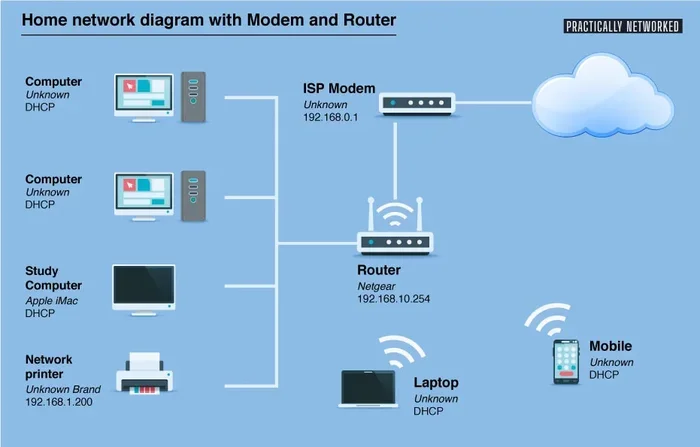
Here is an important detail. If you keep your Spectrum modem but add your own router, you need to put the Spectrum gateway into bridge mode. This turns off its WiFi router features. Your new router then handles all the WiFi duties.
You can usually enable bridge mode through the Spectrum gateway settings. If you are not sure how, Spectrum customer service can walk you through it. Some people also choose to buy a separate modem and router combo for a cleaner setup.
Steps to Change Out Your Router With Spectrum
Ready to make the switch? Here is a simple step-by-step guide to help you change out your router with Spectrum.
Step 1: Buy a Compatible Router
First, pick a router that works with Spectrum. Use the compatibility checklist we covered above. Some popular choices include routers from Netgear, ASUS, TP-Link, and Linksys.
Buy your router from a trusted retailer. Make sure it is new and comes with a warranty. Read reviews before you decide. Look for models that fit your budget and needs.
Step 2: Put Your Spectrum Gateway Into Bridge Mode
Log into your Spectrum gateway admin panel. You can usually do this by typing 10.0.0.1 into your browser. Find the bridge mode setting and turn it on.
This step disables the WiFi router part of the gateway. Your gateway will now only act as a modem. It will pass the internet signal to your new router.
Step 3: Connect Your New Router
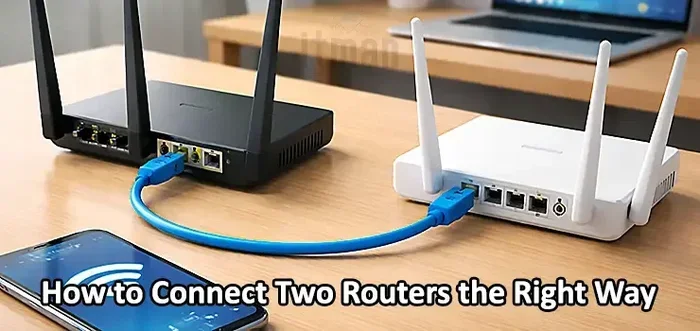
Use an Ethernet cable to connect the Spectrum gateway to your new router. Plug one end into the gateway’s Ethernet port. Plug the other end into your new router’s WAN or Internet port.
Power on your new router. Wait a minute or two for it to start up. You should see the power light and internet light come on.
Step 4: Configure Your New Router
Open a web browser and type your new router’s admin address. This is usually something like 192.168.1.1 or 192.168.0.1. Check the router’s manual for the exact address.
Follow the setup wizard. Set up your WiFi network name and password. Choose a strong password to keep your network safe. Save your settings and connect your devices.
Step 5: Test Your Connection
Once setup is complete, run a WiFi speed test. You can use websites like Speedtest.net or Fast.com. Compare the results to what you were getting with the Spectrum gateway.
You should notice a difference. Faster speeds and stronger signals are common after a switch. If something is not working right, check all the cable connections. You can also restart your router and gateway.
Best Routers to Replace Your Spectrum Router
Not sure which router to buy? Here are some great options that work well with Spectrum internet.
Netgear Nighthawk AX12 (RAX120)
This is a top-tier WiFi 6 router. It offers fast speeds and excellent range. It handles many devices at once without slowing down. It is a great choice for families or heavy users.
ASUS RT-AX86U
This router is known for its strong performance. It supports WiFi 6 and has great security features. The ASUS interface is user-friendly and easy to navigate. It is a solid pick for gamers and streamers.
TP-Link Archer AX73
If you want good value, this is a great option. It supports WiFi 6 and covers a large area. It is affordable compared to other WiFi 6 routers. It is a smart choice for budget-conscious buyers.
Linksys Velop MX5300 (Mesh System)
If you have a large home, consider a mesh WiFi system. The Linksys Velop MX5300 covers up to 5,400 square feet. It uses WiFi 6 technology for fast speeds. Mesh systems use multiple units to spread WiFi throughout your home.
What You Lose When You Switch From Spectrum Equipment
Switching to your own router has some trade-offs. It is important to know what you give up.
You Lose Spectrum WiFi App Support
Spectrum offers a WiFi app that lets you manage your gateway remotely. You can pause internet access for specific devices. You can run speed tests through the app. You can see who is connected to your network.
When you switch to a third-party router, you lose access to this app. You will need to use your router’s own admin panel for these tasks. Most modern routers have their own apps, which work just as well.
You Lose Spectrum Security Suite
Spectrum includes a basic security suite with their gateway. It helps protect your network from some online threats. When you use your own router, this feature is no longer available.
You can replace this with a separate security solution. Many routers now include built-in security features. You can also use third-party antivirus and firewall software.
Technical Support Changes
Spectrum support helps with their own equipment. If you use your own router, Spectrum will not troubleshoot it for you. They can still help with your internet connection and modem.
But if your router has issues, you will need to contact the router manufacturer. Most router brands offer free support online. They have knowledge bases, forums, and live chat options.
Common Mistakes People Make When Changing Their Spectrum Router
Avoid these common pitfalls when you switch your router.
Forgetting to Enable Bridge Mode
This is the number one mistake. If you do not put the Spectrum gateway into bridge mode, you will get double NAT issues. This can cause slow speeds, connection drops, and problems with online gaming.
Always enable bridge mode before connecting your new router. It takes just a few minutes and saves a lot of headaches.
Buying an Incompatible Modem
Not all modems work with Spectrum. Before you buy a separate modem, check Spectrum’s approved device list. Using an incompatible modem can lead to connection problems.
Skipping the Firmware Update
After you set up your new router, check for firmware updates. These updates fix bugs and improve security. Skipping them leaves your network vulnerable to known issues.
Placing the Router in a Bad Spot
Where you put your router matters a lot. Do not hide it behind a TV or inside a closet. Place it in a central, open area. This gives you the best WiFi coverage throughout your home.
Expert Tips to Get the Most From Your New Router
Here are some quick tips to help you get the best performance from your new setup.
- Place your router centrally: This gives the best coverage to every room in your home.
- Use the 5GHz band for speed: The 5GHz band is faster but has shorter range. Use it for devices close to the router.
- Use the 2.4GHz band for range: The 2.4GHz band reaches farther but is slower. Good for smart home devices.
- Restart your router regularly: A quick restart can fix slow speeds and connection issues.
- Set up a guest network: This keeps your main network secure when visitors connect.
- Update firmware monthly: Check for updates once a month to keep your router running smoothly.
How Much Can You Really Save?
Let us do the math. Spectrum charges about $12 to $15 per month for their gateway. Over one year, that is $144 to $180. Over three years, it is $432 to $540.
A good router costs between $80 and $200. Even at the high end, you break even in less than a year. After that, you are saving the full rental fee every month.
Some people save over $500 over a few years by switching. That is real money in your pocket. And you get better WiFi performance at the same time.
If you have had Spectrum internet for a while, the savings really add up. Even if you have been renting for years, switching now still makes sense. You will start saving right away.
Frequently Asked Questions
Can I use my own router with Spectrum internet?
Yes, you can use your own router with Spectrum. You just need to make sure it is compatible with your internet plan. Put your Spectrum gateway into bridge mode first, then connect your new router. This lets you keep your Spectrum internet service while using your own equipment.
Do I need to return my Spectrum router if I switch to my own?
Yes, you should return the Spectrum gateway to avoid further rental charges. You can return it at a Spectrum store or by mail. Contact Spectrum customer service for a return label and instructions. Keep your return receipt for your records.
Will changing my router affect my internet speed?
It can actually improve your speed. Spectrum gateways are often basic and may limit your speeds. A better router can unlock faster WiFi speeds and better performance. Your wired internet speed from the modem stays the same, but your wireless experience gets much better.
What happens to my WiFi name and password when I switch routers?
Your new router will have its own default WiFi name and password. You will need to set these up during the router configuration process. You can choose any name and password you like. Write them down so you do not forget them.
Can I use a mesh WiFi system with Spectrum?
Absolutely. Mesh WiFi systems work great with Spectrum internet. You just need to put the Spectrum gateway into bridge mode and connect the mesh router to it. Mesh systems are especially good for larger homes that need full coverage.
Is it hard to set up a new router with Spectrum?
No, it is not hard at all. The process takes about 15 to 30 minutes. You need to enable bridge mode, connect the cables, and run the router setup wizard. Most modern routers have simple mobile apps that guide you through every step.
Final Thoughts
Changing out your router with Spectrum is a smart move. You save money every month. You get better WiFi performance. You gain more control over your home network. The process is simple and well worth the small effort.
Do not keep paying Spectrum’s rental fee when you do not have to. Pick a compatible router, follow the steps in this guide, and enjoy the difference. Whether you choose a single router or a mesh system, you will notice the improvement right away.
Start today. Check your Spectrum plan, pick a router, and make the switch. Your wallet and your WiFi will thank you.