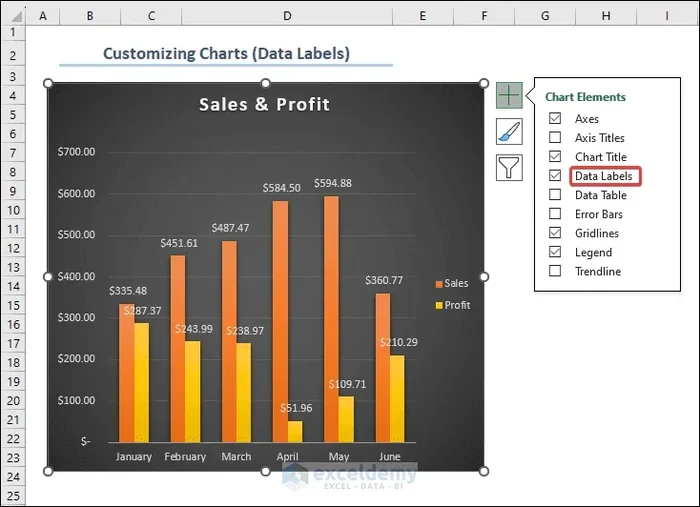
What Is The Definition Of Data Labels And Why They Matter
The definition of data labels is simple: they are descriptive tags or identifiers attached to data points, files, products, or systems to make them easier to find, understand, and manage. Whether you are labeling files, products, or digital records, data labels keep things organized and save you time. This guide covers everything from the basic data labels definition to real-world uses, types, and best practices you can start applying today.
Have you ever opened a drawer full of cables and wondered which one goes where? Or searched through a stack of papers trying to find the right document? That frustration disappears when you use data labels. These simple tags and identifiers transform chaos into order. Let us break down the definition of data labels and explore why they are so important in both work and everyday life.
At its core, the data labels definition refers to any descriptive marker attached to a piece of data. This data can be digital, like a computer file or spreadsheet entry. It can also be physical, like a sticker on a folder or a tag on a product. The goal stays the same. Data labels give people a quick way to identify, sort, and retrieve information without guessing or digging.
Think of data labels as the name tags of the information world. Just like a name tag at a conference helps you remember someone’s name, a well-designed label helps you remember what a file, product, or system contains. They remove guesswork. They reduce errors. And they make life smoother for everyone involved.
In this article, we will walk through the full data labels definition, look at the different types you can use, and share practical tips for creating labels that actually work. Whether you are a student organizing research files or a business owner managing inventory, you will find something useful here.
Key Takeaways
- Clear Definition: A data label is a tag or identifier that describes and organizes data for easy recognition and retrieval.
- Boosts Productivity: Using data labels saves time when searching for files, products, or information.
- Multiple Types Exist: Physical labels, digital tags, barcode labels, and color-coded categories all fall under the data labeling system umbrella.
- Easy to Create: You can make effective labels using simple tools like word processors or dedicated label makers.
- Common Mistakes Hurt: Inconsistent naming and missing details are the top errors people make with data labels.
- Widely Applicable: From home offices to large businesses, data labels serve nearly every industry and personal need.
📑 Table of Contents
- What Is the Definition of Data Labels?
- Why Data Labels Matter in Everyday Life
- Types of Data Labels You Should Know
- How to Create Effective Data Labels
- Common Mistakes When Using Data Labels
- The Role of Data Labels in Technology and Security
- Key Takeaways
- Final Thoughts on the Definition of Data Labels
What Is the Definition of Data Labels?
The definition of data labels is straightforward. A data label is a short descriptive text or symbol attached to a data point or item. It provides context. It tells the viewer what the data is about without needing to open or inspect the item itself.
For example, imagine a folder labeled “2024 Tax Documents.” That label is a data label. It tells you exactly what is inside. You do not need to open every paper to know what the folder contains. This is the power of a good data label.
In the digital world, data labels take many forms. They appear as column headers in spreadsheets. They show up as file names on your desktop. They display as tags in content management systems. Each one serves the same purpose. They help users find and understand data quickly.
Why the Definition Matters
You might wonder why we need a formal data labels definition. The answer is clarity. When everyone on a team understands what a data label is and how to use it, communication improves. Misunderstandings drop. Work gets done faster.
Consider a shared network drive at work. If one person names files casually and another uses a strict naming system, finding anything becomes a nightmare. A shared understanding of what data labels are and how they should work solves this problem. It creates a common language for organizing information.
Using computerized systems to manage and print data labels adds another layer of efficiency. These systems reduce human error and speed up the labeling process significantly. You can read more about the advantages and disadvantages of computerized systems to understand how automation impacts labeling workflows.
Why Data Labels Matter in Everyday Life
We use data labels more often than we realize. They are everywhere. From the product barcode at the grocery store to the folder on your laptop, labels help us navigate a world full of information. Understanding why they matter helps you appreciate their value.
Saving Time and Reducing Frustration
Time is precious. Every minute spent searching for a misplaced file or an unmarked cable is a minute wasted. Data labels cut search time dramatically. When everything has a clear, consistent label, you find what you need in seconds.
Think about your own workspace. How long does it take you to find an important document? Could a simple label change save you five minutes every day? Over a year, those minutes add up. Data labels are a small investment with a big return.
Improving Accuracy and Reducing Errors
Mislabeled data causes mistakes. In a business setting, a mislabeled file could mean a missed deadline or a lost customer. In a home office, an unlabeled storage bin might mean you buy duplicates of something you already own.
Proper data labels act as a safeguard. They ensure that the right information goes to the right place. They help prevent costly errors. This is especially true in industries like healthcare, finance, and logistics, where accuracy is critical.
Supporting Team Collaboration
When multiple people work on the same project, data labels become even more important. A shared labeling system keeps everyone on the same page. New team members can find what they need without asking ten questions.
Using modern tools like word processors to create consistent, professional-looking labels helps teams maintain standards. You can explore the advantages and disadvantages of word processors to see how these tools support label creation and document management.
Types of Data Labels You Should Know
Not all data labels are the same. Different situations call for different types of labels. Understanding the options helps you choose the right one for your needs. Here are the most common types of data labels used today.
Physical Data Labels
Physical data labels are tangible markers you can touch and see. They include stickers, tags, and printed sheets. You will find them on folders, products, cables, and storage bins.
- Adhesive Stickers: Small, printable stickers that you stick onto surfaces. Great for folders and binders.
- Barcode Labels: Scannable codes that store data in a visual format. Common in retail and warehouses.
- Name Tags: Simple labels used for identification in offices, events, and classrooms.
- Color-Coded Labels: Labels using colors to categorize items quickly. Red for urgent, green for completed, and so on.
Physical labels work best when you need quick visual identification. They do not require a screen or a search function. You just look and go.
Digital Data Labels
Digital data labels exist inside software, databases, and file systems. They include file names, tags, metadata, and column headers.
- File Names: The simplest form of digital labeling. A well-named file like “Q3_Report_Final.pdf” tells you everything you need.
- Metadata Tags: Hidden labels embedded in files that describe content, author, date, and more.
- Spreadsheet Headers: Column labels in a spreadsheet that tell you what each column contains.
- Content Tags: Labels used in blogs, websites, and content platforms to group related articles together.
Digital labels shine when you need to search, filter, or sort large amounts of information. They scale easily and work across devices and platforms.
Hybrid Data Labels
Some labels combine physical and digital elements. A barcode on a product is a perfect example. The physical sticker holds the label, but scanning it pulls up digital data. This hybrid approach links the real world with digital systems.
Hybrid data labels are becoming more popular as businesses adopt new technology for inventory and tracking. The pros and cons of new technology in labeling show how these systems improve accuracy while introducing new learning curves for staff.
How to Create Effective Data Labels
Creating great data labels is easier than you think. It does not require expensive software or special skills. You just need a clear system and a few simple tools.
Step 1: Define Your Categories
Before you create any label, decide what categories you need. Are you organizing by date, by project, by department, or by topic? Clear categories make labeling consistent and logical.
Write down your categories first. Keep them short and specific. Instead of “Work,” use “Marketing Reports” or “Client Invoices.” Specificity is the key to effective data labels.
Step 2: Choose a Naming Convention
A naming convention is a set of rules for how labels are formatted. It ensures consistency across all your labels. For example, you might use the format YYYY-MM-DD_ProjectName_DocumentType for all file labels.
Here are some tips for a strong naming convention:
- Use short but descriptive names.
- Avoid special characters that might cause technical issues.
- Include dates in a standard format (YYYY-MM-DD works best).
- Use underscores or hyphens instead of spaces in file names.
- Keep all labels in the same language and style.
Step 3: Pick the Right Tools
You need the right tools to create professional-looking data labels. For physical labels, a label maker or a printer with label paper works great. For digital labels, word processors and spreadsheet software do the job.
Many label makers let you design custom templates. You can add logos, barcodes, and color codes. This saves time and keeps your labels looking polished and consistent.
Step 4: Test and Refine
Once you start using your labels, watch how well they work. Do people understand them at a glance? Are they easy to find? If not, adjust your system.
The best data labels evolve over time. Ask for feedback from your team or family. Make small improvements. A good labeling system grows with your needs.
Common Mistakes When Using Data Labels
Even with the best intentions, people make mistakes with data labels. Knowing these common pitfalls helps you avoid them and build a better system from the start.
Using Vague or Generic Names
The biggest mistake is using vague names like “Document1” or “Stuff.” These labels tell you nothing. They defeat the purpose of labeling entirely. Always use specific, descriptive names that leave no room for confusion.
Inconsistent Formatting
Mixing formats creates chaos. If one person uses “Jan-2024” and another uses “01/2024,” finding files becomes a guessing game. Stick to one format and make sure everyone follows it. Consistency is the backbone of any good data labeling system.
Overcomplicating the System
Some people create labeling systems so complex that nobody wants to use them. If your system requires a manual to understand, it is too complicated. Keep it simple. The best data labels are easy to create and easy to understand.
Ignoring Updates
Labels need maintenance. Outdated labels mislead people. If a project changes or a file is updated, update the label too. Regular audits of your labeling system keep everything accurate and useful.
The Role of Data Labels in Technology and Security
Data labels play a bigger role in technology than many people realize. They help organize networks, secure systems, and protect sensitive information. Understanding this connection gives you a broader view of why labels matter.
Labels in Network and Access Control
In IT environments, data labels help identify network cables, servers, and access points. A well-labeled network makes troubleshooting faster and reduces downtime. When something goes wrong, technicians can trace the issue quickly if everything is properly labeled.
You can learn more about how network cables benefit from proper labeling by reading the advantages and disadvantages of network cables guide. Proper labeling of cables is one of the simplest yet most impactful practices in any tech setup.
Labels and Data Security
Labels also play a role in security. Sensitive files should carry clear labels that indicate their confidentiality level. This prevents unauthorized access and keeps data safe. Access control systems often rely on labeled credentials and tagged data to function properly.
You can explore how labeling intersects with security by checking the advantages and disadvantages of access control systems. These systems often use labeled badges, tags, and credentials to manage who enters specific areas.
VPN and Data Labeling
In the digital security space, data labels help classify information that passes through networks. Properly labeled data makes it easier to apply the right security rules. For instance, sensitive customer data should always carry a “Confidential” label so that encryption and access controls apply automatically.
Understanding how your VPN settings interact with labeled data is important for privacy. Some VPN configurations can expose your data if labels and classifications are not handled properly. You can read more about this in our guide on 5 VPN settings exposing your data right now.
Key Takeaways
- Clear Definition: A data label is a descriptive tag or identifier attached to data, products, or systems to make them easy to find and understand.
- Boosts Productivity: Using data labels saves time when searching for files, products, or information in any setting.
- Multiple Types Exist: Physical labels, digital tags, barcode labels, and color-coded categories all serve different purposes within a data labeling system.
- Easy to Create: You can make effective labels using simple tools like word processors, label makers, or even handwritten stickers.
- Common Mistakes Hurt: Vague names, inconsistent formatting, and ignoring updates are the top errors people make with data labels.
- Widely Applicable: From home offices to large enterprises, data labels serve nearly every industry and personal organization need.
- Security Connection: Proper labeling supports data security, access control, and network management in technology environments.
Final Thoughts on the Definition of Data Labels
The definition of data labels might sound technical, but the concept is as simple as it gets. A label is just a way of saying, “This is what this is.” It is a small thing that makes a huge difference. Whether you are organizing a home office, managing a business inventory, or securing digital files, data labels are your best friend.
Start small. Pick one area of your life or workspace that needs better organization. Create a few clear, consistent labels and see the difference. You will wonder how you ever managed without them.
The beauty of data labels lies in their simplicity. You do not need expensive tools or advanced skills. You just need a little intention and a consistent system. Once you build that system, it pays dividends every single day. Your future self will thank you every time you find something in seconds instead of minutes.
Remember, the goal of any data label is clarity. If your label makes sense to someone else who has never seen your system, you have done it right. Keep it simple, keep it consistent, and keep it useful. That is all it takes to master the art and science of data labels.
Frequently Asked Questions
What is the basic definition of data labels?
A data label is a descriptive tag or identifier attached to a piece of data, a product, or a system. Its purpose is to make the item easy to identify, find, and understand without opening or inspecting it. The definition of data labels covers both physical stickers and digital tags.
Why are data labels important for businesses?
Data labels save businesses time by making files, products, and information easy to locate. They reduce errors caused by misidentification. They also support teamwork by giving everyone a shared system for organizing and finding information. Consistent labels improve efficiency across every department.
What are the most common types of data labels?
The most common types include adhesive stickers, barcode labels, file names, metadata tags, spreadsheet headers, and color-coded categories. Each type serves a specific purpose. Physical labels work for tangible items, while digital labels excel at organizing electronic information.
Can I create data labels using a word processor?
Yes, absolutely. Most word processors offer label templates that let you design and print professional-looking labels quickly. You can customize fonts, add logos, and create consistent formats. This makes word processors one of the easiest tools for creating both physical and printed digital labels.
What mistakes should I avoid when labeling data?
The biggest mistakes include using vague names, inconsistent formatting, overcomplicating the system, and failing to update old labels. Avoid these pitfalls by keeping names specific, choosing one format, staying simple, and reviewing your labels regularly. A well-maintained labeling system stays useful for years.
How do data labels relate to data security?
Data labels help classify information by sensitivity and confidentiality level. Properly labeled data allows security systems to apply the right protections automatically. This is especially important for access control and network management. Clear labels make it easier to enforce security rules across your organization.