Can You Wi Fi Without Internet Yes Here Is How It Works
Yes, you can absolutely use WiFi without an internet connection. Setting up a wireless network that works offline is simpler than most people think. Whether you want to share files, stream local media, or connect smart home devices, offline WiFi gives you full network control without needing an internet service provider.
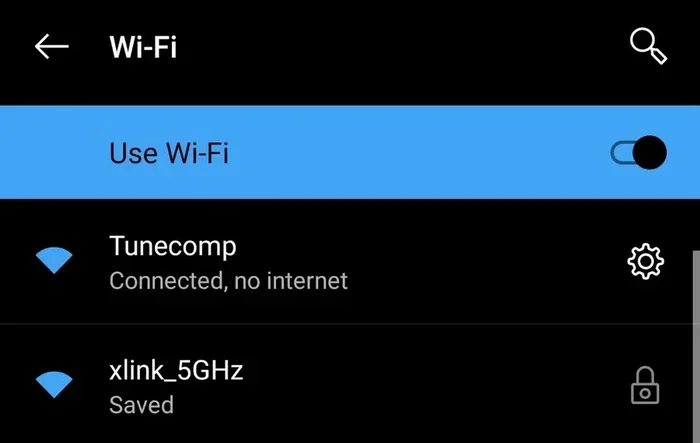
Have you ever connected to a WiFi network and wondered why you had no internet? Or maybe you wanted to set up a wireless network at home but did not have an internet service provider yet. The good news is that you can Wi Fi without internet, and it is way more common than you might think.
Many people confuse WiFi with internet. They assume that if the WiFi icon shows up on their phone or laptop, they must be online. But that is not true. WiFi is simply a way for devices to talk to each other wirelessly. It creates a local network. The internet is something entirely different. It is the global connection that links all these networks together.
In this article, we will walk you through exactly how WiFi without internet works. We will show you why you might need it, how to set it up, and what you can do with it. By the end, you will understand that a wireless network does not need an internet connection to be useful.
Whether you are a tech beginner or someone who just wants to save money, this guide covers everything you need to know about using offline WiFi in your home or office.
Key Takeaways
- WiFi and internet are not the same thing. WiFi is a local wireless network, while internet is the global connection that links networks together.
- You can create a WiFi network without any ISP. A router or hotspot device can broadcast a wireless signal even when it has no internet access.
- Offline WiFi is useful for file sharing, streaming local content, and smart home setups. Many everyday tasks do not require a live internet connection.
- Setting up offline WiFi is quick and easy. Most routers let you disable the internet connection while keeping the wireless network active.
- Common issues include device pairing problems and incorrect network settings. These are usually easy to fix with basic troubleshooting steps.
📑 Table of Contents
- What Does It Mean to Have WiFi Without Internet
- How WiFi Works Without an Internet Connection
- Common Reasons You Need WiFi Without Internet
- Setting Up WiFi Without Internet Access
- Devices That Work Great on WiFi Without Internet
- Troubleshooting WiFi Without Internet Issues
- Expert Tips for Getting the Most Out of Offline WiFi
- Final Thoughts
What Does It Mean to Have WiFi Without Internet
Let us start with the basics. WiFi without internet means your devices can connect to a wireless network, but that network does not reach the wider internet. Your router or hotspot creates a local area network, or LAN. Devices on this network can communicate with each other. They cannot, however, browse websites, check email, or stream content from the cloud.
Think of it like a private conversation room. Everyone inside the room can talk to each other freely. But there is no door that leads outside. That is essentially what offline WiFi is. Your devices are all in the same room, connected wirelessly, but they cannot leave that room to access the global network.
This setup is incredibly useful in many situations. You might want to transfer files between two laptops. You might want to print a document from your phone to a wireless printer. Or you might be setting up smart home devices that do not need the cloud to work. All of these tasks only require a local wireless connection.
The key takeaway here is simple. WiFi is the road. Internet is the destination. You can build the road without ever going anywhere.
WiFi vs Internet: What Is the Difference
It helps to understand the distinction clearly. WiFi is a technology that uses radio waves to send data between devices over short distances. It is a local wireless connection. Internet is a massive global network of networks. It connects computers, servers, and data centers all around the world.
When you connect to WiFi at home, your router links your devices together. If that router is also connected to an internet service provider, then your devices can reach the wider web. If the router is not connected to an ISP, your devices still form a network. They just cannot go beyond it.
Here is a quick comparison:
- WiFi: The wireless technology that connects devices locally. No internet required.
- Internet: The global network that provides access to websites, services, and cloud content.
- Router: The device that creates the WiFi network. It can work with or without an internet connection.
- ISP: The company that provides your internet access. Not needed for offline WiFi.
How WiFi Works Without an Internet Connection
Now that you understand the difference, let us look at how WiFi without internet actually works. The process is straightforward, and you do not need advanced technical skills to set it up.
A WiFi router or access point broadcasts a wireless signal using radio frequencies. Devices like phones, tablets, and laptops have WiFi chips that pick up this signal. When two devices connect to the same router, they join the same local network. They can then share data directly with each other.
None of this requires an internet connection. The router simply acts as a bridge between your devices. It routes data back and forth between them on the local network. This is called local network communication, and it works perfectly fine without any external internet access.
The Role of Your Router in Offline Mode
Your WiFi router is the heart of any offline network. Even when it has no internet connection, it can still do several important things:
- Broadcast a wireless network name, also called an SSID.
- Assign local IP addresses to connected devices.
- Allow devices to discover each other on the network.
- Enable file sharing and printer access between devices.
- Support local streaming from a network-attached storage drive.
All of these functions happen entirely within your home. The router does not need to send or receive any data from the outside world. It simply manages the local traffic between your devices.
Many people do not realize that their router has been working in offline mode before. If you ever unplugged your internet modem and noticed your WiFi still showed up on your phone, that is exactly what happened. The router kept broadcasting its signal. It just could not route traffic beyond your local network.
Common Reasons You Need WiFi Without Internet
There are many practical reasons why someone would want WiFi without internet. Let us explore the most common ones.
1. File Sharing Between Devices
If you need to move large files between your laptop and another computer, offline WiFi is the fastest way to do it. You do not need USB drives or cloud uploads. Just connect both devices to the same local network and share files directly. This is especially helpful when you are working with large video files or backups.
2. Setting Up Smart Home Devices
Many smart home devices, like smart plugs, light bulbs, and sensors, only need a local WiFi connection to function. They do not always require internet access to operate. You can set them up and control them through a local network without ever connecting to the wider web.
3. Printing Without the Cloud
Wireless printers work great on offline WiFi networks. You can send print jobs from your phone or laptop directly to the printer over the local network. No internet connection is needed for the actual printing process.
4. Streaming Local Media
If you have a media server or a NAS device at home, you can stream movies, music, and photos to your devices over a local WiFi network. This is perfect for movie nights or sharing a photo library with family members. The content stays on your local network and does not need to travel through the internet.
5. Gaming on a Local Network
Many multiplayer games work over a local network without internet. You can play with friends in the same house using offline WiFi. This is great for LAN parties or casual gaming sessions where you do not want to rely on an external connection.
6. Internet Outage Preparedness
When your internet goes down, having a working WiFi network still gives you options. You can access shared files, print documents, or use local apps that do not need the cloud. An offline WiFi network acts as a backup communication system for your devices.
Setting Up WiFi Without Internet Access
Setting up WiFi without internet is surprisingly simple. You do not need to be a tech expert. Here is a step-by-step guide to get your offline network running.
Step 1: Connect Your Router to Power
Plug in your WiFi router and turn it on. Make sure it has power and the indicator lights are on. You do not need to connect it to a modem or internet source for offline use.
Step 2: Access the Router Settings
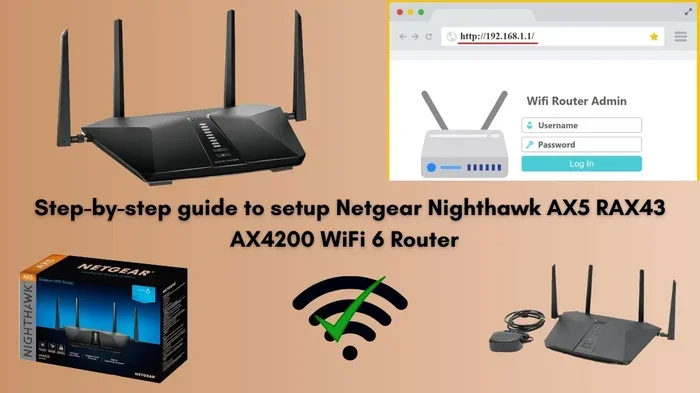
Open a web browser on a device connected to the router. Type the router’s IP address into the address bar. This is usually something like 192.168.1.1 or 192.168.0.1. Check your router manual if you are not sure.
Step 3: Configure the Wireless Network
Go to the wireless settings section. Set a network name, also known as an SSID. Choose a strong WiFi password. Select a WiFi channel that has less interference. These settings control your local network and do not require internet access.
Step 4: Disable Internet Connection (Optional)
If your router is connected to a modem but you want to keep it offline, you can simply disconnect the modem or turn off the internet connection in your router settings. The router will continue to broadcast its wireless signal. Devices will connect to the local network normally.
Step 5: Connect Your Devices
On each device, go to the WiFi settings and select your network name. Enter the password. Once connected, your devices are on the same local network. You can now share files, print, and stream local content.
That is it. You now have a fully functional wireless network without internet. It takes about five to ten minutes to set up, and you do not need any special equipment beyond a standard WiFi router.
Devices That Work Great on WiFi Without Internet
Not all devices need the internet to be useful. Here are some common devices that work perfectly on an offline WiFi network.
- Wireless printers: Connect to the local network and print directly from any device.
- Smart TVs and streaming boxes: Play media from a local server or USB drive.
- NAS devices: Access stored files, photos, and videos over the local network.
- Smart home hubs: Control lights, locks, and sensors without cloud dependency.
- Gaming consoles: Play local multiplayer games with friends in the same house.
- Laptops and tablets: Share files, sync documents, and collaborate offline.
- Security cameras: View live feeds on a local network without cloud storage.
These devices rely on local network communication rather than internet access. As long as they are connected to the same WiFi network, they can work together seamlessly.
Troubleshooting WiFi Without Internet Issues
Even though offline WiFi is simple, you might run into some issues. Here are the most common problems and how to fix them.
Devices Cannot Find the Network
If your device does not see the WiFi network, try moving closer to the router. Check that the router is powered on and broadcasting. You may also want to restart the router by unplugging it for 30 seconds and plugging it back in.
Devices Connect but Cannot Share Files
This usually happens when file sharing settings are not configured correctly. On Windows, make sure network discovery and file sharing are turned on. On Mac, check the sharing preferences in system settings. On phones, you may need to use a specific file sharing app that works over local networks.
Slow Transfer Speeds
If file transfers are slow, try switching to a less crowded WiFi channel. You can also move the router to a central location in your home. Walls and other obstacles can weaken the wireless signal and slow down local network performance.
Devices Keep Disconnecting
Interference from other electronic devices can cause connection drops. Keep your router away from microwaves, cordless phones, and Bluetooth devices. Updating your router firmware can also fix stability issues.
Printer Not Showing Up on the Network
Make sure the printer is connected to the same WiFi network as your computer. Restart both the printer and the router. You may also need to install the printer driver manually on your device.
Expert Tips for Getting the Most Out of Offline WiFi
Here are some practical tips to help you make the most of your WiFi without internet setup.
- Use a dedicated router for offline tasks. This keeps your local network separate and avoids any conflicts with your main internet connection.
- Update your router firmware regularly. Even without internet, firmware updates improve performance and security.
- Set up a guest network. This lets visitors connect to your local network without accessing your main shared files.
- Use wired connections for critical devices. Some devices perform better with an Ethernet cable, even on a local network.
- Label your network and password. Keep a note of your SSID and WiFi password somewhere safe so you do not forget them.
- Test your local network speed. Use a local speed test tool to check how fast devices communicate with each other over WiFi.
These tips will help you build a reliable and efficient offline wireless network. You will be surprised at how much you can accomplish without ever touching the internet.
Final Thoughts
The idea that you can Wi Fi without internet opens up a lot of possibilities. Many people assume that WiFi only has value when connected to the web. But as we have seen, a local wireless network is useful on its own. You can share files, print documents, stream local media, set up smart home devices, and even game with friends. All without a single internet connection.
Setting up offline WiFi is easy. You just need a router and a few connected devices. The router creates the wireless network, and your devices communicate directly with each other. No ISP, no modem, no internet plan required.
So the next time someone asks you can you Wi Fi without internet, you can confidently say yes. You now know how it works, why it is useful, and how to set it up yourself. Whether you are dealing with an internet outage, saving money, or just wanting a simple local network, offline WiFi has you covered.
Take some time to try it out. Set up a small offline network at home and explore what your devices can do without the internet. You might be surprised by how much you can accomplish. A wireless network is more than just a gateway to the web. It is a powerful tool for connecting your devices locally, and it works even when the internet does not.
Frequently Asked Questions
Can I use WiFi at home without paying for internet?
Yes, you can. A WiFi router does not need an internet service provider to broadcast a wireless signal. You can create a local network for file sharing, printing, and streaming local content without paying for an internet plan.
What is the difference between WiFi and internet?
WiFi is the wireless technology that connects devices to a local network. Internet is the global network that connects your local network to the rest of the world. You can have one without the other. Many people use offline WiFi daily without realizing it.
Do smart home devices need internet to work?
Many smart home devices can work on a local WiFi network without internet. Devices like smart plugs, light bulbs, and sensors often function perfectly offline. Some features may be limited, but basic control usually works fine without the cloud.
Can I print wirelessly without an internet connection?
Absolutely. Wireless printers connect to your local WiFi network and accept print jobs from devices on the same network. No internet connection is needed for the actual printing process to work.
How fast is offline WiFi compared to online WiFi?
Offline WiFi can actually be faster for local tasks like file sharing and streaming local media. Since the data does not have to travel to the internet and back, transfers happen directly between devices on your local network.
What equipment do I need for WiFi without internet?
You only need a WiFi router and the devices you want to connect. No modem, no ISP, and no internet plan are required. Any standard WiFi router can broadcast a local network signal on its own.