Can You Use Hdmi And Optical Audio At The Same Time
Yes, you can use HDMI and Optical Audio at the same time in most home setups. This guide covers how both connections work, when to use each, and common mistakes to avoid. HDMI and Optical Audio each bring unique benefits to your home theater or sound system.
Setting up a home theater or sound system can feel confusing at first. You have cables, ports, and audio formats to think about. Many people ask whether they can use HDMI and Optical Audio at the same time. The good news is that most modern devices support multiple audio outputs. You just need to know how to configure them correctly.
Understanding your options helps you get the best sound from your setup. Whether you are connecting a soundbar, AV receiver, or TV, knowing how these connections work makes a big difference. Let us dive into the details and clear up the confusion.
Key Takeaways
- HDMI and Optical Audio can work together: Many devices support both connections simultaneously.
- HDMI carries more data: It supports higher quality audio formats like Dolby Atmos and DTS:X.
- Optical Audio is reliable: It provides a clean digital signal without electrical interference.
- Setting up both is simple: You just need the right cables and available ports on your devices.
- Watch for audio latency: Timing differences can cause sync issues between video and audio.
- Check your device specs: Not all TVs and receivers support simultaneous HDMI and optical output.
📑 Table of Contents
- What Is HDMI Audio and How Does It Work?
- What Is Optical Audio and How Does It Work?
- Using HDMI and Optical Audio Together
- HDMI ARC vs Optical Audio: Key Differences
- How to Set Up Both HDMI and Optical Audio Simultaneously
- Audio Quality: HDMI vs Optical
- Troubleshooting Common HDMI and Optical Audio Problems
- Final Thoughts on Using HDMI and Optical Audio Together
What Is HDMI Audio and How Does It Work?
HDMI stands for High-Definition Multimedia Interface. It is a cable that carries both video and audio through a single connection. This makes it very popular for home theater setups. When you plug in an HDMI cable, you get high-quality video and sound all at once.
HDMI audio supports many advanced formats. These include Dolby Atmos, DTS:X, and uncompressed multichannel audio. The cable can carry a lot of data, which means better sound quality. Most modern TVs, projectors, and receivers have HDMI ports built in.
How HDMI Handles Audio Signals
The HDMI cable sends digital audio signals from your source device to your display or receiver. This means the sound stays clean and clear from start to finish. There is no need for extra cables just for audio. One HDMI cable does the job of several older cable types.
HDMI also supports something called ARC, which stands for Audio Return Channel. This lets sound travel back from your TV to your soundbar or receiver. It is a handy feature that simplifies your setup. You do not need a separate cable just to send audio back upstream.
What Is Optical Audio and How Does It Work?
Optical audio uses a thin cable with a square plug on each end. It sends digital audio signals using light, not electricity. This is why it is also called a TOSLINK cable. The light signal travels through a fiber optic strand inside the cable.
Optical audio output is found on many TVs, gaming consoles, and media players. It gives you a reliable digital connection. Because it uses light instead of electrical current, it is less prone to interference. This can result in a cleaner audio signal in some situations.
What Audio Formats Does Optical Support?
Optical audio supports several common formats. These include Dolby Digital, DTS, and PCM audio. However, it does not support the newest formats like Dolby Atmos over optical. This is an important limitation to keep in mind. If you want the latest surround sound formats, HDMI is usually the better choice.
Even with this limitation, optical audio still delivers great sound. Many people use it for their soundbars and stereo systems. It is a solid option for everyday listening and movie watching.
Using HDMI and Optical Audio Together
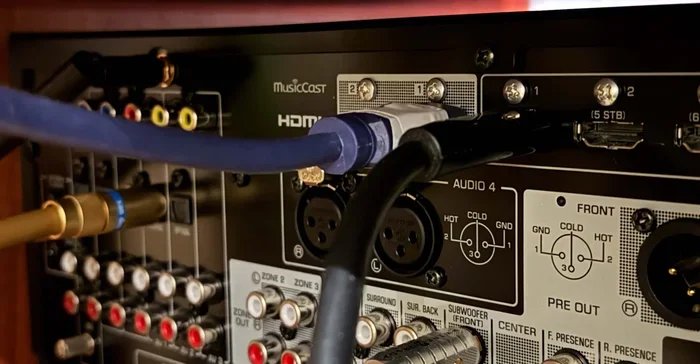
The answer is yes, in most cases you can use both connections at the same time. Many devices have both HDMI and optical audio ports. You can send audio through one while using the other for a different purpose. This gives you more flexibility in how you set up your sound system.
However, there are some things to keep in mind. Not every device handles dual audio outputs the same way. Some TVs let you choose which output to use. Others may send the same signal to both ports. Check your device manual to understand how it works.
Every new technology has its advantages and disadvantages of new technology that you should consider before choosing your setup. Understanding these trade-offs helps you make the best decision for your home theater.
When Does Using Both Make Sense?
There are several situations where using both HDMI and optical audio is useful. Maybe your TV has HDMI ARC but your soundbar only has optical input. In that case, you can use HDMI for video and optical for audio. This is a common setup in many living rooms.
Another scenario is when you have multiple audio zones. You might want HDMI audio for your main speakers and optical audio for a secondary room. Using both connections lets you create a more complex and customized sound setup.
HDMI ARC vs Optical Audio: Key Differences
HDMI ARC and optical audio are not the same thing. They serve similar purposes but work differently. HDMI ARC sends audio back from your TV to your audio device. Optical audio sends digital sound from a source device to a receiver or speaker.
HDMI and Optical Audio differ in several important ways. HDMI carries both video and audio in one cable. Optical audio only carries sound. HDMI supports more audio formats. Optical audio is simpler and less likely to have compatibility issues.
| Feature | HDMI ARC | Optical Audio |
|---|---|---|
| Carries Video | Yes | No |
| Max Audio Channels | Up to 8 | Up to 5.1 |
| Supports Dolby Atmos | Yes (with eARC) | No |
| Interference Risk | Low | Very Low |
| Cable Length Limit | Up to 50 feet | Up to 16 feet recommended |
| Setup Complexity | Moderate | Simple |
As you can see from the table, each connection type has its strengths. Your choice depends on what you need from your home theater setup. Both options deliver good audio quality for most listening situations.
Quick Tips for Choosing Between HDMI and Optical
- Choose HDMI if you want the highest quality audio and video in one cable.
- Choose Optical if your device does not have HDMI or if you want a simple connection.
- Use both if you need to split audio between different rooms or devices.
- Check your device for eARC support if you want Dolby Atmos over HDMI.
How to Set Up Both HDMI and Optical Audio Simultaneously
Setting up both connections is easier than you might think. Follow these steps to get your sound system running with both HDMI and optical audio.
- Check your TV or source device for both HDMI and optical ports.
- Connect the HDMI cable from your source to your TV or receiver.
- Connect the optical cable from your source to your soundbar or audio device.
- Go to your TV settings and enable both audio outputs.
- Test the sound on each output to make sure everything works.
Setting up your audio connections is a lot like organizing your workspace. Just as you would carefully consider the advantages and disadvantages of word processors before picking one for your writing needs, you should compare your audio options before finalizing your setup.
Common Setup Mistakes to Avoid
Many people run into problems when setting up dual audio outputs. Here are some common mistakes to watch out for.
- Using cheap cables: Low-quality HDMI or optical cables can cause signal loss.
- Ignoring device settings: Your TV may default to one audio output only.
- Not checking port types: Some HDMI ports support ARC while others do not.
- Overlooking firmware updates: Old device firmware can cause compatibility issues.
Taking a few extra minutes to check your setup can save you a lot of frustration later. Make sure each cable is firmly connected and your device settings are correct.
Audio Quality: HDMI vs Optical
When it comes to audio quality, HDMI has a clear edge. It supports uncompressed audio and newer formats like Dolby Atmos. Optical audio is limited to compressed formats and older standards. For most people, the difference is noticeable but not dramatic.
However, optical audio has its own strengths. The light-based signal is very clean. It does not pick up electromagnetic interference from other cables or devices. In some setups, this can actually result in better sound than HDMI.
If you are building a serious home theater setup, HDMI is usually the better choice. But for casual listening or simpler setups, optical audio works great. The best choice depends on your needs and your equipment.
Expert Insights on Dual Audio Setups
Audio engineers often recommend using the connection that best matches your device capabilities. If your TV and sound system both support HDMI ARC, start there. If one device only has optical, use that connection for that device.
In a smart home environment, you might also consider the advantages and disadvantages of access control systems when planning your audio and video layout. These systems can affect where you place your devices and how you route your cables.
The key is to plan your setup before you buy cables. Know which ports your devices have. Check what audio formats each connection supports. This saves time and money in the long run.
Troubleshooting Common HDMI and Optical Audio Problems
Even with a careful setup, you might run into issues. Here are some common problems and how to fix them.
No sound from optical audio: Check that your TV is set to output audio through the optical port. Also make sure the cable is firmly plugged in at both ends.
HDMI audio not working: Try a different HDMI cable or port. Some ports only carry video. Make sure ARC is enabled in your TV settings.
Audio and video out of sync: This is called audio latency. It can happen when using both connections at once. Try adjusting the audio delay settings on your receiver or TV.
Sound cuts out intermittently: This is often caused by a loose cable connection. Check all connections and replace any damaged cables.
Most audio issues have simple fixes. Start with the basics and work your way up. A little patience goes a long way when troubleshooting your audio device setup.
Final Thoughts on Using HDMI and Optical Audio Together
Using both HDMI and Optical Audio at the same time is a practical choice for many home setups. Both connections bring something valuable to the table. HDMI offers high-quality audio and video in a single cable. Optical audio provides a clean, interference-free digital signal. Together, they give you flexibility and great sound.
Remember to check your device capabilities before setting up. Not all TVs and receivers support dual audio output equally. Take the time to configure your settings correctly. A well-planned setup delivers the best listening experience.
Now that you know how HDMI and Optical Audio work together, you can set up your system with confidence. Enjoy your movies, music, and games with the best sound possible.
Frequently Asked Questions
Can I use HDMI and optical audio on the same TV?
Yes, most modern TVs have both HDMI and optical audio ports. You can use them at the same time if your TV supports dual audio output. Check your TV settings to make sure both outputs are enabled.
Does optical audio support Dolby Atmos?
No, standard optical audio does not support Dolby Atmos. You need HDMI with eARC to pass through Dolby Atmos signals. If you want the best surround sound experience, HDMI is the way to go.
Can I connect a soundbar using both HDMI and optical?
Yes, some soundbars allow you to connect via both HDMI and optical at the same time. This can be useful if your TV has limited HDMI ports. Just make sure your soundbar supports dual input modes.
Is HDMI audio better than optical audio?
In most cases, HDMI audio is better. It supports more audio formats and higher quality sound. However, optical audio is less prone to interference and very reliable. The best choice depends on your specific setup and needs.
What is the difference between HDMI ARC and optical audio?
HDMI ARC sends audio back from your TV to your audio device. Optical audio sends digital sound from a source device to a receiver. HDMI ARC also carries video, while optical audio only carries sound.
Can I split audio between HDMI and optical outputs?
Yes, you can split audio between both outputs in many setups. This is useful for multi-room audio or connecting different types of speakers. Check your device settings to configure dual audio output properly.
=== CONCLUSION ===
Using HDMI and Optical Audio at the same time is a practical choice for many home setups. Both connections bring something valuable to the table. HDMI offers high-quality audio and video in a single cable. Optical audio provides a clean, interference-free digital signal. Together, they give you flexibility and great sound.
Remember to check your device capabilities before setting up. Not all TVs and receivers support dual audio output equally. Take the time to configure your settings correctly. A well-planned setup delivers the best listening experience.
HDMI and Optical Audio are both excellent technologies. Use them together to get the most out of your home theater or sound system. You will enjoy better sound, more options, and a more connected entertainment experience.