Can You Use Bluetooth With A Cd Player For Wireless Audio
Yes, you can use Bluetooth with a CD player by adding a Bluetooth adapter or receiver to your existing setup. This lets you stream your CD collection wirelessly to Bluetooth headphones, speakers, or car stereos without any messy cables. Adding Bluetooth to a CD player is affordable, easy, and opens up a world of wireless audio possibilities.
There is something timeless about popping a CD into a player and letting the music fill a room. But let us be honest. Wires can be annoying. They tangle. They limit where you can place your player. And they just feel a bit outdated in a world that runs on wireless connections. So the question keeps coming up: can you use Bluetooth with a CD player? The short answer is yes. But the full story is much more interesting.
If you love your CD collection but want the freedom of wireless audio, you are in the right place. This guide walks you through everything you need to know. From choosing the right adapter to setting up your connection, we cover it all. By the end, you will know exactly how to make your CD player Bluetooth-enabled. You will also learn how to get the best sound quality and avoid common pitfalls along the way.
Key Takeaways
- Bluetooth adapters work with most CD players: A simple Bluetooth receiver or transmitter can make any CD player wireless in minutes.
- Two main options exist: You can use a Bluetooth transmitter (for CD players with audio output) or a Bluetooth receiver (for CD players with aux input).
- Wireless audio quality is surprisingly good: Modern Bluetooth codecs like aptX and AAC deliver clear, rich sound that rivals wired connections.
- Setup is simple and affordable: Most Bluetooth adapters cost under $30 and require no technical expertise to install.
- Pairing is straightforward: Once connected, your CD player streams wirelessly to any Bluetooth-enabled device in range.
- Common issues have easy fixes: Interference, pairing problems, and range limits can all be solved with simple troubleshooting steps.
📑 Table of Contents
- What Is Bluetooth And How Does It Work With A CD Player?
- How To Add Bluetooth To Your CD Player
- Best Bluetooth Adapters For CD Players
- Wireless Audio Quality: What To Expect
- Tips For Getting The Best Bluetooth Experience With Your CD Player
- Common Problems And How To Fix Them
- Is It Worth Adding Bluetooth To Your CD Player?
What Is Bluetooth And How Does It Work With A CD Player?
Bluetooth is a wireless technology that lets devices talk to each other over short distances. It uses radio waves instead of cables to send data. When you pair two Bluetooth devices, they create a private wireless connection. This connection can carry audio, files, and other data back and forth.
Now, most CD players were not built with Bluetooth built in. They were designed in an era when cables ruled. But that does not mean you are stuck. You can add Bluetooth connectivity to almost any CD player with the right accessory. The process is simple and does not require any technical skills.
The way it works depends on what kind of CD player you have. Some CD players have a standard audio output. Others have an aux input. And some have both. Your setup will determine which type of Bluetooth device you need. Let us break that down next.
How Bluetooth Transmits Audio
Bluetooth sends audio using small data packets over radio waves. When you hit play on your CD player, the audio gets converted into a digital signal. A Bluetooth adapter then sends that signal wirelessly to your headphones, speaker, or stereo. The receiving device decodes the signal and plays the music. This all happens in milliseconds. You will not notice any delay in most cases.
Modern Bluetooth versions have come a long way. Bluetooth 5.0 and newer offer better range and stronger connections. They also support higher quality audio codecs. This means your wireless music sounds clearer and more detailed than ever before. You are not sacrificing quality by going wireless anymore.
How To Add Bluetooth To Your CD Player
Adding Bluetooth to your CD player is easier than you might think. There are two main methods. Each works best for different types of CD players. Let us look at both options so you can pick the right one for your setup.
Option 1: Use A Bluetooth Transmitter
A Bluetooth transmitter plugs into the audio output of your CD player. It takes the audio signal and sends it wirelessly via Bluetooth. This is the most common method. It works with CD players that have a standard 3.5mm audio out or RCA output.
Here is how it works in practice. You plug the transmitter into your CD player. Then you pair it with your Bluetooth headphones or speaker. Once paired, every sound from the CD player goes straight to your wireless device. No cables needed. No fuss. Just pure wireless streaming.
Many Bluetooth transmitters also act as receivers. This means they can do both jobs. You get a lot of flexibility for a small price. Look for a transmitter that supports the latest Bluetooth version for the best results.
Option 2: Use A Bluetooth Receiver
A Bluetooth receiver works the opposite way. It connects to your CD player through an aux input. The receiver picks up Bluetooth signals from your phone or tablet and plays them through the CD player’s speakers. This method is great if your CD player has good speakers but lacks wireless capability.
With a Bluetooth receiver, you can also stream music from your phone directly through the CD player. Imagine loading up a playlist on your phone and playing it through your trusty old CD player speakers. It gives new life to older equipment. This is a fantastic way to get the best of both worlds.
If you want to try this approach, you can also check out how to turn regular speakers into Bluetooth for additional tips on making non-wireless speakers work wirelessly.
Best Bluetooth Adapters For CD Players
Not all Bluetooth adapters are created equal. Some deliver great sound. Others fall short. Here are the features you should look for when shopping for an adapter.
- Bluetooth Version: Look for Bluetooth 5.0 or higher. It offers better range and more stable connections.
- Audio Codec Support: Codecs like aptX, aptX HD, and AAC deliver higher quality audio than basic SBC.
- Battery Life: If you want portability, pick an adapter with long battery life. Some last over 10 hours on a single charge.
- Dual Mode: Adapters that work as both transmitter and receiver give you the most flexibility.
- Compact Size: A small adapter is easier to hide and carry around. You do not want bulky hardware ruining your setup.
- Price Range: Good Bluetooth adapters cost between $15 and $40. You do not need to spend a fortune.
Some popular options include the TaoTronics Bluetooth transmitter, the 1Mii Bluetooth receiver, and the Avantree aptX adapter. Each of these has strong reviews and reliable performance. They all make excellent choices for adding Bluetooth connectivity to your CD player.
What To Avoid When Buying
Steer clear of the cheapest adapters you find. They often use older Bluetooth versions. The sound quality suffers as a result. You might also run into connection drops and interference. Spending a little extra upfront saves you frustration later. Also avoid adapters that only support one mode. A dual-mode transmitter and receiver gives you far more options for wireless audio setups.
Wireless Audio Quality: What To Expect
One of the biggest concerns people have is sound quality. They worry that going wireless means sacrificing audio fidelity. The good news is that modern Bluetooth technology has largely solved this problem. Let us talk about what you can realistically expect.
With a good Bluetooth adapter and a quality codec, the difference between wired and wireless is barely noticeable. You get clear highs, solid mids, and deep bass. For casual listening, the audio quality is more than enough. Even audiophiles will find modern Bluetooth setups satisfying.
That said, there are some things to keep in mind. Bluetooth compresses audio slightly compared to a direct wired connection. The compression is minimal with modern codecs. But if you are a critical listener, you might notice subtle differences in very complex tracks. For 99% of listeners, this is not an issue at all.
Factors That Affect Sound Quality
Several things influence how your Bluetooth audio sounds. Understanding these helps you get the best results.
- Bluetooth Version: Newer versions support better codecs and stronger signals.
- Distance: Stay within 30 feet of your connected device for the clearest signal.
- Interference: Wi-Fi routers and other wireless devices can cause interference. Keep your Bluetooth adapter away from these sources.
- Codec Support: aptX and AAC codecs deliver noticeably better sound than standard SBC.
- CD Player Quality: A well-maintained CD player with a good digital-to-analog converter produces better source audio.
If you are also interested in using Bluetooth for other entertainment setups, you might enjoy reading about using Alexa as a Bluetooth speaker for more wireless audio ideas.
Tips For Getting The Best Bluetooth Experience With Your CD Player
Getting the most out of your wireless setup takes a little know-how. Here are some practical tips that make a big difference.
Keep Your Devices Close
Bluetooth works best at close range. Stay within 30 feet of your connected device for the strongest signal. Walls and obstacles weaken the signal. If you notice dropouts, try moving closer to your receiver or speaker.
Keep Firmware Updated
Many Bluetooth adapters receive firmware updates. These updates improve performance and fix bugs. Check the manufacturer’s website or app for updates. A simple update can solve connection issues you did not even know you had.
Charge Everything Before Use
Nothing kills the vibe like a dead battery in the middle of a listening session. Charge your Bluetooth adapter fully before your first use. Also keep it plugged in during long sessions if possible. Most adapters have indicator lights that show battery level.
Pair In A Quiet Environment
When you first pair your devices, do it in a quiet space with minimal interference. This ensures a clean, stable connection from the start. Once paired, you can move around more freely without worrying about reconnecting.
Use High Quality Audio Files
Your Bluetooth setup is only as good as the source audio. Use well-encoded audio files or clean CDs for the best results. Scratched or low-quality CDs will sound bad no matter how good your Bluetooth connection is.
For more wireless audio tips, you can also look into using Bluetooth headphones for gaming to learn about optimizing wireless audio setups across different devices.
Common Problems And How To Fix Them
Even the best setups can run into hiccups. Here are the most common issues people face when using Bluetooth with a CD player. And more importantly, how to fix them.
Connection Drops Frequently
If your Bluetooth connection keeps dropping, the first thing to check is distance. Move closer to the paired device. Also check for interference from Wi-Fi routers, microwaves, or other wireless electronics. Switching to a less crowded Bluetooth channel can also help.
Paired But No Sound
This is more common than you think. Often the audio output is still routed to a wired connection. Check your CD player settings and make sure the audio output is set to the Bluetooth adapter. On some devices, you need to manually switch the output source.
Poor Sound Quality
If the sound seems muffled or thin, check your codec settings. Make sure both devices support the same high-quality codec. Also check that your Bluetooth adapter firmware is up to date. A simple reset of both devices often fixes sound quality issues too.
Pairing Fails
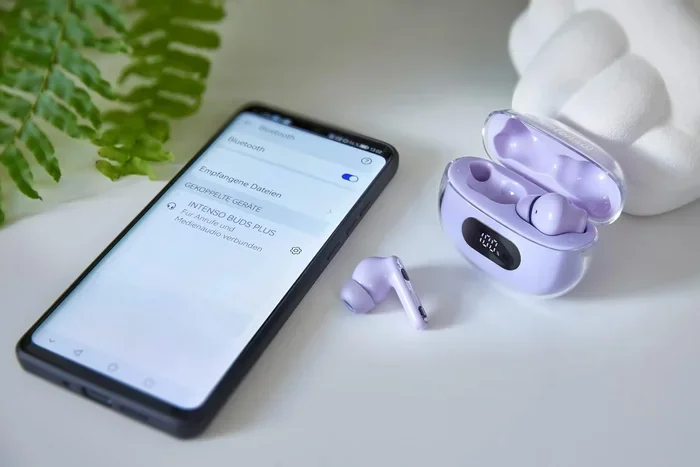
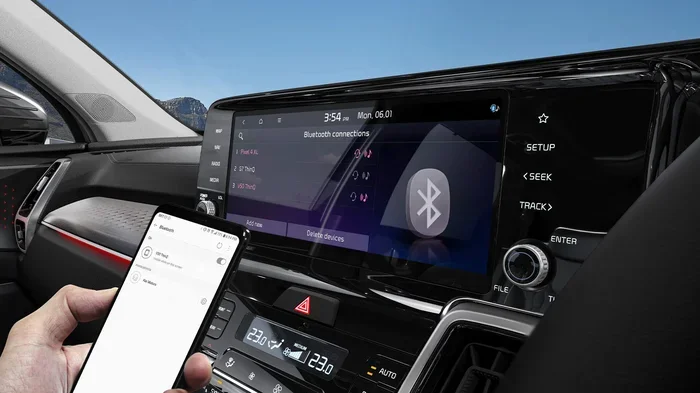
If your devices will not pair, try resetting both devices. Turn off Bluetooth on both, wait 10 seconds, and turn them back on. Make sure your adapter is in pairing mode. If that does not work, delete old pairings and start fresh. Most pairing issues are solved with a simple reset.
Range Is Too Short
Bluetooth range varies by device and version. If you need more range, consider a Bluetooth adapter with an external antenna. These adapters can reach 100 feet or more in open spaces. For most home setups, the standard 30-foot range is more than enough.
Is It Worth Adding Bluetooth To Your CD Player?
The short answer is yes. Adding Bluetooth to your CD player is one of the best upgrades you can make. It costs very little. The setup takes just minutes. And it transforms how you use your CD player. You get the freedom to listen anywhere in your home without being tethered by wires.
Think about it. You can listen to your favorite CDs while cooking in the kitchen. You can enjoy music in the backyard. You can even share your collection with friends who have Bluetooth headphones. The possibilities open up dramatically once you go wireless.
Your CD player does not have to be stuck in the past. With a simple Bluetooth adapter, it becomes a modern wireless audio source. You keep all the nostalgia and warmth of physical CDs. You also get the convenience and freedom of today’s wireless technology. It is the perfect combination.
Whether you are a casual listener or a dedicated collector, adding Bluetooth makes sense. It is affordable. It is easy. And it makes a real difference in how you enjoy your music every single day. So go ahead. Make your CD player wireless. You will wonder why you did not do it sooner.