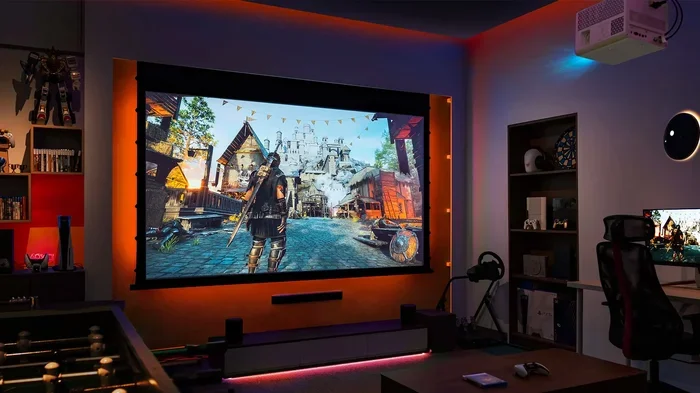
Can You Game On A 4k Projector And Is It Really Worth It
Yes, you can game on a 4K projector, and the experience is absolutely stunning when set up correctly. A 4K projector delivers massive screen sizes, rich colors, and immersive detail that no TV can match. However, input lag, refresh rate, and room setup all play a huge role in how well your 4K projector gaming experience performs. This guide covers everything you need to know before buying.
Can you game on a 4K projector? The short answer is yes. But the real question is whether the experience is smooth, responsive, and worth your money. 4K projector gaming has come a long way in recent years. Projectors now offer stunning resolution, low input lag, and HDR support that rivals even the best monitors. If you want to turn your living room into a personal arcade or home theater, a 4K gaming projector might be exactly what you need.
In this guide, we will walk you through everything you need to know. We will cover input lag, refresh rates, setup tips, pros and cons, and the best projectors on the market right now. Whether you play on a console or a PC, this article will help you decide if can you game on a 4K projector setup is right for you.
Key Takeaways
- 4K projectors offer incredible immersion: The large screen size and sharp detail make gaming feel cinematic and engaging.
- Input lag is the biggest factor: Look for projectors with under 20ms input lag for competitive gaming.
- HDR and high refresh rates matter: These features dramatically improve visual quality and motion clarity.
- Room setup is critical: Ambient light, throw distance, and screen choice all affect your gaming experience.
- Not all projectors are equal: Some models are built specifically for gaming with dedicated game modes.
- Cost vs. value is favorable: A good 4K projector can be cheaper than a large 4K TV while delivering a bigger picture.
📑 Table of Contents
What Makes A 4K Projector Great For Gaming
Not all projectors are built for gaming. Some are designed for office presentations or movie nights. But a 4K gaming projector is a different beast entirely. It needs to deliver sharp images, fast response times, and vibrant colors that bring your games to life.
Understanding 4K Resolution For Gaming
4K resolution means your image has about 8.3 million pixels. That is four times the detail of a standard 1080p screen. When you game on a big screen with that level of detail, everything looks incredibly crisp. Text is sharp. Shadows have depth. Colors pop with life.
But resolution alone does not make a great gaming setup. You also need to think about color accuracy and contrast ratio. A projector with poor contrast will look washed out in dark scenes. This is especially important for horror games or dark exploration titles where shadows matter.
Why Big Screen Gaming Feels Different
There is something magical about gaming on a large screen. When your image spans 100 inches or more, you feel like you are inside the game. This is called immersion, and it is one of the biggest advantages of using a projector for 4K projector gaming.
Compare this to a 55-inch TV sitting on your wall. The TV is good. But it cannot match the sense of scale that a projector provides. When you play a racing game or a first-person shooter on a big projection screen, the experience feels completely different. You feel more involved in the action.
Input Lag And Refresh Rate: The Real Gaming Numbers
If you want to know whether can you game on a 4K projector setup will feel smooth, you need to understand two key specs: input lag and refresh rate. These numbers make or break the gaming experience.
What Is Input Lag And Why It Matters
Input lag is the delay between your button press and the action appearing on screen. If you press a button to jump and the character jumps half a second later, that is frustrating. For casual gamers, this might not matter as much. But for competitive players, even a few milliseconds can make a difference.
For smooth 4K projector gaming, you want input lag under 20 milliseconds. Many modern gaming projectors hit this target thanks to dedicated game modes that optimize the image processing pipeline. Without a game mode, some projectors can have input lag of 50ms or more, which feels sluggish.
Refresh Rate Requirements For Smooth Gameplay
Refresh rate refers to how many times per second the projector updates the image. A 60Hz projector refreshes 60 times per second. A 120Hz projector refreshes 120 times per second. Higher refresh rates mean smoother motion and less motion blur during fast-paced gameplay.
For most gamers, 60Hz is acceptable. But if you play competitive shooters or fast-action games, 120Hz makes a noticeable difference. Some projectors now support 120Hz at 4K resolution, though they tend to be more expensive. HDMI 2.1 support is also important because it allows higher bandwidth for transmitting 4K at 120Hz signals from your console or PC.
Quick Tips: Reducing Input Lag On Your Projector
- Always enable the game mode on your projector. This disables unnecessary image processing.
- Use a wired connection instead of wireless. Ethernet or HDMI cables have less latency.
- Keep your projector firmware updated. Manufacturers often improve latency through software updates.
- Turn off any extra features like motion smoothing or dynamic contrast during gameplay.
- Place your projector as close to the screen as possible to reduce signal processing time.
Setting Up Your 4K Projector For Gaming
Setting up a 4K projector gaming station is different from setting up a TV. You need to think about room layout, lighting, and connections. But with the right approach, the setup process is straightforward and rewarding.
Choosing The Right Room And Screen
The room you use for 4K projector gaming matters a lot. Ambient light is the enemy of projector image quality. If you game in a bright room with windows, your image will look washed out and dull. The best setup is a room you can darken or control the lighting in.
You also need to think about throw distance. This is the distance between your projector and the screen. Short throw projectors can produce a large image from a short distance, which is great for smaller rooms. Long throw projectors need more space behind them but often deliver brighter and sharper images.
Your screen choice matters too. A ambient light rejecting screen can help maintain image quality even in rooms with some light. These screens are designed to reflect only the projector light while absorbing ambient light from other sources.
Connecting Your Console Or PC
Getting your gaming device connected to the projector is a key step. Most modern projectors support HDMI 2.1, which is the best connection for 4K gaming. Make sure your console or PC also supports HDMI 2.1 to take full advantage of 4K at 120Hz.
If you are using a PC, you may also need to adjust your graphics card settings. Enable HDR in your Windows display settings and set the output resolution to 4K. Some projectors also support keystone correction, which adjusts the image shape if the projector is not perfectly aligned with the screen. However, using keystone correction can slightly reduce image quality, so try to position your projector straight on for the best results.
For those who also manage gaming accounts or tech setup on their phones, you might find it helpful to learn how to add prefixes to numbers on iPhone for better organization of your gaming profiles and contacts.
Common Mistakes To Avoid During Setup
- Placing the projector in a spot where people walk in front of the beam. This creates shadows and can be distracting.
- Forgetting to calibrate the colors. Out-of-the-box settings often look too bright or too warm.
- Using a white wall instead of a proper screen. A dedicated screen gives much better contrast and color.
- Ignoring ventilation. Projectors generate heat and need airflow to prevent overheating during long gaming sessions.
- Not testing the setup with actual games before finalizing the projector placement.
Pros And Cons Of Gaming On A 4K Projector
Like any gaming setup, 4K projector gaming comes with its own set of trade-offs. Let us look at the advantages and disadvantages so you can make an informed decision.
The Advantages
- Massive screen size: Projectors can produce images of 100 inches or more, creating an unmatched cinematic feel.
- Portability: Many projectors are lightweight and easy to move from room to room or take to a friend’s house.
- Cost efficiency: A good 4K projector can cost less than a 65-inch or 75-inch 4K TV while giving you a much larger image.
- Eye comfort: Projectors use reflected light rather than direct light, which is easier on your eyes during long gaming sessions.
- Versatility: You can use the same projector for movies, presentations, and gaming.
The Drawbacks
- Input lag concerns: Not all projectors are fast enough for competitive gaming, even with game mode enabled.
- Ambient light sensitivity: Projectors struggle in bright rooms, which limits where you can game.
- Bulb replacement costs: Traditional projectors use bulbs that need replacing every few thousand hours, adding to long-term costs.
- Setup complexity: Getting the perfect image size, focus, and alignment takes more effort than plugging in a TV.
- Noise: Some projectors have loud fans that can be distracting during quiet game moments.
Best 4K Projectors For Gaming In 2024
The market for gaming projectors has grown significantly. There are now several excellent options at different price points. Here is what to look for and some top recommendations.
What To Look For In A Gaming Projector
When shopping for a 4K gaming projector, focus on these key features:
- Input lag under 20ms: This is non-negotiable for a responsive gaming experience.
- 4K UHD resolution: You want true 4K, not pixel-shifted or enhanced 4K.
- HDR support: HDR10 or Dolby Vision support makes colors and contrast much more vibrant.
- Refresh rate of at least 60Hz: 120Hz is ideal for fast-paced games.
- HDMI 2.1 ports: This ensures you can get the full 4K 120Hz signal from your console or PC.
- Good color accuracy: The projector should reproduce colors faithfully without oversaturation.
- Adequate brightness: Look for at least 2000 lumens if you game in a room with some light.
Top Picks For 2024
Here is a quick comparison of some popular 4K gaming projectors:
| Projector | Resolution | Input Lag | Refresh Rate | HDR | Price Range |
|---|---|---|---|---|---|
| BenQ TK700STi | 4K UHD | 16ms | 60Hz | HDR10 | $1,200-$1,400 |
| Epson Home Cinema 5050UB | 4K Enhanced | 20ms | 60Hz | HDR10 | $2,500-$3,000 |
| Optoma UHD38 | 4K UHD | 16ms | 60Hz | HDR10 | $1,300-$1,500 |
| ViewSonic X10-4K | 4K UHD | 18ms | 60Hz | HDR10 | $1,000-$1,200 |
| LG HU85LA | 4K UHD | 14ms | 120Hz | HDR10 | $2,800-$3,200 |
If you use spreadsheets to track your gaming setup costs or projector expenses, you know how annoying it can be when a line won’t delete in Microsoft Excel. Make sure your budgeting spreadsheets are clean so you can compare projector prices easily.
Expert Insights: What The Pros Look For
Professional gamers and AV reviewers often emphasize the same priorities when choosing a projector for 4K projector gaming. First, they look at input lag numbers in game mode, not just the standard mode. Second, they test the projector with actual games, not just test patterns. A projector might look great on a static image but perform differently with fast-moving game content.
Another thing the pros focus on is the projector’s ability to handle dark room performance. In a darkened room, a projector with excellent contrast ratio will show deep blacks and bright highlights side by side. This creates a much more dynamic and engaging image during gameplay. Look for projectors with a high contrast ratio of at least 300,000:1 for the best results.
Is A 4K Projector Worth It For Gaming?
The final question is whether can you game on a 4K projector setup is truly worth the investment. The answer depends on your gaming style, your room, and your budget.
Who Should Buy A 4K Gaming Projector
A 4K projector is a great choice if you:
- Want a massive, cinematic gaming experience at home
- Have a room where you can control lighting
- Play mostly single-player or story-driven games where input lag matters less
- Want a versatile setup that works for movies, TV, and gaming
- Have a budget of $1,000-$3,000 for a quality projector
Who Should Skip It
A projector might not be the best choice if you:
- Play competitive multiplayer games where every millisecond of input lag counts
- Game in a bright room that you cannot darken
- Have very limited space for projector placement
- Need a setup that works instantly without calibration or adjustment
For most casual and immersive gamers, a 4K projector gaming setup delivers an experience that is hard to beat. The combination of big screen size, sharp resolution, and rich colors creates a level of immersion that a television simply cannot replicate.
Final Verdict
Can you game on a 4K projector? Absolutely. The technology has matured to the point where projectors can deliver a genuinely excellent gaming experience. The key is choosing the right projector with low input lag, good refresh rates, and proper setup. If you invest in a quality 4K gaming projector and set up your room correctly, you will enjoy gaming on a scale that feels truly cinematic.
Whether you are playing a sprawling RPG on a dark evening or racing through neon-lit tracks, a 4K projector brings your games to life in a way that is hard to describe until you experience it yourself. The big screen, the vivid detail, and the immersive scale all come together to create something special. If you have been wondering about making the switch, now is a great time to explore the world of 4K projector gaming.
Frequently Asked Questions
Is a 4K projector good for competitive gaming?
A 4K projector can work for competitive gaming if it has low input lag and a high refresh rate. Look for projectors with dedicated game modes and input lag under 20ms. However, for the most competitive play, a high-refresh gaming monitor may still have an edge due to faster response times and consistent brightness.
What is the best projector for 4K gaming on a budget?
Budget-friendly options like the Optoma UHD38 and ViewSonic X10-4K offer solid 4K performance at lower price points. These projectors balance cost with features like low input lag, HDR support, and good color accuracy. You can find quality 4K gaming projectors in the $1,000 to $1,500 range.
Do I need a special screen for 4K projector gaming?
A dedicated gaming screen helps, but it is not strictly required. A high-quality white wall can work in a pinch. However, an ambient light rejecting screen or a gray screen designed for projectors will significantly improve contrast and color accuracy. The screen choice can make a big difference in your overall experience.
Can I connect a PlayStation 5 to a 4K projector?
Yes, you can connect a PlayStation 5 to a 4K projector using an HDMI 2.1 cable. The PS5 supports 4K gaming at 120Hz, and many modern projectors with HDMI 2.1 ports can handle this signal. Make sure to enable 4K and 120Hz output in your PS5 settings and use the projector’s game mode for the best performance.
How does ambient light affect 4K projector gaming?
Ambient light washes out the projected image and reduces contrast. In a bright room, your 4K projector will look dim and lifeless. For the best gaming experience, dim the lights or close the curtains. If you must game in a bright room, consider an ambient light rejecting screen and a projector with high brightness measured in lumens.
What is the difference between 4K UHD and 4K enhanced resolution in projectors?
True 4K UHD means the projector has 8.3 million physical pixels on the chip. 4K enhanced or pixel-shifted projectors use a 1080p chip that shifts pixels to create a near-4K image. True 4K UHD provides sharper detail and better image quality, but enhanced 4K projectors are more affordable and still offer a significant upgrade over 1080p.