Can Rg6 Be Used For 4k Uhd Streaming and Home Setup
Can Rg6 be used for 4k UHD streaming? The short answer is yes, but with some important caveats. RG6 coaxial cable can carry 4K signals under the right conditions, but your setup, distance, and signal quality all matter. This guide breaks down everything you need to know about using RG6 for 4K in your home entertainment system.
Let us talk about something that confuses a lot of people. You just bought a shiny new 4K TV. You are ready to binge your favorite shows in stunning 4K UHD resolution. But then you look at your cables and wonder, “Can Rg6 be used for 4k?” It is a fair question. Many homes still rely on coaxial cable for their TV signals. And RG6 is one of the most common types you will find. The good news is that RG6 can handle 4K in many situations. But there are some things you need to know before you plug everything in and hope for the best.
In this guide, we will walk through everything you need to know about using RG6 for 4K streaming. We will cover signal quality, bandwidth, distance limits, and how RG6 compares to HDMI. By the end, you will know exactly whether your current setup can deliver the crisp 4K picture you want. Let us dive in.
Key Takeaways
- RG6 can support 4K: Under the right conditions, RG6 coaxial cable is capable of transmitting 4K UHD signals to your TV or display.
- Distance matters a lot: Signal loss increases with cable length, so shorter runs deliver better 4K quality.
- Shielding is critical: Double or triple-shielded RG6 cables reduce interference and improve 4K performance.
- HDMI may still be better: For pure 4K streaming, HDMI often provides a more reliable and higher-quality connection than coaxial.
- Your splitter and connectors matter: Cheap splitters and poor connections can degrade your 4K signal even with high-quality RG6.
- Check your bandwidth needs: 4K streaming requires significant bandwidth, and not all RG6 setups can deliver consistently.
📑 Table of Contents
What Is RG6 Coaxial Cable?
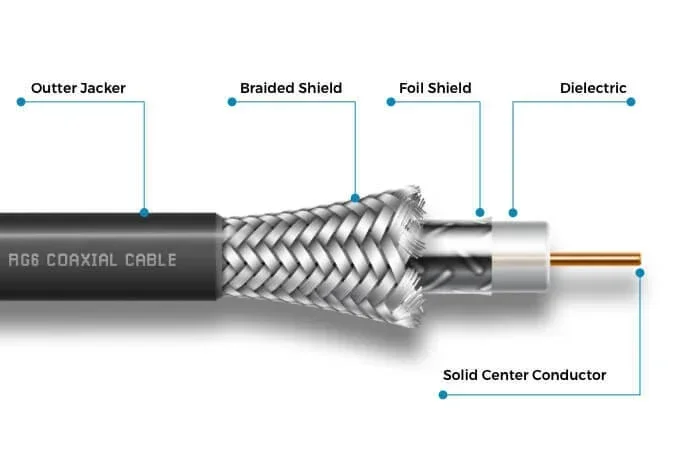
Before we answer the big question, let us understand what we are working with. RG6 is a type of coaxial cable. It is the kind of cable you usually see running from the wall outlet to your cable box or satellite receiver. It has a copper core surrounded by insulation, a shielding layer, and an outer jacket.
RG6 replaced the older RG59 cable in most modern installations. The reason is simple. RG6 offers better shielding and can handle higher frequencies. This makes it ideal for digital TV signals and satellite connections. Most homes built after the year 2000 use RG6 as their standard coaxial cable for TV and internet.
Understanding RG6 Specifications
Here are the key specs of a standard RG6 cable:
- Impedance: 75 ohms
- Core: Solid copper or copper-clad steel
- Frequency range: Up to 3 GHz
- Shield: Typically dual or triple layered
- Connector types: F-type, compression, or twist-on
The frequency range is what really matters for 4K. Higher frequency means more data can pass through the cable. And 4K video needs a lot of data. A standard RG6 cable with its 3 GHz frequency range can technically carry a 4K signal. But there is a catch, and we will get to that in a moment.
How RG6 Differs From Other Cables
Not all cables are created equal. Here is how RG6 stacks up against some other common options:
- RG59: Older, thinner, and less shielding. It struggles with high-frequency signals and is not ideal for 4K.
- RG11: Thicker and better for long runs. It has lower signal loss than RG6 over distance.
- HDMI: The gold standard for 4K. It carries uncompressed audio and video in a single cable.
- Cat6 Ethernet: Great for internet-based streaming but not for traditional cable TV signals.
So where does RG6 fit in? It sits in a middle ground. It is better than RG59 for 4K. But it is not as good as HDMI for pure video quality. However, for many home setups, RG6 gets the job done just fine.
Can Rg6 Be Used For 4k UHD Streaming?
This is the question that brought you here. And the answer is, it depends. Can Rg6 be used for 4k? Yes, it can. But the quality of your 4K experience depends on several factors. Let us break them down.
Bandwidth and Signal Quality
4K video requires a lot of bandwidth. A 4K stream at 60 frames per second needs roughly 18 to 25 megabits per second for compressed content. Uncompressed 4K needs much more. RG6 cable has a bandwidth capacity of up to 3 GHz. That is more than enough for most 4K signals.
But here is where it gets tricky. The signal quality can degrade as it travels through the cable. This is called signal loss or attenuation. The longer your RG6 run, the more signal you lose. For short runs, under 50 feet, RG6 handles 4K beautifully. Beyond that, you might start seeing issues.
Signal Loss Over Distance
Signal loss is the biggest enemy of long cable runs. Here is a simple breakdown:
- Under 25 feet: Minimal signal loss. Your 4K picture will look great.
- 25 to 50 feet: Slight signal loss. Still good for most 4K content.
- 50 to 100 feet: Noticeable signal loss. You may need a signal booster.
- Over 100 feet: Significant signal loss. RG6 alone may not cut it for reliable 4K.
If your cable run is long, consider using a signal amplifier or switching to RG11 for the main trunk line. These steps can help maintain strong 4K quality over distance.
RG6 vs HDMI for 4K Setup
When it comes to 4K, HDMI is the undisputed champion. But that does not mean RG6 has no place in your setup. Let us compare the two directly.
| Feature | RG6 Coaxial | HDMI |
|---|---|---|
| Max 4K Resolution | 4K at 30Hz (compressed) | 4K at 60Hz (uncompressed) |
| Audio Support | Limited (depends on setup) | Full Dolby Atmos, DTS:X |
| Distance Limit | Up to 100 feet (with boosters) | Up to 50 feet (without boosters) |
| Ease of Installation | Easy, already in many walls | Simple plug-and-play |
| Cost | Low to moderate | Low to moderate |
| Interference Resistance | Good (with proper shielding) | Excellent |
As you can see, HDMI wins on pure performance. But RG6 has its advantages. If your home already has coaxial wiring in the walls, you do not need to rip them open and run new cables. That saves time and money. And with a good 4K modulator or converter, you can get a solid 4K experience over RG6.
For many people, the choice comes down to convenience. You might use RG6 for your cable TV input and HDMI for your streaming devices. This hybrid approach works well for most home theater setups.
Setting Up Your Home for 4K with RG6
If you have decided to use RG6 for your 4K setup, here is how to do it right. Proper installation makes all the difference.
Choose the Right RG6 Cable
Not all RG6 cables are the same. Look for these features when shopping:
- Double or triple shielding: This reduces electromagnetic interference and keeps your signal clean.
- Solid copper core: Avoid cables with copper-clad steel. They have higher resistance and more signal loss.
- Heavy-duty jacket: A thick outer jacket protects the cable from damage during installation.
- Rated for high frequency: Make sure the cable is rated for at least 3 GHz.
Spend a little extra on a quality cable. It will pay off in better picture quality and fewer headaches down the road.
Use Quality Connectors
The connector matters just as much as the cable itself. Cheap connectors create weak points where signal can leak or degrade. Here are some tips:
- Use compression connectors: They provide the most secure and reliable connection.
- Avoid twist-on connectors: They are convenient but not as reliable for 4K signals.
- Check for tight fits: A loose connector will cause signal dropouts and picture issues.
- Seal outdoor connections: Use weatherproof connectors or tape for any outdoor runs.
Add a Signal Booster If Needed
If your cable run is longer than 50 feet, a signal booster can be a game changer. A booster amplifies the signal before it reaches your TV or display. This helps maintain the bandwidth needed for smooth 4K playback.
Place the booster close to the source, not near the TV. This ensures the signal is strong before it travels through the rest of the cable. You can find inline boosters that screw right into your coaxial line. They are easy to install and not too expensive.
Minimize Bends and Kinks
Coaxial cable does not like sharp bends. A tight kink can damage the inner conductor and cause signal loss. Here is what to keep in mind:
- Maintain a minimum bend radius of 1 inch for RG6.
- Do not coil excess cable tightly. Use large loops instead.
- Avoid running cable near power lines or electrical devices.
- Use cable clips to secure the cable without pinching it.
These small precautions go a long way toward preserving your 4K signal quality.
Common Mistakes People Make with RG6 and 4K
Even with the best cable, mistakes can ruin your 4K experience. Here are the most common ones to avoid.
Using Old or Damaged Cable
Old cables degrade over time. The shielding can crack. The core can corrode. If your RG6 cable is more than 10 years old, consider replacing it. A new high-quality cable is inexpensive and can make a huge difference in your 4K picture quality.
Using Too Many Splitters
Every splitter you add weakens the signal. If you split a coaxial line three or four times to feed multiple TVs, your 4K signal may suffer. Each split reduces the signal strength. Use a powered splitter or a distribution amplifier if you need to feed multiple displays.
Ignoring the Modulator
If you are converting a coaxial signal to 4K, the modulator matters. A cheap modulator will not deliver true 4K quality. Invest in a reputable modulator that supports 4K pass-through. This single device can make or break your setup.
Skipping the Test
After you set up your RG6 4K connection, always test it. Play a 4K demo clip or stream a 4K movie. Look for any flickering, color banding, or dropouts. These issues often point to a cable or connection problem that is easy to fix.
Expert Tips for the Best 4K Experience with RG6
Want to get the most out of your RG6 4K setup? Here are some expert-backed tips that make a real difference.
- Keep cable runs short: Under 50 feet is ideal for the best 4K quality over RG6.
- Use gold-plated connectors: They resist corrosion and provide a better connection.
- Label your cables: This saves you time when troubleshooting issues later.
- Upgrade your splitters: High-quality splitters with built-in amplification preserve signal strength.
- Consider a hybrid setup: Use RG6 for cable TV and HDMI for streaming devices. Best of both worlds.
- Check your TV’s input settings: Make sure your TV is set to the right input and resolution for 4K.
For those looking to streamline their home setup, there are also apps and tools that can help you manage your entertainment devices more efficiently. Check out this guide on 4 apps that are like Uber for finding dog walkers if you want to explore how modern apps simplify everyday tasks, much like how the right setup simplifies your 4K viewing experience.
Another important tip is to keep your firmware updated. Both your TV and any streaming devices connected via RG6 should have the latest software. Updates often include improvements for 4K playback and bug fixes that can enhance your experience.
When to Upgrade Beyond RG6
While RG6 works for 4K in many cases, there are times when you should consider upgrading. Here are some signs that it is time to move beyond RG6:
- You are experiencing frequent signal dropouts or picture artifacts.
- Your cable runs exceed 100 feet without a booster.
- You want 4K at 60Hz with full HDR support.
- You are running multiple 4K displays from a single source.
- You need uncompressed 4K video with lossless audio.
In these situations, switching to HDMI or fiber-optic cabling is the better choice. HDMI cables rated for 4K at 60Hz (often called Premium High Speed HDMI) will give you the full 4K experience without any compromises.
That said, do not rush to rip out your coaxial wiring. RG6 is still a solid option for many homes. It works well for cable TV, satellite, and even 4K streaming when set up correctly. The key is understanding its limitations and working within them.
Final Thoughts
So, can Rg6 be used for 4k? Absolutely. RG6 coaxial cable is a capable and reliable option for delivering 4K UHD content in your home. It is not the absolute best choice for pure 4K performance, but it gets the job done in most setups. The key is using quality cable, proper connectors, and smart installation practices.
Keep your cable runs short, invest in good shielding, and do not overload your lines with too many splits. If you follow these guidelines, you will enjoy a crisp and beautiful 4K picture through your RG6 setup. For those who want the absolute best quality, HDMI remains the top choice. But for many households, RG6 is more than enough to deliver an excellent 4K viewing experience.
The bottom line is this: do not let old coaxial wiring hold you back from enjoying your favorite content in stunning 4K resolution. With the right approach, your RG6 setup can surprise you with just how well it handles ultra-high-definition content. Take the time to set it up properly, and you will be rewarded with a picture that looks amazing.
Frequently Asked Questions
Can I run 4K over RG6 coaxial cable?
Yes, you can run 4K over RG6 coaxial cable. However, the quality depends on factors like cable length, shielding, and connectors. For runs under 50 feet with good-quality RG6, you will get a solid 4K experience. Longer runs may require a signal booster to maintain quality.
Does RG6 support 4K at 60Hz?
Standard RG6 can support 4K at 30Hz over coaxial. For 4K at 60Hz, you typically need an HDMI connection or a high-quality coaxial setup with a 4K-capable modulator. The coaxial path may compress the signal, which can limit frame rates for certain 4K content.
What is the maximum distance for RG6 4K transmission?
For reliable 4K over RG6, keep your cable run under 50 feet. Beyond that, signal loss becomes significant. You can extend the range to 100 feet or more by using a signal amplifier or booster. For runs over 100 feet, consider switching to RG11 or using HDMI with a fiber-optic extension.
Is RG6 better than RG59 for 4K?
Yes, RG6 is significantly better than RG59 for 4K. RG6 has thicker shielding, a larger conductor, and a higher frequency rating. RG59 was designed for analog signals and older TV standards. It simply cannot handle the bandwidth demands of 4K video reliably.
Do I need special RG6 for 4K streaming?
You do not need a special “4K RG6” cable. But you should use a high-quality RG6 with double or triple shielding and a solid copper core. Look for cables rated for at least 3 GHz frequency. These standard features ensure the cable can handle the data demands of 4K content.
Can I use RG6 for both cable TV and 4K streaming?
Yes, RG6 can handle both cable TV signals and 4K streaming. Many homes use RG6 for their cable TV connection and then connect a streaming device or 4K box to the TV via HDMI. This hybrid approach works well and lets you enjoy 4K content without rewiring your entire home.
=== CONCLUSION ===
Can Rg6 be used for 4k? The answer is a confident yes. RG6 coaxial cable is a practical and effective choice for 4K UHD streaming and home setups. It may not be the fanciest option on the market, but it gets the job done for most households. By choosing quality cable, keeping runs short, and using proper connectors, you can enjoy a stunning 4K picture without spending a fortune on new wiring.
Remember that every setup is different. Your wall wiring, the length of your runs, and the devices you use all play a role. Test your setup, troubleshoot any issues, and do not be afraid to upgrade a component if needed. The goal is simple: enjoy your favorite movies, shows, and sports in beautiful 4K resolution. With the right RG6 setup, that is entirely within your reach.