Can Wired Headphones Use Bluetooth for Wireless Audio
Can wired headphones use Bluetooth? The short answer is yes. You can easily add wireless capability to any wired pair using a Bluetooth adapter or transmitter. This guide covers everything you need to know about making your wired headphones Bluetooth-compatible, from choosing the right adapter to understanding audio quality and avoiding common mistakes.
Can wired headphones use Bluetooth? Yes, they absolutely can. If you have a favorite pair of wired headphones that you love but wish they were wireless, there is good news. You can add Bluetooth functionality to almost any wired pair with a simple adapter or transmitter. This means you can ditch the cable and still enjoy your music, podcasts, and calls without buying a whole new set of wireless headphones.
The world of wireless audio has grown fast in recent years. More people want the freedom of Bluetooth without spending extra money on new gear. Whether you have wired earphones from years ago or a premium pair with a 3.5mm jack, there is a way to make them work wirelessly. In this article, we will walk you through every method, every option, and every thing you need to know about making wired headphones Bluetooth-compatible.
We will cover how Bluetooth adapters work, which type is best for your setup, and whether audio quality takes a hit when you go wireless. You will also learn about common mistakes to avoid and tips from experts to get the best experience. By the end, you will have a clear picture of your options and feel confident making your wired headphones wireless.
Key Takeaways
- Wired headphones can go wireless: A Bluetooth adapter or transmitter lets any wired pair connect to phones, tablets, and laptops without cables.
- Multiple adapter types exist: You can choose from USB dongles, 3.5mm transmitters, and Bluetooth receivers depending on your device and needs.
- Audio quality is mostly preserved: Modern Bluetooth codecs like aptX and AAC keep the sound quality close to what you get with a wired connection.
- Setup is simple and fast: Most Bluetooth adapters pair in under a minute and work right out of the box.
- Watch out for audio latency: Some adapters may cause a slight delay, which matters for gaming and video watching.
- Battery life varies: Bluetooth adapters typically last 8 to 20 hours on a single charge, so pick one that fits your usage.
📑 Table of Contents
- What Does It Mean to Use Bluetooth with Wired Headphones?
- How to Make Wired Headphones Bluetooth-Compatible
- Types of Bluetooth Adapters for Wired Headphones
- Does Bluetooth Affect Audio Quality?
- Benefits of Adding Bluetooth to Wired Headphones
- Common Mistakes and Pro Tips for Best Results
- Final Verdict
What Does It Mean to Use Bluetooth with Wired Headphones?
Using Bluetooth with wired headphones means adding a wireless connection to a pair that normally uses a cable. Instead of plugging your headphones into a phone or laptop with an AUX cable, you use a small device to send the audio signal through the air. This device is called a Bluetooth adapter or a Bluetooth transmitter. Once paired, your audio streams wirelessly from your device to the adapter, and then to your headphones.
The process is simpler than it sounds. A Bluetooth transmitter takes the audio output from your device and converts it into a Bluetooth signal. Your wired earphones plug into the transmitter, and the signal travels through the air to your phone, tablet, or computer. This lets you move around freely without being tied to your device by a cable.
How Bluetooth Works with Wired Gear
Bluetooth pairing is the first step. You turn on the adapter, put it in pairing mode, and select it from your device’s Bluetooth menu. Once connected, the adapter handles all the work of converting digital audio into a wireless signal. Your wired headphones do not need any internal changes. They stay exactly the same. The only difference is that the audio now comes through the air instead of a wire.
The Bluetooth range is typically about 30 feet (10 meters) for most adapters. This means you can move around your room or office without losing the connection. Some newer adapters with Bluetooth 5.0 offer an even wider range and more stable connection. This makes them great for watching videos, taking calls, or just listening to music while you move around.
How to Make Wired Headphones Bluetooth-Compatible
Turning your wired headphones into wireless ones is easier than you might think. There are a few different methods, and each one works well for different situations. Let us look at the main ways you can add Bluetooth to your existing pair.
Method 1: Use a Bluetooth Transmitter
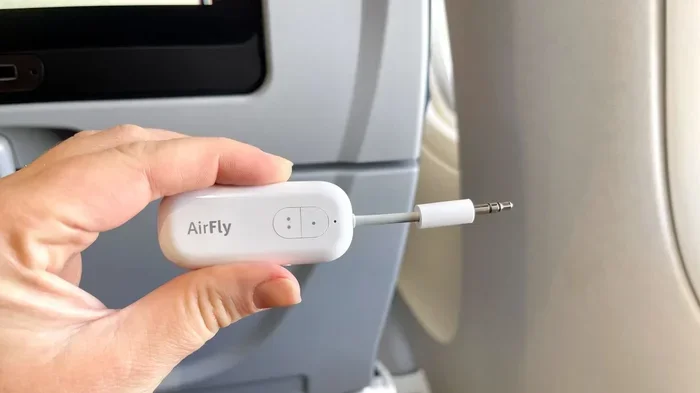
A Bluetooth transmitter is the most popular option for wired earphones and headphones with a 3.5mm jack. You plug the transmitter into the audio output of your device. Then you connect your headphones to the transmitter using an AUX cable. The transmitter sends the audio wirelessly to your headphones through Bluetooth.
This method works great with TVs, computers, and gaming consoles. Most transmitters also have a Bluetooth 5.0 connection, which means a faster and more stable link. Some transmitters also support Bluetooth aptX, a codec that keeps audio quality very close to what you get with a wired connection.
Method 2: Use a Bluetooth Receiver
A Bluetooth receiver works in the opposite direction. Instead of sending audio out, it receives a Bluetooth signal and turns it into an audio output. You plug the receiver into your headphones using the 3.5mm jack or USB input. Then you pair the receiver with your phone or tablet. The audio streams from your device to the receiver and then to your headphones.
This method is ideal if your headphones do not have a built-in battery or power source. The receiver draws power from the headphones or from a small USB port. It is a clean and simple way to add wireless audio to any pair of wired headphones.
Method 3: Use a Bluetooth Adapter Dongle
A Bluetooth dongle is a small USB stick that plugs directly into your computer or laptop. It acts as a Bluetooth-enabled audio adapter. Once plugged in and paired, your computer sends audio wirelessly to your headphones. This is a great option for desktop computers that do not have built-in Bluetooth.
Dongles are compact and portable. You can unplug them and take them with you wherever you go. They are also usually affordable. A good Bluetooth dongle can cost as little as 15 to 30 dollars. This makes it one of the easiest and cheapest ways to add wireless audio to your setup.
Types of Bluetooth Adapters for Wired Headphones
Not all Bluetooth adapters are the same. Different types serve different needs. Here is a look at the main options available for making your wired headphones work with Bluetooth.
| Adapter Type | Best For | Connection | Battery Life |
|---|---|---|---|
| Bluetooth Transmitter | TVs, computers, gaming consoles | AUX cable + Bluetooth | 8 to 20 hours |
| Bluetooth Receiver | Wired earphones, in-ear monitors | 3.5mm jack or USB | 6 to 12 hours |
| Bluetooth Dongle | Laptops, desktops without built-in Bluetooth | USB port | No battery needed |
| All-in-One Adapter | Versatile use across devices | 3.5mm + USB + Bluetooth | 10 to 15 hours |
Each type has its strengths. A Bluetooth transmitter is perfect if you want to make a TV wireless. A Bluetooth receiver works well for simple plug-and-play use with phones. A Bluetooth dongle is ideal for computers. And an all-in-one adapter gives you the most flexibility.
What to Look for When Choosing an Adapter
When picking an adapter for your wired headphones, there are a few things to keep in mind. First, check the Bluetooth version. Bluetooth 5.0 offers better range and a stronger connection than older versions. Second, look for codec support. Bluetooth aptX and aptX HD deliver better audio quality than standard Bluetooth. Third, consider battery life if the adapter is portable. Finally, check the compatibility with your device. Make sure the adapter works with your phone, tablet, or computer.
Does Bluetooth Affect Audio Quality?
This is one of the most common questions people ask when they learn about Bluetooth for wired headphones. The short answer is: it depends. The quality of wireless audio depends on several factors, including the Bluetooth codec, the adapter quality, and your headphones themselves.
Understanding Bluetooth Codecs
A Bluetooth codec is the format used to compress and send audio wirelessly. Different codecs offer different levels of quality. Bluetooth aptX and aptX HD are known for high-quality audio. Bluetooth AAC is common on Apple devices and also delivers good sound. Standard SBC is the basic codec that all Bluetooth devices support, but it does not sound as good as aptX or AAC.
If you care about audio quality, look for an adapter that supports aptX or aptX Low Latency. These codecs keep the sound rich and clear. You will notice a big difference compared to basic SBC. For most casual listening, even standard Bluetooth sounds very good. But for music lovers and audiophiles, codec support matters a lot.
Does Wireless Mean Lower Quality?
In the past, wireless audio did not match the quality of a wired connection. Today, that is no longer true. Modern Bluetooth 5.0 adapters with aptX support deliver sound that is very close to wired quality. You may not notice the difference in everyday listening. The lossless audio of a wired connection is slightly better, but for most people, the wireless version is more than good enough.
One thing to keep in mind is audio latency. This is the small delay between when the audio is sent and when you hear it. For music, this delay is usually unnoticeable. But for gaming or watching videos, it can be a problem. Look for adapters that advertise low latency or support aptX Low Latency to avoid this issue.
Benefits of Adding Bluetooth to Wired Headphones
Making your wired headphones Bluetooth-compatible comes with several real benefits. Here are the main reasons people choose to add wireless capability to their favorite wired pair.
Freedom and Convenience
The biggest benefit is freedom. You are no longer tied to your phone or laptop by a cable. You can walk around the room, do chores, or sit on the couch without worrying about the wire getting caught or tangled. This is especially helpful if you use your headphones while cooking, cleaning, or working around the house.
Save Money
Buying a new pair of wireless headphones can be expensive. A good pair can cost 100 dollars or more. Instead, you can spend 20 to 40 dollars on a Bluetooth adapter and keep your current headphones. This saves you a lot of money. You also get to keep the comfort and sound quality of headphones you already love.
Better Battery Life on Your Phone
Wireless headphones need their own battery, and that battery dies. When it does, you cannot use them at all. A Bluetooth adapter with a rechargeable battery means your wired headphones stay powered as long as the adapter has charge. And many adapters last 10 hours or more on a single charge. This is great for long flights or workdays.
Use Headphones with Multiple Devices
A Bluetooth-enabled adapter lets you switch between devices easily. You can listen to music from your phone and then switch to your TV without unplugging anything. This is very convenient for households where one pair of headphones is shared across devices like a TV, a computer, and a phone.
Common Mistakes and Pro Tips for Best Results
Adding Bluetooth to wired headphones is simple, but there are a few mistakes people make. Avoid these pitfalls to get the best experience.
Common Mistakes to Avoid
Skipping firmware updates: Many Bluetooth adapters have firmware that can be updated. Updates improve performance and fix bugs. Always check for updates after you buy a new adapter.
Ignoring codec compatibility: Not all adapters support all codecs. If you want the best sound, make sure your adapter and your source device support the same codec like aptX or AAC.
Placing the adapter too far away: While Bluetooth range is usually around 30 feet, walls and obstacles can reduce it. Keep the adapter close to your listening area for the best connection.
Forgetting to charge the adapter: If your adapter has a battery, it will die eventually. Make it a habit to charge it regularly so you are never caught without wireless audio.
Using a low-quality adapter: Cheap adapters may have poor sound quality, high latency, or weak connections. Invest in a well-reviewed adapter for the best results.
Expert Tips for the Best Wireless Experience
Choose an adapter with a built-in microphone: This lets you take calls and use voice assistants without needing your phone nearby. Many adapters now include a mic, so look for one that does.
Keep your devices close during pairing: When you first set up your Bluetooth pairing, keep the adapter and your phone within a few feet of each other. This ensures a smooth and fast connection.
Use the right cable: If your headphones use a 3.5mm jack, make sure the adapter has the right input. Some adapters also support USB-C or USB-A. Check your headphone jack type before buying.
Test for latency before buying: If you plan to use your headphones for gaming or video, test the adapter for audio delay. Look for products that specifically advertise low latency support.
Store your adapter safely: Since adapters are small, they can be easy to lose. Keep them in a small case or pouch when you are not using them. This also protects the charging port and the AUX cable connection.
Final Verdict
The answer to the question can wired headphones use Bluetooth is a clear yes. With the right adapter, transmitter, or dongle, you can turn almost any pair of wired headphones into wireless ones. The process is simple, affordable, and does not require any technical skills. Whether you choose a Bluetooth transmitter, a Bluetooth receiver, or a Bluetooth dongle, you will enjoy the freedom of wireless audio without buying new headphones.
Modern Bluetooth technology has come a long way. Bluetooth 5.0 and advanced codecs like aptX mean that wireless audio quality is now very close to wired quality. You can enjoy your favorite music, podcasts, and calls without the hassle of cables. The key is to choose the right adapter for your needs and to follow the tips in this guide.
So go ahead and make your wired headphones wireless. It is one of the best small upgrades you can make. You will wonder how you ever lived with a cable in the way. Can wired headphones use Bluetooth? Now you know the answer, and you have everything you need to get started.
Frequently Asked Questions
Can any wired headphones be made Bluetooth compatible?
Yes, almost any wired headphones can be made Bluetooth compatible. You just need a Bluetooth adapter, transmitter, or receiver that matches your headphone jack type. Whether your headphones have a 3.5mm jack or a USB-C connection, there is an adapter that works for you.
Does using a Bluetooth adapter reduce audio quality?
Not significantly. Modern Bluetooth adapters with aptX or AAC codecs deliver audio quality that is very close to wired quality. You may notice a tiny difference if you are an audiophile, but for everyday listening, the wireless sound is excellent.
How long does it take to pair a Bluetooth adapter with wired headphones?
Most Bluetooth adapters pair in under a minute. You turn on the adapter, put it in pairing mode, and select it from your device Bluetooth settings. The process is quick and straightforward for most users.
Is audio latency a problem with Bluetooth wired headphones?
Audio latency can be a minor issue with some adapters, especially for gaming and video watching. To avoid this, choose an adapter that supports aptX Low Latency or Bluetooth 5.0, which reduces delay significantly.
Can I use Bluetooth adapters with both ears independently?
Yes, most Bluetooth adapters work with both earpieces since you plug them into your wired headphones the same way you always do. The adapter sends the same audio signal to both sides, so you get full stereo sound wirelessly.
How far can I move away from my device with Bluetooth wired headphones?
Most Bluetooth adapters have a range of about 30 feet (10 meters). With Bluetooth 5.0, the range can extend further and the connection stays more stable even through walls and obstacles.
=== CONCLUSION ===
Adding Bluetooth to your wired headphones is one of the smartest upgrades you can make. It gives you wireless freedom without the cost of buying new headphones. Whether you use a Bluetooth transmitter, a Bluetooth receiver, or a simple Bluetooth dongle, the process is easy and the results are great. You get to keep the headphones you love while enjoying the convenience of wireless audio. So if you have been wondering whether your wired headphones can use Bluetooth, now you know the answer. Go ahead, pick an adapter, and start enjoying your music without wires.