Can Wifi 5 Be Upgraded To Wi Fi 6 And Is It Worth It
Can Wifi 5 Be Upgraded To Wi Fi 6? Yes, you can upgrade from Wifi 5 to Wifi 6, but it requires a new router and compatible devices to unlock the full benefits. Wifi 6 delivers faster speeds, better network efficiency, and improved performance in crowded environments. Whether the upgrade is worth it depends on your current setup, internet plan, and how many devices you connect.
Most people love their current internet setup until something slows it down. Maybe your smart home devices keep dropping off the network. Perhaps your video calls freeze during peak hours. Or your kids are gaming while you stream a movie, and the whole house suffers. If you have a Wifi 5 router and are tired of these frustrations, you might be asking one big question: Can Wifi 5 Be Upgraded To Wi Fi 6?
The short answer is yes. You can absolutely move from Wifi 5 to Wifi 6. But the real question most people care about is whether it is worth the time and money. This guide covers everything you need to know. We will break down the differences, explain the upgrade process, compare costs, and help you decide if making the switch makes sense for your home.
By the end of this article, you will know exactly what you need to upgrade, what you will gain, and whether the investment pays off. Let us dive in.
Key Takeaways
- Wifi 5 to Wifi 6 Upgrade Is Possible: You need a Wifi 6 router and ideally Wifi 6-capable devices to get the full benefits.
- Speed and Efficiency Improve Noticeably: Wifi 6 offers up to 40% faster speeds and handles multiple devices far better than Wifi 5.
- Backward Compatibility Works: A Wifi 6 router works with older Wifi 5 devices, though you won’t get Wifi 6 speeds on those devices.
- Worth It for Smart Homes: If you have many connected devices, the upgrade to Wifi 6 is highly recommended.
- Cost Varies: Wifi 6 routers range from affordable to premium, so there is an option for most budgets.
- Security Improves: Wifi 6 supports WPA3, which offers stronger encryption than Wifi 5.
- Check Your Internet Plan: Upgrading to Wifi 6 won’t help if your internet plan doesn’t support faster speeds.
📑 Table of Contents
- Understanding the Difference Between Wifi 5 and Wifi 6
- Can You Upgrade Wifi 5 to Wifi 6?
- How to Upgrade Your Network to Wifi 6
- Is Upgrading to Wifi 6 Worth It?
- Wifi 5 vs Wifi 6 Comparison Table
- Common Mistakes When Upgrading to Wifi 6
- Key Takeaways on Upgrading from Wifi 5 to Wifi 6
- Conclusion: Should You Upgrade from Wifi 5 to Wifi 6?
Understanding the Difference Between Wifi 5 and Wifi 6
Before you decide to upgrade, it helps to understand what each standard actually does. Wifi 5 and Wifi 6 are both wireless networking standards, but they were built for different eras of internet use. Wifi 5 came out in 2014 and was designed for homes with a handful of connected devices. Today, the average household has over 20 smart devices. That is where Wifi 6 steps in.
What Is Wifi 5?
Wifi 5, also known as 802.11ac, has been the workhorse of home networking for nearly a decade. It offers solid speeds up to 3.5 Gbps on the 5GHz band. It handles everyday tasks like browsing, streaming, and video calls with ease. However, it struggles when many devices connect at the same time. Think of it like a single-lane road. When traffic is light, everything flows smoothly. But during rush hour, congestion builds fast.
What Is Wifi 6?
Wifi 6, or 802.11ax, is the next generation of wireless technology. It was designed to solve the congestion problem. It uses advanced techniques like OFDMA and MU-MIMO to manage multiple devices efficiently. Think of it as a multi-lane highway that can handle heavy traffic without slowing down. Wifi 6 also operates on both the 2.4GHz and 5GHz bands, and it supports speeds up to 9.6 Gbps. That is a massive jump from Wifi 5.
Key Technical Differences
Here are the major technical differences that set Wifi 5 and Wifi 6 apart:
- Speed: Wifi 5 tops out at 3.5 Gbps, while Wifi 6 reaches up to 9.6 Gbps.
- Efficiency: Wifi 6 uses OFDMA to divide channels into smaller subchannels, reducing congestion.
- Device Handling: Wifi 6 can communicate with more devices simultaneously using MU-MIMO technology.
- Battery Life: Wifi 6 includes Target Wake Time, which helps smart devices save battery.
- Security: Wifi 6 requires WPA3 encryption, which is more secure than the WPA2 used by Wifi 5.
- Range: Wifi 6 performs better on the 2.4GHz band, giving you improved coverage in larger homes.
These differences matter a lot when you are deciding whether to upgrade. A wifi 5 to wifi 6 upgrade is not just about faster downloads. It is about a smoother, more reliable network overall.
Can You Upgrade Wifi 5 to Wifi 6?
Now let us get to the core question: Can Wifi 5 Be Upgraded To Wi Fi 6? The answer depends on what part of your network you want to upgrade. You cannot simply update your current Wifi 5 router with a software patch to make it Wifi 6. The hardware itself is different. However, upgrading your network to Wifi 6 is straightforward and very doable.
What You Need to Upgrade
To move from Wifi 5 to Wifi 6, you need the following:
- A Wifi 6 Router: This is the most important piece. Look for routers that support the 802.11ax standard. Popular options include the TP-Link AX6000, Netgear Nighthawk AX8, and Asus RT-AX86U.
- A Modem That Supports Your Internet Speed: If your internet plan delivers speeds above 1 Gbps, make sure your modem can handle that. A slow modem will bottleneck your new Wifi 6 router.
- Wifi 6-Capable Devices (Optional but Recommended): To get the full Wifi 6 speed benefits, your phones, laptops, and tablets should support the standard. Most devices made after 2020 include Wifi 6 support.
Does Your Current Setup Support the Upgrade?
Most modern homes can support a wifi 6 upgrade without major changes. Here is a quick checklist:
- Do you have a coaxial or fiber internet connection? If yes, you are likely good to go.
- Is your current router more than three years old? If so, a Wifi 6 router will be a huge improvement.
- Do you have a modem provided by your internet service provider? Check if it supports gigabit speeds.
- Are your devices relatively recent? Devices from the last few years usually support Wifi 6.
If you checked all of these boxes, you are ready to make the switch. The upgrade process itself is simple. You unbox the new Wifi 6 router, connect it to your modem, and follow the setup instructions. Most modern routers have companion apps that guide you through everything step by step.
What Happens to Your Existing Wifi 5 Devices?
One of the best things about Wifi 6 is backward compatibility. Your older Wifi 5 devices will still connect to a Wifi 6 router. They just will not get the speed or efficiency benefits of Wifi 6. Think of it like putting a modern engine in an older car. The car still runs, but it does not get the full performance boost.
However, here is the good news. As you replace your older devices over time, more and more of them will take advantage of Wifi 6 speeds. This makes the upgrade a smart long-term investment.
How to Upgrade Your Network to Wifi 6
Ready to make the switch? Here is a step-by-step guide to upgrading your network from Wifi 5 to Wifi 6.
Step 1: Check Your Internet Speed
Before buying a new router, run a speed test. Visit a site like Speedtest.net and check your current download and upload speeds. If your plan already delivers 500 Mbps or higher, a Wifi 6 router will help you get the most out of it. If your plan is slower, upgrading the router alone may not make a huge difference.
Step 2: Choose the Right Wifi 6 Router
Not all Wifi 6 routers are the same. Some are budget-friendly, while others are packed with premium features. Here are a few things to consider:
- Budget Routers: Models like the TP-Link AX3000 offer solid Wifi 6 performance at an affordable price.
- Mid-Range Routers: Options like the Asus RT-AX86U provide excellent speed and coverage for most homes.
- Premium Routers: High-end models like the Netgear Nighthawk AX12 deliver top-tier performance for large homes with many devices.
Quick Tip: If you have a large home, consider a Wifi 6 mesh system instead of a single router. Mesh systems use multiple nodes to spread coverage evenly throughout your house.
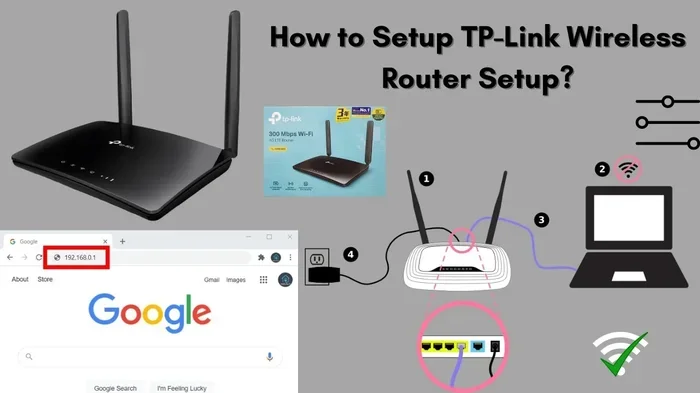
Step 3: Set Up Your New Router
Setting up a Wifi 6 router is easier than most people think. Here is what to do:
- Unbox your new router and place it in a central location in your home.
- Connect the router to your modem using an Ethernet cable.
- Plug in the power adapter and wait for the router to boot up.
- Download the manufacturer’s app or open the router’s web interface.
- Follow the on-screen setup guide to configure your network name and password.
- Connect your devices and enjoy the faster speeds.
Quick Tip: Place your router in an open, elevated area. Avoid hiding it inside a closet or behind furniture, as this can weaken the signal.
Step 4: Update Device Drivers and Firmware
After setting up your new Wifi 6 router, make sure your devices are up to date. On your phone, laptop, or tablet, check for the latest network drivers or operating system updates. This ensures your devices can communicate with the router using Wifi 6 protocols.
Expert Insight: The Role of Your Internet Service Provider
Some internet service providers (ISPs) offer gateway devices that combine a modem and router. If you rent your equipment from your ISP, ask them if they offer a Wifi 6 gateway. Many providers now carry Wifi 6 options and may even swap it out for free or at a low cost. This can save you the hassle of buying your own router.
Is Upgrading to Wifi 6 Worth It?
This is the question everyone wants answered. Is upgrading from Wifi 5 to Wifi 6 worth the cost and effort? The honest answer is: it depends on your situation. Let us break it down.
When the Upgrade Is Definitely Worth It
You should strongly consider upgrading to Wifi 6 if any of these apply to you:
- You Have Many Connected Devices: If your home has 15 or more smart devices, Wifi 6 will transform your network. It handles heavy device loads without breaking a sweat.
- You Have a Fast Internet Plan: If your plan delivers 300 Mbps or more, a Wifi 6 router will let you actually reach those speeds.
- You Do a Lot of Streaming or Gaming: Wifi 6 reduces latency and improves stability, which is a game-changer for streaming 4K video or playing competitive games.
- Your Current Router Is Old: If your Wifi 5 router is more than four years old, a Wifi 6 upgrade will feel like getting a brand-new internet connection.
- You Live in a Dense Area: If you live in an apartment or neighborhood with many nearby networks, Wifi 6 handles interference much better than Wifi 5.
When the Upgrade May Not Be Necessary
On the other hand, you might not need to rush into a wifi 6 upgrade if:
- Your Internet Plan Is Slow: If your plan only delivers 50 to 100 Mbps, a Wifi 5 router is likely already handling it fine.
- You Have Few Devices: A household with only a few connected devices may not see a big difference with Wifi 6.
- You Are on a Tight Budget: Wifi 6 routers cost more than Wifi 5 routers. If the extra cost does not fit your budget right now, there is no shame in waiting.
Cost vs. Benefit Analysis
Let us talk numbers. A solid Wifi 6 router typically costs between $100 and $200. Premium models can go up to $300 or more. Compare that to the cost of a Wifi 5 router, which ranges from $40 to $100. The price gap is real, but so is the performance gain.
Think of it this way. A Wifi 6 router is an investment in your home network. It future-proofs your setup for the next several years. As more devices support Wifi 6, having a compatible router puts you ahead of the curve. Over time, the improved speed, reliability, and efficiency can easily justify the upfront cost.
Quick Tips to Maximize Your Wifi 6 Investment
- Enable WPA3 security on your new router for the best protection.
- Use the 5GHz band for speed-sensitive tasks like gaming and streaming.
- Use the 2.4GHz band for smart home devices that need range over speed.
- Regularly update your router firmware to get the latest performance improvements.
- Place your router centrally in your home for the best coverage.
Wifi 5 vs Wifi 6 Comparison Table
Still not sure which standard is right for you? Here is a side-by-side comparison of Wifi 5 and Wifi 6:
| Feature | Wifi 5 (802.11ac) | Wifi 6 (802.11ax) |
|---|---|---|
| Max Speed | 3.5 Gbps | 9.6 Gbps |
| Frequency Bands | 5GHz | 2.4GHz and 5GHz |
| Multi-Device Handling | Basic MU-MIMO | Advanced MU-MIMO and OFDMA |
| Security | WPA2 | WPA3 |
| Battery Efficiency | No Target Wake Time | Target Wake Time Support |
| Ideal For | Small households with few devices | Smart homes with many devices |
| Average Router Price | $40 – $100 | $100 – $300+ |
| Backward Compatibility | Yes | Yes |
The table makes it clear why so many people are making the move from Wifi 5 to Wifi 6. The improvements in speed, security, and device handling are significant.
Common Mistakes When Upgrading to Wifi 6
Even with the best intentions, people make mistakes when upgrading their network. Here are a few to avoid:
Buying a Wifi 6 Router Without Checking Your Devices
A Wifi 6 router only delivers Wifi 6 speeds to devices that support the standard. If your old laptop or phone only supports Wifi 5, it will connect to the new router but at Wifi 5 speeds. Always check your device specifications before investing in a wifi 6 upgrade.
Ignoring Your Internet Plan
Upgrading to Wifi 6 will not make your internet faster than what your ISP provides. If your plan caps at 100 Mbps, a Wifi 6 router will not give you 1 Gbps. Make sure your internet plan supports the speeds you want before upgrading your router.
Skipping Firmware Updates
Many people set up their new Wifi 6 router and forget about it. Router manufacturers release firmware updates that fix bugs, improve performance, and patch security holes. Check for updates regularly in your router’s app or admin panel.
Placing the Router in a Poor Location
Even the best Wifi 6 router will underperform if it is hidden away in a basement or tucked behind a TV. Place it in a central, open area for the strongest signal throughout your home.
Not Upgrading Your Modem
Your Wifi 6 router is only as fast as your modem allows. If your modem is old and only supports slower speeds, it will become a bottleneck. Consider upgrading your modem alongside your router for the best results.
Key Takeaways on Upgrading from Wifi 5 to Wifi 6
Let us recap the most important points about upgrading from Wifi 5 to Wifi 6:
- Upgrading is straightforward: You need a new Wifi 6 router and ideally a modem that supports faster speeds.
- Backward compatibility is built in: Your older Wifi 5 devices will still work with a Wifi 6 router.
- The performance gains are real: Faster speeds, lower latency, and better multi-device handling make Wifi 6 a meaningful upgrade.
- Cost is reasonable: Wifi 6 routers are now widely available at various price points, making the upgrade accessible to most households.
- Security improves: WPA3 encryption and other Wifi 6 security features protect your network better than older standards.
- Future-proofing matters: As more devices adopt Wifi 6, having a compatible router ensures you are ready.
- Check your internet plan: A Wifi 6 upgrade works best when paired with a fast internet plan from your ISP.
Conclusion: Should You Upgrade from Wifi 5 to Wifi 6?
So, can Wifi 5 Be Upgraded To Wi Fi 6? Absolutely. The process is simple, the benefits are real, and the investment pays off for most households. Whether you are dealing with slow speeds, network congestion, or just want to future-proof your home, Wifi 6 delivers on all fronts.
If you have a growing number of smart devices, a fast internet plan, and a router that is several years old, upgrading to Wifi 6 is one of the best decisions you can make for your home network. The improved speed, better security, and enhanced device handling will change the way you experience the internet every day.
Start by checking your current setup. Run a speed test. Look at your router model. And then decide if a wifi 5 to wifi 6 upgrade fits your needs and budget. The technology is here, it is affordable, and it is ready to transform your home network.
Do not wait until your network slows you down. Make the switch to Wifi 6 today and experience the difference for yourself.
Frequently Asked Questions
Can I upgrade my Wifi 5 router to Wifi 6 with a software update?
No, you cannot upgrade from Wifi 5 to Wifi 6 with a software update alone. The hardware in a Wifi 5 router is physically different from what is needed for Wifi 6. You will need to purchase a new Wifi 6 router to access the faster speeds and improved features.
Do I need to replace all my devices to benefit from Wifi 6?
No, you do not need to replace all your devices. A Wifi 6 router is backward compatible with older Wifi 5 and Wifi 4 devices. However, only devices that support Wifi 6 will experience the full speed and efficiency benefits. Over time, as you replace older devices, more of them will take advantage of Wifi 6.
How much does a Wifi 6 router cost?
Wifi 6 routers range in price from around $80 for budget models to over $300 for premium options. Most solid mid-range Wifi 6 routers cost between $120 and $200. The price depends on features like the number of antennas, coverage area, and extra capabilities like mesh support.
Will a Wifi 6 router improve my internet speed?
A Wifi 6 router can improve your wireless speeds, but only if your internet plan supports it. If your ISP delivers 500 Mbps and your old Wifi 5 router was limiting you to 300 Mbps, a Wifi 6 router will unlock those faster speeds. However, if your plan is slow, a new router alone will not change your internet speed.
Is Wifi 6 better for smart homes?
Yes, Wifi 6 is significantly better for smart homes. It uses OFDMA and MU-MIMO to handle many devices at once without slowdowns. If you have smart lights, cameras, thermostats, and speakers all connected, a Wifi 6 router keeps everything running smoothly and reduces network congestion.
What is the lifespan of a Wifi 6 router?
A good Wifi 6 router should last between four and six years with proper care. Keeping the firmware updated, placing the router in a well-ventilated area, and protecting it from power surges can help extend its lifespan. As wireless standards evolve, Wifi 7 is already on the horizon, but Wifi 6 will remain relevant for several more years.