Can I Use The Usb To Lightning Cable With Ipad And Iphone
Yes, you can use a usb to lightning cable with both your iPad and iPhone. This simple cable connects your Apple devices to power sources, computers, and chargers for fast charging and data transfer. Understanding compatibility, cable types, and MFi certification helps you avoid common mistakes and get the best performance from your Apple Lightning cable.
Have you ever grabbed a cable from a drawer, plugged it into your iPhone or iPad, and wondered if it would actually work? The usb to lightning cable is one of the most common accessories people own. Yet many users still have questions about compatibility, charging speed, and whether their cable is safe to use.
The good news is straightforward. A usb to lightning cable works with both iPad and iPhone models that feature the Lightning connector. Whether you want to charge your device, sync data, or transfer files, this cable handles the job. But not all cables are created equal. Some charge faster. Some last longer. And some simply should not be used at all.
In this guide, we will walk through everything you need to know. We will cover compatibility, charging speeds, data transfer, and how to pick the right cable. By the end, you will feel confident about every lightning cable purchase you make.
Key Takeaways
- Universal Compatibility: A usb to lightning cable works with most iPad and iPhone models, making it a versatile charging essential.
- MFi Certification Matters: Always choose MFi-certified cables to ensure safety, speed, and compatibility with your Apple devices.
- Charging Speed Varies: Your cable’s charging speed depends on the power adapter wattage, cable quality, and device model.
- Data Transfer Is Possible: Beyond charging, these cables sync photos, music, and files between your device and a computer.
- Watch for Common Mistakes: Avoid using damaged cables, unverified knockoffs, and wrong power adapters to protect your device.
- Cable Length and Build Matter: Braided and longer cables offer more durability and flexibility for everyday use.
📑 Table of Contents
- What Is a Usb To Lightning Cable?
- Can You Use a Usb To Lightning Cable With Ipad?
- Can You Use a Usb To Lightning Cable With Iphone?
- Types of Usb To Lightning Cables
- Charging Speed: What Affects It?
- Data Transfer With a Usb To Lightning Cable
- Common Mistakes to Avoid
- How to Choose the Right Usb To Lightning Cable
- Usb To Lightning Cable vs Usb C to Lightning Cable
- Final Thoughts
What Is a Usb To Lightning Cable?
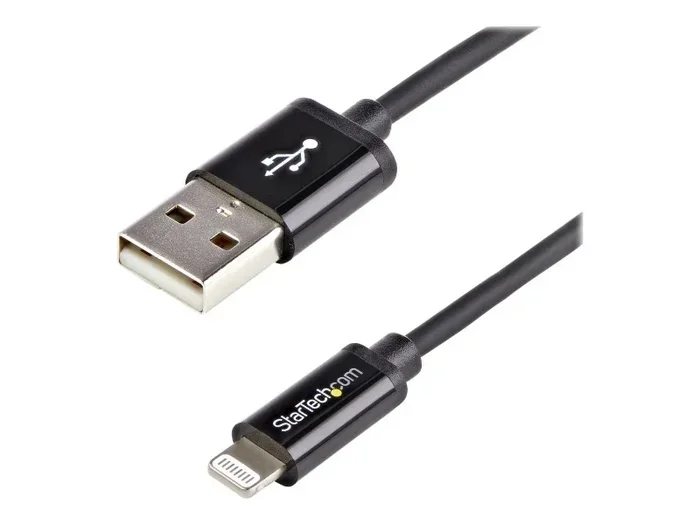
A usb to lightning cable is a charging and syncing cable made by Apple. One end plugs into a USB port on your computer or power adapter. The other end connects to your iPhone or iPad through the Lightning connector. This design has been Apple’s standard since 2012.
The cable carries both power and data. That means you can charge your battery and transfer files at the same time. It is a simple, two-in-one tool that most Apple users rely on every single day.
How Does the Lightning Connector Work?
The Lightning connector is a reversible plug. You can insert it either way, which saves you from flipping it around frustratingly. Inside, eight pins handle power delivery and data communication. This compact design fits into a slim port on your iPad and iPhone.
Apple designed the Lightning connector to be durable. However, the cable itself can wear out over time. Frequent bending, pulling, and heat exposure all shorten the lifespan of your Apple Lightning cable.
Can You Use a Usb To Lightning Cable With Ipad?
Yes, you absolutely can. Most iPad models use the same Lightning connector as iPhones. This includes the iPad Air, iPad mini, and several standard iPad versions. If your iPad has a Lightning port, a usb to lightning cable will charge it and sync data.
Which iPad Models Support Lightning Cables?
Here is a quick look at the iPads that use a Lightning connector:
- iPad (5th generation and later)
- iPad Air (all models)
- iPad mini (all models)
- iPad Pro 9.7-inch and 10.5-inch
Newer iPad Pro models from 2018 onward use USB-C instead. So if you own one of those, you will need a different cable. Always check your iPad model before buying a charging cable.
Can You Use a Usb To Lightning Cable With Iphone?
Absolutely. Every iPhone from the 5s all the way through the iPhone 14 series uses the Lightning connector. The usb to lightning cable is the go-to charging tool for iPhone users. You can plug it into a wall adapter, a laptop USB port, or even a car charger.
One thing to keep in mind: older iPhones may charge more slowly with certain cables. The iPhone 5s and earlier models support slower charging standards. Newer models like the iPhone 12 and later can handle faster fast charging when paired with the right power adapter.
Does Your iPhone Model Affect Charging Speed?
Yes, it does. Here is a simple breakdown:
- iPhone 5s to iPhone 8: Charges at standard speed with a usb to lightning cable and a 5-watt adapter.
- iPhone 8 and later: Supports fast charging with an 18-watt or higher USB-C power adapter and a USB-C to Lightning cable.
- iPhone 15 series: Uses USB-C to USB-C cables instead of Lightning cables.
So if you want fast charging on an older iPhone, you may need to upgrade both your cable and your power adapter.
Types of Usb To Lightning Cables
Not all lightning cables are the same. Apple makes several versions, and third-party brands offer many more. Understanding the differences helps you choose wisely.
Original Apple Lightning Cable
The original Apple Lightning cable is the gold standard. It is MFi certified, which means Apple has tested it for safety and performance. These cables charge at full speed and sync data reliably. The downside is the price. A single Apple cable can cost around $19 to $35.
MFi Certified Third-Party Cables
MFi stands for “Made for iPhone.” These cables are made by other companies but meet Apple’s strict standards. Many brands like Anker, Belkin, and Nomad produce high-quality MFi certified cables. They cost less than Apple’s own cables but still deliver reliable charging speed and data transfer.
Non-Certified or Knockoff Cables
You have probably seen cheap Lightning cables at dollar stores or online marketplaces. These cables are not MFi certified. They may work at first, but they often cause problems. Some charge slowly. Others stop working after a few weeks. In rare cases, they can even damage your device or pose a safety risk.
Quick Tip
Always look for the MFi certification logo when buying a usb to lightning cable. This small seal ensures the cable works safely with your Apple device. Avoid cables that do not clearly display this certification.
Braided vs. Rubber Cables
Cable build quality matters more than most people think. Braided cables resist fraying and last longer. Rubber cables are flexible but tend to crack and split over time. If you use your cable daily, a braided lightning cable is a smarter investment.
Charging Speed: What Affects It?
Many users wonder why their usb to lightning cable charges slowly. The truth is, charging speed depends on several factors working together. The cable is only one piece of the puzzle.
The Power Adapter Matters
Your wall adapter determines how much power reaches your device. A 5-watt adapter charges slowly. A 12-watt adapter is faster and works well with iPads. An 18-watt or higher adapter enables fast charging on supported iPhones.
If you use a low-wattage adapter with a high-quality cable, your device will still charge slowly. The cable cannot deliver more power than the adapter provides.
Cable Quality and Length
Thicker cables with better wiring deliver power more efficiently. Long cables (6 feet or more) may charge slightly slower due to resistance. For the fastest charging speed, use a shorter, high-quality Apple Lightning cable.
Device Settings and Battery Health
Your device itself plays a role too. Older batteries charge more slowly. Background apps running during charging can also slow things down. Turning on Airplane Mode while charging helps your device juice up faster.
| Factor | Impact on Charging Speed | What to Do |
|---|---|---|
| Power Adapter Wattage | High | Use a higher-wattage adapter for faster charging |
| Cable Quality | Medium | Choose MFi certified cables with thick wiring |
| Cable Length | Low to Medium | Use shorter cables for optimal speed |
| Battery Health | Medium | Check battery health in Settings and replace if needed |
| Background Apps | Low to Medium | Enable Airplane Mode while charging |
Data Transfer With a Usb To Lightning Cable
Charging is not the only job a usb to lightning cable does. You can also use it to transfer data between your device and a computer. This is handy when you want to back up photos, sync music, or update your iOS software.
How to Sync Your Device
Connect your iPhone or iPad to your Mac or PC using the lightning cable. Open iTunes on Windows or Finder on Mac. Your device should appear on screen. From there, you can back up your data, update your software, and transfer files.
For a wireless alternative, iCloud handles many syncing tasks without a cable. But a wired connection is faster and more reliable for large file transfers. If you have a lot of photos or videos to move, plugging in with your Apple Lightning cable is the way to go.
Troubleshooting Data Transfer Issues
If your computer does not recognize your device, try these steps:
- Unplug the cable and plug it back in firmly.
- Try a different USB port on your computer.
- Update your computer’s operating system and iTunes or Finder.
- Restart your iPhone or iPad.
- Check if the cable is MFi certified and not damaged.
Sometimes a simple cable swap solves the problem. A worn-out charging cable often causes connection issues that look like software problems.
Expert Insight
Apple’s Lightning connector is a smart design, but it has a limited lifespan. Most cables last between 1 and 2 years with regular use. Investing in a braided, MFi certified usb to lightning cable can double or even triple that lifespan. It is one of the cheapest upgrades you can make for your daily tech routine.
Common Mistakes to Avoid
Even experienced users make mistakes with their cables. Here are the most common ones and how to avoid them.
Using Non-Certified Cables
Cheap, uncertified cables are tempting because they cost so little. But they often fail to meet safety standards. They may overheat, charge slowly, or stop working altogether. Always choose MFi certified options to protect your iPad and iPhone.
Ignoring Cable Damage
A frayed cable is a safety hazard. Exposed wires can cause short circuits or electric shocks. If you notice any damage to your lightning cable, replace it immediately. Do not keep using a damaged cable just because it still works sometimes.
Using the Wrong Power Adapter
Not all adapters work well with every cable. Using a very low-wattage adapter results in slow charging. Using an incompatible adapter can sometimes cause issues. Stick with Apple adapters or trusted third-party options rated for your device.
Forgetting to Remove Cases
Thick phone cases can make it hard to plug in your usb to lightning cable. The connector may not seat properly, leading to intermittent charging. Remove the case if you notice charging problems.
Common Mistakes Summary
- Using non-certified or knockoff cables
- Continuing to use frayed or damaged cables
- Pairing your cable with the wrong power adapter
- Charging with thick cases still on your device
- Ignoring slow charging as a normal issue when it is actually a cable problem
How to Choose the Right Usb To Lightning Cable
With so many options available, picking the right cable can feel overwhelming. Here is what to look for when shopping for a usb to lightning cable.
Check for MFi Certification
This is the single most important factor. MFi certification guarantees compatibility and safety. If a cable does not mention MFi, skip it.
Consider Your Needs
Do you need a long cable for charging across the room? Go for 6 to 10 feet. Do you want something portable for your bag? A shorter cable works better. Think about where and how you will use the cable most often.
Look for Reinforced Connectors
Cables with reinforced connectors at the plug ends last much longer. These designs reduce stress on the cable where it bends most. Brands like Anker and Belkin offer excellent reinforced options.
Read Reviews
Before buying, check user reviews. Look for feedback on charging speed, durability, and compatibility. Real-world experiences give you a clearer picture than marketing claims alone.
Usb To Lightning Cable vs Usb C to Lightning Cable
Apple introduced the USB-C to Lightning cable alongside the iPhone 15 lineup. If you own an older device, you likely use the standard usb to lightning cable (USB-A to Lightning). If you have a newer device or a newer Mac, the USB-C version may be more relevant.
The USB-C to Lightning cable supports faster charging and data transfer. It is the better choice if your power adapter and computer have USB-C ports. However, the standard USB-A to Lightning cable still works perfectly for most everyday charging needs.
Both cable types serve the same core purpose: connecting your Apple device to power and data sources. The difference lies in the connector type on the computer or adapter end.
Final Thoughts
The usb to lightning cable remains one of the most essential accessories for iPad and iPhone users. It charges your device, syncs your data, and keeps you connected every day. The key is choosing the right cable and using it correctly.
Stick with MFi certified options, avoid cheap knockoffs, and replace damaged cables promptly. These simple habits protect your device and keep your charging cable performing at its best. Whether you are at home, at work, or on the go, a reliable usb to lightning cable keeps everything running smoothly.
If you want to explore more useful tech tips, check out our guide on adding prefixes to numbers on iPhone for helpful number formatting tricks. And if you are looking for gift ideas or handy tools, our 10 gadgets to make moms life easier list includes some great accessory recommendations.
Take a moment today to inspect your cables. A small investment in a quality lightning cable saves time, frustration, and money in the long run.
Frequently Asked Questions
Can I use any usb to lightning cable with my iPhone?
You can use most cables, but for the best results, choose an MFi certified usb to lightning cable. Non-certified cables may charge slowly or cause compatibility issues. Always check for Apple’s certification before purchasing.
Why is my usb to lightning cable charging so slowly?
Slow charging usually comes from a low-wattage power adapter, a damaged cable, or background apps draining your battery. Try using a higher-wattage adapter and a high-quality charging cable to see if your speed improves.
Can I use a usb to lightning cable to sync my iPad with my computer?
Yes, you can. Connect your iPad to your computer with the lightning cable, open Finder on Mac or iTunes on Windows, and your device will appear. You can then back up data, update software, and transfer files.
How long does a usb to lightning cable last?
A good quality cable lasts about 1 to 2 years with regular use. Braided cables tend to outlast rubber ones. If you notice fraying or intermittent charging, it is time to replace your Apple Lightning cable.
Is it safe to use a third-party usb to lightning cable?
Yes, as long as the cable is MFi certified. MFi certified third-party cables meet Apple’s safety and performance standards. Avoid uncertified cables from unknown brands, as they can pose risks to your device.
Can I charge my iPad with an iPhone usb to lightning cable?
Yes, you can. Both devices use the same Lightning connector. However, iPads often charge faster with a 12-watt or higher adapter. Using your iPhone’s 5-watt adapter will work but will charge more slowly.