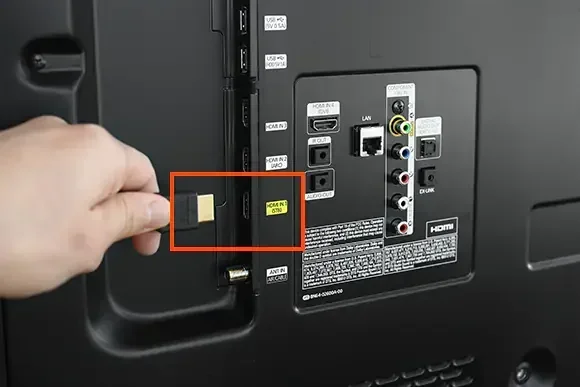
Can I Use Any Hdmi Cable Without Running Into Issues
Can I use any HDMI cable without running into problems? The short answer is no. Not all HDMI cables are the same, and using the wrong one can cause poor picture quality, no audio, or no signal at all. This guide breaks down HDMI cable types, versions, and compatibility so you can make the right choice every time.
You plug in an HDMI cable, hit play on your favorite movie, and… nothing happens. Or maybe you get a fuzzy picture, no sound, or a message saying the signal is not supported. It is frustrating. And the first question that pops into your head is usually the same one: can I use any HDMI cable?
The truth is, not all HDMI cables are created equal. They come in different versions, speeds, and sizes. Some handle basic HD content just fine. Others are built for 4K resolution and high frame rates. Using the wrong one can cause a long list of problems. That is exactly why this guide exists.
In this article, we will walk you through everything you need to know about HDMI cable compatibility. You will learn about the different cable types, what each version supports, and how to avoid common mistakes. By the end, you will know exactly which HDMI cable to buy for your setup. No more guesswork. No more frustration.
Key Takeaways
- HDMI cables are not universal: Different versions support different resolutions, speeds, and features.
- Using the wrong cable can lead to no signal, low resolution, or audio problems.
- HDMI 2.0 and 2.1 cables are essential for 4K and 8K content and high refresh rates.
- Cable length matters: Longer cables can lose signal quality and bandwidth.
- Premium High Speed HDMI cables offer the best reliability for modern devices.
- Check your device specs before buying any HDMI cable to avoid compatibility issues.
📑 Table of Contents
- Understanding HDMI Cable Types and Their Uses
- HDMI Cable Versions: What Each Version Brings
- Common Problems When You Use the Wrong HDMI Cable
- How to Choose the Right HDMI Cable for Your Setup
- HDMI Cable Compatibility Across Devices
- Expert Tips for Getting the Most From Your HDMI Cable
- Common Mistakes People Make With HDMI Cables
- Conclusion
Understanding HDMI Cable Types and Their Uses
Before you can answer the question can I use any HDMI cable, you need to understand the different types that exist. Not every cable fits every device or supports every feature. Let us break it down.
Standard HDMI Cable
The Standard HDMI cable is the most basic type. It was designed for older devices and supports resolutions up to 1080i. If you have an older TV or a basic cable box, this cable might still work. But it will not handle modern 4K content or high refresh rates. Using a Standard HDMI cable for a 4K TV will result in no signal or a very poor picture.
High Speed HDMI Cable
High Speed HDMI cables are a big step up. They support resolutions up to 4K at 30Hz. Most High Speed HDMI cables you find today can handle 1080p and 3D content as well. This is the most common cable type for home entertainment setups. If you have a 4K TV and a streaming device, this is probably the cable you need.
Premium High Speed HDMI Cable
Premium High Speed HDMI cables go even further. They support 4K resolution at 60Hz and are tested for higher bandwidth. These cables also support HDR, which stands for High Dynamic Range. HDR makes colors pop and gives you a much more vivid picture. If you want the best quality from your 4K Blu-ray player or gaming console, this is the cable to choose.
Ultra High Speed HDMI Cable
Ultra High Speed HDMI cables are the newest and most advanced. They support 8K resolution and even 4K at 120Hz or 144Hz. These cables are designed for the latest HDMI 2.1 devices. If you have a next-gen gaming console like the PS5 or Xbox Series X, or a high-end PC setup, you will need this cable to unlock all the features.
Mini and Micro HDMI Cables
Some devices use smaller HDMI connectors. Mini HDMI and Micro HDMI cables are used with cameras, tablets, and some laptops. They carry the same signal as standard HDMI cables but in a smaller form factor. Make sure your device has the right port before buying one of these.
Ethernet HDMI Cable
An Ethernet HDMI cable includes a built-in data channel. This lets connected devices share an internet connection without needing a separate ethernet cable. It is not about speed or resolution. It is about convenience. If you want to reduce cable clutter, an Ethernet HDMI cable might be a good option.
HDMI Cable Versions: What Each Version Brings
HDMI technology has evolved a lot over the years. Each new HDMI cable version brings better bandwidth, higher resolutions, and new features. Knowing these versions helps you understand HDMI cable compatibility and avoid buying the wrong one.
HDMI 1.4
HDMI 1.4 was a big deal when it came out. It introduced support for 4K resolution at 30Hz. It also added the HDMI ARC feature, which lets your TV send audio back to a soundbar or receiver using just one cable. Most older devices use HDMI 1.4 or earlier.
HDMI 2.0
HDMI 2.0 doubled the bandwidth compared to version 1.4. It supports 4K at 60Hz and wider color gamuts. This version made 4K streaming and gaming much smoother. Most Premium High Speed HDMI cables are built for HDMI 2.0 devices.
HDMI 2.1
HDMI 2.1 is the latest standard. It supports up to 10K resolution and 4K at 120Hz or even 144Hz. It also introduced features like Variable Refresh Rate (VRR) and Auto Low Latency Mode (ALLM). These features are huge for gamers. To use HDMI 2.1, you need an Ultra High Speed HDMI cable.
| Version | Max Resolution | Max Refresh Rate | Key Feature |
|---|---|---|---|
| HDMI 1.4 | 4K at 30Hz | 30Hz | HDMI ARC, 3D support |
| HDMI 2.0 | 4K at 60Hz | 60Hz | Wider color gamut, HDR |
| HDMI 2.1 | 10K | 120Hz / 144Hz | VRR, ALLM, eARC |
What Does Bandwidth Mean for HDMI Cables?
HDMI bandwidth is the amount of data a cable can carry per second. Higher bandwidth means higher resolution and smoother motion. A Standard HDMI cable has very low bandwidth. An Ultra High Speed HDMI cable has the highest bandwidth available today. If your cable does not have enough bandwidth, your device will downgrade the signal. You might see a blurry picture or lose features like HDR.
Common Problems When You Use the Wrong HDMI Cable
So what happens when you ignore all of this and just grab any cable lying around? Can I use any HDMI cable and expect it to work perfectly? Sometimes yes, sometimes no. But more often than not, the wrong cable causes problems.
No Signal or Intermittent Signal
This is the most common issue. You plug in the cable, and your TV shows “No Signal.” This usually happens when the cable does not support the resolution or refresh rate of your device. The connection drops or fails to establish at all.
Poor Picture Quality
A low-quality or outdated cable can cause a blurry, pixelated, or washed-out picture. If you are paying for a 4K subscription but watching in 1080p, the cable might be the culprit. HDMI cable quality matters more than most people realize.
No Audio
Sometimes the picture looks fine but there is no sound. This can happen if the cable does not support the audio format your device is sending. It is especially common with HDMI ARC setups where audio needs to travel back to a sound system.
Flickering or Glitching Screen
A loose or incompatible cable can cause the screen to flicker or show random glitches. This is common with long cables or cables that do not meet the required HDMI bandwidth standards.
HDR and Color Issues
If your HDR content looks dull or the colors are wrong, your cable might not support HDR. Not all HDMI cables can carry HDR metadata. You need a Premium High Speed or Ultra High Speed cable to get the full HDR experience.
Gaming Lag and Input Delay
Gamers, listen up. Using the wrong cable can add input lag, which makes your games feel sluggish. Features like VRR and ALLM only work with HDMI 2.1 and Ultra High Speed cables. If you are gaming on a 4K TV at 120Hz and your cable does not support it, you will miss out.
How to Choose the Right HDMI Cable for Your Setup
Choosing the right cable is simpler than it sounds. You just need to match the cable to your devices and what you want to do with them. Here is a practical guide.
Step 1: Check Your Device Specifications
Before buying any cable, look up what your TV, monitor, or device supports. Check the resolution, refresh rate, and features like HDR or HDMI ARC. This tells you what kind of HDMI cable you need. You can usually find this info in the user manual or on the manufacturer website.
Step 2: Match the Cable to Your Needs
If you watch regular HD content and do not need fancy features, a High Speed HDMI cable will work. If you have a 4K TV and want HDR, go for a Premium High Speed HDMI cable. If you are a serious gamer with a 4K 120Hz setup, you need an Ultra High Speed HDMI cable.
Step 3: Consider Cable Length
Cable length affects signal quality. Longer cables can lose bandwidth and signal strength. For most setups, a cable between 3 and 10 feet works great. If you need a longer cable, look for one with built-in signal boosting or go for a higher-quality cable to avoid signal loss.
Step 4: Buy from Reputable Brands
Not all HDMI cables are created equal, even if they have the same label. Buy from trusted brands that follow HDMI licensing standards. Cheap, unbranded cables often fail to meet the claimed specifications. Spending a little more on a quality cable saves you from headaches later.
Step 5: Look for the HDMI Certification Label
Certified cables carry a label that tells you exactly what they support. Look for labels like “Premium High Speed HDMI Cable” or “Ultra High Speed HDMI Cable.” These labels mean the cable has been tested and meets the official standards. Avoid cables that make vague claims without certification.
HDMI Cable Compatibility Across Devices
Can I use any HDMI cable across different devices? The answer depends on what devices you are connecting. A cable that works perfectly for a Blu-ray player might not work for a gaming console. Let us look at common setups.
TV and Streaming Devices
For streaming devices like Apple TV, Roku, or Chromecast with Google TV, a High Speed HDMI cable or Premium High Speed HDMI cable is usually enough. These devices output 4K content, so you need a cable that supports 4K at 60Hz and HDR.
Gaming Consoles
Modern gaming consoles like the PS5 and Xbox Series X demand the best HDMI cables available. They support 4K at 120Hz, HDR, and VRR. You need an Ultra High Speed HDMI cable to unlock all these features. Using a standard or even High Speed cable will limit your experience.
PC and Monitor Setups
If you use a PC with an external monitor, the cable you need depends on your GPU and monitor resolution. For 4K gaming at high refresh rates, go with an Ultra High Speed HDMI cable. For office work and regular use, a High Speed HDMI cable is perfectly fine.
Soundbars and AV Receivers
When connecting a soundbar or AV receiver to your TV, use an HDMI ARC or eARC compatible cable. These cables handle audio signals going back from the TV to the audio device. Not all HDMI cables support ARC or eARC, so check the label before buying.
Using HDMI Splitters and Adapters
Sometimes you need an HDMI splitter or HDMI adapter to connect multiple devices or convert ports. These accessories should also match the HDMI version of your setup. A cheap splitter can downgrade your signal and ruin the picture quality. Always choose certified accessories.
Expert Tips for Getting the Most From Your HDMI Cable
Even with the right cable, there are a few things you can do to get the best performance. These tips come from experience and can save you a lot of troubleshooting time.
Always Firmly Seat the Connector
A loose HDMI connection causes all kinds of problems. Make sure the cable clicks in firmly on both ends. If the port feels loose, try a different cable or check if the port needs cleaning.
Avoid Bending or Pinching the Cable
Physical damage to an HDMI cable can break the internal wiring. Do not bend it sharply or run it under heavy furniture. Keep the cable as straight as possible between the two devices.
Replace Old Cables When Upgrading Devices
If you upgrade your TV or console, check if your existing cable supports the new features. An old cable that worked fine with a 1080p TV might not work with a new 4K 120Hz TV. Upgrading your HDMI cable along with your devices ensures you get the full experience.
Test Your Setup Before Mounting
If you are installing a cable behind a wall or mounting a TV, test the connection first. Run through all the channels, apps, and features you plan to use. Fixing a problem before it is hidden behind a wall saves a lot of time and effort.
Keep Firmware Updated
Sometimes the issue is not the cable at all. Device firmware updates often include fixes for HDMI compatibility issues. Check for updates on your TV, console, or streaming device regularly.
Buy the Right Cable for the Right Job
Do not use a short cable for a long run, and do not use a basic cable for a 4K setup. Matching the cable to the job is the single best way to avoid problems. When in doubt, go one step up in quality.
Common Mistakes People Make With HDMI Cables
Even with the best intentions, people make mistakes when choosing HDMI cables. Here are the most common ones to avoid.
- Assuming all HDMI cables are the same. They are not. Different versions support different features and resolutions.
- Buying the longest cable available. Longer cables lose signal. Buy the length you need, not the longest you can find.
- Ignoring certification labels. Certified cables have been tested. Uncertified cables may not meet the standards they claim.
- Using an old cable with new devices. Technology changes fast. An old cable might not support the features of a new device.
- Thinking price equals quality. An expensive cable is not always a better cable. Look for certifications and specs instead of price tags.
- Not checking HDMI port versions. Your device might have HDMI 2.0 ports but you bought an HDMI 2.1 cable. Check both sides.
Conclusion
So, can I use any HDMI cable without running into issues? The honest answer is no. HDMI cables come in different types, versions, and speeds. Each one serves a different purpose. Using the right cable ensures you get the best picture, the best sound, and the smoothest experience from your devices.
Take the time to understand your setup. Check your device specs. Match the cable to the job. Whether you need a Standard HDMI cable for an old device or an Ultra High Speed HDMI cable for a next-gen gaming setup, the right choice makes all the difference.
Do not let a cheap or wrong HDMI cable ruin your viewing experience. With the knowledge you have gained from this guide, you can shop with confidence and avoid the most common pitfalls. Pick the right cable, connect your devices, and enjoy your content the way it was meant to be seen.
Remember, a great setup starts with the right cable. Make that choice count.
Frequently Asked Questions
Can I use any HDMI cable for 4K TV?
Not every HDMI cable supports 4K. You need at least a High Speed HDMI cable or a Premium High Speed HDMI cable for 4K at 60Hz. Using a Standard HDMI cable with a 4K TV will result in no signal or a downgraded resolution. Always check the cable specifications before purchasing.
What happens if I use the wrong HDMI cable?
Using the wrong cable can cause a no signal error, poor picture quality, no audio, or flickering. In some cases, advanced features like HDR or 120Hz refresh rate will not work. The device and cable negotiate the best possible connection, but the result may be far below what your setup can deliver.
Do expensive HDMI cables make a difference?
Price alone does not guarantee quality. What matters is the cable certification and specifications. A certified Premium High Speed HDMI cable or Ultra High Speed HDMI cable will perform well regardless of price. Avoid cheap uncertified cables, but do not overspend on cables that claim to be “premium” without proper certification.
Can I use an HDMI 2.0 cable with an HDMI 2.1 device?
Yes, but you will not get the full benefits of HDMI 2.1. The connection will work at the HDMI 2.0 level, supporting 4K at 60Hz. To access 4K at 120Hz, VRR, and other HDMI 2.1 features, you need an Ultra High Speed HDMI cable and an HDMI 2.1 port on both devices.
Does HDMI cable length affect quality?
Yes, longer cables can lose signal strength and bandwidth. For most home setups, cables under 10 feet work great. If you need a longer cable, choose a higher-quality or certified cable with signal boosting to maintain picture and sound quality over distance.
Do I need a special HDMI cable for gaming?
For modern gaming at 4K and 120Hz, you need an Ultra High Speed HDMI cable. This cable supports HDMI 2.1 features like VRR and ALLM. For older consoles or 1080p setups, a High Speed HDMI cable is usually sufficient. Always match the cable to your console and TV capabilities.