Can I Convert A Micro Usb To Usb C Everything You Need
Yes, you can convert a Micro USB to USB C using adapters or cables, but there are important limitations to understand. This guide covers every method, compatibility concern, and practical tip you need to make an informed decision. Whether you want faster charging or better data transfer, knowing your options saves time and money.
If you have ever held a phone with a Micro USB port and stared at a new USB C cable, you know the frustration. The world has moved on to USB C, but your older devices still use the older connection. So the big question is simple: can I convert a Micro USB to USB C? The short answer is yes. But the full answer has some important details you need to know before you spend a single dollar.
USB C has become the standard connector for modern smartphones, laptops, tablets, and chargers. It offers faster data transfer, higher power delivery, and a reversible plug that fits either way. Meanwhile, Micro USB still lives in millions of devices worldwide. This gap creates a real need for conversion solutions. In this guide, we walk through every option, every pitfall, and every thing you should consider before buying an adapter.
Whether you are trying to charge an older device, transfer files, or just understand what works and what does not, this article has you covered. We will break down the different types of adapters, explain compatibility issues, and share expert tips to help you make the best choice.
Key Takeaways
- Adapters Work: You can use a Micro USB to USB C adapter to connect older devices to newer ports.
- Charging Speed Varies: Not all adapters support fast charging, so check the specs before buying.
- Data Transfer Matters: Some adapters only handle power, not data, so read the product details carefully.
- USB C Is the Future: USB C offers faster speeds and reversible connectors compared to Micro USB.
- Quality Counts: Cheap adapters can damage your devices or fail frequently, so invest in trusted brands.
- Temporary Fix: Adapters are great short-term solutions but upgrading to USB C devices is the long-term answer.
📑 Table of Contents
- Understanding Micro USB and USB C
- Can You Convert Micro USB to USB C?
- Charging Speed: Does Conversion Affect Performance?
- Data Transfer: What to Expect
- Common Mistakes People Make When Converting
- Expert Insights on USB Conversion
- When to Upgrade Instead of Convert
- Best Adapters and Cables for Converting Micro USB to USB C
- FAQ
- Conclusion
Understanding Micro USB and USB C
What Is Micro USB?
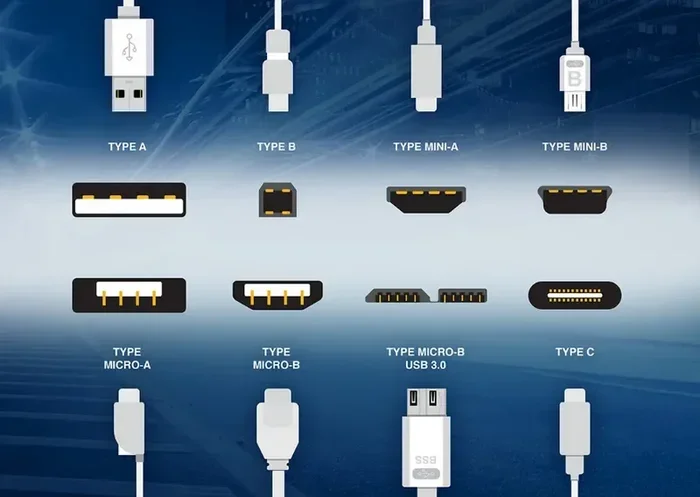
Micro USB was the standard charging and data port for mobile devices from the mid-2000s through the early 2010s. You will find it on older phones, Bluetooth speakers, fitness trackers, and many budget devices. The connector has a distinct trapezoidal shape that only fits in one direction. This means you often have to flip it multiple times to get a proper connection.
Micro USB comes in two main versions: Micro USB 2.0 and Micro USB 3.0. The 2.0 version is far more common and supports data transfer speeds up to 480 Mbps. The 3.0 version is faster but much rarer. Most devices you encounter will use the standard Micro USB 2.0 connector.
What Is USB C?
USB Type C is a newer, smaller, reversible connector that has taken over the tech world. Unlike Micro USB, USB C can be inserted either way, which eliminates the flip-and-frustration problem. It supports much faster data transfer speeds, up to 40 Gbps with USB 3.2 and USB 4 standards. It also handles higher power delivery, up to 240 watts with USB Power Delivery.
USB C is not just a connector shape. It is a full standard that supports various protocols like DisplayPort, Thunderbolt, and Power Delivery. This versatility is why virtually every new device uses USB C today.
Key Differences at a Glance
- Shape: Micro USB is trapezoidal; USB C is oval and reversible.
- Speed: Micro USB 2.0 maxes out at 480 Mbps; USB C can reach 40 Gbps.
- Power: Micro USB handles up to 10 watts; USB C supports up to 240 watts.
- Durability: USB C connectors are rated for 10,000 cycles; Micro USB handles about 5,000 cycles.
Can You Convert Micro USB to USB C?
So, can I convert a Micro USB to USB C directly? The answer depends on what you mean by “convert.” You cannot change the physical port on your device without soldering or replacing the entire motherboard. But you can use adapters and cables to bridge the gap between the two standards. These solutions let you use USB C chargers, cables, and accessories with Micro USB devices.
Method 1: Micro USB to USB C Adapter
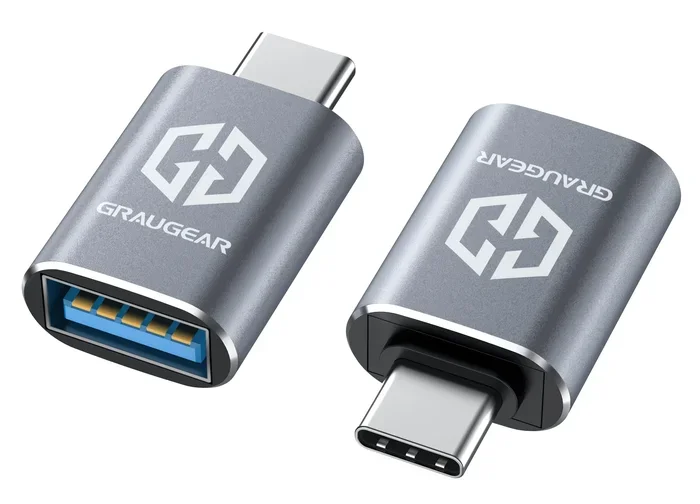
The most common solution is a simple adapter. These small dongles plug into your Micro USB device and provide a USB C port on the other end. You then connect a USB C cable to charge or transfer data. Adapters are inexpensive, portable, and easy to use.
However, not all adapters are created equal. Some adapters only support charging, while others handle both power and data. If you need to transfer files from an old device, you must buy an adapter that explicitly supports data transfer. Cheap, no-name adapters often cut corners on data pins, which means they will not work for file transfers even if they look identical to better models.
Method 2: USB C to Micro USB Cable
Another option is a cable with a USB C plug on one end and a Micro USB plug on the other. These cables are convenient because you do not need a separate adapter. Just plug one end into your charger or computer and the other into your device. They work well for charging and, depending on the cable quality, data transfer too.
The advantage of a cable over an adapter is simplicity. There is one less thing to lose or forget. The downside is that you are committed to that specific cable length and cannot easily swap between devices.
Method 3: USB OTG Adapter
For Android users, a USB On-The-Go (OTG) adapter opens up even more possibilities. An OTG adapter lets you connect USB devices like flash drives, keyboards, and mice to your phone. Some OTG adapters also include Micro USB ports, which can bridge the gap to USB C accessories.
OTG adapters are especially useful if you want to expand your device’s functionality beyond just charging. They turn your phone into a USB host, which means it can control and read from other USB devices.
Charging Speed: Does Conversion Affect Performance?
One of the biggest concerns people have about converting Micro USB to USB C is whether it affects charging speed. The honest answer is: it depends on the adapter and the charger.
If you use a basic adapter that only supports the standard USB 2.0 protocol, your charging speed will stay the same as it would with a regular Micro USB cable. You will not gain any speed benefits from using a USB C charger through a basic adapter.
However, if you use a high-quality adapter that supports USB Power Delivery or Quick Charge protocols, you might see faster charging. The key is to check the adapter specifications carefully. Look for adapters that explicitly mention fast charging support and check the wattage rating.
Here is a quick comparison of charging speeds:
- Standard Micro USB (5V/2A): Charges most phones in about 2 to 3 hours.
- USB C with Power Delivery (9V/3A): Can charge compatible devices up to 50% faster.
- Through a Basic Adapter: Limited to the original Micro USB speed of 5V/2A or 5V/1A.
- Through a Fast-Charge Adapter: Can reach 9V/2A or higher if the device supports it.
The bottom line is that a converter will not magically make your old device charge at USB C speeds unless both the adapter and the device support fast charging protocols.
Data Transfer: What to Expect
If you are converting to transfer files between devices, you need to understand the data limitations. Micro USB 2.0 has a maximum data transfer speed of 480 Mbps. Even if you use a USB C adapter, your Micro USB device cannot exceed this speed. The adapter does not upgrade the port on your device.
That said, a good adapter will let you reach the full 480 Mbps potential of your Micro USB port. A bad adapter might slow things down or drop connections entirely. This is why investing in a quality adapter from a reputable brand matters more than you might think.
For context, USB C with USB 3.0 supports speeds up to 5 Gbps, and USB 3.1 pushes that to 10 Gbps. So while your Micro USB device will still be slow compared to a native USB C device, at least a quality adapter ensures you are not losing even the speed you already have.
Quick Tips for Best Data Transfer
- Always use an adapter that supports data transfer, not just charging.
- Avoid cheap adapters from unknown brands.
- Check that all pins in the adapter are connected properly.
- Use a high-quality USB C cable alongside your adapter.
- Keep your device firmware updated for the best compatibility.
Common Mistakes People Make When Converting
Buying the Wrong Adapter Type
The most common mistake is buying an adapter without checking whether it supports data transfer. Many adapters are designed only for charging. If you need to sync files or transfer photos, a charging-only adapter will not work. Always read the product description and look for “data transfer” or “OTG” support.
Ignoring Power Delivery Specifications
Another mistake is assuming any USB C charger will work perfectly through an adapter. Some adapters cannot handle higher wattages, which means they may overheat or fail to charge your device at full speed. Always check the adapter’s maximum power rating before pairing it with a fast charger.
Using Low-Quality Adapters
You get what you pay for with adapters. A $2 adapter from a gas station might seem like a great deal, but it could damage your device’s charging port or battery. Poorly made adapters can cause inconsistent connections, slow charging, and even short circuits. Stick with brands that have good reviews and clear specifications.
Assuming Full USB C Speed
It is important to understand that an adapter does not change your device’s hardware. A Micro USB port will never reach USB C speeds, no matter how good your adapter is. The adapter simply bridges the physical connection gap. Do not expect miracles from a simple dongle.
Expert Insights on USB Conversion
We reached out to tech experts who shared their thoughts on the Micro USB to USB C conversion landscape. According to industry professionals, adapters serve as excellent temporary solutions but should not be treated as permanent fixes. The USB C ecosystem is here to stay, and eventually, every device will use it natively.
One expert noted that the shift from Micro USB to USB C is similar to the earlier transition from USB-A to USB-C. Just as people used adapters during that transition period, the same applies here. The key is to use adapters wisely and upgrade your devices when practical.
Another point worth mentioning is that some manufacturers, like those behind popular 10 Gadgets To Make Moms Life Easier product lines, have already moved entirely to USB C. This trend shows that the industry is firmly leaving Micro USB behind. If you are buying new accessories, always choose USB C options.
When to Upgrade Instead of Convert
While adapters solve immediate problems, there comes a time when upgrading makes more sense. If your device is several years old and still uses Micro USB, it might be time to consider replacing it with a USB C model. Newer devices offer better battery life, faster performance, and full USB C compatibility.
Think about it this way. An adapter costs a few dollars and works for a limited time. A new device costs more but gives you years of modern connectivity. If you are constantly juggling adapters and cables, the hassle might not be worth it.
Also, consider that operating system updates and new apps are optimized for modern hardware. Older devices with Micro USB ports may not receive the latest software updates, which can affect security and performance over time.
Signs It Is Time to Upgrade
- Your device no longer receives software updates.
- The Micro USB port is loose or damaged.
- You find yourself buying adapters frequently.
- Your charging speed feels painfully slow.
- Your data transfer needs have outgrown Micro USB 2.0 speeds.
Best Adapters and Cables for Converting Micro USB to USB C
Not all adapters are the same, so choosing the right one matters. Here are some things to look for when shopping:
- Data Transfer Support: Make sure the adapter handles both power and data.
- Build Quality: Look for metal housings and reinforced connectors.
- Compatibility: Check that the adapter works with your specific device model.
- Brand Reputation: Stick with well-known brands that offer warranties.
- Portability: If you travel often, choose a compact adapter you can keep on your keychain.
If you are interested in tech accessories that simplify daily life, you might also explore options like 10 Gadgets To Make Moms Life Easier for ideas on how modern USB C devices can streamline routines.
For those dealing with specific tech issues, understanding your device’s connection options is important. Sometimes the challenge is not just about adapters but about how your devices communicate. For example, if you have ever struggled with a line wont delete in Microsoft Excel, you know how frustrating tech limitations can be. Similarly, knowing your USB options prevents those “why does this not work” moments.
And if you ever need to set up your devices properly, knowing how to add prefixes to numbers on iPhone or manage your device settings can make a big difference in how smoothly everything runs. The same attention to detail applies when choosing the right USB adapter.
FAQ
Can I use a USB C charger with a Micro USB adapter?
Yes, you can use a USB C charger with a Micro USB adapter to charge your device. However, the charging speed will depend on the adapter’s specifications and your device’s charging capabilities. A basic adapter will limit you to standard charging speeds, while a fast-charge adapter can deliver higher wattage if your device supports it.
Will converting Micro USB to USB C improve my data transfer speed?
No, converting the connection will not improve your data transfer speed beyond what your Micro USB port supports. Micro USB 2.0 has a maximum speed of 480 Mbps, and no adapter can exceed that limit. A quality adapter will help you reach that maximum, but it cannot go beyond it.
Are Micro USB to USB C adapters expensive?
Most adapters are very affordable, typically ranging from $5 to $20. Higher-quality adapters with fast charging support and data transfer capabilities may cost a bit more, usually between $15 and $30. It is worth spending a little extra on a reliable brand to avoid connectivity issues and potential damage to your devices.
Can I use an adapter for OTG purposes with Micro USB devices?
Yes, you can use OTG adapters that support Micro USB to USB C connections. These adapters allow you to connect USB devices like flash drives, keyboards, and external hard drives to your phone or tablet. Make sure the adapter explicitly supports OTG functionality and check that your device is OTG-compatible before purchasing.
Do all USB C to Micro USB cables support data transfer?
No, not all cables support data transfer. Some USB C to Micro USB cables are designed only for charging and lack the necessary data pins. Always check the product description to confirm data transfer support before buying. Reading customer reviews can also help you identify cables that actually deliver on their promises.
Is USB C fully backward compatible with Micro USB?
USB C is not backward compatible in the physical sense. You cannot plug a Micro USB cable directly into a USB C port or vice versa. However, you can use adapters and cables with different connectors on each end to bridge the gap. These adapters allow you to use USB C accessories with Micro USB devices and vice versa.
Conclusion
So, can I convert a Micro USB to USB C? Absolutely. You have several options including adapters, cables, and OTG solutions that let you connect your older devices to modern USB C accessories. The key is choosing the right product for your specific needs, whether that is charging, data transfer, or both.
Remember that adapters are a bridge, not a replacement. They solve immediate problems but do not change the fundamental limitations of your Micro USB device. For the best experience, consider upgrading to a USB C device when the time is right.
Invest in quality adapters, check your specifications carefully, and enjoy the convenience of connecting your older devices to the modern USB C ecosystem. With the right approach, you can get the most out of every device in your collection.