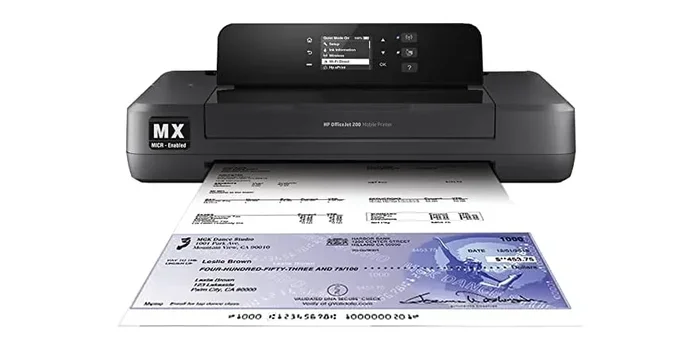
Can Any Printer Be A MICR Printer Without Extra Hardware
Not every printer can handle MICR printing without the right setup. A MICR printer uses special magnetic toner and fonts to print the routing and account numbers found on checks. While some standard laser printers can be converted, you need MICR toner and compatible fonts to make it work.
Have you ever wondered whether your everyday office printer can double as a MICR printer? The short answer is yes — but with some important caveats. Many people assume they need to buy a dedicated machine just to print checks or financial documents. That is not always true. You might already own a printer that can handle MICR printing with the right supplies and setup.
A MICR printer is a specialized device designed to print the magnetic ink characters found on personal and business checks. These characters include the bank routing number, account number, and check number. Banks rely on this technology to process millions of checks every day quickly and accurately. Without proper MICR printing, checks can be delayed, rejected, or even flagged for fraud.
In this guide, we will walk you through everything you need to know about converting your existing printer into a MICR printer. We will cover how the technology works, which printers are compatible, what supplies you need, and the common pitfalls to avoid. Whether you run a small business or handle check printing at home, this article has you covered.
Key Takeaways
- MICR printing requires specific toner and fonts — not just any printer can do it out of the box.
- Laser printers are the best choice for converting into a MICR printer without extra hardware.
- MICR toner is different from regular toner and contains iron oxide for magnetic readability.
- Inkjet printers are not recommended for MICR check printing due to smearing and compatibility issues.
- You do not always need extra hardware if your printer supports MICR toner cartridges and fonts.
- Common mistakes include using regular toner and wrong font sizes, which cause check rejection.
- Compliance with banking standards is essential for successful check processing.
📑 Table of Contents
- What Is a MICR Printer and How Does It Work?
- Can Any Printer Be Converted to a MICR Printer?
- What You Need to Convert a Printer to MICR
- Common Mistakes When Setting Up a MICR Printer
- Do You Really Need Extra Hardware?
- Benefits of Using a Converted MICR Printer
- Expert Tips for Reliable MICR Printing
- How to Choose the Right Printer for MICR Printing
- Frequently Asked Questions
- Final Thoughts
What Is a MICR Printer and How Does It Work?
MICR stands for Magnetic Ink Character Recognition. It is a technology that has been used by banks since the 1950s. The system relies on special characters printed with magnetic ink. When a check moves through a processing machine, the magnetic ink is read and verified against the printed data.
The characters used in MICR printing look different from standard text. They use a specific font called E-13B or CMC-7. These fonts have unique shapes that machines can recognize with high accuracy. The magnetic properties of the ink allow the reading equipment to distinguish MICR characters from regular printed text.
Why MICR Printing Matters for Banks
Banks process enormous volumes of checks daily. Manual sorting and reading would be too slow and error-prone. MICR technology speeds up this process dramatically. When a check is deposited, it passes through a scanner that reads the bottom line. The machine identifies the routing number, account number, and check number in seconds.
This automation reduces human error and speeds up clearing times. For businesses, faster check processing means better cash flow management. For banks, it means higher efficiency and lower operational costs. That is why the banking industry has strict standards for MICR printing compliance.
The Role of Magnetic Toner in MICR Printing
Not all toner is created equal. MICR toner contains iron oxide particles that give it magnetic properties. Regular toner does not have these particles. When a standard laser printer uses regular toner, the printed characters will not be readable by MICR scanners.
This is the single most important factor in determining whether a printer can function as a MICR printer. Even if your printer produces crisp, high-quality text, it will fail at check processing if it uses regular toner. The magnetic properties are non-negotiable for banking compliance.
Can Any Printer Be Converted to a MICR Printer?
The honest answer is that most laser printers can be converted, but not all of them. The conversion depends on several factors, including the printer model, the type of toner it uses, and whether it supports MICR font sizes. Let us break this down.
Laser Printers: The Best Candidates
Laser printers are by far the best option for MICR printing. They use toner cartridges, which can be replaced with MICR toner. The fusing process in a laser printer applies heat to bond the toner to the paper, creating a durable print that survives the check processing journey.
Most HP, Brother, Dell, and Xerox laser printers can be converted with a MICR toner cartridge swap. You simply replace your regular black toner with a MICR-rated black toner. The printer does the rest. No additional hardware is needed in most cases.
Inkjet Printers: Why They Fall Short
Inkjet printers use liquid ink, not toner. This creates several problems for MICR printing. First, liquid ink does not contain iron oxide. Second, inkjet prints tend to smudge easily, which is a serious issue for checks that pass through multiple processing machines. Third, most banking institutions will reject checks printed on inkjet printers because they do not meet MICR standards.
Some people try to use special MICR inkjet cartridges, but these are rare and unreliable. The banking industry strongly recommends laser printers for any check printing needs. If you currently use an inkjet printer, it is worth investing in a basic laser printer for MICR tasks.
Dot Matrix and Impact Printers
Older dot matrix printers can technically print MICR characters, but they are largely obsolete. These printers use an impact mechanism that strikes a ribbon against the paper. While the output can be readable, the print quality is often inconsistent. Modern banks prefer laser-based MICR printing for reliability and clarity.
What You Need to Convert a Printer to MICR
Converting a standard laser printer into a functional MICR printer is simpler than most people think. You do not need expensive add-ons or specialized equipment in most cases. Here is what you actually need.
MICR Toner Cartridge
This is the most critical component. A MICR toner cartridge replaces your standard black toner. It contains the iron oxide particles needed for magnetic readability. These cartridges are available for most major printer brands and are reasonably priced.
When shopping for MICR toner, look for cartridges that are certified for banking compliance. Not all MICR toners are created equal. Some cheaper options may not meet the strict magnetic standards required by banks. Always check the specifications before purchasing.
MICR Font Installation
Even with the right toner, you need to use the correct font. The standard MICR fonts are E-13B and CMC-7. Your word processor or check printing software must be set to use one of these fonts. Without the correct font, the characters will not be recognized by bank processing equipment.
Installing a MICR font is straightforward. You can download E-13B fonts from various sources and install them on your computer. Once installed, select the font in your document before printing. The font ensures that the character shapes match what bank scanners expect to see.
Check Stock Paper
While not strictly hardware, using proper check stock paper matters. MICR checks are printed on specialized paper that is designed to withstand the rigors of check processing. Regular paper may jam in processing equipment or produce poor scan results.
Check stock paper is widely available and affordable. It often comes with security features like watermarks and microprinting. These features help prevent check fraud and add an extra layer of protection.
Printer Compatibility Checklist
Before you start the conversion process, verify your printer meets these requirements:
- Laser printing technology — inkjet and dot matrix are not suitable for reliable MICR output.
- Replaceable toner cartridge — the printer must accept third-party or MICR-specific toner cartridges.
- Minimum resolution of 600 dpi — this ensures the MICR characters are printed clearly and consistently.
- Support for custom font installation — your computer and software must allow font changes.
- Consistent print alignment — MICR characters must be printed in a precise position on the check.
Common Mistakes When Setting Up a MICR Printer
Many people run into problems when trying to use their printer for MICR check printing. Most of these issues are preventable. Let us look at the most common mistakes and how to avoid them.
Using Regular Toner Instead of MICR Toner
This is the number one mistake. Regular black toner will not produce magnetic characters. Your checks will be rejected by bank processing equipment every single time. It is tempting to save money by using what you already have, but it will cost you more in the long run through rejected checks and processing delays.
Always purchase certified MICR toner from a reputable supplier. The investment is small compared to the cost of failed check processing.
Wrong Font Size or Style
MICR characters must be printed at specific sizes. The E-13B font has precise character dimensions that scanners are calibrated to read. If your font is too large, too small, or styled differently, the scanner may not recognize it.
Stick with the standard MICR fonts and avoid any modifications. Do not bold, italicize, or otherwise alter the MICR line on your checks. The characters must appear exactly as the banking standards require.
Poor Print Quality
Faded or uneven prints can cause MICR scanners to fail. Make sure your printer is well-maintained. Clean the rollers and drum regularly. Replace toner cartridges before they run completely empty. A full, fresh MICR toner cartridge produces the best results.
You should also check your printer settings. Print at the highest quality setting for MICR documents. Lower quality settings may save time but will compromise the readability of the magnetic characters.
Ignoring Printer Alignment
The MICR line must be printed in the correct position on the check. If your printer is misaligned, the characters may appear too high, too low, or off-center. Most check printing software includes alignment tools. Use them to ensure the MICR line is positioned correctly.
Some printers have a manual alignment adjustment for the paper path. Check your printer manual for instructions on adjusting the paper feed rollers. Proper alignment prevents jams and ensures consistent MICR print placement.
Do You Really Need Extra Hardware?
One of the most common questions people ask is whether they need additional hardware to print MICR checks. The short answer is no — in most cases, you do not. A standard laser printer with MICR toner and the right font is all you need.
Some people invest in check printing software that includes MICR font packages and alignment tools. While this software is helpful, it is not hardware. It runs on your existing computer and integrates with your printer. You do not need a separate MICR printing device or external magnetic encoder.
However, there are a few situations where extra equipment might be useful. If you print checks in very high volumes, a dedicated check printer with automatic stacking and trimming can save time. For most small businesses and home users, a converted laser printer handles the job perfectly well.
If you encounter persistent issues with your printer, sometimes the problem lies elsewhere in your system. For example, formatting errors in spreadsheets or document files can cause unexpected printing behavior. You might find it helpful to check resources like troubleshooting common Excel printing issues if your check data comes from spreadsheet files.
Benefits of Using a Converted MICR Printer
Converting your existing printer to handle MICR printing offers several advantages. Let us look at why this approach makes sense for most users.
Cost Savings
Dedicated MICR printers can cost several hundred dollars. Converting your existing laser printer costs a fraction of that. A MICR toner cartridge typically runs between $50 and $100. Add in the free MICR fonts, and your total conversion cost is minimal.
Convenience
You do not need a second printer sitting on your desk. Your converted laser printer handles both everyday printing and MICR check printing. This saves space and reduces clutter in your workspace.
Flexibility
With a converted printer, you can print checks whenever you need them. You are not dependent on a single-purpose machine. If your MICR toner runs out, you can swap in regular toner for other documents and swap back when needed.
Quality Output
Modern laser printers produce excellent print quality. When paired with MICR toner, the output meets banking standards for clarity and readability. Your checks will process smoothly through bank equipment without delays or rejections.
Expert Tips for Reliable MICR Printing
Getting the best results from your converted MICR printer comes down to a few best practices. Follow these tips to ensure consistent, compliant output every time.
- Always use fresh MICR toner — old or low-toner cartridges produce weak magnetic signals that scanners may miss.
- Store MICR toner properly — keep cartridges in a cool, dry place away from direct sunlight.
- Print test checks regularly — run a test print before printing a full batch to verify alignment and quality.
- Use check stock paper — regular copy paper is not designed for check processing and can cause jams.
- Keep your printer firmware updated — manufacturers occasionally release updates that improve print quality and compatibility.
- Clean your printer monthly — toner dust and paper debris can affect print consistency over time.
- Verify compliance — periodically check that your printed checks meet current banking MICR standards.
How to Choose the Right Printer for MICR Printing
If you are in the market for a new printer and want one that handles MICR printing well, here are some factors to consider.
Brand Recommendations
Brother, HP, and Dell laser printers are popular choices for MICR conversion. They offer reliable performance, easy toner replacement, and good print resolution. Look for models with a resolution of at least 600 dpi and a straight paper path for best results.
Volume Considerations
Consider how many checks you print per month. For low volumes (under 100 checks), a basic desktop laser printer works fine. For higher volumes, consider a printer with a larger paper tray and faster print speeds.
Warranty and Support
Check whether your printer warranty covers the use of third-party MICR toner. Some manufacturers void warranties if non-OEM toner is used. Look for printers with flexible warranty terms or consider purchasing MICR toner from reputable third-party suppliers.
Frequently Asked Questions
Can I use my inkjet printer for MICR check printing?
No, inkjet printers are not suitable for MICR printing. They use liquid ink that lacks the magnetic properties required for check processing. Banks will reject checks printed on inkjet printers. A laser printer with MICR toner is the recommended solution for reliable MICR output.
How much does it cost to convert a printer to MICR?
The conversion cost is typically between $50 and $150. This includes a MICR toner cartridge and free MICR font downloads. Compared to buying a dedicated MICR printer, this is a very affordable option for most users.
Is MICR toner different from regular black toner?
Yes, MICR toner contains iron oxide particles that give it magnetic properties. Regular black toner does not have these particles. The magnetic properties are essential for bank scanners to read and verify check information during processing.
Can any laser printer use MICR toner?
Most laser printers can use MICR toner, but compatibility varies by model. Check that your printer accepts third-party toner cartridges and has a resolution of at least 600 dpi. Popular brands like Brother, HP, and Dell are widely compatible with MICR toner cartridges.
Do I need special software to print MICR checks?
You need check printing software or a word processor that supports MICR fonts. The software itself is not hardware — it runs on your computer. Many check printing platforms include MICR font packages and alignment tools to simplify the process.
What happens if my MICR check is rejected by the bank?
Rejected MICR checks usually result from incorrect font usage, wrong toner, poor print quality, or misaligned MICR lines. Double-check that you are using MICR toner, the E-13B or CMC-7 font, and that your print alignment is precise. Fixing these issues typically resolves rejection problems.
Final Thoughts
The question of whether any printer can be a MICR printer does not have a simple yes or no answer. The reality is more nuanced. Most laser printers can be converted with the right supplies and setup. Inkjet printers cannot. Dot matrix printers are outdated and unreliable for modern banking needs.
The key to success is using MICR toner, installing the correct MICR font, and printing on appropriate check stock paper. With these three elements in place, your existing laser printer can handle MICR check printing without any extra hardware.
This approach saves you money, reduces clutter, and gives you the flexibility to print checks whenever you need them. It is a practical solution for small businesses, home offices, and anyone who handles check printing regularly.
Take the time to verify your printer compatibility, invest in quality MICR toner, and follow the best practices outlined in this guide. Your converted printer will deliver reliable, bank-compliant MICR output for years to come.