Can A Usb Port Provide 12v Power To Run Your Gadgets
Can a USB port provide 12v power? The short answer is no, standard USB ports deliver 5v, not 12v. However, with the right USB Power Delivery technology and voltage boosters, you can step up USB power to 12v for certain devices. Understanding USB voltage output helps you choose the right power adapter and avoid damaging your gadgets.
Have you ever plugged a gadget into a USB port and wondered if it could deliver enough power? Maybe you have a device that needs 12v and you are staring at a USB cable thinking, “Can this actually work?” It is a fair question. We use USB ports for everything now. We charge phones, connect keyboards, and even power small fans. But 12v is a different story. Let us break this down in simple terms so you never have to guess again.
The world of USB power can feel confusing. There are different port types, different voltage levels, and a lot of numbers thrown around. But here is the good news. By the end of this article, you will know exactly what a USB port can and cannot do. You will understand USB voltage output, learn about USB Power Delivery, and discover practical ways to power your 12v gadgets safely. No jargon. No fluff. Just clear, useful information you can use right away.
Key Takeaways
- Standard USB ports output 5v: USB-A and USB-B ports are designed to deliver 5 volts, not 12v.
- USB-C with Power Delivery can go higher: USB-C PD can support up to 20v, but 12v requires specific negotiation.
- Voltage boosters exist: You can use a DC-DC step-up converter to get 12v from a USB port safely.
- Not all gadgets need 12v: Many devices work fine on 5v, so check your device specs first.
- Using the wrong voltage can damage devices: Always match the voltage requirements of your gadget.
- External power adapters are often better: For reliable 12v power, a dedicated adapter beats USB every time.
📑 Table of Contents
Understanding USB Port Voltage Basics
Before we answer the big question, let us talk about what USB ports actually deliver. Every USB port has a standard voltage it was designed to provide. This is not random. It is built into the USB specification that manufacturers follow. Knowing these basics makes everything else easier to understand.
What Is USB Voltage?
Voltage is the electrical pressure that pushes power through a cable. Think of it like water pressure in a hose. Too little pressure and the water trickles. Too much and things burst. USB ports are designed to push a specific amount of voltage to keep your devices safe and working properly.
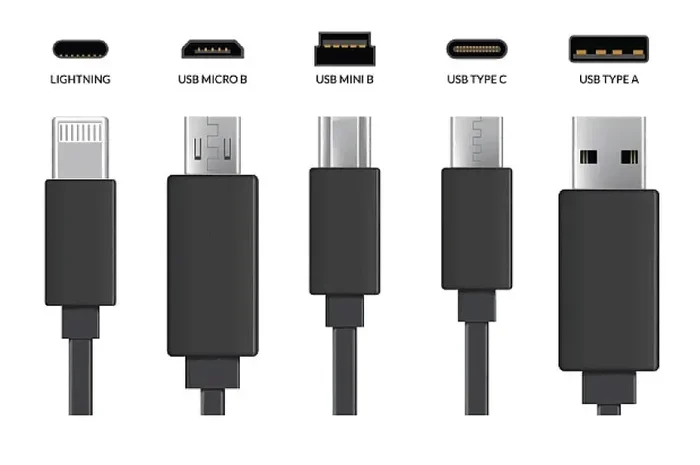
The most common USB voltage you will encounter is 5 volts. This is the standard for USB-A and USB-B ports. These are the rectangular ports you have been plugging into for decades. They were designed for low-power devices like keyboards, mice, and phone chargers.
How Much Power Can a USB Port Deliver?
Power is measured in watts, and it equals voltage multiplied by current. A standard USB 2.0 port delivers 5v at 0.5 amps, which is 2.5 watts. USB 3.0 bumped this up to 5v at 0.9 amps, or 4.5 watts. These numbers work fine for small devices. But 12v gadgets need a lot more power than that.
Here is a quick look at standard USB power outputs:
- USB 2.0 (Type-A): 5v at 0.5 amps (2.5 watts)
- USB 3.0 (Type-A): 5v at 0.9 amps (4.5 watts)
- USB Battery Charging 1.2: 5v at 1.5 amps (7.5 watts)
- USB-C (without PD): 5v at 3 amps (15 watts)
- USB-C PD (up to 20v): 5v to 20v at up to 3 amps (60 watts max)
Notice that none of these list 12v as a standard output. That is because 12v is not part of the original USB specification. So if you are hoping a regular USB port will just hand out 12v, that is not how it works.
Can A Usb Port Provide 12v Power?
This is the question at the heart of everything we are discussing. The honest answer is that a standard USB port cannot provide 12v power directly. But the full story has some important nuances. Let us dig into the details so you understand exactly what is possible.
Why Standard USB Ports Only Output 5v
USB ports were designed with safety in mind. The 5v standard keeps things simple and safe for everyday devices. Most gadgets you plug into a USB port are built to handle 5v. Your phone, your tablet, your wireless mouse. They all expect 5v. Changing this standard would break compatibility with millions of existing devices.
Also, higher voltage means more heat. More heat means more risk. USB cables and connectors are not built to handle 12v under normal conditions. The thin wires inside a USB cable can overheat if pushed beyond their limits. This is a real safety concern that engineers took seriously when setting the standards.
USB Power Delivery and 12v
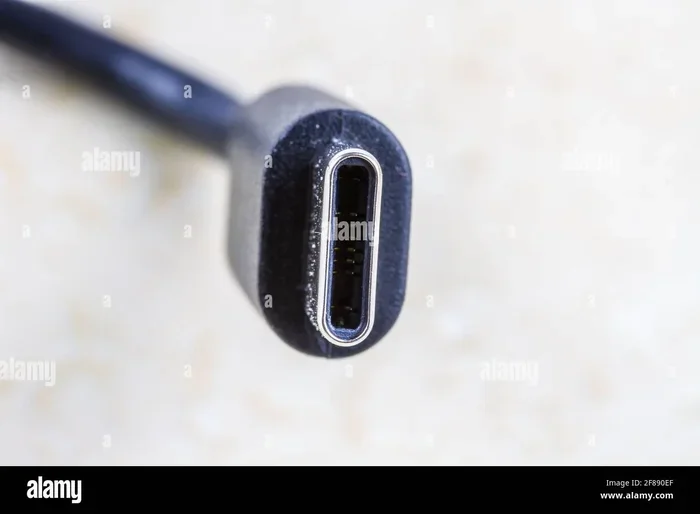
Here is where things get interesting. USB Power Delivery, also known as USB PD, is a modern protocol that allows USB-C ports to negotiate higher voltages. This means a USB-C PD port can potentially output 9v, 15v, 20v, and in some cases other voltage levels.
But does USB PD support 12v? The answer is yes and no. The official USB PD spec includes voltage steps of 5v, 9v, 15v, and 20v. Twelve volts is not a standard PD voltage step. However, some devices and chargers can be configured to output 12v through proprietary protocols or custom firmware. This is not common, but it does happen.
So if you have a USB-C port with Power Delivery, it might be able to deliver 12v in specific scenarios. But you cannot count on it. You need to check the specifications of your particular charger and device.
What Happens If You Try To Force 12v Through a USB Port?
Never try to push 12v through a standard USB port. Doing so can fry the port, damage the cable, or even harm the device you are trying to power. The internal circuitry of a USB port is rated for 5v. Applying 12v is like putting diesel fuel in a gasoline engine. It might seem like it would just work, but the results are almost always bad.
Some people try to modify USB cables or ports to handle higher voltage. This is extremely dangerous and not recommended. It can cause short circuits, fires, or permanent damage to your equipment. Always stick to the designed voltage levels.
How To Get 12v Power From a USB Connection
Just because a standard USB port cannot deliver 12v directly does not mean you are stuck. There are practical solutions that let you use a USB connection to power 12v devices. These workarounds are safe, reliable, and widely available.
Using a DC-DC Step-Up Converter
A DC-DC step-up converter is a small device that takes a lower voltage and boosts it to a higher one. You plug it into a USB port (which gives you 5v), and the converter steps that up to 12v. It is like having a tiny transformer in your pocket.
These converters are cheap and easy to find. You can pick one up online for under fifteen dollars. They come in different sizes and wattage ratings, so you can find one that matches your device needs. A typical step-up converter can handle 12v at 1 to 2 amps, which is enough for many small gadgets.
Here is how to use one:
- Plug the USB cable into the step-up converter input.
- Connect the converter output to your 12v device.
- Make sure the voltage is set to 12v before connecting your device.
- Power on and enjoy.
Just be careful about the wattage. If your device needs more power than the converter can handle, it will not work properly. Check the specs of both your converter and your device before you start.
USB-C PD Chargers With 12v Output
Some USB-C PD chargers on the market offer custom voltage profiles that include 12v. These are not standard, but certain manufacturers build them for specific use cases. For example, some laptop chargers or industrial USB hubs can output 12v through USB-C.
If you go this route, make sure the charger explicitly lists 12v as an output option. Do not assume a PD charger will give you 12v just because it supports higher voltages. Always read the product specifications carefully.
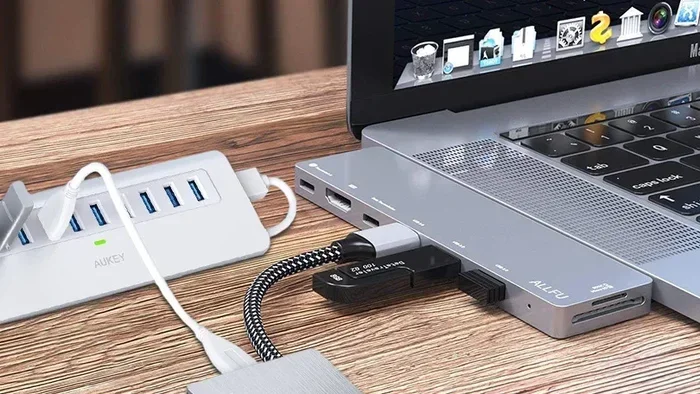
Using a USB Hub With External Power
Another option is to use a powered USB hub that comes with a 12v adapter. The hub itself runs on 12v from the external power supply, and it provides USB ports for your devices. This works well for devices that need 12v but connect via USB.
This setup is common in home offices and small workshops. You plug the hub into the wall with a 12v power brick, and then connect your USB devices to the hub. The hub handles the power conversion so your devices get the right voltage.
DIY Voltage Regulator Circuits
If you are handy with electronics, you can build a simple voltage regulator circuit that converts USB 5v to 12v. This involves using a boost converter chip, some capacitors, and an inductor. It is a fun project for hobbyists, but it requires some basic knowledge of electronics.
For most people, buying a pre-made step-up converter is the safer and easier choice. DIY circuits can be unpredictable, and mistakes can lead to overheating or electrical shorts. Only go the DIY route if you have experience and proper safety equipment.
Devices That Need 12v Power
Not all gadgets run on 5v. Some devices are designed specifically for 12v input. Understanding which devices need 12v helps you figure out the best way to power them. Here are some common examples.
Common 12v USB Gadgets
- Portable monitors: Many portable USB monitors run on 12v and draw 1 to 2 amps.
- External hard drives: Some 3.5-inch external drives need 12v to spin the platters.
- USB cooling pads: Laptop cooling pads often require 12v for the fans.
- LED light strips: USB-powered LED strips frequently operate at 12v.
- Small pumps and motors: Miniature water pumps and motors often use 12v.
- Car USB adapters: Many car chargers step down 12v from the car battery to 5v for USB devices.
If you have any of these devices, you know the frustration of needing a 12v power source but only having a USB port available. The solutions we discussed earlier can bridge that gap.
How To Check Your Device Voltage Requirements
Before you try to power any device from a USB port, check its voltage requirements. Here is where to look:
- On the device label: Look for a sticker or engraving that lists input voltage.
- In the user manual: The manual will usually specify the required voltage and amperage.
- On the manufacturer website: Search for the product model and check the specs page.
- On the original power adapter: If you still have it, the adapter will list its output voltage.
Always match the voltage exactly. Using a 5v device on 12v will destroy it. Using a 12v device on 5v means it simply will not work. Getting the voltage right is the single most important thing you can do to protect your gadgets.
Common Mistakes When Using USB Power
There are several mistakes people make when trying to use USB ports for power. Avoiding these pitfalls can save you money, time, and frustration.
Assuming All USB Ports Are the Same
Not all USB ports deliver the same power. A USB port on your computer is different from a USB port on a wall charger. A port on a TV is different from a port on a gaming console. Always check the power output of the specific port you are using.
Ignoring Amperage Requirements
Voltage is not the only thing that matters. Amperage, or current, determines how much power actually flows. A 12v device that needs 2 amps requires 24 watts. If your USB port or converter cannot deliver that much, your device will not work correctly or at all.
Using Cheap or Uncertified Converters
Budget step-up converters can be tempting, but they are not all created equal. Cheap converters may have poor voltage regulation, which means the output voltage can spike or drop. This can damage your connected device. Look for converters with safety certifications and good reviews.
Overloading the USB Port
Every USB port has a maximum power limit. Trying to draw more power than the port can supply will either cause the device to not work or trigger a safety shutoff on the port. In rare cases, overloading can damage the port or the computer. Know your limits and stay within them.
Expert Tips for Powering Gadgets Safely
Here are some practical tips from people who work with USB power every day. These small habits can make a big difference in keeping your devices safe and running smoothly.
- Always check voltage before connecting: A quick check can prevent costly mistakes.
- Use short, high-quality USB cables: Longer cables lose more power through resistance.
- Monitor heat: If a converter or cable feels hot to the touch, disconnect it immediately.
- Buy from reputable brands: Name-brand converters and chargers are more reliable and safer.
- When in doubt, use a dedicated power adapter: A proper 12v wall adapter is always the safest choice for 12v devices.
These tips might seem obvious, but you would be surprised how often they are ignored. A few seconds of caution can save you from a fried device or a burned-out port.
The Future of USB Power Delivery
The USB standard is constantly evolving. New versions bring higher power limits and more flexible voltage options. What does this mean for the future of 12v USB power?
The upcoming USB Power Delivery 3.1 specification introduces even higher voltage levels and power capabilities. While it does not specifically add 12v as a new standard step, it does expand the range of what USB power can do. As technology advances, we may see more devices that can natively use 12v over USB without needing external converters.
For now, the solutions we have discussed work well and are widely available. A DC-DC step-up converter remains the most practical way to get 12v from a USB port. As USB technology continues to evolve, these workarounds may become less necessary, but for today, they are your best bet.
Conclusion
So, can a USB port provide 12v? The short answer is no, not directly. Standard USB ports are built to deliver 5v, and that is not changing anytime soon. But the longer answer is more encouraging. With the right tools and knowledge, you can absolutely use a USB connection to power your 12v gadgets safely.
USB Power Delivery opens up new possibilities, and DC-DC step-up converters give you a practical, affordable way to bridge the voltage gap. Just remember to check your device requirements, use quality equipment, and never exceed the limits of your USB port or cable.
The world of USB power is more flexible than most people realize. With a little know-how, you can power devices you never thought possible from a simple USB port. Just be smart about it, stay within safe limits, and enjoy the convenience that modern USB technology offers.
Frequently Asked Questions
Can a standard USB-A port output 12v?
No, a standard USB-A port outputs 5v only. It is not designed to deliver 12v, and attempting to force 12v through it can damage the port and connected devices. You need a voltage booster or step-up converter to get 12v from a USB-A connection.
What is USB Power Delivery (PD)?
USB Power Delivery is a modern protocol that allows USB-C ports to negotiate higher voltages and currents. It supports voltage steps of 5v, 9v, 15v, and 20v. While 12v is not a standard PD step, some proprietary chargers can output 12v through USB-C PD.
Can I use a step-up converter to get 12v from USB?
Yes, a DC-DC step-up converter is the most common and safe way to get 12v from a USB port. These small devices take the 5v from USB and boost it to 12v. Make sure to choose a converter with enough wattage for your device.
Will using 12v on a 5v USB device damage it?
Absolutely. Applying 12v to a device rated for 5v will almost certainly damage or destroy it. Always match the voltage exactly to what your device requires. Check the label, manual, or manufacturer website for the correct voltage.
How much power can a USB-C PD port deliver?
A USB-C PD port can deliver up to 100 watts with the right charger and cable. This is enough to power laptops and other high-demand devices. However, the voltage is negotiated between the charger and device, and 12v is not a standard PD voltage level.
Are there any USB devices that natively run on 12v?
Most USB devices run on 5v by design. However, some gadgets like portable monitors, external hard drives, and LED strips are designed for 12v input and use a USB connector for convenience. These devices typically come with or require a separate 12v power adapter.