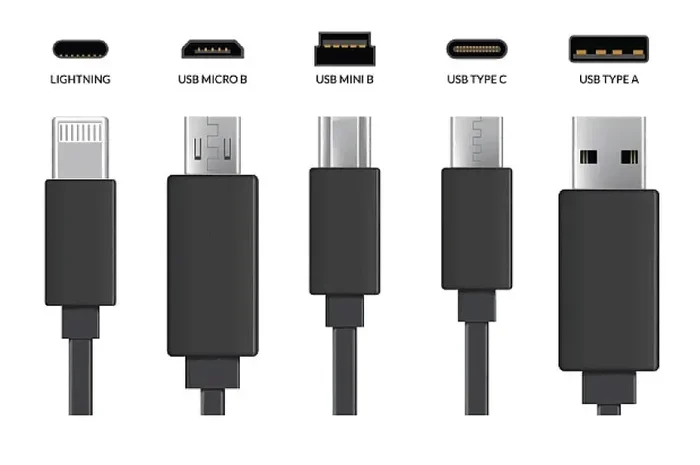
Are Micro USB A and B Interchangeable with Each Other
Micro USB A and Micro USB B connectors look similar but are NOT interchangeable. They have different shapes, pin configurations, and intended uses. Using the wrong connector can damage your devices or prevent proper charging and data transfer. This guide breaks down every difference so you can pick the right cable every time.
Have you ever grabbed a USB cable from a drawer, plugged it into your device, and realized it just would not fit? That frustrating moment is exactly why understanding the difference between Micro USB A and Micro USB B matters. These two connectors may look almost identical at first glance, but they serve very different purposes. In this article, we will answer the big question: are Micro USB A and B interchangeable with each other? The short answer is no. But the full answer is much more interesting, and it could save you money, time, and even your favorite gadgets.
USB connectors come in many shapes and sizes. Over the years, manufacturers have used different designs for different devices. Micro USB A and Micro USB B are two of the most common types you will find in older electronics. They both belong to the Micro USB family, but they are not the same. Knowing which one your device needs can make a huge difference in how well your devices charge and transfer data.
Whether you are sorting through a box of old cables or buying a replacement for your camera or phone, this guide has you covered. We will walk through every key difference, explain why they are not interchangeable, and give you practical tips to avoid common mistakes. Let us get into it.
Key Takeaways
- Micro USB A and B are physically different and designed for different device types.
- Plugging the wrong connector in can cause damage to your port or device.
- Micro USB A is for host devices like computers and chargers, while Micro USB B is for peripheral devices like phones and cameras.
- Always check your device manual before buying a replacement cable.
- USB Type-C is replacing Micro USB in most modern devices, but many older gadgets still rely on these connectors.
- Using the correct connector ensures faster charging and reliable data transfer speeds.
📑 Table of Contents
- What Are Micro USB A and Micro USB B Connectors?
- Key Differences Between Micro USB A and Micro USB B
- Are Micro USB A and B Interchangeable with Each Other?
- Common Devices That Use Each Connector Type
- How to Tell Micro USB A and B Apart
- What Happens When You Force the Wrong Connector?
- Expert Tips for Choosing the Right USB Cable
- Common Mistakes People Make with Micro USB Cables
- The Future of USB Connectors
- Conclusion
What Are Micro USB A and Micro USB B Connectors?
Before we dive into whether they are interchangeable, let us understand what each connector actually is. Both Micro USB A and Micro USB B are part of the Universal Serial Bus standard. They were designed to be smaller than regular USB connectors so they could fit into compact devices like smartphones, tablets, and portable electronics.
Understanding Micro USB A
Micro USB A is the connector type found on host devices. Think of your laptop, desktop computer, wall charger, or a USB hub. These devices provide power and data to other devices. The Micro USB A connector has a flat, rectangular shape with a slightly tapered top. It was designed specifically to serve as the “source” end of a USB connection.
The pin configuration inside a Micro USB A connector has five pins arranged in a specific pattern. This design allows it to deliver power and data in the standard USB way. When you plug a cable into your computer or a wall adapter, you are most likely using a Micro USB A connector on that end.
Understanding Micro USB B
Micro USB B is the connector found on peripheral or slave devices. These are the devices that receive power and data from a host. Smartphones, digital cameras, portable hard drives, and GPS units commonly used Micro USB B connectors. The shape is quite different from Micro USB A. It has a slightly square-like form with two small protruding edges on the top. It looks a bit like a small trapezoid with notches.
The pin layout inside Micro USB B is also different from Micro USB A, even though both have five pins. The arrangement is tailored to support the specific role of the peripheral device. This design ensures that the cable only fits one way, reducing the risk of incorrect connections.
Key Differences Between Micro USB A and Micro USB B
Now that you know the basics, let us look at the specific differences. These are the reasons why Micro USB A and B are not interchangeable.
Physical Shape and Size
The most obvious difference is the shape. Micro USB A is rectangular and slim. Micro USB B is more square-shaped with small side tabs. Even a millimeter of difference in shape means they will not fit into each other’s ports. This was a deliberate design choice by the USB Implementers Forum (USB-IF), the group that sets USB standards.
Pin Configuration and Orientation
Inside the connectors, the pin arrangements differ. While both connectors have five pins, the placement and function of some pins vary. This means that even if you could physically force one into the other port (which you should never try), the electrical connection would not work correctly.
Intended Device Roles
Micro USB A is built for host devices that send out power and data. Micro USB B is built for devices that receive power and data. This role-based design is a core principle of USB technology. It ensures that cables connect in the correct direction every time.
Cable Compatibility
A standard USB cable has different connectors on each end. A typical cable might have a Micro USB A on one end and a Micro USB B on the other. This is by design. The A end plugs into the host, and the B end plugs into the device. You cannot swap them because the shapes are intentionally different.
Are Micro USB A and B Interchangeable with Each Other?
The answer is a clear and definitive no. Micro USB A and Micro USB B are not interchangeable. They have different shapes, different internal pin layouts, and different purposes. You cannot use a Micro USB A cable where a Micro USB B port is required, and vice versa.
Some people assume that because both connectors are small and belong to the Micro USB family, they can be used interchangeably. This is a common misconception. The slight differences in shape are there for a reason. They prevent incorrect connections that could damage your devices or cause data transfer failures.
If you try to force a Micro USB A connector into a Micro USB B port, it simply will not fit. The shapes are too different. And even if you somehow managed to squeeze it in, the electrical pins would not align correctly. This could lead to short circuits or permanent damage to your device port.
Why Interchangeability Would Be a Problem
Imagine if Micro USB A and B were interchangeable. You might plug a cable into your phone the wrong way and fry the charging circuit. The USB standard was carefully designed to prevent this from happening. The different shapes act as a built-in safety mechanism.
Even in cases where both connectors look similar, such as Mini USB A and Mini USB B, the same rule applies. They are not interchangeable. Always match the connector type to the port on your device.
Common Devices That Use Each Connector Type
Knowing which devices use which connector can help you avoid buying the wrong cable. Here is a quick breakdown.
Devices That Use Micro USB A
- Desktop computers and laptops (USB ports on the body)
- Wall chargers and car chargers
- USB hubs and docking stations
- Game consoles and streaming devices
- Printers and scanners (host-side connections)
When you need a cable to connect your device to a computer or charger, you are typically looking for a Micro USB A connector on the host end. Many older devices relied on this standard before USB Type-C became popular.
Devices That Use Micro USB B
- Android smartphones (older models)
- Digital cameras and camcorders
- Portable Bluetooth speakers
- GPS navigation devices
- External hard drives and flash drives
- Portable gaming devices
If your device is a phone, camera, or any gadget that you charge from an external source, it most likely uses a Micro USB B port. The cable will have a Micro USB B connector on the device end and a standard USB A connector on the other end.
How to Tell Micro USB A and B Apart
If you have a pile of cables and are not sure which is which, here are some quick ways to identify them.
Look at the Shape
Micro USB A is flat and rectangular. Micro USB B is more square with small notches or tabs on the sides. Hold the connector up to the light and compare the shapes side by side. The difference becomes obvious once you know what to look for.
Check the Size of the Opening
The port on your device will only accept one type of connector. If the port is more rectangular, it takes Micro USB A. If the port is more square with small side edges, it takes Micro USB B. Never force a connector into a port. If it does not fit easily, it is the wrong type.
Look for Labels on the Cable
Many quality cables have small text printed on the connector housing. Look for “USB Micro A” or “USB Micro B” printed on the plug. This is the fastest way to identify the correct cable without guessing.
Some people also use cable organizers or labeled pouches to keep their cables sorted. This is a great habit, especially if you have a collection of older devices that all use different connector types.
What Happens When You Force the Wrong Connector?
Forcing the wrong connector into a port is one of the most common ways people damage their devices. Let us look at what can go wrong.
Possible Damage to the Port
If you try to insert a Micro USB A into a Micro USB B port, the plastic housing will not line up with the metal contacts. You may bend or break the pins inside the port. Once the pins are damaged, the port may stop working entirely. Repairing a damaged USB port can be costly and time-consuming.
Risk of Short Circuits
Even if the connector partially inserts, the misaligned pins can cause a short circuit. This can fry the USB controller on your device. In rare cases, it can even damage the battery or other internal components. This is especially risky with devices that are plugged into a power source.
Data Transfer Failures
Even if no physical damage occurs, using the wrong connector will result in failed data transfers. Your computer will not recognize the device, or file transfers will stall and error out. This wastes time and can lead to data corruption if you are in the middle of a transfer.
Some users report issues when transferring data from devices to spreadsheets, where a line that won’t delete in Microsoft Excel becomes a frustrating problem. While this is a software issue, using the wrong cable can sometimes cause incomplete file transfers that lead to corrupted data. Always use the correct connector to keep your files safe.
Expert Tips for Choosing the Right USB Cable
Buying the right USB cable does not have to be confusing. Here are some practical tips to help you make the best choice.
Check Your Device Manual
The easiest way to know which connector you need is to check the user manual or the manufacturer’s website. Look for the charging port specification. It will clearly state whether your device uses Micro USB A, Micro USB B, Mini USB, or USB Type-C.
Buy from Reputable Brands
Cheap, no-name cables may not have the correct connector shapes. They can also be unsafe. Stick with reputable brands or certified cables from trusted retailers. Quality cables have properly aligned connectors and safe wiring inside.
Consider Upgrading to USB Type-C
If you are replacing an old cable, consider upgrading to USB Type-C. This newer standard is reversible, faster, and more durable. Many modern devices have already moved to USB Type-C. It is a future-proof investment that will save you from connector confusion in the long run.
Keep a Cable Organizer
Label your cables or use a cable organizer with different compartments. This way, you always know which cable goes with which device. It saves time and prevents accidental damage from using the wrong connector.
Test Before You Trust
When you buy a new cable, test it with your device before relying on it for important tasks. Check that it charges properly and transfers data at expected speeds. A bad cable can cause slow charging, intermittent connections, or no connection at all.
Be Careful with Public Charging Stations
When using public USB ports at airports or cafes, make sure you are using your own cable with the correct connector. Public ports can sometimes have worn-out or damaged connectors that may not work with your device properly. Using your own cable ensures a secure and reliable connection.
For those who carry multiple devices on the go, having the right cables matters even more. Whether you are a tech enthusiast or someone who simply wants their phone charged and ready, using the correct Micro USB A or Micro USB B connector makes all the difference.
Common Mistakes People Make with Micro USB Cables
Even tech-savvy people sometimes make mistakes with USB cables. Here are the most common ones to avoid.
- Assuming all Micro USB cables are the same: They are not. The A and B connectors are different.
- Forcing a connector into a port: If it does not fit, stop. Forcing it can cause permanent damage.
- Buying cables without checking the device requirements: Always verify the connector type before purchasing.
- Ignoring cable quality: Cheap cables can cause slow charging, data loss, or even safety hazards.
- Confusing Micro USB with Mini USB: These are different standards entirely. Mini USB is larger and older.
By avoiding these mistakes, you can extend the life of your devices and ensure reliable charging and data transfer every time.
The Future of USB Connectors
The technology world is moving fast. Micro USB connectors, both A and B, are becoming less common as USB Type-C takes over. Newer smartphones, tablets, and laptops are shipping with USB Type-C ports. This reversible connector offers faster data transfer speeds and higher power delivery.
However, millions of devices still use Micro USB connectors. If you have older gadgets, cameras, or accessories, understanding the difference between Micro USB A and Micro USB B remains important. It is also worth noting that some security and access control systems still rely on older USB standards for data transfer and device management. Understanding connector compatibility helps ensure these systems work without issues.
The transition to USB Type-C is happening, but it will take time. In the meantime, knowing your Micro USB connectors inside and out will serve you well.
Conclusion
So, are Micro USB A and B interchangeable with each other? The answer is a firm no. They are two different connectors designed for two different roles in the USB ecosystem. Micro USB A is for host devices, and Micro USB B is for peripheral devices. Their shapes, pin configurations, and purposes are all different.
Using the wrong connector will not work. It can damage your device, corrupt data, and waste your time. Always check which connector type your device needs before plugging in a cable. If you are unsure, consult your device manual or look up the specifications online.
Taking a few extra seconds to match the right connector can save you from costly repairs and frustrating experience. Keep your cables organized, buy quality products, and stay informed about connector standards. Your devices will thank you for it.
Whether you are charging your phone, transferring photos from your camera, or syncing data from an older device, using the correct Micro USB A or Micro USB B cable is the key to a smooth and safe connection. Make the right choice every time, and your gadgets will keep running without a hitch.
Frequently Asked Questions
Can I use a Micro USB A cable with a Micro USB B device?
No, you cannot. Micro USB A and Micro USB B have different shapes and pin configurations. The A connector will not fit into a B port, and vice versa. Always match the connector type to the port on your device to avoid damage.
Why are Micro USB A and B shaped differently?
The different shapes are intentional. They prevent incorrect connections that could damage your devices. Micro USB A is designed for host devices like computers and chargers, while Micro USB B is designed for peripheral devices like phones and cameras. This role-based design is a core part of the USB standard.
Are all Micro USB cables the same?
No, not all Micro USB cables are the same. They come in different connector types (A, B, and even Mini USB). Each type has a specific shape and purpose. Always check your device requirements before buying a replacement cable.
What should I do if my Micro USB port is damaged?
If your port is damaged, stop using it immediately. Continuing to use a damaged port can cause further harm to your device. Take it to a qualified repair technician who can replace the port safely. Using the correct connector going forward can help prevent future damage.
Is USB Type-C replacing Micro USB?
Yes, USB Type-C is gradually replacing Micro USB in most modern devices. It is reversible, faster, and more durable. However, many older devices still use Micro USB connectors. If you have older gadgets, understanding Micro USB A and B differences remains important.
Can I use an adapter to connect Micro USB A to Micro USB B?
Standard adapters that convert Micro USB A to Micro USB B do not exist because the two are fundamentally different in purpose and design. If you need to connect a host device to a peripheral device, use the correct cable that has the matching connectors on each end. For specific connectivity needs related to security and access systems, you may want to review the advantages and disadvantages of access control systems to understand how proper cable management plays a role in those setups.