Are Usb C Cables Passive The Truth You Need To Hear
Are USB C cables passive? Yes, many of them are, and that is perfectly fine for most everyday tasks. Passive USB C cables carry signals and power without built-in electronics, making them simple, affordable, and reliable for short-distance use. In this guide, we break down everything you need to know about USB C cables passive vs active, how to choose the right one, and common mistakes to avoid.
Key Takeaways
- Passive USB C cables have no built-in electronics and work best for short distances under 3 feet.
- Active USB C cables include signal-boosting chips that maintain speed and power over longer runs.
- Not all USB C cables passive support the same speeds, power levels, or data transfer standards.
- Cable length, build quality, and USB standard certification are the three most important factors to consider.
- Using the wrong type of cable can cause slow charging, poor data speeds, and even device damage.
- A mix of both passive and active cables covers most real-world use cases effectively.
- Always look for USB-IF or Thunderbolt certification to ensure you are getting a quality cable.
📑 Table of Contents
- What Does Passive Mean in USB C Cables?
- How Passive USB C Cables Actually Work
- Active vs Passive USB C Cables Compared
- When Do You Need an Active USB C Cable?
- How to Tell If Your USB C Cable Is Passive or Active
- Common Mistakes People Make With USB C Cables
- Quick Tips for Choosing the Right USB C Cable
- Expert Insights on USB C Cable Selection
- Conclusion
What Does Passive Mean in USB C Cables?
When people ask are USB C cables passive, they want to know whether the cable has any built-in electronics. A passive USB C cable carries signals and power from one end to the other without any active amplification or chipsets inside. Think of it like a garden hose. Water flows through it, but the hose itself does not change the water in any way. A passive USB C cable works the same way. It connects two devices and lets data and power travel between them without modification.
These cables are the most common type you will find on store shelves today. They are simple, affordable, and work well for many everyday tasks. But they also come with limitations that many users do not realize. The key thing to understand is that a passive USB C cable cannot boost or regenerate the signal. It relies entirely on the devices at each end to handle the communication. This means that factors like cable length, wire quality, and the USB standard all play a big role in how well the cable performs.
Not all USB C cables passive are created equal. Some can handle fast charging and high-speed data transfer. Others are limited to basic tasks. The difference comes down to the wiring inside the cable and the USB standard it supports. For example, a basic passive USB C cable might support USB 2.0 speeds, which maxes out at 480 Mbps. That is fine for charging your phone or transferring small files. But if you need to move large video files or connect to an external monitor, you will need a cable that supports USB 3.1 or Thunderbolt.
Quick Tip: If you need a cable longer than 3 feet for high-speed data, consider an active USB C cable instead. It has built-in electronics that boost the signal and maintain speed over longer distances. A passive USB C cable works best when your devices are close together and your needs are straightforward.
How Passive USB C Cables Actually Work
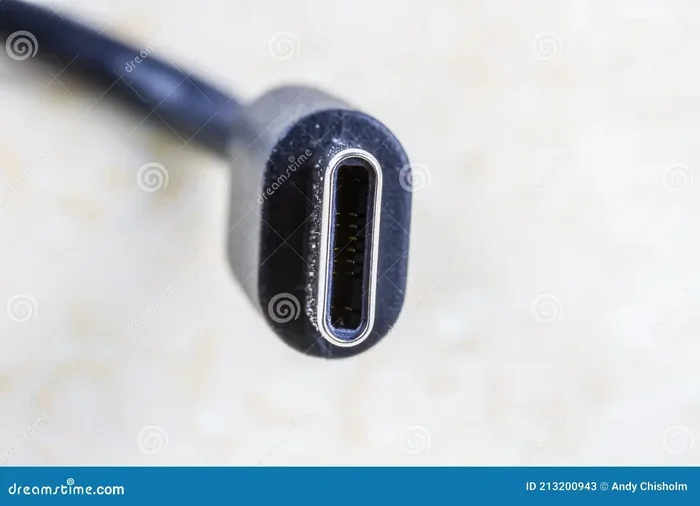
A passive USB C cable contains multiple wires inside a single outer jacket. Each wire has a specific job. Some carry power, some carry data, and others serve as ground conductors. The USB C connector itself has 24 pins. These pins handle power delivery, data transfer, video output, and configuration signals. In a passive USB C cable, all of these signals pass through without any modification or amplification.
When you plug in a passive USB C cable, the devices on each end negotiate the connection. They agree on the power profile, data speed, and other settings. This negotiation happens through the Configuration Channel (CC) pins in the connector. Here is a simple breakdown of what happens inside a passive USB C cable:
- Power wires carry electrical current from the charger to your device.
- Data wires transmit information between devices at the agreed speed.
- CC pins handle the negotiation between devices for power and data profiles.
- Shield layers protect the internal wires from electromagnetic interference.
Because there are no active components, a passive USB C cable cannot correct signal degradation. If the signal weakens over distance, the cable just passes that weaker signal along. This is why cable length and build quality are so important. A short, well-built passive cable can deliver excellent performance. But stretch that same cable to 10 feet and you may notice a drop in speed or reliability.
The Role of USB Standards in Passive Cables
The USB standard your cable supports determines what a passive USB C cable can actually do. Here are the most common standards you will encounter:
- USB 2.0: Basic speeds of 480 Mbps. Fine for charging and simple file transfers.
- USB 3.0 (USB 3.1 Gen 1): Speeds up to 5 Gbps. Good for most everyday tasks.
- USB 3.1 Gen 2: Speeds up to 10 Gbps. Great for large file transfers and external drives.
- Thunderbolt 3: Speeds up to 40 Gbps. Best for professional workflows and high-resolution displays.
- Thunderbolt 4: Also 40 Gbps but with stricter certification requirements and more features.
A passive USB C cable can support any of these standards, but the cable itself must be built with the right wiring to handle the higher speeds. Not every USB C cables passive on the market meet these standards. This is why checking specifications before you buy is so important.
Active vs Passive USB C Cables Compared
Understanding the difference between active vs passive USB C cables is essential for making the right purchase. Each type has its strengths and weaknesses, and knowing when to use each one saves you time, money, and frustration.
| Feature | Passive USB C Cable | Active USB C Cable |
|---|---|---|
| Built-in Electronics | None | Yes, includes a chip or chipset |
| Signal Boosting | No | Yes, regenerates the signal |
| Max Length for Full Speed | About 3 feet (1 meter) | Up to 16 feet (5 meters) or more |
| Price Range | $5 to $20 | $15 to $50+ |
| Power Delivery | Up to 100W with proper wiring | Up to 100W with consistent delivery |
| Best For | Short-distance charging and data | Long-distance connections and docking |
| Durability | Simpler design, fewer failure points | More complex, chip can fail |
The comparison table shows that active USB C cables are not always better. They simply serve a different purpose. If you keep your cable short and your needs basic, a passive USB C cable is often the smarter choice. One important thing to note: USB C cables passive do not always look different from active cables on the outside. You usually cannot tell just by looking at them. You need to check the specs or test the cable to know for sure.
When Passive Cables Are the Better Choice
There are many situations where a passive USB C cable is the clear winner. Short-distance connections work perfectly because the signal stays strong over a brief span. Budget-friendly options are another advantage since passive cables cost less to manufacture. Simple charging tasks like powering up your phone or tablet do not need any signal boosting. Passive cables also run cooler because they have no active electronics generating heat. Fewer failure points mean they tend to last longer under normal conditions. For most home and office setups, a quality passive USB C cable handles everything you need.
When Do You Need an Active USB C Cable?
There are specific scenarios where a passive USB C cable simply will not cut it. In these cases, you need an active USB C cable with built-in signal boosting. The most common reason people need an active cable is distance. If you need to connect devices that are more than 3 to 6 feet apart, a passive USB C cable will likely lose signal quality. An active cable solves this problem with its built-in electronics that regenerate the signal as it travels.
Use Cases That Require Active Cables
- Docking stations: If you use a USB C hub or USB C dock at your desk, an active cable ensures stable connectivity across the full bandwidth.
- External monitors: Connecting a monitor over longer distances often requires signal boosting that only an active cable provides.
- USB C to HDMI adapters: These often need an active cable to deliver video at full resolution without drops or artifacts.
- Professional audio/video setups: Creators working with high-bandwidth workflows need the reliability of active cables for consistent performance.
- Long cable runs in offices: If your desk setup requires cables that stretch across a room, active is the only reliable option.
Another situation where you might need an active cable is with USB C power delivery at higher wattages. Some active cables are specifically designed to handle 100W or more while maintaining stable power delivery over longer distances. It is also worth noting that Thunderbolt USB C cables longer than 2 meters are almost always active. Thunderbolt signals are very sensitive to distance and degradation, so active boosting is essential for longer runs.
How to Tell If Your USB C Cable Is Passive or Active
Since you cannot always tell by looking at a cable, here are some practical ways to find out if your USB C cable is passive or active. The first method is to check the packaging or product specs. Manufacturers usually state whether the cable is passive or active. Look for terms like “signal booster,” “active chip,” or “built-in electronics.” If none of these are mentioned, it is likely a passive USB C cable.
You can also look at the cable itself. Some active USB C cables are slightly thicker than passive ones because they contain additional circuitry. If a cable looks unusually bulky for its length, it might have active components inside. Testing the cable performance is another approach. Connect two devices and transfer a large file. If the speed drops significantly compared to what the cable should support, it might be a passive cable that is being pushed beyond its limits.
Another test is to check if the cable works reliably over longer distances. If a 6-foot cable works but a 10-foot cable of the same type does not, the longer one is likely passive and suffering from signal loss. Using a USB C cable tester is the most accurate method. These affordable tools check the wiring and capabilities of your cable. They are a great investment if you work with multiple USB C accessories and want to ensure you are using the right cable for each task.
Common Mistakes People Make With USB C Cables
Even experienced tech users make mistakes when it comes to choosing and using USB C cables. The biggest error is assuming all USB C cables are the same. Not all USB C cables passive support the same speeds or power levels. A cheap passive USB C cable might charge your phone fine, but it could be too slow for an external SSD or a 4K monitor. Ignoring cable length is another common mistake. Longer cables mean more signal loss, especially for passive designs. If you need both length and speed, an active cable is your best bet.
Buying based on price alone is a risky habit. Very cheap USB C cables often use thin wiring and skip important safety features. This can lead to slow charging, data corruption, or even device damage. Overlooking certification is another pitfall. Look for cables that are USB-IF certified or carry Thunderbolt certification. These certifications mean the cable has been tested and meets specific standards for performance and safety. A passive USB C cable without certification is a gamble.
Using the wrong cable for the job causes endless frustration. A passive cable for a long-distance docking setup will not deliver the performance you expect. Match the cable type to your use case for the best results. Finally, neglecting cable care shortens the lifespan of even the best USB C cables passive. Bending them sharply, yanking them from ports, and exposing them to heat all cause wear and tear over time.
Quick Tips for Choosing the Right USB C Cable
Here are some fast tips to keep in mind when shopping for USB C cables:
- Know your needs: Do you need fast charging, high-speed data, or video output? Choose accordingly.
- Check the USB standard: USB 3.1 Gen 2 or Thunderbolt cables offer the best performance for demanding tasks.
- Measure your distances: Keep passive cables under 3 feet for best results with high-speed data.
- Buy from reputable brands: Brands that invest in quality testing produce more reliable and consistent cables.
- Read reviews: Real user experiences can reveal issues that specs alone will not show you.
- Consider an active cable for long runs: If you need length, do not sacrifice speed or reliability.
Expert Insights on USB C Cable Selection
Industry experts consistently emphasize that cable quality directly impacts your entire USB C ecosystem. A poor passive USB C cable can bottleneck even the most expensive devices. Your phone, laptop, or tablet is only as fast as the cable connecting it. According to tech reviewers and USB-IF testing labs, the most common complaint is not about cable failure but about underperformance. Users buy a cable expecting USB 3.1 speeds and get USB 2.0 speeds instead. This almost always comes down to using a passive USB C cable that does not meet the advertised standard.
Experts also recommend keeping a mix of both passive and active cables on hand. A short passive cable for everyday charging and a longer active cable for docking and video connections covers most use cases. This approach balances cost, convenience, and performance. One more expert tip: always check the USB C power delivery profile your device supports before buying a cable. A cable that only supports 60W will not magically deliver 100W, even if the connector fits. Matching the cable to your device’s power profile ensures safe and optimal charging.
Your USB C setup is part of a broader digital lifestyle. Beyond cables and chargers, there are many tech tools that can simplify your daily routine. Whether you are looking for the right accessory or other tech solutions, the ecosystem of connected devices continues to grow. For instance, if you ever need help finding tech solutions for other parts of your life, there are platforms like apps that work like Uber for finding dog walkers that show how technology can streamline everyday tasks and save you valuable time.
Conclusion
The question “Are USB C cables passive?” has a clear answer: yes, many of them are, and that is perfectly fine for most users. Passive USB C cables handle everyday charging, data transfer, and accessory connections with ease. They are affordable, reliable, and widely available. However, understanding when you need an active USB C cable is just as important. If you work with long cable runs, high-resolution displays, or professional peripherals, an active cable will save you from frustration and performance issues.
The key takeaway is to match your cable to your needs. Check the USB standard, consider the cable length, and look for proper certification. A well-chosen passive USB C cable can serve you well for years, while the right active cable opens up possibilities that passive cables simply cannot match. Take a moment to audit your current cable collection. Identify which ones are passive and which are active. Replace any cables that are not meeting your performance needs. With the right USB C cables in your setup, you will enjoy faster charging, smoother data transfers, and a more reliable digital experience every single day.
Frequently Asked Questions
What is the main difference between a passive and an active USB C cable?
A passive USB C cable has no built-in electronics and simply carries signals and power as they are. An active USB C cable includes a chip or circuitry that boosts and regenerates the signal, allowing it to maintain speed and power over longer distances.
Can a passive USB C cable support fast charging?
Yes, a quality passive USB C cable can support fast charging up to 100W if it is properly wired and meets the USB Power Delivery standard. However, the cable must be short enough and built with thick enough wires to handle the power without significant loss.
How long can a passive USB C cable be before it loses performance?
For high-speed data transfer, a passive USB C cable should stay under 3 feet (about 1 meter) to maintain full performance. Beyond that length, signal degradation becomes more likely, and an active cable is a better choice.
Do all USB C cables look the same on the outside?
Yes, most USB C cables passive and active look nearly identical from the outside. You usually cannot tell the difference just by looking. You need to check the product specs, packaging, or test the cable to determine whether it is passive or active.
Is it safe to use a passive USB C cable for my laptop?
It is safe as long as the cable meets the power and data requirements of your laptop. A passive USB C cable that supports USB 3.1 Gen 2 or Thunderbolt and is properly rated for the wattage your laptop needs will work perfectly for most short-distance connections.
How can I test if my USB C cable is passive or active?
You can check the product description for terms like “signal booster” or “active chip.” You can also test data transfer speeds at different cable lengths. If a longer cable of the same type performs significantly worse, it is likely a passive USB C cable that is being pushed beyond its effective range.