Does Mesh Wifi Replace Your Router for Better Coverage
Mesh wifi systems can replace your traditional router and eliminate dead zones across your home. This technology uses multiple nodes to create seamless wireless coverage in every room. If you struggle with weak signals or buffering, a mesh wifi system might be the solution you need. Let us explore how it works and whether it is right for your home network.
Does mesh wifi replace your router? This is a question many homeowners ask when they experience weak signals in certain rooms or when their current setup struggles to keep up with connected devices. A mesh wifi system offers a modern approach to home networking that solves many common problems.
Traditional routers work well for small spaces. But as homes grow larger and more devices connect, a single router often falls short. Dead zones appear in hallways, basements, and far rooms. That is where mesh technology steps in. It creates a unified network with multiple points that work together to blanket your home in strong signal.
In this guide, we will cover everything you need to know. You will learn how mesh wifi works, whether it fully replaces your current router, and when making the switch makes sense. We also share practical tips to help you get the best results from your new setup.
Key Takeaways
- Mesh wifi replaces your router: It acts as a full replacement for your traditional broadband router and provides superior coverage.
- Seamless roaming is a game changer: Your devices switch between nodes without dropping the connection.
- Not everyone needs mesh: Small apartments may not benefit as much as large homes with multiple floors.
- Setup is simple: Most systems are designed for easy self-installation.
- Compatibility matters: You can often add mesh nodes to an existing router setup.
- Internet speed stays strong: Mesh systems help maintain fast speeds across the entire coverage area.
📑 Table of Contents
- What Is Mesh Wifi and How Does It Work?
- Does Mesh Wifi Replace Your Router?
- Mesh Wifi vs Traditional Router: Coverage Comparison
- When Should You Switch to Mesh Wifi?
- How to Set Up Mesh Wifi in Your Home
- Common Mistakes to Avoid with Mesh Wifi Systems
- Expert Insights: What Networking Professionals Say
- Key Takeaways
What Is Mesh Wifi and How Does It Work?
A mesh wifi system is a set of devices that work together to spread your internet signal throughout your home. Instead of relying on one single unit, you place multiple nodes around your space. Each node talks to the others and to your modem to create one unified network.
Think of it like a web of signals. The main node connects to your modem. The other nodes relay that signal to distant rooms. This means every part of your home gets a strong connection. You do not need to switch networks as you walk around your house.
Here is how a basic mesh setup works:
- The primary node plugs into your modem and acts as the central hub.
- Satellite nodes place around your home extend the signal.
- All nodes share the same network name and password.
- Your devices automatically connect to the strongest node.
This design makes wireless coverage much more consistent. Traditional routers send signals from one point. Walls, floors, and furniture block those signals over distance. Mesh nodes spread the source of the signal out, so it travels shorter distances and faces fewer obstacles.
Many modern mesh systems also use dual-band or tri-band technology. This means they use multiple frequency bands to handle traffic more efficiently. The result is better performance when many devices are online at the same time.
Does Mesh Wifi Replace Your Router?
The short answer is yes. A mesh wifi system replaces your traditional router in most cases. When you set up a mesh network, the primary node takes over the job of your router. It handles traffic management, assigns IP addresses, and connects to your modem.
However, there are some important details to understand:
Mesh systems that replace your router entirely come with a dedicated hub node. This hub connects directly to your modem. It performs all the functions of a standard router plus the mesh relay duties. You remove your old router from the setup and use the mesh system in its place.
Some mesh systems work alongside your existing router. In this case, you bridge the mesh nodes to your current router. This can be useful if you want to keep certain router features. But it is not the most common setup for most users.
So when you ask, “does mesh wifi replace your router?” the answer depends on the system you choose and how you set it up. Most people want a full replacement. And most modern mesh kits are designed to work that way right out of the box.
How to Know If Your Current Router Needs Replacing
Not sure if your current setup is holding you back? Watch for these signs:
- You experience wifi dead zones in rooms far from your router.
- Streaming videos buffer frequently, even with a strong signal indicator.
- Multiple devices slow down the network when used at the same time.
- Your router is several years old and does not support newer wifi standards.
- You have a large home with more than one floor.
If any of these sound familiar, a mesh system may be the upgrade you need. It provides better network coverage and handles more devices without breaking a sweat.
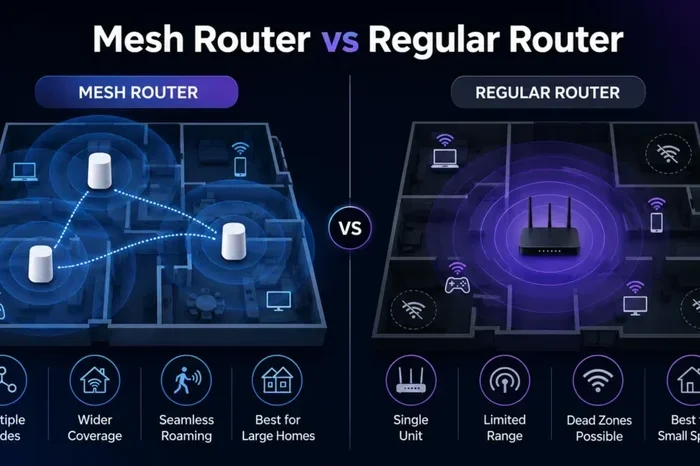
Mesh Wifi vs Traditional Router: Coverage Comparison
Understanding the difference between mesh and traditional setups helps you make a smart choice. Let us compare them side by side.
| Feature | Traditional Router | Mesh Wifi System |
|---|---|---|
| Coverage Area | Small to medium homes | Small to large homes |
| Signal Consistency | Weakens with distance | Strong and even throughout |
| Number of Devices | Handles moderate load | Handles heavy device loads |
| Setup Complexity | Simple | Simple to moderate |
| Cost | Lower upfront | Higher upfront |
| Expandability | Requires extenders | Add nodes easily |
| Seamless Roaming | No | Yes |
As you can see, mesh systems offer clear advantages for wireless coverage in larger spaces. A traditional router works fine for a small apartment. But once your home grows, the limitations become obvious.
One key advantage of mesh is seamless roaming. When you walk from your living room to your bedroom, your phone stays on the same network. It switches to the nearest node without you even noticing. With a traditional router and an extender, you often need to manually switch networks. This can interrupt calls, downloads, and streaming sessions.
Another important point: mesh systems use wifi extenders built into the nodes. You do not need to buy separate extender devices. Everything works as one cohesive unit. This makes the whole experience much cleaner and more reliable.
When Should You Switch to Mesh Wifi?
Not every home needs a mesh system. But certain situations make the switch almost essential. Here are the most common reasons homeowners decide to replace their router with mesh.
You Live in a Large Home
Homes over 2,000 square feet often struggle with a single router. Walls, doors, and distance all weaken the signal. A mesh wifi system places nodes in different rooms so every area gets strong coverage. If you have a multi-story house, this is especially important.
You Have Many Connected Devices
Smart TVs, phones, tablets, smart speakers, security cameras, and home automation devices all compete for bandwidth. A traditional router can get overwhelmed. Mesh systems handle many devices more gracefully because they distribute the load across multiple nodes.
You Work From Home
Reliable internet is non-negotiable when you work remotely. A dropped connection during a video call is frustrating and unprofessional. Mesh wifi gives you a stable connection in every room. You can move around your home and stay connected without interruption.
You Want Future-Proof Coverage
Mesh systems support the latest wifi standards, including wifi 6 and wifi 6E. These standards offer faster speeds and better performance in crowded environments. Investing in a quality mesh system now means your network stays relevant for years.
How to Set Up Mesh Wifi in Your Home
Setting up a mesh system is simpler than many people expect. Most brands design their kits for easy installation. Here is a general overview of the process.
Step 1: Choose the Right System
Before you buy, consider the size of your home and your connectivity needs. A 2-pack works well for small to medium homes. A 3-pack suits larger homes or multi-floor setups. Think about how many connected devices you have and what you use the network for.
Popular brands like Google Nest Wifi, Eero, and Netgear Orbi offer reliable options. Each has its own app that walks you through setup step by step.
Step 2: Place Your Nodes Strategically
Node placement makes a big difference in performance. Follow these tips:
- Place the primary node near your modem.
- Put satellite nodes in central locations between the main node and weak areas.
- Avoid placing nodes behind large furniture or inside closed cabinets.
- Keep nodes within reasonable range of each other for the best signal.
Proper placement ensures every node gets a strong connection from the others. This maximizes your network performance across the entire coverage area.
Step 3: Connect and Configure
Most mesh systems use a smartphone app. You download the app, follow the prompts, and the system configures itself. You will set your network name and password during this process. The app also helps you manage your network, update firmware, and monitor connected devices.
If you want to extend wifi with an ethernet cable for the best possible backhaul connection, some mesh systems support wired connections between nodes. This can boost speed and stability even further. Check if your chosen system supports ethernet backhaul before purchasing.
Step 4: Add Nodes if Needed
One of the best things about mesh systems is scalability. If you find a spot with weak coverage, you can simply add another node. This is much easier than running long ethernet cables or buying a separate extender.
If you are considering whether to add mesh wifi to an existing router, many systems support a bridge or access point mode. This lets you keep your current router while adding mesh nodes for better coverage. It is a flexible option that gives you the best of both worlds.
Quick Tips for the Best Mesh Experience
- Restart your mesh nodes occasionally to keep things running smoothly.
- Update firmware regularly to get the latest features and security patches.
- Place the main node in a central, open area of your home.
- Use the app to run speed tests and identify weak spots.
- Consider a wired backhaul connection if your home supports it.
Common Mistakes to Avoid with Mesh Wifi Systems
Even though mesh systems are user-friendly, some common mistakes can reduce their effectiveness. Here is what to watch out for.
Placing nodes too far apart. Each node needs to communicate with the others. If you space them too far apart, the signal between nodes weakens. This creates bottlenecks and slows down your network. Place nodes close enough that they maintain a strong connection to each other.
Ignoring your modem. Your mesh system connects to your modem. If your modem is outdated, it can bottleneck your entire network. Make sure your modem supports the speeds you are paying for. If you are unsure, check with your internet service provider about upgrading.
Not using the app to optimize. Most mesh systems come with companion apps. These apps help you find the best node placement, run diagnostics, and manage connected devices. Skipping the app means you miss out on valuable optimization tools.
Buying more nodes than you need. While mesh systems are scalable, adding too many nodes can actually cause interference. Start with the number recommended for your home size and add more only if you see coverage gaps.
Expert Insights: What Networking Professionals Say
Network experts agree that mesh wifi is one of the best upgrades for home internet. According to industry professionals, the biggest advantage is the consistency of coverage. A single router creates a signal pattern that weakens predictably with distance. Mesh systems create overlapping coverage zones that eliminate weak spots.
Experts also highlight the importance of wifi signal strength throughout the home. Many people do not realize that their current router provides adequate speed in the living room but drops significantly in the bedroom. A mesh system solves this problem by bringing the signal closer to every device.
For those wondering if they can connect mesh to an existing router, the answer is generally yes. Many mesh systems support bridge mode. This lets you use your current router as the modem connection point while the mesh nodes handle distribution. However, a full replacement is usually simpler and more effective.
Professionals also recommend considering your internet speed when choosing a mesh system. If you pay for gigabit internet, make sure your mesh system can handle those speeds. Look for systems that support the latest wifi standards and offer gigabit ethernet ports.
Key Takeaways
- Mesh wifi replaces your router: The primary node handles all router functions while also distributing the wifi signal.
- Coverage improves dramatically: Multiple nodes eliminate dead zones and provide consistent signal throughout your home.
- Setup is straightforward: Most systems use a simple app and take less than 30 minutes to configure.
- Scalability is a major advantage: You can add nodes as your home or needs grow.
- Seamless roaming keeps you connected: Your devices switch between nodes without dropping the connection.
- Not always necessary for small spaces: A traditional router may suffice for apartments or small homes.
- Consider your internet speed: Choose a mesh system that supports the speeds you are paying for.
So does mesh wifi replace your router? In most cases, the answer is a clear yes. A mesh wifi system takes over all the duties of your traditional router while delivering far better wireless coverage across your home. It eliminates dead zones, handles many devices with ease, and provides a seamless experience as you move from room to room.
If you live in a larger home, work from home, or simply want reliable internet everywhere, mesh is the way to go. The initial investment is higher than a single router, but the improvement in performance and convenience is well worth it.
Before you make the switch, consider your home size, your device count, and your internet speed. Choose a system that fits your needs. Follow the setup tips in this guide, and you will enjoy a strong, reliable home network for years to come.
Remember, you can always buy a router and install it yourself if you prefer a simpler setup. But for most modern homes, a mesh system delivers the coverage and performance that a single router simply cannot match.
Frequently Asked Questions
Can mesh wifi replace my existing router completely?
Yes, in most cases a mesh wifi system fully replaces your router. The primary node connects to your modem and handles all routing functions. You simply remove your old router from the setup and use the mesh system in its place. This is the standard setup for most mesh kits on the market today.
Do I need to buy a new modem if I switch to mesh?
Not necessarily. Your mesh system connects to your existing modem. However, if your modem is outdated, it could limit your speeds. Check with your internet provider to make sure your modem supports your current internet plan before making the switch.
How many mesh nodes do I need for my home?
This depends on the size of your home. A 2-pack works well for homes up to about 2,000 square feet. A 3-pack suits larger homes or multi-floor setups. Most manufacturers provide coverage estimates based on square footage to help you choose the right kit.
Can I use mesh wifi with my existing router in bridge mode?
Yes, many mesh systems support bridge mode. This lets you keep your existing router while adding mesh nodes for better coverage. However, a full replacement is usually simpler and avoids potential compatibility issues. Check your specific system’s documentation for bridge mode instructions.
Is mesh wifi faster than a traditional router?
Mesh wifi is not inherently faster than a good traditional router. However, it provides more consistent speeds throughout your home because the signal travels shorter distances between nodes. This means you experience fewer speed drops in rooms far from your router.
Can I add more nodes to my mesh system later?
Absolutely. One of the biggest advantages of mesh systems is scalability. You can buy additional nodes from the same brand and add them to your network anytime. This lets you expand coverage as your needs change or your home layout evolves.
=== CONCLUSION ===
Mesh wifi has transformed how we think about home internet coverage. It addresses the biggest weakness of traditional routers: inconsistent signal across large spaces. By using multiple nodes that work together, mesh systems deliver strong, reliable wifi everywhere in your home.
If you have been struggling with dead zones, slow speeds, or dropped connections, it is time to consider a mesh system. It replaces your router, simplifies your setup, and future-proofs your home network. The technology is mature, affordable, and easy to use. Make the switch today and experience the difference that mesh wifi can make for your connected home.