Do You Have To Pay Monthly For A Wifi Box Is It Worth It
Do you have to pay monthly for a wifi box? The short answer is it depends on whether you rent or buy your equipment. Most internet service providers charge a monthly rental fee for their wifi boxes, typically ranging from $10 to $15 per month. However, you can save hundreds of dollars each year by purchasing your own wifi box instead of renting one from your ISP. This guide breaks down all the costs and helps you decide what makes sense for your home.
Do you pay a monthly fee for your wifi box and never really question it? You are not alone. Millions of households across the country pay rental fees for their internet equipment every single month without thinking twice. But what if you could cut that cost and keep more money in your pocket?
The truth is, paying monthly for a wifi box is not always necessary. There are real alternatives that can save you serious cash over time. Whether you are a casual internet user or someone who relies on a fast connection for work and streaming, understanding your options matters. Let us walk through everything you need to know about wifi box costs and whether it makes sense to keep renting or switch to owning your equipment.
Key Takeaways
- Renting a wifi box costs $10-$15 monthly: Most ISPs charge recurring fees for their equipment, adding up to $120-$180 per year.
- Buying your own wifi box saves money long-term: A one-time purchase of $80-$200 can eliminate monthly rental fees entirely.
- ISP rental boxes are often outdated: Renting means you may get older hardware that doesn’t support the latest wifi standards.
- Your choice depends on your needs: Consider your internet speed, home size, and budget before deciding to rent or buy.
- Hidden fees add up quickly: Many people don’t realize how much they pay over years for equipment they could own.
- You can return rented equipment: Canceling your rental frees you from monthly charges and gives you flexibility.
📑 Table of Contents
- What Exactly Is A Wifi Box?
- How Much Does A Wifi Box Cost Monthly?
- Renting Vs Buying A Wifi Box
- Hidden Costs Of A Wifi Box Rental
- Can You Avoid The Monthly Fee Entirely?
- Is It Worth Paying Monthly For A Wifi Box?
- Tips For Choosing Your Own Wifi Box
- Common Mistakes People Make With Wifi Box Costs
- Expert Insights On Wifi Box Costs
- How To Make The Switch From Renting To Owning
- Final Thoughts
What Exactly Is A Wifi Box?
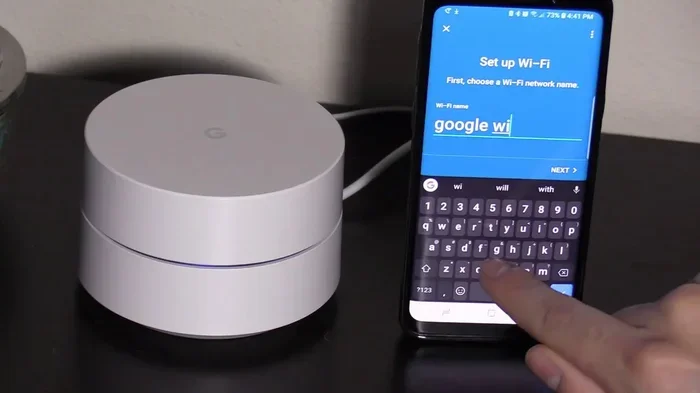
A wifi box is the device your internet service provider gives you to connect your home to the internet. It usually combines a modem and a router into one unit. The modem brings the internet signal into your home, and the router spreads that signal wirelessly to your phones, laptops, and smart devices.
Some people call it a gateway, a modem-router combo, or simply a wireless box. No matter what you call it, the purpose is the same. It is the box that makes your wifi work. Without it, you cannot get online unless you use a wired connection directly to your modem.
Most ISPs like Xfinity, AT&T, and Verizon provide these devices when you sign up for an internet plan. The question is whether you should keep using their equipment or find a better option. That is where the monthly cost debate really begins.
How Much Does A Wifi Box Cost Monthly?
The monthly cost of a wifi box depends on your internet provider and the type of equipment you use. Here is a closer look at what you might be paying right now.
Typical Rental Fees By Provider
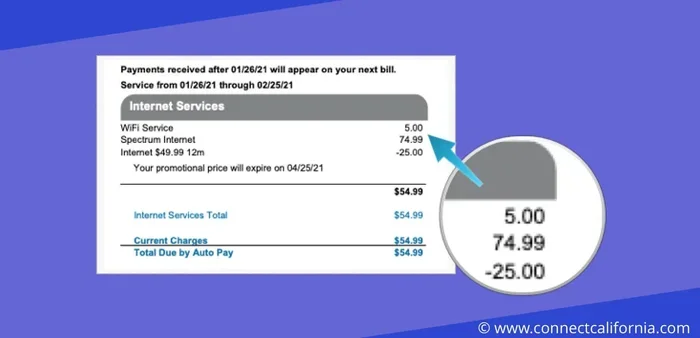
Most major ISPs charge a monthly rental fee for their wifi equipment. These fees are often buried in your bill under names like “equipment fee,” “gateway fee,” or “wifi device charge.” Here is a general breakdown:
- Xfinity: $14 to $15 per month for their xFi Gateway
- AT&T: $10 to $15 per month depending on your plan
- Verizon: $10 to $12 per month for their router
- Spectrum: $5 to $10 per month for their modem/router
- Smaller regional ISPs: $5 to $15 per month varies widely
Those numbers might not look like much on their own. But over a year, they add up fast. A $15 monthly fee means you pay $180 per year just to rent equipment. Over three or five years, that is $540 to $900. And that is money you will never see again.
What Happens If You Do Not Pay?
If you stop paying the rental fee, your ISP may eventually disconnect your service or charge a late fee. Some providers will also block your internet access until the equipment is returned or the balance is cleared. It is not worth the risk to simply stop paying without understanding your options first.
Renting Vs Buying A Wifi Box
This is the big decision. Should you keep renting from your ISP or buy your own equipment? Both options have clear advantages and downsides. Let us break them down so you can make the best choice for your situation.
The Case For Renting
Renting a wifi box from your ISP is simple. There is less setup involved, and if something breaks, the provider replaces it at no extra cost to you. You also do not need to worry about keeping the equipment updated.
For people who are not tech-savvy, renting removes the headache. You plug it in, and it works. If you only plan to stay with your ISP for a short time, renting might make more sense than buying equipment you will need to return or store.
The Case For Buying
Buying your own wifi box gives you more control. You can choose higher-quality hardware that matches your internet speed and home size. You also eliminate the monthly rental fee forever. Over time, the savings can be significant.
If you want the latest wifi technology like Wi-Fi 6 or Wi-Fi 6E, buying your own router is the way to go. ISP rental equipment often lags behind in terms of speed and features. When you buy your own, you pick exactly what works best for you.
Cost Comparison Table
| Option | Upfront Cost | Monthly Cost | Annual Cost | 5-Year Total |
|---|---|---|---|---|
| Renting from ISP | $0 | $10-$15 | $120-$180 | $600-$900 |
| Buying your own | $80-$200 | $0 | $0 | $80-$200 |
| Saving with purchase | — | — | — | $520-$700 saved |
As you can see, buying your own wifi box can save you hundreds of dollars over just a few years. That is real money you can put toward other bills or even treat yourself to something nice.
Hidden Costs Of A Wifi Box Rental
Most people do not realize there are hidden costs beyond the monthly rental fee. These extras can make renting even more expensive than you think.
Equipment Upgrade Fees
Sometimes your ISP will push you to upgrade your rented equipment. They might say the new box will improve your speed or coverage. But upgrading often means a higher monthly fee. You might go from $10 to $15 or more per month just for a newer model. These upgrades are rarely necessary for most households.
Installation And Setup Charges
When you first sign up for internet service, many ISPs charge an installation fee. This fee sometimes includes setting up your wifi box. Even if you do not pay for professional installation, you might face a self-installation fee that still adds to your first bill.
Return Shipping Fees
If you ever decide to cancel your service or return the rented equipment, you might face a return shipping fee. Some providers make it easy and free, but others charge $10 to $20 just to send the box back. These small fees are easy to overlook but they still cost you money.
Early Termination Fees
Some internet contracts include early termination fees. If you decide to switch providers or cancel before your contract ends, you could pay a penalty. This is not directly related to the wifi box, but it affects your overall internet costs.
Can You Avoid The Monthly Fee Entirely?
Yes, you absolutely can. There are several ways to avoid paying a monthly fee for your wifi box. Here are the most effective strategies.
Buy Your Own Modem And Router
The most popular way to skip the rental fee is to buy your own equipment. You can purchase a modem and router separately or get a combo unit that handles both jobs. Just make sure your ISP allows third-party equipment. Most major providers do, but you should check before you buy.
Once you have your own gear, you simply return the rented equipment and connect your new box. The setup process is usually straightforward, and many ISPs have step-by-step guides to help you through it.
Use A Mobile Hotspot Instead
Another option is to use a mobile hotspot instead of a traditional wifi box. If you have a smartphone with a generous data plan, you can share your phone’s internet connection with other devices. This works well for light internet use, but it may not be enough for heavy streaming or large households.
For those exploring this path, you might want to check if a hotspot can replace your home wifi setup effectively.
Look For ISPs With No Rental Fees
Some internet providers do not charge equipment rental fees at all. These companies include several smaller and regional ISPs, as well as some fiber-optic providers. If you are shopping around for a new internet plan, compare the total cost including any equipment fees before you sign up.
Extend Your Existing Network Without Extra Cost
If you already have a wifi box but need better coverage in your home, you do not always need to pay for a second device. You can extend your network using an ethernet cable. Running a cable to a second router or access point can boost your signal without adding a monthly fee.
For tips on doing this affordably, check out this guide on extending your wifi with an ethernet cable to improve coverage at no extra monthly cost.
Is It Worth Paying Monthly For A Wifi Box?
Now for the big question. Is it actually worth paying a monthly fee for a wifi box? The honest answer is it depends on your situation.
If you are a renter who moves frequently, renting might make sense. You do not want to buy equipment you will have to pack up and transport every year or two. In this case, the convenience of renting outweighs the cost.
But if you plan to stay in your home for several years, buying your own wifi box is almost always the better financial choice. The upfront investment pays for itself within the first year, and every month after that is pure savings.
Here are a few quick tips to help you decide:
- Calculate your total rental costs over the next 1, 2, or 5 years.
- Compare that number to the cost of buying your own equipment.
- Consider your internet needs. Do you need the latest wifi standards or is your current setup fine?
- Check if your ISP allows third-party modems and routers.
- Think about your tech comfort level. Can you set up and troubleshoot your own equipment?
Most people who make the switch from renting to buying are surprised at how easy it is and how much money they save. The process is simpler than you might think, and the results speak for themselves.
Tips For Choosing Your Own Wifi Box
If you decide to buy your own equipment, you want to make the right choice. Here are some tips to guide you.
Check Compatibility With Your ISP
Not every modem or router works with every internet provider. Before you buy, check your ISP’s list of approved devices. This list is usually available on their website or by calling customer support. Buying a compatible device saves you time and frustration.
Match The Speed To Your Plan
Your wifi box should be able to handle the internet speed you are paying for. If you have a 500 Mbps plan, you need a router that can deliver that speed wirelessly. Cheaper routers might bottleneck your connection and leave you with slower speeds than you are paying for.
Consider Your Home Size
A small apartment might only need a basic router. But a larger home with multiple floors and thick walls needs a more powerful device. Look for routers with good range and coverage. Some models also support mesh networks, which can extend coverage throughout your entire home.
Look For Wi-Fi 6 Support
Wi-Fi 6 is the latest standard, and it offers faster speeds, better performance in crowded areas, and lower latency. If you are buying new equipment, going with a Wi-Fi 6 router is a smart investment. It future-proofs your setup and handles multiple devices with ease.
Read Reviews Before You Buy
Do not just buy the first router you see. Read reviews from other users and trusted tech websites. Look for feedback on range, speed, reliability, and ease of setup. A well-reviewed router will give you the best experience for your money.
Common Mistakes People Make With Wifi Box Costs
Avoid these common pitfalls that can cost you more money than necessary.
Never Checking Your Bill For Rental Fees
Many people never notice the rental fee on their monthly bill because it is listed in small print or under a confusing label. Make it a habit to review your bill carefully each month. You might be paying for equipment you do not even realize you are renting.
Forgetting To Return Old Equipment
If you switch providers or cancel service, always return the rented equipment promptly. Some ISPs continue charging rental fees on returned equipment if the return process is not completed correctly. Keep your confirmation and tracking number as proof.
Assuming All Wifi Boxes Are The Same
Not all wifi boxes are created equal. ISP rental boxes are often basic models that work fine for average use but struggle with heavy demand. Investing in a better router means better performance and fewer frustrations.
Overlooking The Long-Term Cost
The monthly rental fee might seem small, but it is a recurring expense that never ends as long as you rent. People often forget to calculate the total cost over months and years. A quick look at the numbers can be eye-opening and motivate you to make the switch.
Not Asking About Fee Waivers
Some ISPs will waive the equipment fee if you ask, especially if you are a loyal customer or threatening to cancel. It never hurts to call and negotiate. You might be surprised at what you can get waived or reduced.
Expert Insights On Wifi Box Costs
Industry experts consistently advise consumers to evaluate their wifi box rental fees at least once a year. The technology landscape changes quickly, and what you are paying for today might not be the best value tomorrow. Experts also recommend keeping your equipment up to date to ensure optimal performance and security.
One common recommendation from tech professionals is to own your own equipment whenever possible. This gives you full control over your network, better security settings, and the freedom to upgrade when you want without asking permission from your ISP.
Another expert tip is to monitor your network for unauthorized devices. If someone is using your wifi without permission, it can slow down your connection and potentially compromise your security. Many ISPs offer tools to manage connected devices, and you can also check your settings through your router’s admin panel.
For those concerned about unauthorized access, learning how to block specific devices from your wifi network can add an extra layer of protection and peace of mind.
How To Make The Switch From Renting To Owning
Ready to make the switch? Here is a simple step-by-step process to get started.
- Check your ISP’s approved equipment list for compatible modems and routers.
- Choose your equipment based on your internet speed and home size.
- Purchase the modem and/or router from a retailer or online store.
- Set up your new equipment following the manufacturer’s instructions.
- Contact your ISP to inform them you are switching to your own device.
- Return the rented equipment using the method your ISP provides.
- Confirm the rental fee is removed from your next bill.
The entire process usually takes less than a week. Once the rental fee is gone, you will see the savings every month going forward. It is one of the easiest ways to reduce your monthly bills without cutting services you rely on.
Final Thoughts
So, do you have to pay monthly for a wifi box? The answer is no, you do not have to. While renting from your ISP is convenient, it is not your only option. Buying your own wifi equipment can save you significant money over time and give you better control over your home network.
The key is to understand your costs, explore your options, and make an informed decision. Whether you choose to rent or buy, the most important thing is that you are getting the best value for your money. Do not let a hidden monthly fee drain your budget year after year when a simple switch can fix the problem.
Take a look at your next bill, calculate what you are paying, and decide if it is time to make a change. Your wallet will thank you.
Frequently Asked Questions
Can I use my own router instead of the one my ISP provided?
Yes, most ISPs allow you to use your own router. You just need to make sure it is compatible with your internet plan. Check your ISP’s approved equipment list before purchasing. Once you have a compatible router, you can connect it to your modem and return the rented equipment to stop paying the monthly fee.
How much can I save by buying my own wifi box?
You can save between $120 and $180 per year by eliminating the monthly rental fee. Over five years, that adds up to $600 to $900 in savings. The upfront cost of buying your own equipment typically pays for itself within the first 12 months, making it a smart financial move for most households.
What happens if I return my rented wifi box early?
If you return the rented equipment before your contract ends, check for any early termination fees. Most ISPs will stop charging the rental fee once the equipment is returned and confirmed. Always get a return confirmation number and keep your shipping receipt as proof of the return date.
Do I need a modem and a router, or can I get just one device?
You can get a single combo device called a gateway that handles both modem and router functions. This is what most ISPs provide as their rental box. You can also buy a modem and router separately for more flexibility. Separate devices often perform better and are easier to upgrade individually.
Is it hard to set up a wifi box you bought yourself?
No, setting up your own wifi box is usually straightforward. Most routers come with a simple setup guide and a mobile app. You connect the modem to your internet line, then connect the router to the modem, and follow the on-screen instructions. If you run into trouble, most manufacturers offer online support and troubleshooting guides.
Will my internet speed improve if I buy my own wifi box?
It might. ISP rental boxes are often basic models that may not support the fastest speeds available. A newer, higher-quality router can unlock better performance and faster wireless speeds. However, your actual speed also depends on your internet plan and your home’s layout and construction materials.