Does Google WiFi Have WiFi 6 Features You Should Know
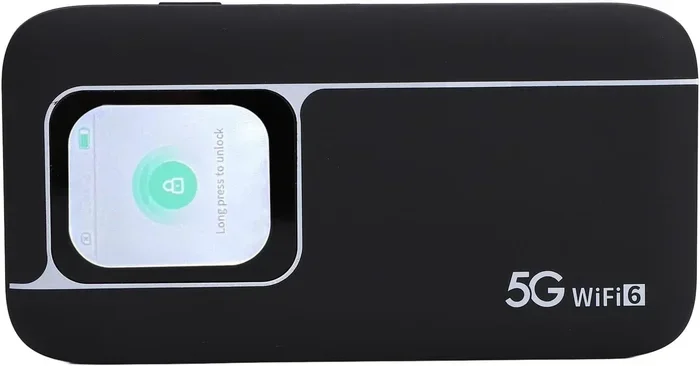
Does Google WiFi have WiFi 6? The answer depends on which model you own. Older Google WiFi units use the WiFi 5 standard, while newer Nest WiFi and Nest WiFi Pro devices support WiFi 6 and WiFi 6E. Understanding your specific model helps you get the best wireless performance for your home network.
Many people wonder about the wireless technology inside their Google WiFi router. You might have heard about WiFi 6 and its faster speeds. Maybe you are thinking about upgrading your home network. Or perhaps you just want to know what your current setup can do. This guide answers the big question: does Google WiFi have WiFi 6?
The short answer is not a simple yes or no. Google has released several versions of its WiFi system over the years. Each version uses a different wireless standard. Some models support WiFi 5, while newer ones offer WiFi 6 and even WiFi 6E. Knowing which one you have makes a huge difference for your internet experience.
In this article, we will break down every Google WiFi model. We will look at what WiFi 6 actually means. You will learn how to check your own device. We will also talk about whether upgrading makes sense for your home. By the end, you will know exactly where your setup stands.
Key Takeaways
- Google WiFi (original) uses WiFi 5: The first-generation Google WiFi routers do not support WiFi 6.
- Nest WiFi Pro supports WiFi 6E: Google’s newer mesh systems offer the latest wireless standards for faster speeds.
- WiFi 6 brings real benefits: You get better speed, lower latency, and improved performance with multiple devices.
- Check your model number: Looking at the label on your device tells you exactly which WiFi standard it uses.
- Mesh systems matter: A Google mesh network can extend coverage, but the WiFi standard depends on the hardware generation.
- Upgrading may help smart homes: If you have many smart home devices, WiFi 6 handles them much better.
📑 Table of Contents
What Is WiFi 6 and Why Does It Matter?
WiFi 6 is the newest wireless standard for home networks. It is also known as 802.11ax. This standard brings big improvements over the older WiFi 5 (802.11ac) technology. But what does that mean for you in real life?
Faster Speeds for Everyone
WiFi 6 offers much faster data speeds than older standards. The theoretical maximum speed jumps to 9.6 Gbps. That is a huge step up from WiFi 5’s 3.5 Gbps. In everyday use, you will notice faster downloads and smoother streaming. Your wireless connection feels more responsive overall.
Better Performance with Many Devices
Most homes now have dozens of connected devices. Smart TVs, phones, tablets, and smart speakers all compete for bandwidth. WiFi 6 uses a technology called OFDMA. This lets your router talk to multiple devices at the same time. Without it, your router handles them one by one. That causes slowdowns when many people are online.
Lower Latency and Better Battery Life
WiFi 6 also reduces latency. This means less lag when you are gaming or video calling. It also includes a feature called Target Wake Time. This helps battery-powered devices use less energy. Your wireless devices last longer between charges.
If you want to learn more about setting up a wireless network at home, check out Can I Get Just Wi-Fi at Home for helpful tips on building your setup.
Does Google WiFi Support WiFi 6?
The answer depends entirely on which Google WiFi model you own. Google has made several different versions of its mesh router system. Each one uses a different wireless standard. Let us look at them one by one.
Original Google WiFi (2016)
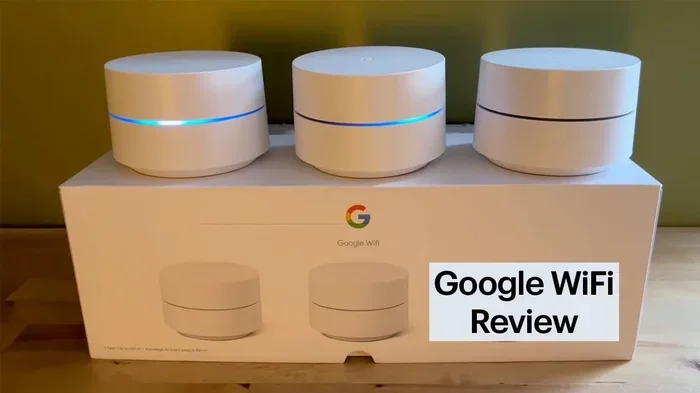
The first Google WiFi system came out in 2016. It uses WiFi 5 (802.11ac) technology. This model does not support WiFi 6 at all. It works fine for basic internet tasks. But it cannot take advantage of the newer WiFi 6 features. If you still have this model, your wireless speeds are limited by the older standard.
Google WiFi 2nd Generation (2019)
Google released an updated version around 2019. This model also uses WiFi 5. The hardware improved slightly. But it still does not include WiFi 6 support. The design changed to a more compact form factor. However, the wireless standard remained the same as the original.
Nest WiFi (2019)
The Nest WiFi system replaced the original Google WiFi. It also uses WiFi 5 technology. Google rebranded the product but kept the same wireless standard. The Nest WiFi points work well as a mesh network. They offer solid coverage for most homes. But they do not bring WiFi 6 speeds to your network.
Nest WiFi Pro (2022)
This is where things change. Nest WiFi Pro supports WiFi 6E. This is an extension of the WiFi 6 standard. WiFi 6E adds access to the 6 GHz band. This gives you even more speed and less interference. If you own Nest WiFi Pro, you have WiFi 6 capabilities in your home.
Want to understand how mesh systems work without wires? Read about Can Google Mesh Work Wirelessly to learn more about wireless mesh technology.
Google WiFi vs WiFi 6: Key Differences
Understanding the difference between your Google WiFi model and WiFi 6 helps you make smart choices. Let us compare them side by side.
Speed Comparison
WiFi 5 on older Google WiFi units maxes out around 1.2 Gbps per node. WiFi 6 can reach up to 9.6 Gbps in theory. In real-world tests, WiFi 6 delivers roughly 40% faster speeds. This difference matters when multiple people stream or game at the same time.
Device Handling
Older Google WiFi handles devices one at a time. WiFi 6 uses MU-MIMO and OFDMA. These technologies let the router serve many devices simultaneously. If your household has more than 15 connected devices, WiFi 6 makes a noticeable difference.
Range and Coverage
WiFi 6 improves range through better signal processing. The BSS Coloring feature reduces interference from neighboring networks. Older Google WiFi units may struggle in dense apartment buildings. WiFi 6 handles crowded wireless environments much better.
Smart Home Compatibility
Many smart home devices work fine on WiFi 5. But newer devices increasingly use WiFi 6. If you plan to add more smart gadgets, WiFi 6 keeps your network ready. It also reduces the strain on your wireless connection when many devices are active.
For help understanding how to connect your devices to your network, see Can I Add Wi-Fi to My PC for practical setup guidance.
Benefits of WiFi 6 for Your Home Network
If your Google WiFi supports WiFi 6, you unlock several real advantages. Let us explore what these mean for your daily internet use.
Streaming and Gaming Improve
WiFi 6 delivers the bandwidth that 4K streaming demands. It also cuts down on lag during online gaming. If you share your connection with family members, everyone benefits. The network stays fast even during peak usage hours.
Future-Proofing Your Setup
Internet providers keep offering faster plans. Gigabit and multi-gig connections are becoming common. Older WiFi standards cannot keep up with these speeds. WiFi 6 ensures your home network can handle what your ISP provides. This means you get the speeds you pay for.
Works Well with Many Devices
The average home now has 20 or more connected devices. Phones, laptops, smart TVs, security cameras, and smart speakers all connect. WiFi 6 manages this traffic efficiently. Your network stays stable even when many devices are active at once.
Improved Security Features
WiFi 6 supports WPA3 encryption. This is the latest security standard for wireless networks. It offers stronger protection against attacks. Your home network stays safer from unauthorized access.
Curious about whether your PC can connect without a wired connection? Check out Can I Connect My PC to Wi-Fi Without Ethernet for helpful options.
How to Check If Your Google WiFi Has WiFi 6
Not sure which model you own? Checking is quick and easy. You do not need to be a tech expert to find this information.
Check the Label on Your Device
Look at the bottom or back of your Google WiFi unit. You will see a model number printed there. Write it down or take a photo. Common model numbers include GW2001 for original Google WiFi and GW2004 for Nest WiFi.
Use the Google Home App
Open the Google Home app on your phone. Tap on your WiFi device. Go to Settings and then Network. The app shows your hardware details. Look for the WiFi standard listed there. It will say WiFi 5 or WiFi 6 depending on your model.
Search Online with Your Model Number
Type your model number into a search engine. The manufacturer’s specs page tells you the WiFi standard. You can also visit Google’s support site. They list the wireless capabilities for each model clearly.
Look at the Packaging or Receipt
If you still have the box or receipt, check the product name. Nest WiFi Pro specifically mentions WiFi 6E support. The original Google WiFi and Nest WiFi boxes say WiFi 5. This is the simplest way to confirm your model.
Not sure which adapter your PC uses to connect? Find out at Can Any Wi-Fi Adapter Work on Any PC for adapter compatibility tips.
Should You Upgrade to WiFi 6?
Deciding whether to upgrade depends on your situation. Not everyone needs WiFi 6 right now. But certain households benefit a lot from the upgrade.
When You Should Upgrade
Upgrade if you own a Nest WiFi Pro or plan to buy one. Upgrade if you have more than 15 connected devices. Upgrade if you pay for gigabit internet and want to use those speeds. Upgrade if you experience slow speeds during peak hours. Upgrade if you are a serious gamer who needs low latency.
When You Can Wait
Wait if you have fewer than 10 connected devices. Wait if your current internet plan is under 200 Mbps. Wait if your current Google WiFi works well for your needs. Wait if you are not planning to add new smart home devices soon.
What to Consider Before Upgrading
Think about your household size. More people means more devices and more demand. Consider your internet plan speed. A WiFi 6 router will not make a slow plan faster. Think about your budget. Newer Google WiFi Pro units cost more than older models. Weigh the cost against the benefits you will actually see.
Having trouble with your wireless connection at home? Find solutions in Can I Get Just Wi-Fi at Home for practical troubleshooting tips.
Final Thoughts
So, does Google WiFi have WiFi 6? The answer depends on your specific model. Older Google WiFi units and Nest WiFi use WiFi 5. Only the Nest WiFi Pro supports WiFi 6 and WiFi 6E. This matters because WiFi 6 brings faster speeds, better device handling, and improved range.
If you own a Nest WiFi Pro, you are already enjoying WiFi 6 benefits. If you have an older model, you are not missing out on the basics. WiFi 5 still handles most home internet tasks well. But as more devices join your network, WiFi 6 becomes more valuable.
Check your model number today. You will know exactly what wireless standard your Google WiFi uses. From there, you can decide if an upgrade makes sense. Your home network should work hard for you. Understanding your WiFi standard is the first step to getting the most out of it.
Frequently Asked Questions
Does Google WiFi support WiFi 6?
Only the Nest WiFi Pro model supports WiFi 6E. The original Google WiFi and Nest WiFi units use WiFi 5. Check your model number to confirm which standard your device uses.
What is the difference between WiFi 5 and WiFi 6?
WiFi 6 offers faster speeds, better performance with many devices, and lower latency. It uses technologies like OFDMA and MU-MIMO to handle traffic more efficiently. WiFi 5 works fine for basic use but struggles with heavy device loads.
Can I upgrade my old Google WiFi to WiFi 6?
No, you cannot upgrade the hardware of an older Google WiFi unit. The wireless standard is built into the device. You would need to buy a new Nest WiFi Pro to get WiFi 6 support.
Is WiFi 6 worth it for a small home?
It depends on how many devices you have. If you have fewer than 10 devices and a basic internet plan, WiFi 5 may be enough. But WiFi 6 provides better future-proofing and smoother performance as your setup grows.
How do I know if my Google WiFi is WiFi 6?
Check the model number on the device label or in the Google Home app. Nest WiFi Pro models support WiFi 6E. All other Google WiFi and Nest WiFi models use WiFi 5.
Will WiFi 6 improve my internet speed?
WiFi 6 can deliver faster speeds, but your internet plan also matters. If your ISP plan is slow, a WiFi 6 router will not make it faster. However, WiFi 6 helps you get the most out of faster internet plans and reduces slowdowns with many devices.