Does ATT Require A Router For Your Home Internet Setup
Does ATT Require A Router depends on your internet plan and equipment. AT&T provides a gateway device that combines a modem and router, but you can use your own router if you prefer. Understanding your options helps you get the best home internet setup for speed, coverage, and cost.
Setting up home internet can feel confusing. One question many people ask is whether they need a separate router when they sign up for AT&T internet. The answer depends on your plan type and the equipment AT&T provides.
AT&T internet service works in different ways depending on whether you have fiber, DSL, or fixed wireless. Each type uses specific internet equipment to get you online. Understanding what AT&T gives you and what you might need to buy yourself makes the whole process much easier.
In this guide, we will walk through everything you need to know about Does ATT Require A Router. We will cover what equipment AT&T provides, whether you can use your own router, and how to set up your Wi-Fi network the right way. By the end, you will feel confident about your home internet setup choices.
Key Takeaways
- AT&T provides a gateway device: Most AT&T internet plans include a combined modem-router unit called a gateway.
- You can use your own router: AT&T allows you to bring your own router, but you still need the gateway in bridge mode.
- AT&T fiber uses different equipment: Fiber plans may use an ONT (Optical Network Terminal) that acts as a modem.
- Using your own router can improve performance: Third-party routers often offer better speed, range, and features than AT&T’s default gateway.
- Setup is simple: Whether you use AT&T equipment or your own, setting up your Wi-Fi network follows a straightforward process.
- Rental fees add up: AT&T charges a monthly fee for their gateway, which can be avoided by using your own wireless router.
- Mesh systems work with AT&T: You can connect a mesh network to your AT&T setup for better whole-home coverage.
📑 Table of Contents
- What Equipment Does AT&T Provide for Internet Service
- Does AT&T Require A Router for Internet Service
- How to Set Up Your AT&T Internet Router
- AT&T Internet Plans and Router Requirements by Type
- Benefits of Using Your Own Router With AT&T
- Common Router Setup Mistakes to Avoid with AT&T
- Final Thoughts on Does ATT Require A Router
What Equipment Does AT&T Provide for Internet Service
When you sign up for AT&T internet, the company gives you specific networking equipment. This equipment is designed to connect your home to AT&T’s network and distribute internet signals to your devices. Let us look at what is included and how it works.
AT&T Gateway: The All-in-One Device
Most AT&T internet plans come with a device called a gateway. A gateway is a single box that acts as both a modem and a wireless router. It takes the signal from AT&T’s network and turns it into a Wi-Fi connection you can use at home.
The AT&T gateway also includes built-in Wi-Fi and Ethernet ports. This means you can connect devices using cables or wirelessly. For many households, this all-in-one device is enough to handle internet browsing, streaming, and video calls.
AT&T calls their gateway different names depending on the plan. Some common models include the BGW210, BGW320, and the Smart Home Manager. Each model offers different Wi-Fi speeds and features. The newer models support faster broadband speeds and better range.
What About AT&T Fiber Customers
If you have AT&T Fiber, your setup is a little different. Fiber internet uses light signals, so it needs a special device called an ONT (Optical Network Terminal). The ONT converts the light signal into an electrical signal your devices can use.
AT&T often pairs the ONT with a separate router or a gateway unit. In some cases, the ONT itself has basic router functions. But for the best performance, you may want to add your own wireless router to the setup.
Does AT&T Charge for the Equipment
Yes, AT&T charges a monthly rental fee for their gateway. This fee typically ranges from $10 to $15 per month. Over a year, that adds up to $120 to $180 in rental costs.
Some people prefer to avoid these fees by buying their own router. If you Can I Buy A Router And Install Myself, you can save money over time. Just make sure the router you choose is compatible with AT&T’s network.
Does AT&T Require A Router for Internet Service
The short answer is no, AT&T does not strictly require a separate router. The gateway they provide handles both modem and router functions. But whether you need a separate router depends on your home size, device count, and internet usage habits.
When the AT&T Gateway Is Enough
If you live alone or with one other person, the AT&T gateway might be all you need. A small apartment or a single-story home with few connected devices works well with the built-in Wi-Fi router in the gateway.
Basic internet activities like browsing, checking email, and light streaming do not need extra router power. If you only have a few devices connected at a time, the gateway should handle everything smoothly.
When You Need a Separate Router
Larger homes with many walls and floors benefit from a dedicated router. The AT&T gateway works best when placed in a central location. If your home is large or has thick walls, the Wi-Fi signal may not reach every room.
Households with many connected devices also need a stronger router. Smart home gadgets, gaming consoles, multiple phones, and laptops all compete for bandwidth. A separate high-performance router can handle this traffic much better than a gateway alone.
Gamers and streamers will especially notice a difference with a dedicated router. These activities need stable, fast connections. A separate Wi-Fi router can provide the low latency and high speeds that heavy users demand.
Can You Use Your Own Router With AT&T
Yes, you can absolutely use your own router with AT&T internet. To do this, you need to put the AT&T gateway into bridge mode. Bridge mode turns off the router functions of the gateway and lets your personal router handle all Wi-Fi duties.
Using your own router gives you more control. You can choose a router with better range, faster speeds, and advanced features like parental controls and quality of service settings. Many people who want a customized home network prefer this approach.
If you are considering this route, you might also want to explore Can I Get A Hotspot Instead Of Wi-Fi as an alternative for certain situations where a router setup is not practical.
How to Set Up Your AT&T Internet Router
Setting up your AT&T internet connection is straightforward. Whether you use the AT&T gateway or your own router, the basic steps are similar. Here is a simple guide to get you online quickly.
Setting Up the AT&T Gateway
First, place the gateway in a central location in your home. Avoid putting it in a closet or behind furniture. A central, elevated spot helps the Wi-Fi signal spread evenly throughout your space.
Next, connect the gateway to the AT&T wall outlet using the provided cable. Plug the power cord into the gateway and an electrical outlet. Wait for the lights on the gateway to stabilize, which usually takes about 2 to 3 minutes.
Once the gateway is ready, connect your devices. You can use the Wi-Fi name and password printed on the bottom of the gateway. Or you can connect a computer using an Ethernet cable for a faster initial setup.
Open a web browser and go to the AT&T router admin page. From there, you can customize your Wi-Fi network name, set a strong password, and adjust other settings. Taking a few minutes to configure these options improves your internet experience right away.
Using Your Own Router With AT&T
If you want to use your own router, start by putting the AT&T gateway into bridge mode. You can usually do this through the gateway settings page or by calling AT&T support. Once bridge mode is enabled, the gateway acts only as a modem.
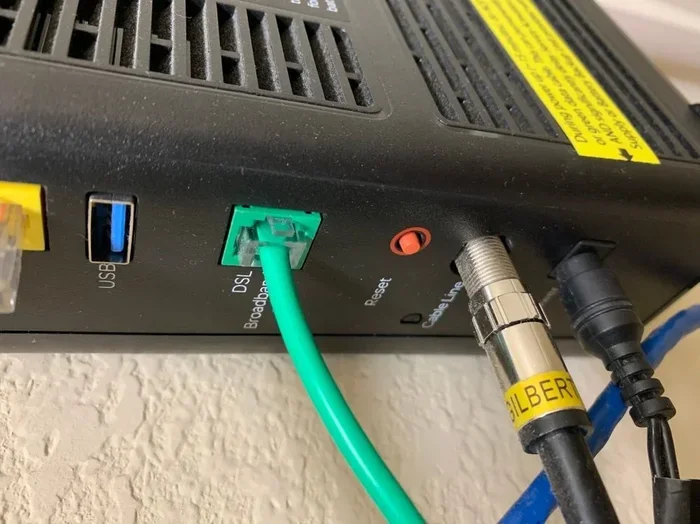
Connect your router to the gateway using an Ethernet cable. Plug one end into the gateway’s Ethernet port and the other into your router’s WAN or Internet port. Power on your router and wait for it to start up.
Your router will create its own Wi-Fi network. Use the router’s admin interface to set the network name and password. Now you can connect all your devices to the new network and enjoy better wireless coverage.
For larger homes, you might want to consider a mesh Wi-Fi system. These systems use multiple units to spread Wi-Fi coverage across your entire home. If you are curious about this option, check out Can I Connect Mesh To Existing Router for more details on how mesh systems work with your existing setup.
AT&T Internet Plans and Router Requirements by Type
Different AT&T internet plans use different technologies. Each technology has specific equipment requirements. Understanding these differences helps you choose the right setup for your needs.
| AT&T Plan Type | Equipment Provided | Separate Router Needed? | Typical Speeds |
|---|---|---|---|
| AT&T Fiber | ONT + Gateway or Router | Sometimes | Up to 5 Gbps |
| AT&T Internet (DSL) | Gateway (Modem-Router) | Rarely | Up to 100 Mbps |
| AT&T Fixed Wireless | Gateway with built-in router | Sometimes | Up to 25 Mbps |
| AT&T 5G Home Internet | 5G Gateway | Rarely | Up to 1 Gbps |
As you can see, most AT&T plans include a gateway that handles both modem and router functions. The need for a separate router depends mainly on your home size and usage demands.
AT&T Fiber plans offer the fastest speeds. These plans may benefit the most from a high-quality separate router. The gateway that comes with fiber plans is good, but a dedicated router can push those speeds to their full potential.
DSL and fixed wireless plans have lower speed caps. For these plans, the included gateway is usually sufficient. A separate router may still help if you have a larger home or many devices.
Benefits of Using Your Own Router With AT&T
Many people choose to ditch the AT&T gateway and use their own router instead. There are several good reasons for this choice. Let us explore the main benefits.
Better Wi-Fi Performance
Third-party routers often deliver better Wi-Fi performance than AT&T gateways. They use more advanced antennas and Wi-Fi technology like Wi-Fi 6 and Wi-Fi 6E. These standards offer faster speeds and handle more devices at once.
More Features and Control
Your own router gives you access to advanced features. You can set up parental controls, prioritize bandwidth for specific devices, and create guest networks. These features help you manage your home network more effectively.
Save Money Over Time
Avoiding the AT&T rental fee saves you money. A good router costs between $100 and $200 one time. After 8 to 12 months, you have already saved compared to paying the monthly rental fee. Over several years, the savings add up significantly.
If you are exploring other internet service providers and wondering about equipment choices, you might find it helpful to read about Can I Change Out My Router With Spectrum for a comparison of router options across different ISPs.
Future-Proof Your Network
Technology changes fast. Buying your own router means you can upgrade whenever you want. You are not stuck with whatever AT&T provides. This flexibility lets you stay current with the latest Wi-Fi standards and networking features.
Common Router Setup Mistakes to Avoid with AT&T
Setting up a router seems simple, but small mistakes can cause big problems. Here are common errors people make with their AT&T internet setup and how to avoid them.
- Placing the router in a bad location: Keep your gateway or router in an open, central spot. Walls, metal objects, and appliances can block the Wi-Fi signal.
- Forgetting to update firmware: Routers need software updates just like phones and computers. Check for updates regularly to keep your network secure and running smoothly.
- Using the default password: Always change the default admin password and Wi-Fi password. This protects your home network from unauthorized access.
- Not putting the gateway in bridge mode: If you use your own router, make sure to enable bridge mode on the AT&T gateway first. Otherwise, you will have two routers fighting for control, which causes connection issues.
- Ignoring speed test results: After setup, run a speed test to make sure you are getting the speeds you pay for. If speeds are low, try moving the router or adjusting settings.
Taking a few extra minutes to avoid these mistakes saves hours of frustration later. A proper setup ensures your AT&T internet works at its best from day one.
Final Thoughts on Does ATT Require A Router
So, does AT&T require a separate router? The answer is no, not strictly. AT&T provides a gateway that handles both modem and router duties. For many users, this all-in-one device works perfectly fine.
However, if you live in a larger home, have many connected devices, or want better performance, adding your own wireless router is a smart move. You get faster speeds, better range, and more features. Plus, you avoid the monthly rental fee that AT&T charges for their gateway.
Whether you stick with the AT&T gateway or bring your own router, the key is to set everything up correctly. Place your equipment in a central location, use strong passwords, and keep your firmware updated. These simple steps make a huge difference in your daily internet experience.
Understanding your options gives you control over your home internet setup. You no longer have to guess what works best. With the right equipment and a little knowledge, you can enjoy fast, reliable Wi-Fi throughout your home.
Take some time today to evaluate your current setup. If you are not happy with your Wi-Fi coverage or speed, consider upgrading your router or adjusting your placement. Small changes can lead to big improvements in how you use the internet every day.
Frequently Asked Questions
Do I Need a Router If I Have AT&T Internet?
AT&T provides a gateway that includes both a modem and a router built into one device. For most basic internet needs, this gateway is enough. However, if you want better speed, range, or features, adding a separate wireless router can improve your experience significantly.
Can I Use My Own Router With AT&T Internet Service?
Yes, you can use your own router with AT&T. You just need to put the AT&T gateway into bridge mode first. This disables the gateway’s router functions and lets your personal router manage all Wi-Fi connections. Make sure your router is compatible with AT&T’s internet type, whether it is fiber, DSL, or fixed wireless.
What Is the Difference Between a Modem and a Router?
A modem connects your home to AT&T’s internet network. A router takes that connection and shares it with your devices through Wi-Fi or Ethernet cables. AT&T’s gateway combines both functions into a single box. Using separate devices gives you more control and often better performance.
Does AT&T Charge Extra for a Router?
AT&T charges a monthly rental fee for their gateway, typically $10 to $15 per month. This fee covers the modem and router combined. If you buy your own router and use the AT&T gateway in bridge mode, you can eliminate this monthly cost and save money over time.
How Can I Improve Wi-Fi Coverage with My AT&T Setup?
Start by placing your gateway or router in a central, open location. Avoid closets and corners. For larger homes, consider a mesh Wi-Fi system or a Wi-Fi extender. You can also update your router’s firmware and switch to less crowded Wi-Fi channels to boost performance.
What AT&T Gateway Models Support Third-Party Routers?
Most modern AT&T gateways support bridge mode, including the BGW210, BGW320, and Smart Home Manager models. To enable bridge mode, log into the gateway settings or call AT&T support. Once in bridge mode, connect your own router to the gateway using an Ethernet cable.
=== CONCLUSION ===
Does ATT Require A Router for your home internet setup? Not necessarily. AT&T provides a gateway that works as both a modem and a router for most plans. But you have options. You can use the AT&T gateway as-is, or you can bring your own router for better performance and savings.
Your choice depends on your home size, the number of devices you use, and your internet habits. Small households with basic needs will find the AT&T gateway sufficient. Larger homes and heavy users will benefit from a dedicated wireless router or a mesh network setup.
Take the time to understand your equipment and options. A well-planned home internet setup makes every online activity faster and more enjoyable. Whether you stream movies, work from home, or game online, the right router setup makes all the difference.