Do Audio Jack To Usb Adapters Work For Your Headphones
Audio jack to USB adapters do work, but their performance depends on your device, headphones, and the adapter quality. These small dongles convert analog signals to digital, letting you plug wired headphones into laptops, phones, and tablets that only have USB ports. Understanding how they function helps you avoid frustration and get the best sound from your setup.
You just bought a great pair of wired headphones. You plug them in, ready to enjoy your favorite music. But wait. Your phone, laptop, or tablet doesn’t have a headphone jack. Sound familiar? This is where an audio jack to USB adapter comes in. These tiny devices promise to solve your problem in seconds. But do they actually work? The short answer is yes. The longer answer is that it depends on several factors. Let me walk you through everything you need to know.
In this guide, I will explain exactly how audio jack to USB adapters function, which devices they work with, common problems you might face, and how to pick the right one. Whether you are a casual listener or an audiophile who cares about sound quality, this article has you covered. I will also share practical tips that will save you time and money. So let us dive in.
Key Takeaways
- Audio jack to USB adapters bridge the gap between older wired headphones and newer devices that lack a 3.5mm headphone jack.
- They work by converting analog signals to digital, which requires a built-in DAC (digital-to-analog converter) inside the adapter.
- Not all adapters are equal. Cheap adapters may introduce audio latency, noise, or poor sound quality compared to premium options.
- Compatibility varies by device. Some phones, laptops, and tablets need specific adapter types, such as USB-C to 3.5mm or USB-A to 3.5mm.
- Driver installation may be required on Windows computers for certain USB audio adapters to function properly.
- Wireless alternatives exist, but a USB audio adapter remains the best choice for audiophiles who want zero latency and wired reliability.
- Check our guide on 10 Gadgets To Make Moms Life Easier for more helpful tech accessories that simplify everyday tasks.
📑 Table of Contents
- What Is An Audio Jack To USB Adapter?
- How Do Audio Jack To USB Adapters Work?
- Do They Actually Work With Your Headphones?
- Common Compatibility Issues And How To Fix Them
- When Should You Use A USB Audio Adapter?
- Tips For Getting The Best Audio Quality From Your Adapter
- Common Mistakes People Make With USB Audio Adapters
- Expert Insights On USB Audio Adapters
- Final Thoughts
What Is An Audio Jack To USB Adapter?
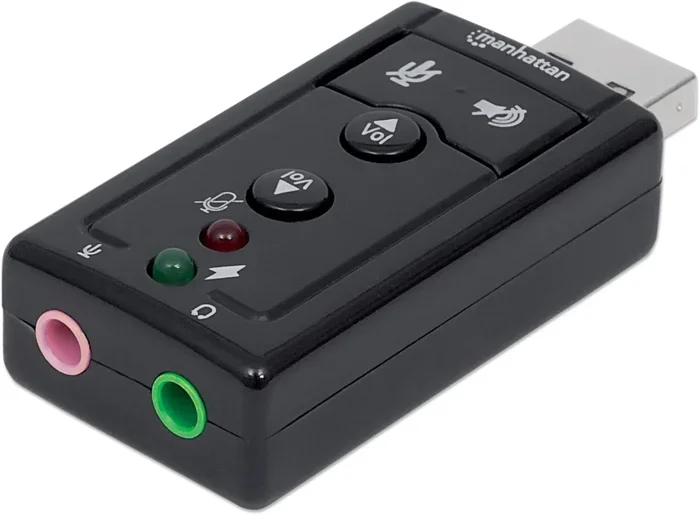
An audio jack to USB adapter is a small dongle that lets you connect headphones with a 3.5mm plug to a device that only has a USB port. Think of it as a translator. Your headphones speak one language (analog audio), and your USB port speaks another (digital data). The adapter bridges that gap.
These adapters come in different shapes and sizes. The most common types include:
- USB-A to 3.5mm – Plugs into a standard rectangular USB port. Great for desktop computers and older laptops.
- USB-C to 3.5mm – Fits into the smaller oval-shaped USB-C port found on modern phones, tablets, and newer laptops.
- Lightning to 3.5mm – Designed specifically for Apple devices like iPhones and iPads.
Each type serves the same basic purpose but connects to a different port. Choosing the right one is your first step toward getting your headphones working again.
Why Do Devices Remove The Headphone Jack?
You might wonder why companies removed the headphone jack in the first place. The reasons are simple. Removing the jack frees up internal space for bigger batteries, better speakers, or new features. It also encourages people to go wireless. From a manufacturer’s perspective, this makes sense. But for users who love their wired headphones, it can be annoying.
The good news is that USB audio adapters have become widely available and affordable. You can find them for as little as five to ten dollars online. Of course, spending a little more on a quality adapter pays off in better sound and fewer headaches.
How Do Audio Jack To USB Adapters Work?
Understanding how these adapters work helps you appreciate why some sound better than others. At the heart of every audio jack to USB adapter is a tiny chip called a DAC, which stands for digital-to-analog converter. Let me break that down in simple terms.
When you stream music from Spotify or Apple Music, the audio file is stored as digital data. That is ones and zeros. Your headphones cannot play digital data directly. They need an analog electrical signal. The DAC inside the adapter converts the digital signal into an analog one. Then the analog signal travels through the cable to your headphones, and you hear music.
Here is a simple step-by-step of what happens:
- Your device sends digital audio data through the USB port.
- The adapter’s DAC chip converts the digital data into an analog signal.
- The analog signal travels through the 3.5mm cable to your headphones.
- Your headphones turn the electrical signal into sound waves.
That process happens in milliseconds. You do not notice any delay in most cases. But the quality of the DAC chip matters a lot. A cheap adapter uses a basic DAC that may produce flat or tinny sound. A premium adapter uses a better DAC that delivers richer bass, clearer highs, and more detailed sound overall.
The Role Of The DAC In Audio Quality
The DAC is the most important part of your USB audio adapter. Think of it as the engine of a car. A powerful engine makes the car fast. A good DAC makes your audio sound better. Some adapters have built-in amplifiers too, which boost the signal so your headphones get louder and clearer.
If you use high-impedance headphones or studio monitors, a basic adapter will struggle. You need an adapter with a strong DAC and amplifier. For everyday listening with standard earbuds or consumer headphones, even a budget adapter works fine.
Do They Actually Work With Your Headphones?
The short answer is yes, audio jack to USB adapters work with most wired headphones. But there are some important exceptions and things to watch out for. Let me walk you through the different scenarios.
With Smartphones And Tablets
Most modern Android phones and Windows tablets with USB-C ports work well with a USB-C to 3.5mm adapter. Apple iPhones need a Lightning to 3.5mm adapter, which Apple sells separately. Samsung, Google Pixel, and other Android phones generally support USB-C audio adapters without any extra setup. Just plug it in and your headphones should work immediately.
One thing to keep in mind. Some Android phones disable the USB-C audio output when you plug in a charger at the same time. This is not common, but it does happen. If your headphones stop working while charging, try unplugging the charger and see if the audio returns.
With Laptops And Desktops
Desktop computers and older laptops usually have both USB ports and a headphone jack. So you might not need an adapter at all. But if your computer only has USB ports, a USB audio adapter is the perfect solution. Windows computers usually recognize USB audio adapters automatically. Mac computers handle them well too.
On some Windows laptops, you might need to install a driver. This is rare but possible. Check the adapter manufacturer’s website for driver downloads if the sound does not work right away after plugging it in.
With Gaming Consoles And Smart TVs
Some gaming consoles and smart TVs also support USB audio adapters. The Nintendo Switch, for example, works with USB-C to 3.5mm adapters for wired headset use. Many smart TVs have USB ports that can power audio adapters, though compatibility varies by brand and model. Always check the TV’s manual or specs before buying an adapter.
Common Compatibility Issues And How To Fix Them
Even though audio jack to USB adapters work with most devices, you might run into problems. Here are the most common issues and how to solve them.
No Sound After Plugging In
This is the most common complaint. If you plug in your adapter and hear nothing, try these steps:
- Check that the adapter is fully inserted into the USB port.
- Make sure your headphones are plugged firmly into the adapter’s 3.5mm jack.
- Go to your device’s sound settings and select the USB adapter as the audio output device.
- Try a different USB port. Some ports may not supply enough power.
- Restart your device and try again.
On Windows, you can access sound settings by right-clicking the speaker icon in your taskbar. On Mac, go to System Settings and then Sound. On phones, check your Bluetooth and sound output settings.
Distorted Or Crackling Audio
If the sound comes through but it sounds fuzzy or crackly, the problem is usually one of three things:
- A cheap adapter with a low-quality DAC chip.
- Interference from other USB devices or cables running nearby.
- Incompatible headphones. Some high-impedance headphones need more power than a basic adapter can provide.
Switching to a better-quality adapter often solves this problem. Look for adapters with built-in DAC chips from reputable brands like Fiio, Sabrent, or UGreen.
Audio Lag Or Latency
Audio latency means there is a slight delay between the video and the sound. This is more common with USB adapters than with a direct headphone jack connection. For watching videos or playing games, latency can be annoying. Premium adapters with better DAC chips reduce latency significantly. If you are sensitive to audio delay, consider a USB sound card adapter designed for low-latency performance.
Adapter Not Recognized By Device
Sometimes your device simply does not recognize the adapter. This can happen with certain USB hubs or unpowered USB ports. Try plugging the adapter directly into your device instead of through a hub. If that does not work, the adapter itself might be defective. Most reputable brands offer warranties, so you can usually get a replacement.
When Should You Use A USB Audio Adapter?
There are many situations where an audio jack to USB adapter makes perfect sense. Here are the most common ones:
- Your phone removed the headphone jack. This is the number one reason people buy these adapters. If you have wired headphones and a USB-C phone, an adapter is essential.
- You want better audio quality than Bluetooth. Bluetooth compresses audio. A wired connection through an adapter preserves more of the original audio detail. For music lovers, this difference is real.
- You use headphones for work calls. A USB adapter with a built-in microphone works great for Zoom calls and online meetings.
- Your laptop only has USB ports. Many modern thin laptops have dropped the 3.5mm jack entirely. A USB adapter fills that gap.
- You travel frequently. These adapters are small and lightweight. They fit easily in your pocket or laptop bag.
For those who want to explore more helpful tech accessories that make daily life simpler, our guide on 10 Gadgets To Make Moms Life Easier has some great ideas for staying organized and connected.
USB Adapters vs Bluetooth: Which Is Better?
This is a question many people ask. Both options have pros and cons. Let me break it down for you.
| Feature | USB Audio Adapter | Bluetooth Headphones |
|---|---|---|
| Audio Quality | Better (uncompressed signal) | Good (compressed signal) |
| Latency | Very low or none | Noticeable delay |
| Battery Required | No (powered by USB) | Yes (needs charging) |
| Portability | Small dongle + cable | Wireless freedom |
| Compatibility | Works with any 3.5mm headphones | Only works with Bluetooth devices |
| Price | Low to moderate | Wide range |
As you can see, USB adapters win on audio quality and zero latency. Bluetooth wins on convenience and wireless freedom. The best choice depends on what matters most to you. If sound quality is your priority, go with a USB audio adapter. If you want to move around freely, Bluetooth is the way to go.
For more on how your devices connect wirelessly, you might also enjoy our article on are all rings connected to wifi to understand the broader picture of wireless connectivity.
Tips For Getting The Best Audio Quality From Your Adapter
Getting the most out of your audio jack to USB adapter is easier than you think. Follow these practical tips for the best experience.
- Buy a quality adapter. Spending $15 to $30 on a well-reviewed adapter makes a huge difference compared to a $5 no-name dongle. Look for adapters with dedicated DAC chips.
- Use short cables. Longer cables can pick up interference and weaken the signal. Keep your 3.5mm cable as short as practical.
- Update your device drivers. On Windows, outdated USB audio drivers can cause sound problems. Check for driver updates regularly.
- Avoid USB hubs. Plug the adapter directly into your device for the best power supply and connection stability.
- Clean your headphone jack. Dust and lint inside the 3.5mm plug can cause poor contact and crackling sound. A quick wipe with a dry cloth helps.
- Check your audio settings. Make sure your device is set to output audio through the USB adapter, not the built-in speaker or Bluetooth connection.
These small steps can dramatically improve your listening experience. Most people skip them and then blame the adapter for poor sound. Often, the problem is something simple that a quick fix solves.
Quick Tips For iPhone Users
iPhone users have a slightly different experience. Apple uses its Lightning connector for iPhones up to the iPhone 14 series. The iPhone 15 and newer models use USB-C. Make sure you buy the right adapter for your specific iPhone model. Using the wrong adapter will not work and could damage your device.
For more iPhone-specific tips, check out our guide on adding prefixes to numbers on iPhone for helpful ways to manage your phone settings more effectively.
Common Mistakes People Make With USB Audio Adapters
Avoiding these mistakes will save you time, money, and frustration.
- Buying the cheapest adapter possible. A $3 adapter might work, but the sound quality will likely be poor and it may break within weeks. Invest in something decent.
- Assuming all adapters work the same way. USB-A and USB-C adapters are not interchangeable. Make sure you buy the right type for your device.
- Ignoring driver updates. On Windows computers, outdated drivers are a leading cause of audio problems. Keep them updated.
- Using a damaged cable. A frayed or bent 3.5mm cable can cause intermittent sound or complete silence. Replace damaged cables promptly.
- Not testing the adapter before buying. If possible, read reviews and check compatibility lists before purchasing. Not every adapter works with every device.
These mistakes are easy to avoid with a little research. Taking five extra minutes to read reviews can save you hours of frustration later.
Expert Insights On USB Audio Adapters
Audio engineers and tech reviewers generally agree on a few key points about audio jack to USB adapters. First, the DAC chip matters more than the adapter’s physical build. A well-built adapter with a mediocre DAC will sound worse than a simple adapter with an excellent DAC. Second, the analog cable that runs from the adapter to your headphones matters too. A well-shielded cable reduces interference and delivers cleaner sound.
Third, USB adapters are not just for headphones. They also work with external microphones, musical instruments, and audio interfaces. Musicians and podcasters use USB audio adapters regularly for recording purposes. The versatility of these small devices is often overlooked.
Finally, the audio industry is slowly moving back toward including headphone jacks in some devices. But for now, USB adapters remain the best solution for wired audio on modern devices. They are affordable, reliable, and deliver excellent sound when you choose the right one.
Final Thoughts
So do audio jack to USB adapters work for your headphones? Absolutely yes. They are a simple, effective solution for connecting wired headphones to devices that lack a traditional headphone jack. Whether you are using a USB-C phone, a laptop with only USB ports, or a tablet, the right adapter makes it all work seamlessly.
The key is choosing a quality adapter that matches your device and your listening needs. Avoid the cheapest options if you care about sound quality. Check compatibility before you buy. And follow the simple tips in this guide to get the best performance every time.
With the right USB audio adapter, your favorite wired headphones will sound as good as ever. No compromises needed. Just plug in, play, and enjoy your music the way it was meant to be heard.
Frequently Asked Questions
Do audio jack to USB adapters work with all headphones?
Most wired headphones with a standard 3.5mm plug work perfectly with USB audio adapters. However, high-impedance studio headphones may need an adapter with a built-in amplifier. Check your headphones’ specifications before purchasing an adapter to ensure compatibility.
Why is there no sound when I plug in my USB audio adapter?
The most common reason is that your device is not set to output audio through the USB adapter. Go to your sound settings and select the USB adapter as the default output device. Also make sure the adapter is fully inserted and your headphones are plugged in securely.
Do USB audio adapters affect battery life on phones?
Yes, using a USB audio adapter draws a small amount of power from your phone’s battery. The effect is minimal during normal listening sessions. However, if your phone battery is already low, the adapter may drain it slightly faster than usual.
Can I use a USB audio adapter for gaming?
Yes, USB audio adapters work well for gaming. They offer lower audio latency than Bluetooth connections, which is important for competitive games where timing matters. Look for adapters labeled as low-latency or gaming-grade for the best experience.
Are expensive USB audio adapters worth the money?
For casual listening, a mid-range adapter works great. But if you are an audiophile or use professional headphones, spending more on an adapter with a premium DAC chip is worth it. The difference in sound clarity, bass response, and detail is noticeable.
Can I use a USB audio adapter with a smart TV?
Many smart TVs with USB ports support audio adapters, but compatibility varies by brand and model. Check your TV’s user manual or specifications to confirm USB audio support before purchasing an adapter.
=== CONCLUSION ===
Audio jack to USB adapters are a simple yet essential accessory for anyone who still loves their wired headphones. They work reliably across phones, laptops, tablets, and even some gaming setups. The key to a great experience is picking the right adapter for your device and following the setup tips outlined in this guide. Avoid common mistakes like buying cheap no-name adapters or skipping driver updates. With the right adapter in hand, you will enjoy clear, high-quality audio every time you plug in your headphones. Invest in a good one, and your listening experience will thank you.