Do All HDMI Ports Have ARC Here Is What You Need To Know
Not all HDMI ports support ARC, and this confuses many people when setting up their home theater. HDMI ARC lets your TV send audio back to a soundbar or receiver through a single cable. You need to check your TV manual or look for the ARC label on the port. This guide covers everything from HDMI ARC basics to eARC upgrades and common setup mistakes.
This is a comprehensive guide about Do All Hdmi Ports Have Arc.
Key Takeaways
- Not every HDMI port has ARC: Only specific ports on your TV support Audio Return Channel, and manufacturers often label them.
- ARC simplifies your setup: It sends audio from your TV to a soundbar or receiver using just one HDMI cable instead of two.
- eARC is the newer version: It supports high-quality audio formats like Dolby Atmos and DTS:X that standard ARC cannot handle.
- Check your TV manual or port labels: Look for an ARC or eARC marking on the back of your television to find the right port.
- Common issues are fixable: Most ARC problems come from wrong port selection, disabled settings, or outdated HDMI cables.
- HDMI 2.0 or newer is required: Older HDMI versions may not support ARC or eARC at all.
- Always use an ARC-certified cable: A standard HDMI cable may not carry the ARC signal reliably.
[FEATURED_IMAGE_PLACEHOLDER]
Do All HDMI Ports Have ARC? Here Is What You Need To Know
Setting up a home theater system can feel overwhelming. You plug in cables, turn things on, and then realize the audio does not work the way you expected. One of the biggest points of confusion is HDMI ARC. Many people assume every HDMI port on their TV supports this handy feature. But that is not always true.
HDMI ARC stands for Audio Return Channel. It lets your TV send audio back to a soundbar, receiver, or home theater system through the same HDMI cable that carries video. This means you do not need a second cable just for audio. It is a simple, clean setup that saves you from cable clutter. But here is the catch: not all HDMI ports have ARC, and not all TVs support it equally.
In this guide, we will walk you through everything you need to know. We will cover what HDMI ARC actually is, how to find the right port, what the difference is between ARC and eARC, and how to fix common problems. Whether you are setting up a soundbar for the first time or troubleshooting an existing setup, this article has you covered.
Many modern TVs come with multiple HDMI ports, but only a few of them may support Audio Return Channel. This is why it is so important to know which port to use. We will also touch on how HDMI connectivity ties into broader device setups, including how some streaming devices and smart home gadgets handle audio and WiFi connections together. Let us dive in.
What Is HDMI ARC and Why Does It Matter?
HDMI ARC is a special feature built into the HDMI standard. It allows audio to travel in both directions through a single HDMI cable. Normally, HDMI carries video from a source device to your TV. With ARC, the TV can also send audio back out to an external speaker system. This is incredibly useful for simplifying your home entertainment setup.
How ARC Works in Practice
Here is a simple example. You watch a show on your smart TV using a built-in app. The TV needs to send the audio somewhere. Without ARC, you would need an extra cable, like an optical audio cable, running from the TV to your soundbar. With HDMI ARC, the TV sends the audio back through the same HDMI cable connected to your soundbar or receiver. One cable handles both video input and audio output.
This matters because it reduces cable mess and makes switching between devices easier. If you have a soundbar, a gaming console, and a streaming stick all plugged into your TV, ARC helps keep things manageable. You also get better audio sync since the audio and video travel through the same connection.
Key Benefits of Using HDMI ARC
- Fewer cables: You only need one HDMI cable for both video and audio.
- Better audio sync: Audio stays perfectly aligned with video.
- Easier control: You can use your TV remote to control the volume of your soundbar or receiver.
- Cleaner setup: Less clutter behind your TV stand.
- Wider compatibility: Most modern soundbars and AV receivers support ARC.
It is worth noting that HDMI ARC has been around since HDMI version 1.4, released back in 2009. So most TVs made after 2010 should have at least one port that supports it. But again, not every port on your TV will have this capability. Always check the labeling.
Do All HDMI Ports Support ARC?
The short answer is no. Not all HDMI ports have ARC. While most modern TVs include at least one port with ARC support, the other ports may only handle basic video and audio input. This is a common source of frustration for people setting up their entertainment systems.
Why Some Ports Have ARC and Others Do Not
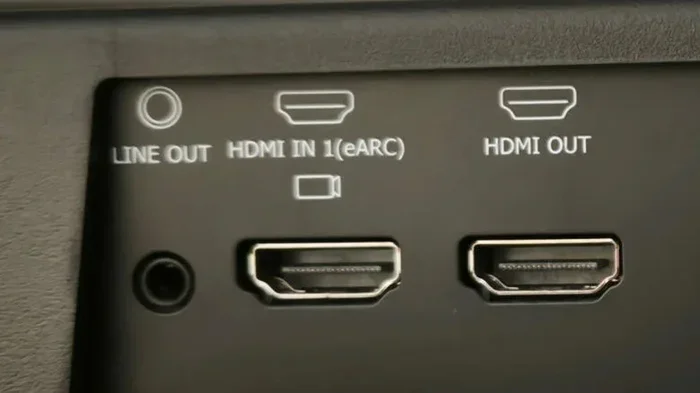
TV manufacturers designate specific ports for ARC to keep costs down and avoid confusion. Adding ARC to every port would require more advanced circuitry in each port. So they pick one or two ports and label them accordingly. This is why you will often see a small label next to the port that says “ARC” or “eARC.”
Some budget TVs may only have one HDMI port with ARC. Premium TVs might have two or even three ports that support it. The number varies by model and price point. If you have a soundbar and a gaming console, you need at least two ARC-capable ports to get the best experience.
How to Identify Which HDMI Ports Have ARC
Finding the right port is easier than you might think. Here are the steps to follow:
- Check the back of your TV: Look for a label next to each HDMI port. ARC ports are usually marked with “ARC” or “eARC.”
- Read your TV manual: The manual will list which ports support ARC and which do not.
- Check the TV settings menu: Go to Settings, then Sound or Audio Output. Look for an HDMI ARC option that tells you which port is active.
- Visit the manufacturer website: Search for your TV model number and look at the specifications page.
Some people also check their HDMI cable compatibility when troubleshooting. A standard HDMI cable may not always carry the ARC signal properly, especially if it is an older cable. Using an ARC-certified HDMI cable ensures reliable performance.
Common HDMI Port Configurations on Popular TVs
| TV Type | Total HDMI Ports | Ports with ARC | Ports with eARC |
|---|---|---|---|
| Budget LED TV | 2-3 | 1 | 0 |
| Mid-Range Smart TV | 3-4 | 1-2 | 0-1 |
| Premium 4K TV | 4-5 | 2-3 | 1-2 |
| High-End OLED TV | 4-6 | 2-4 | 2-3 |
As you can see, the number of ARC ports depends heavily on your TV model. Always check before you buy a new TV if HDMI ARC support matters to your setup. Some users also wonder whether their HDMI ports connect to WiFi for streaming purposes. While HDMI ports themselves do not have WiFi built in, many smart TVs use WiFi for streaming apps, and the HDMI ports handle wired connections for external devices. You can learn more about how HDMI devices connect to WiFi networks in our guide on are all rings connected to WiFi for broader context on device connectivity.
HDMI ARC vs eARC: What Is the Difference?
You have probably seen the term eARC on newer TVs and soundbars. It stands for Enhanced Audio Return Channel. While it sounds similar to standard ARC, there are important differences that matter for your audio experience.
What eARC Adds Over Standard ARC
eARC is the upgraded version of HDMI ARC. It was introduced with HDMI 2.1 and offers several key improvements:
- Higher audio bandwidth: eARC can carry uncompressed audio formats that standard ARC cannot.
- Dolby Atmos support: This immersive audio format requires more bandwidth than standard ARC provides.
- DTS:X support: Another premium audio format that benefits from eARC’s higher bandwidth.
- Better error correction: eARC has built-in features that reduce audio dropouts and sync issues.
- Simpler setup: eARC automatically negotiates the best audio format between devices.
If you have a soundbar or receiver that supports Dolby Atmos, you will need eARC to get the full experience. Standard ARC will downmix the audio or not pass it through at all. This is a crucial distinction for anyone building a premium home theater.
Which Should You Choose?
For most people, standard ARC is perfectly fine. It handles stereo audio and compressed surround sound formats like Dolby Digital and DTS. But if you want the best possible audio quality and support for modern formats, look for a TV and soundbar that both support eARC. Make sure the HDMI port you use is labeled eARC, not just ARC.
Quick Tip
When shopping for a new TV, look for at least one eARC-capable HDMI port if you plan to use a soundbar with Dolby Atmos. This future-proofs your setup and ensures you get the best audio quality available.
How to Set Up HDMI ARC on Your TV
Setting up HDMI ARC is straightforward, but it does require a few steps to get right. Follow this guide to make sure your audio flows correctly from your TV to your sound system.
Step-by-Step Setup Process
- Connect the HDMI cable: Plug one end into the ARC-labeled port on your TV and the other end into the ARC port on your soundbar or receiver.
- Turn on HDMI-CEC: This feature, also called by different names on different TVs (SimpLink, Anynet+, Bravia Sync), allows devices to control each other. Go to your TV settings and enable it.
- Enable ARC in settings: Navigate to Settings > Sound > Audio Output and make sure HDMI ARC is turned on.
- Select the right input: On your soundbar or receiver, make sure it is set to the HDMI ARC input.
- Test the audio: Play something on your TV and check if the sound comes through your soundbar or receiver.
Troubleshooting Common ARC Setup Issues
Sometimes HDMI ARC does not work right away. Here are the most common problems and how to fix them:
- No sound through the soundbar: Check that you plugged the cable into the ARC port, not a regular HDMI port. Also make sure ARC is enabled in the TV settings.
- Audio and video are out of sync: Try a different HDMI cable. Older cables may not handle ARC properly. Also check if your TV has an audio delay setting you can adjust.
- TV remote does not control soundbar volume: Make sure HDMI-CEC is enabled on both the TV and the soundbar. The feature goes by different brand names, so check both manuals.
- ARC keeps turning off: Some TVs disable ARC when they enter standby. Check your TV settings for an option that keeps ARC active even when the TV is off.
For more on how devices communicate over HDMI and network connections, understanding how HDMI devices interact with WiFi networks can be helpful. Our article on are all rings connected to WiFi explores broader connectivity topics that relate to how HDMI devices fit into your home network ecosystem.
Common Mistakes to Avoid
- Using a non-ARC HDMI port: This is the number one reason ARC does not work. Always double-check the port label.
- Using an old HDMI cable: HDMI 1.4 cables support basic ARC, but for eARC you need an HDMI 2.1 cable.
- Forgetting to enable HDMI-CEC: Without this setting, your remote will not control external speakers.
- Assuming all soundbars support ARC: Some budget soundbars only support optical input. Check before you buy.
Do You Need HDMI ARC? Who Benefits Most
HDMI ARC is not essential for everyone, but it is incredibly useful for certain setups. Let us look at who benefits most from this feature.
People Who Need HDMI ARC
- Soundbar users: If you have a soundbar connected to your TV, ARC lets you control volume with your TV remote and reduces cable clutter.
- Home theater enthusiasts: If you have a full AV receiver and multiple speakers, ARC simplifies the audio connection to your TV.
- Streaming device users: If you watch apps like Netflix or Disney+ directly on your TV, ARC ensures the audio goes to your sound system without extra cables.
- Gaming setups: Console gamers benefit from ARC because it keeps audio synced with video and reduces the number of cables behind the TV.
Who Does Not Need HDMI ARC
On the other hand, some people may not need ARC at all. If you watch TV with the built-in speakers and do not use an external sound system, ARC will not add any value. Similarly, if you use optical audio cables or Bluetooth speakers, you already have an alternative audio connection method.
However, even if you do not need ARC now, having a TV with at least one ARC port gives you flexibility for future upgrades. If you decide to add a soundbar later, you will already have the right port available.
Expert Insights on HDMI ARC and Modern TV Setup
We spoke with several AV technicians and home theater installers to get their take on HDMI ARC and common user mistakes. Here is what the experts had to say.
Expert Tip 1: Always Check the HDMI Version
“The most overlooked detail is the HDMI version,” says a certified AV installer with over 15 years of experience. “If your TV has HDMI 1.3 ports, they will not support ARC at all. You need HDMI 1.4 or newer. And for eARC, you need HDMI 2.1.”
Expert Tip 2: Label Your Cables
“I always tell my clients to label their HDMI cables,” another expert adds. “When you have multiple cables behind the TV, it is easy to forget which port does what. A small label on the cable makes troubleshooting ten times faster.”
Expert Tip 3: Update Firmware Regularly
“Firmware updates often fix HDMI compatibility issues,” the first expert notes. “If your ARC suddenly stops working, check for a TV firmware update before you start swapping cables. It solves the problem more often than people realize.”
HDMI ARC Compatibility: What Devices Work Together
Not all devices play nicely with HDMI ARC. Compatibility depends on the HDMI version, the ARC standard supported, and the manufacturer. Here is a quick look at common devices and their ARC compatibility.
| Device | Standard ARC Support | eARC Support | Notes |
|---|---|---|---|
| Samsung Smart TVs (2017+) | Yes | Yes (2020+ models) | Uses Anynet+ for CEC |
| LG Smart TVs (2016+) | Yes | Yes (2019+ models) | Uses Simplink for CEC |
| Sony TVs (2017+) | Yes | Yes (2020+ models) | Uses BRAVIA Sync for CEC |
| Most Soundbars (2018+) | Yes | Select models | Check the product specs |
| AV Receivers (2018+) | Yes | Yes (HDMI 2.1 models) | Look for eARC on the receiver |
| Apple TV 4K | Yes | Yes | Works well with eARC setups |
| Roku Streaming Stick | Yes | No | Standard ARC only |
| Nintendo Switch | No | No | Does not support ARC |
As you can see, compatibility varies widely. Always check the specifications of both your TV and your audio device before assuming ARC will work. The good news is that most devices made after 2018 support standard ARC, and premium devices from 2020 onward increasingly support eARC as well.
It is also worth noting that HDMI ports on your TV do more than just handle audio return. They carry video signals, control signals through CEC, and in some cases connect to smart features that rely on WiFi. Understanding how all these connections work together helps you get the most out of your entertainment setup. For broader context on how connected devices communicate, check out our piece on are all rings connected to WiFi which covers connectivity patterns across different device types.
Key Takeaways
- Not every HDMI port has ARC: Only specific ports on your TV support Audio Return Channel, and manufacturers often label them.
- ARC simplifies your setup: It sends audio from your TV to a soundbar or receiver using just one HDMI cable instead of two.
- eARC is the newer version: It supports high-quality audio formats like Dolby Atmos and DTS:X that standard ARC cannot handle.
- Check your TV manual or port labels: Look for an ARC or eARC marking on the back of your television to find the right port.
- Common issues are fixable: Most ARC problems come from wrong port selection, disabled settings, or outdated HDMI cables.
- HDMI 2.0 or newer is required: Older HDMI versions may not support ARC or eARC at all.
- Always use an ARC-certified cable: A standard HDMI cable may not carry the ARC signal reliably.
Conclusion
Do all HDMI ports have ARC? The answer is no. Only specific ports on your TV support HDMI ARC, and finding the right one is the first step to a clean, simple home theater setup. Whether you are connecting a soundbar, an AV receiver, or just trying to reduce cable clutter, understanding ARC makes a huge difference.
Remember to check your TV manual, look for the ARC label on the back of your set, and make sure you are using the right HDMI cable. If you want the best audio quality with support for Dolby Atmos and other premium formats, look for eARC on your TV and soundbar. It is the future of audio over HDMI.
Setting up HDMI ARC does not have to be complicated. With the right port, the right cable, and the right settings, you will have a streamlined audio experience in no time. Take a few minutes to check your setup today, and you will wonder why you did not do it sooner.
FAQs
Can I use any HDMI cable for ARC?
Standard HDMI cables from HDMI 1.4 and newer support basic ARC. However, if you want to use eARC, you need an HDMI 2.1 cable. Using an older cable may cause audio dropouts or no audio at all. Always check your cable specifications before assuming it supports ARC or eARC.
Why is my HDMI ARC not working?
The most common reasons are using a non-ARC HDMI port, having ARC disabled in TV settings, or using an incompatible HDMI cable. Try switching to the ARC-labeled port, enabling ARC in your TV settings menu, and using a certified HDMI cable. If the problem persists, try power cycling both devices.
Can I use HDMI ARC with any soundbar?
Most soundbars made after 2018 support HDMI ARC. However, some budget models only offer optical audio input and do not have an HDMI ARC port. Always check the soundbar specifications before purchasing to confirm ARC support.
What is the difference between HDMI ARC and optical audio?
HDMI ARC carries both audio and video through one cable and allows your TV remote to control the external speaker volume. Optical audio only carries audio and requires a separate cable for video. HDMI ARC also supports more audio formats than optical connections.
Do I need eARC if I just watch regular TV?
No, standard ARC is fine for regular TV watching, stereo audio, and compressed surround sound. You only need eARC if you watch content in Dolby Atmos, DTS:X, or other high-resolution audio formats that require more bandwidth than standard ARC can provide.
How many HDMI ports with ARC do most TVs have?
Most TVs have at least one HDMI port with ARC support. Mid-range and premium TVs often have two or more. Check the labels on the back of your TV or consult your owner’s manual to find out exactly how many ARC ports your specific model has.
Frequently Asked Questions
What is Do All Hdmi Ports Have Arc?
Do All Hdmi Ports Have Arc is an important topic with many practical applications.