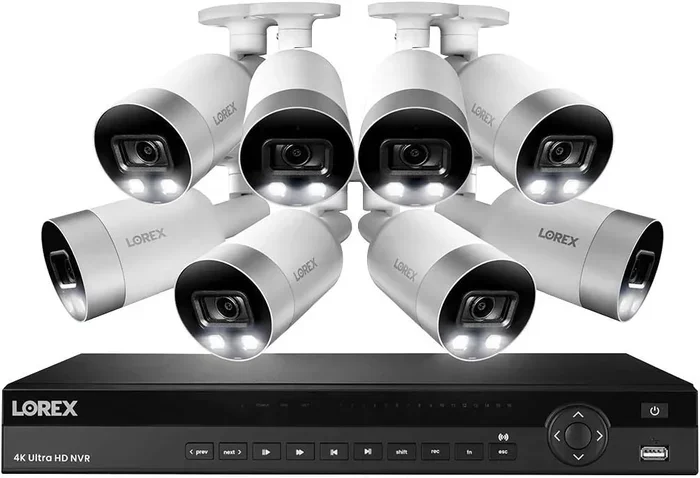
Can You Have A Security Camera Without Internet Or Wi Fi
Yes, you can absolutely have a security camera without internet or WiFi. Many homeowners choose offline surveillance systems that record footage locally using SD cards, DVRs, or NVRs. Whether you live in a rural area, worry about hacking, or simply prefer a simpler setup, security camera without wifi options are widely available and highly effective.
Key Takeaways
- Offline cameras work independently: You do not need an internet connection to record and store security footage locally.
- Multiple camera types support offline use: From wired security camera systems to battery powered security camera units, there are plenty of choices.
- Local storage is reliable: SD card storage and DVR or NVR recording keep your data safe without the cloud.
- Privacy and security improve: Without an internet connection, your home security system is much harder to hack remotely.
- Setup is straightforward: Most offline surveillance systems are easy to install and manage with basic tools.
- Cellular cameras offer remote access without WiFi: These use mobile networks to send alerts and footage to your phone.
- Know the trade-offs: Offline systems may lack real-time remote viewing and smart features found in connected cameras.
📑 Table of Contents
- What Is a Security Camera Without Internet?
- Types of Security Cameras That Work Without Internet
- How Offline Security Cameras Store Footage
- Pros and Cons of Having a Security Camera Without Internet
- Setting Up a Security Camera Without Internet
- Can You Still Monitor Remotely With an Offline Camera?
- Conclusion
What Is a Security Camera Without Internet?
A security camera without internet is a surveillance device that operates independently of an online connection. It records security footage to a local storage device like an SD card, a digital video recorder, or a network video recorder. These systems do not need WiFi or any broadband service to function.
The idea might sound surprising at first. Most modern cameras today push footage to the cloud. But offline surveillance has been around for decades. Think of the classic CCTV camera system you see in shops and offices. Those work perfectly fine without a single Wi-Fi signal.
How Offline Cameras Work
An offline security camera captures video through its lens and saves it directly to a local storage medium. There is no uploading, no cloud processing, and no dependency on an ISP. The camera simply records and stores. You can review the footage by plugging in a monitor or accessing the storage device directly.
Many analog camera systems work this way. The camera sends a raw video signal through a coaxial cable to a DVR, which then encodes and saves the footage. No internet needed. It is simple, reliable, and proven technology.
Why People Choose Camera Systems Without Wi Fi
There are several strong reasons homeowners and businesses opt for security camera without wifi setups:
- No monthly cloud fees: Cloud storage often comes with recurring subscription costs. Local storage eliminates that expense entirely.
- Better privacy: Your footage stays on your property. There is no risk of a cloud service being breached or your data being accessed by third parties.
- Rural or remote locations: Many areas lack reliable internet. An offline system works regardless of your broadband situation.
- No internet outages to worry about: Even in cities, internet downtime happens. An offline camera keeps recording no matter what.
- Lower latency: Without cloud processing, there is no delay in recording. Everything is captured in real time on your local device.
Types of Security Cameras That Work Without Internet
Not all offline cameras are the same. There are several distinct types, each with its own strengths. Let us break them down so you can find the right fit for your needs.
Wired Security Camera Systems
A wired security camera system is the gold standard for offline surveillance. These cameras connect directly to a recording device using physical cables. The most common setup uses power over ethernet, which sends both power and video data through a single cable.
Wired systems are extremely stable. There is no signal interference, no dropped connections, and no bandwidth limits. They are ideal for permanent installations where you want reliable local network camera recording around the clock.
Wireless Cameras With Local Storage
Do not let the word “wireless” confuse you. A wireless security camera can still work without internet. It connects to a local receiver or base station using radio frequencies, not Wi-Fi. The footage is saved to an SD card or a local hub.
These cameras offer more flexibility in placement since you do not need to run cables everywhere. However, they still need a power source, and the range between the camera and receiver can be affected by walls and obstacles.
Battery Powered Security Camera Options
A battery powered security camera is perfect for locations where running power cables is impractical. These cameras run on rechargeable or replaceable batteries and store footage on internal or removable storage.
Many battery powered security camera units come with motion detection that triggers recording only when movement is detected. This conserves battery life and ensures you capture the moments that matter most. They work entirely offline, making them a popular choice for cabins, sheds, and remote properties.
Cellular Security Cameras
A cellular security camera uses a SIM card and mobile data networks to transmit footage. While it does use a data connection, it does not need Wi-Fi or a home internet router. This makes it a unique option for truly remote locations.
You can receive alerts and view live feeds on your phone through the cellular network. Some models also store footage locally on an SD card as a backup. This gives you the best of both worlds: remote access and offline reliability.
How Offline Security Cameras Store Footage
Understanding storage is key when you go with a security camera without wifi setup. Without the cloud, all footage must be saved on-site. Here are the main storage methods used in offline systems.
SD Card Storage
Many modern cameras include a built-in SD card slot. You insert a microSD or full-size SD card, and the camera records directly onto it. This is the simplest and most affordable storage option.
SD card storage works great for single-camera setups. The downside is capacity. A typical SD card holds between 32 GB and 256 GB of footage. Depending on your resolution and frame rate, that might mean a few days to a couple of weeks of recording before you need to overwrite old files.
DVR and NVR Recording
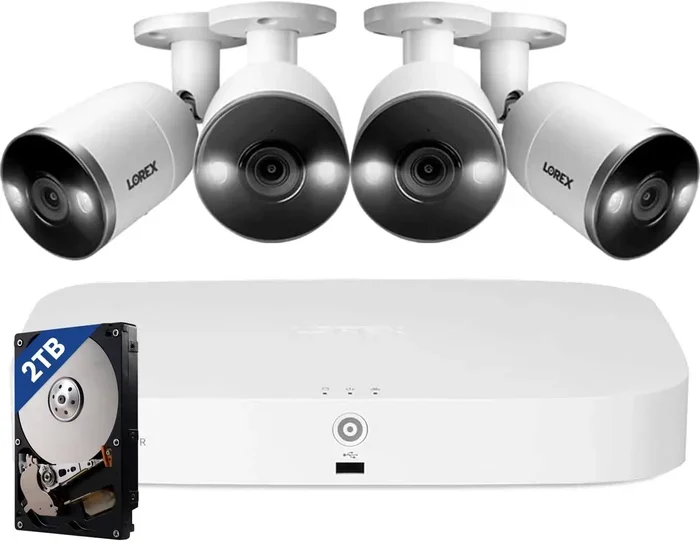
For multi-camera setups, a DVR or NVR is the way to go. A digital video recorder works with analog cameras, while a network video recorder works with IP cameras. Both devices connect to multiple cameras and centralize all recording in one place.
DVRs and NVRs support much larger storage capacities than SD cards. You can install hard drives ranging from 1 TB to 10 TB or more. This means weeks or even months of continuous recording without worrying about running out of space.
Cloud vs Local Storage Comparison
| Feature | Cloud Storage | Local Storage (Offline) |
|---|---|---|
| Internet Required | Yes | No |
| Monthly Cost | Usually yes | No |
| Privacy Level | Moderate | High |
| Remote Access | Yes, anywhere | Limited or none |
| Hack Risk | Higher | Lower |
| Setup Complexity | Simple | Moderate |
| Storage Capacity | Depends on plan | Up to 10+ TB |
Pros and Cons of Having a Security Camera Without Internet
Every setup has trade-offs. Let us look at what you gain and what you might lose with an offline home security system.
Advantages of Offline Surveillance
- Enhanced security: Without an internet connection, hackers cannot access your cameras remotely. Your security footage stays on your property and on your devices.
- No monthly fees: No cloud subscriptions. No data overage charges. You pay once for the equipment and that is it.
- Uninterrupted recording: Internet outages do not affect your cameras. They keep recording no matter what happens with your ISP.
- Simplicity: Fewer components mean fewer things to troubleshoot. A wired analog camera system is straightforward and dependable.
- Lower long-term cost: Over time, avoiding cloud fees saves a significant amount of money.
Limitations You Should Know
- No real-time remote viewing: Without internet, you cannot check your cameras from your phone while you are away from home.
- Limited smart features: Many AI-powered features like person detection, package alerts, and facial recognition rely on cloud processing.
- Physical access required: To review footage, you often need to be near the recording device or storage medium.
- No automatic backups: If the local storage device is damaged or stolen, your footage is gone unless you have a backup plan.
- No integration with smart home ecosystems: Many smart home platforms require an internet connection to sync with security cameras.
Setting Up a Security Camera Without Internet
Setting up an offline home security system is easier than most people think. You do not need to be a tech expert. Here is a practical guide to getting started.
Step-by-Step Setup Guide
- Choose your camera type: Decide between a wired security camera, a wireless camera with local storage, or a battery powered security camera based on your location and needs.
- Plan your camera placement: Walk around your property and identify the key areas you want to monitor. Focus on entry points like doors, gates, and windows.
- Install the cameras: Mount each camera securely using the included brackets. For wired systems, run the cables from each camera to the recording device.
- Connect to the recorder: Plug each camera into the DVR or NVR using the appropriate cables. For power over ethernet setups, a single cable handles both power and data.
- Insert storage media: Install an SD card or connect a hard drive to your recording device. Format the storage and set your recording preferences.
- Power on and test: Turn on all devices and verify that each camera is recording correctly. Check the footage on a connected monitor.
- Set motion detection: Configure motion zones and sensitivity levels so your cameras only record when there is actual movement.
Quick Tips for Best Results
- Use high-capacity SD cards or hard drives to avoid frequent overwriting.
- Place cameras at a height of 8 to 10 feet for the best field of view.
- Choose night vision camera models if you need 24-hour coverage.
- Label your cables and storage devices for easy troubleshooting.
- Periodically check and clean your camera lenses for clear footage.
Common Mistakes to Avoid
- Skipping proper power supply: Make sure each camera has a reliable and consistent power source. Intermittent power means gaps in your security footage.
- Ignoring cable management: Exposed cables can be damaged by weather or animals. Use cable conduits or protective covers.
- Underestimating storage needs: Calculate how much footage you need to keep and choose storage accordingly. When in doubt, go bigger.
- Placing cameras in direct sunlight: Harsh sunlight can wash out footage and damage camera sensors over time.
- Forgetting to test the system: Always run a full test after installation to make sure every camera is working and recording properly.
Expert Insights
According to security professionals, the best offline surveillance setups combine wired cameras with a dedicated NVR or DVR for maximum reliability. A local network camera setup using power over ethernet is often recommended for both homes and small businesses.
Experts also suggest keeping a backup storage device. Even the best CCTV camera system can fail. Having a secondary hard drive or regularly transferring footage to an external device ensures you never lose critical security footage.
“The beauty of an offline system is that it does not depend on anything outside your property,” says a veteran security installer. “As long as the cameras have power, they keep working. That independence is worth a lot.”
Can You Still Monitor Remotely With an Offline Camera?
This is one of the most common questions about security camera without wifi setups. The short answer is: it depends on the type of camera.
Standard offline cameras with local storage do not offer remote viewing. You need to be physically present to check the footage. However, cellular security cameras can bridge this gap. They use a SIM card and mobile data to send notifications and live feeds to your smartphone, all without needing your home internet.
Some advanced IP camera models can create their own local Wi-Fi network. You can connect to this network directly from your phone to view live footage. This is not the same as remote access from anywhere in the world, but it does give you more flexibility than a fully offline system.
If remote monitoring is important to you, consider a hybrid approach. Use offline cameras for primary recording and add a single cellular camera at your main entry point for remote alerts and live viewing.
Conclusion
The answer to whether you can have a security camera without internet or WiFi is a clear and definitive yes. From traditional analog camera systems to modern battery powered security camera units, there are many excellent options for offline home security system setups.
These systems offer strong advantages in privacy, reliability, and cost savings. You do not need to rely on an internet connection to protect your home or business. With proper planning and the right equipment, an offline surveillance setup can be just as effective as any cloud-connected alternative.
Whether you choose a simple wired security camera with an SD card or a full CCTV camera system with a dedicated DVR, the key is to match your setup to your specific needs. Consider your location, your budget, and how much control you want over your security footage.
Take the time to plan your installation, choose quality equipment, and test everything thoroughly. A well-setup security camera without wifi system will give you peace of mind for years to come, no internet connection required.
Frequently Asked Questions
Do security cameras need WiFi to record?
No, many security cameras do not need WiFi to record. Wired security cameras and analog camera systems record footage directly to a local device like a DVR or NVR. These systems work completely offline without any internet connection.
Can I view my offline security camera footage on my phone?
Standard offline cameras do not support remote phone viewing. However, cellular security cameras can send footage and alerts to your phone using a mobile data network. Some systems also allow you to plug a monitor directly into the recorder to review footage on-site.
Is local storage as safe as cloud storage?
Local storage offers better privacy since your footage never leaves your property. However, it is vulnerable to physical damage or theft. Using a backup hard drive or regularly transferring footage to an external device can help protect your security footage from loss.
What is the best security camera for no internet?
The best choice depends on your needs. A wired security camera system with an NVR is ideal for permanent, multi-camera setups. A battery powered security camera with SD card storage works well for temporary or remote locations. Cellular security cameras are great when you want some remote access without home internet.
Can I add WiFi later to an offline security camera system?
Some systems allow you to add a WiFi adapter or connect to a local network hub later. However, this depends on the specific camera model and brand. It is best to check the manufacturer’s specifications before purchasing if you think you might want to add connectivity later.
How long can offline cameras record without internet?
Offline cameras can record continuously as long as they have power and storage. With a large hard drive on a DVR or NVR, a multi-camera system can record for weeks or even months. Battery powered security camera units may have shorter recording times depending on battery capacity and motion activity.