Are There Cameras That Dont Run Off Of Wi Fi Guide
Cameras that don’t run off Wi-Fi are a smart choice for homes, offices, and remote areas where wireless internet is unreliable or unavailable. These devices use cellular data, wired connections, or local storage to record footage without needing a home network. This guide covers every type, brand, and setup option so you can find the perfect fit for your security needs.
Key Takeaways
- Cellular cameras use mobile data plans to send footage anywhere with cell coverage.
- Wired IP cameras connect directly to a recorder and store video locally on an SD card or NVR.
- Battery-powered options work completely off-grid and need no outlet or internet connection.
- PoE cameras receive both power and data through a single Ethernet cable for a clean setup.
- Local storage cameras keep your footage on your own devices, giving you full privacy control.
- Non-WiFi cameras often cost more upfront but save money long-term by removing cloud subscription fees.
- Standalone systems are ideal for rural areas, construction sites, cabins, and off-grid properties.
📑 Table of Contents
- What Are Cameras That Don’t Run Off Wi-Fi?
- Types of Cameras That Don’t Need Wi-Fi
- How to Choose the Right Camera Without Wi-Fi
- WiFi vs Non-WiFi Cameras: A Comparison
- Common Mistakes People Make When Buying Non-WiFi Cameras
- Best Use Cases for Cameras Without Wi-Fi
- Setting Up Your Non-WiFi Camera System
- Are Non-WiFi Cameras Worth the Investment?
What Are Cameras That Don’t Run Off Wi-Fi?
Not every security camera needs a Wi-Fi connection. Cameras that don’t run off Wi-Fi use alternative methods to transmit and store video. These include cellular networks, wired Ethernet cables, and local storage devices like SD cards or digital video recorders.
People choose these cameras for many reasons. Maybe your home has weak Wi-Fi. Perhaps you live in a rural area with no broadband at all. Or you might want a more secure setup that doesn’t rely on your home network. Whatever your reason, there is a camera built for the job.
These devices are sometimes called standalone security cameras, non-WiFi surveillance cameras, or offline security cameras. They all share one thing in common: they work without a continuous Wi-Fi connection.
How Do Cameras That Don’t Run Off Wi-Fi Work?
Most standard cameras send video over your home Wi-Fi to a cloud server or app. But cameras that don’t run off Wi-Fi use different pathways.
Some connect to cellular networks, just like a smartphone. Others plug directly into a router with an Ethernet cable. Many store footage on a memory card inside the camera itself. And some record to a local recorder box instead of the cloud.
The result is the same: you get reliable video surveillance without depending on Wi-Fi. This makes them perfect for remote surveillance without internet and off-grid security setups.
Types of Cameras That Don’t Need Wi-Fi
There are several categories of non-WiFi security cameras on the market today. Each one serves a different need and budget. Let’s break them down so you can find the right match.
Cellular Security Cameras
Cellular security cameras use a SIM card and mobile data to send video. Think of them like a phone that happens to have a camera attached. They connect to 4G or 5G networks and stream footage to your phone or a cloud service.
These are great for locations far from your home. Construction sites, vacation properties, and farms all benefit from cellular cameras. You just need a data plan, and the camera does the rest.
Quick Tip: Look for cameras that support LTE bands used in your area. Not all cellular cameras work on every network. Check with your carrier before buying.
Wired IP Cameras with Local Storage
Wired IP cameras connect to your network through an Ethernet cable. They don’t need Wi-Fi because the cable handles the data transfer. Many of these cameras have an SD card slot for local recording and storage.
These systems are very reliable. A physical cable is harder to jam or intercept than a wireless signal. And since the footage stays local, you don’t need a cloud subscription.
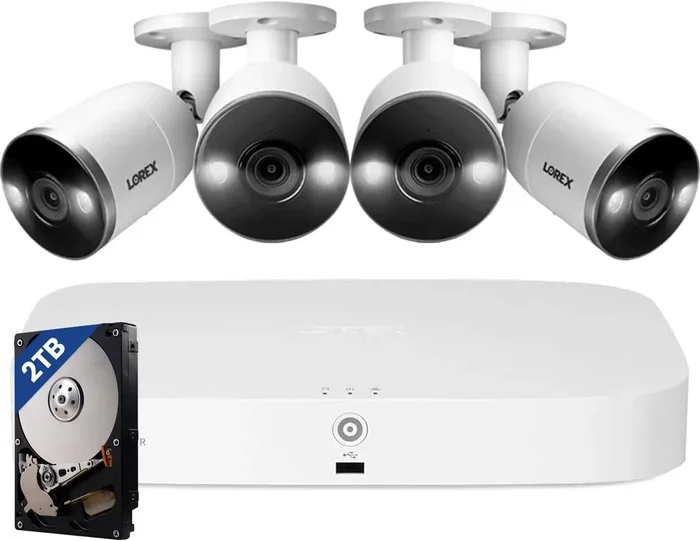
Brands like Reolink, Lorex, and Amcrest make excellent wired options. Prices range from affordable to professional-grade, so there is something for every budget.
SD Card and Battery-Powered Cameras
Some cameras store everything on a removable SD card. They don’t need Wi-Fi or a power outlet. These battery-powered security cameras run on rechargeable or replaceable batteries and record directly to the card inside the unit.
They are perfect for temporary setups or places where running power and internet cables is impractical. Just mount the camera, insert the SD card, and you are good to go.
Common Mistake: Forgetting to check the battery life. Many battery-powered cameras last 2 to 6 months on a single charge. If you set one up and forget about it, you might miss weeks of footage when the battery dies.
PoE (Power over Ethernet) Cameras
PoE cameras are a step up from basic wired cameras. They receive both power and data through a single Ethernet cable. This means no separate power outlet is needed, which makes installation much simpler.
You connect the camera to a PoE switch or a PoE-enabled NVR (Network Video Recorder). The system handles everything. The cameras record locally, and you can view footage on your phone or computer through the recorder’s interface.
Expert Insight: PoE systems are the gold standard for professional wired camera systems. They are used in businesses, warehouses, and large properties because they are stable, scalable, and secure.
DVR and NVR Systems Without Internet
A DVR security system or NVR system can work entirely offline. The cameras connect to the recorder through cables. The recorder saves all footage to a hard drive. You can view live or recorded video on a monitor connected to the recorder.
These systems don’t need the internet to function. However, some models offer optional remote viewing through an app. If you choose to use that feature, you will need a brief internet connection to set it up. After that, the system runs fine without it.
DVR systems use analog cameras, while NVR systems use IP cameras. Both are excellent choices for local recording without cloud dependency.
How to Choose the Right Camera Without Wi-Fi
Choosing the right cameras that don’t run off Wi-Fi comes down to a few key factors. Let’s walk through what matters most.
Consider Your Storage Needs
Where will your footage live? Cameras that don’t run off Wi-Fi typically store video in one of three places:
- SD card: Simple and affordable. Great for single-camera setups. Cards usually hold 32 GB to 256 GB of footage.
- NVR or DVR: Better for multi-camera systems. Hard drives can store weeks or months of video.
- Cloud (optional): Some non-WiFi cameras offer optional cloud backup. You can use this if you have internet access occasionally.
Think about how many cameras you need and how much footage you want to keep. This will guide your storage choice.
Think About Power Sources
Power is just as important as data. Ask yourself where the camera will go and whether an outlet is nearby.
- Plug-in cameras need a power outlet within reach.
- Battery-powered cameras work anywhere but need recharging.
- Solar-powered cameras are perfect for truly off-grid locations.
- PoE cameras get power through the Ethernet cable, so only one cable runs to each camera.
Quick Tip: For outdoor cameras, choose weatherproof models rated IP65 or higher. This ensures they handle rain, dust, and extreme temperatures without issues.
Check the Video Quality and Night Vision
Even without Wi-Fi, you still want clear footage. Look for cameras that record at least 1080p resolution. For better detail, 2K or 4K options are worth the investment.
Night vision is critical for most security setups. Nearly all non-WiFi cameras include infrared LEDs for nighttime recording. Some premium models use color night vision, which captures colored footage even in low light.
Evaluate Motion Detection and Alerts
Good motion detection saves storage space and helps you find important clips faster. Look for cameras with adjustable motion zones and human/vehicle detection. These features reduce false alerts from animals or moving trees.
Some standalone security cameras send alerts via SMS or email even without Wi-Fi, using their cellular connection. This is a huge advantage for remote monitoring.
WiFi vs Non-WiFi Cameras: A Comparison
Not sure whether to go with a traditional Wi-Fi camera or a camera that doesn’t run off Wi-Fi? This comparison table breaks down the key differences.
| Feature | Wi-Fi Cameras | Non-WiFi Cameras |
|---|---|---|
| Internet Required | Yes | No |
| Setup Complexity | Easy | Moderate |
| Remote Viewing | Always | Sometimes (cellular or local) |
| Monthly Fees | Often yes (cloud storage) | Rarely |
| Signal Reliability | Can drop with distance | Very stable (wired or cellular) |
| Power Options | Plug-in or battery | Plug-in, battery, solar, PoE |
| Best For | Urban homes with strong Wi-Fi | Rural areas, off-grid, businesses |
| Privacy Level | Footage goes to cloud | Footage stays local |
As you can see, non-WiFi cameras offer advantages in reliability, privacy, and cost. Wi-Fi cameras win on ease of setup and app convenience. Your choice depends on your specific situation.
Common Mistakes People Make When Buying Non-WiFi Cameras
Avoid these pitfalls when shopping for cameras that don’t run off Wi-Fi.
- Ignoring cellular coverage. A cellular camera is useless if there is no cell signal at the installation spot. Check coverage maps for your carrier before buying.
- Choosing the wrong storage. Not all cameras support the same SD card sizes. Check the maximum capacity before purchasing a memory card.
- Forgetting about power. Battery cameras need regular maintenance. If you want a set-it-and-forget-it setup, choose a wired or solar-powered option.
- Skipping weatherproofing. Outdoor cameras without proper ratings can fail quickly in rain or snow. Always check the IP rating.
- Overlooking local app support. Some non-WiFi cameras only work with specific apps or recorders. Make sure the system is compatible with your phone and devices.
Expert Insight: The biggest mistake is assuming all non-WiFi cameras are the same. They are not. A cellular camera works very differently from a PoE camera. Know what you need before you shop.
Best Use Cases for Cameras Without Wi-Fi
Where do offline security cameras shine the most? Here are some real-world scenarios where they are the clear winner.
Rural Properties and Farms
Many rural homes lack reliable broadband. A cellular security camera or a wired system with local storage is the only practical choice. These cameras protect barns, equipment sheds, and livestock areas without any internet dependency.
Construction Sites
Construction sites change constantly. Running Wi-Fi or cables to a half-built structure is impractical. Battery-powered or cellular cameras can be moved around easily and still capture everything.
Vacation Homes and Cabins
Second homes often sit empty for weeks or months. A standalone security camera with an SD card can monitor the property and record any activity. When you return, simply remove the card and review the footage.
Temporary Events and Gatherings
Outdoor weddings, festivals, and markets benefit from portable camera setups. Battery-powered cameras with local storage are quick to deploy and require no network infrastructure.
Businesses That Need Extra Security
Retail stores, warehouses, and offices often use PoE camera systems for reliable, high-quality surveillance. These wired systems are harder to tamper with and provide consistent footage without any Wi-Fi dependency.
Setting Up Your Non-WiFi Camera System
Setting up cameras that don’t run off Wi-Fi is straightforward once you understand the basics. Here is a quick walkthrough.
First, choose your camera type based on your location and needs. Cellular cameras work best for remote spots. Wired cameras are ideal for permanent installations near a recorder.
Next, plan your storage. Insert an SD card if the camera supports it. Or connect the cameras to an NVR or DVR with a hard drive installed.
Then, mount the cameras in strategic locations. Cover entry points, driveways, and any blind spots. Make sure the camera has a clear line of sight to the area you want to monitor.
Finally, power on the system and test it. Walk in front of the camera to trigger motion detection. Check that the footage is recording properly. Adjust the sensitivity settings if needed to reduce false alerts.
Quick Tip: Label each camera and its cable. When something goes wrong, you will save yourself a lot of troubleshooting time.
Are Non-WiFi Cameras Worth the Investment?
The short answer is yes. Cameras that don’t run off Wi-Fi offer reliability, privacy, and flexibility that Wi-Fi cameras simply cannot match. They work in places where Wi-Fi cannot reach. They store footage locally, which means no monthly cloud fees. And they are harder to hack because they do not broadcast a wireless signal.
Yes, they may cost a bit more upfront. And the setup can be slightly more involved. But the long-term benefits far outweigh these small trade-offs. If you value security, privacy, and peace of mind, a non-WiFi camera system is a smart investment.
Whether you need a single battery-powered camera for a cabin or a full PoE system for a business, there is a non-WiFi security camera that fits your needs. The key is knowing what you want and choosing the right type for your situation.
Take your time. Compare options. Read reviews. And most importantly, pick a system that gives you confidence that your property is protected, no matter what your internet situation looks like.
Frequently Asked Questions
Can I use a security camera without any internet connection at all?
Yes, absolutely. Many cameras record footage directly to an SD card or a local recorder without needing any internet. These cameras that don’t run off Wi-Fi store everything on-site and work completely offline. You just need to physically retrieve the footage to review it.
Do cellular security cameras require a monthly data plan?
Most cellular cameras do require a data plan, similar to a phone plan. Some brands offer prepaid options, while others work with your existing SIM card. The cost is usually much lower than cloud storage subscriptions for Wi-Fi cameras. Expect to pay around $5 to $15 per month per camera.
How far can a wired camera be from the recorder?
A standard Ethernet cable can run up to 328 feet (100 meters) before signal loss. If you need to cover a longer distance, you can use a PoE extender or a switch to boost the signal. This makes wired systems ideal for large properties.
Are non-WiFi cameras more secure than Wi-Fi cameras?
Generally, yes. Since offline security cameras do not transmit data over a wireless network, they are harder to intercept or hack remotely. The footage stays on a local SD card, NVR, or DVR. This gives you much stronger control over your privacy and data security.
Can I monitor non-WiFi cameras from my phone?
It depends on the camera type. Cellular cameras can send alerts and live views to your phone using mobile data. Wired systems with local storage usually require you to connect to the recorder or visit the property to review footage. Some NVR systems offer optional remote viewing if you briefly connect to the internet.
What is the best camera for a cabin with no power or internet?
A battery-powered cellular camera is the best choice for a cabin with no power or internet. These cameras run on rechargeable batteries, connect to a cellular network, and store footage on an SD card or in the cloud when a connection is available. Look for models with long battery life and solar panel compatibility for truly hands-free operation.
=== CONCLUSION ===
Cameras that don’t run off Wi-Fi are a practical, reliable, and secure choice for anyone who needs surveillance without a wireless internet connection. From cellular cameras for remote properties to wired PoE systems for businesses, the options are diverse and powerful. You no longer have to compromise on security just because Wi-Fi is not available.
By choosing the right non-WiFi security camera, you gain full control over your footage, your privacy, and your setup. These systems work where Wi-Fi cameras fail, and they often deliver better performance in the process.
Take what you have learned from this guide and apply it to your own security needs. Whether you are protecting a rural home, a construction site, or a business property, there is a camera that doesn’t run off Wi-Fi ready to do the job. Start exploring your options today and build a security setup that truly works for you.


