Can You Use Av And Hdmi At The Same Time On Your TV
Yes, you can use AV and HDMI at the same time on your TV. Modern televisions support multiple input ports, letting you connect older AV devices and newer HDMI sources simultaneously. This setup is common in homes with mixed entertainment equipment. Understanding how both inputs work helps you get the best picture and sound from every device.
Have you ever wondered if you can use AV and HDMI at the same time on your TV? The short answer is yes, and it is simpler than you might think. Many modern televisions come with multiple input ports, allowing you to connect both older AV devices and newer HDMI sources simultaneously. This guide will walk you through everything you need to know about using both connection types together. You will learn how they work, when to use each one, and how to set up your TV for the best experience.
Understanding your TV inputs can feel confusing at first. There are so many cables, ports, and signal types to keep track of. But once you grasp the basics, setting up a dual-input system becomes second nature. Whether you have an old DVD player and a new streaming box, or a vintage game console paired with a Blu-ray player, this article has you covered. Let us dive into the world of TV connectivity and explore how AV and HDMI can work hand in hand.
Key Takeaways
- Both inputs work together: Your TV can accept AV and HDMI signals at the same time without any issues.
- AV is for older devices: Composite and component cables connect legacy devices like VCRs and older game consoles.
- HDMI delivers better quality: HDMI carries high-definition video and audio through a single cable.
- Setup is straightforward: You just plug each cable into the correct input port on your TV.
- Audio routing matters: You may need to adjust audio settings when using both input types together.
- Check your TV manual: Not all TVs support simultaneous use of every input, so always verify your model.
📑 Table of Contents
What Does It Mean to Use AV and HDMI Together?
Using AV and HDMI at the same time means connecting two or more devices to your television using different cable types. The AV connection uses older composite or component cables that carry analog signals. HDMI, on the other hand, uses a digital connection that delivers both video and audio through a single cable. Your TV treats each input as a separate channel, so both can be active at the same time without any conflict.
Think of it like having two different doors into the same room. Each door leads to a different source, but both open into the same space. Your TV screen can display content from either source whenever you switch inputs. This is especially useful in living rooms where family members might want to watch different things or use different devices throughout the day.
How AV Inputs Work
AV stands for audio and video. Traditional AV connections use RCA cables with red, white, and yellow plugs. The yellow plug carries the video signal, while the red and white plugs handle the right and left audio channels. These cables have been around for decades and are still used with many older devices.
AV inputs are analog, which means they transmit signals as continuous electrical waves. This is different from HDMI, which uses a digital signal. Analog signals can degrade over distance, which is why AV cables usually work best at shorter lengths. Despite their age, AV connections remain reliable for basic devices like VCRs, older gaming consoles, and legacy DVD players.
How HDMI Inputs Work
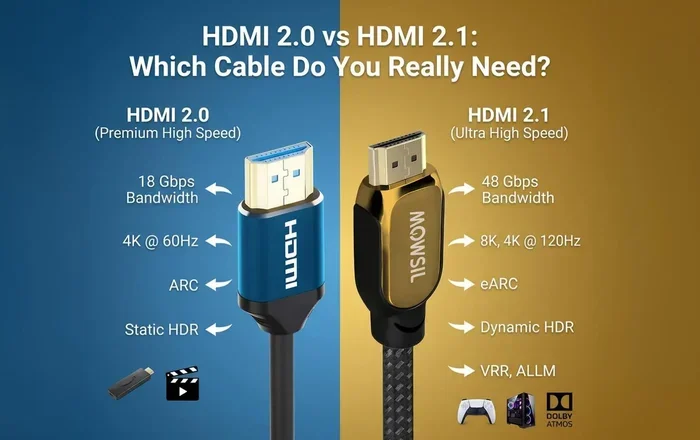
HDMI stands for High-Definition Multimedia Interface. It is the modern standard for connecting audio and video devices. A single HDMI cable can carry uncompressed digital video and multi-channel audio. This makes it far more convenient than running separate audio and video cables.
HDMI supports high resolutions, including 4K and even 8K on the latest cables. It also features technologies like HDR, which improves color and contrast. Most modern devices, such as streaming sticks, gaming consoles, and Blu-ray players, use HDMI as their primary connection method. The digital signal means there is no quality loss, even over longer cable runs.
Can You Use Both AV and HDMI at the Same Time?
The answer is a clear yes. Your television is designed to handle multiple inputs at once. When you plug in an AV cable to one port and an HDMI cable to another, your TV recognizes both as separate input sources. You can switch between them using your remote control or the buttons on the TV itself.
There is no technical reason why these two input types cannot coexist. Each port on your TV operates independently. The AV port processes analog signals, while the HDMI port processes digital signals. They do not interfere with each other. This independence is what allows you to keep older devices connected while also enjoying the benefits of modern HDMI devices.
Understanding the advantages and disadvantages of new technology helps you appreciate why TVs support multiple input types. Manufacturers know that not everyone upgrades their devices at the same pace. By offering both AV and HDMI ports, they ensure backward compatibility while embracing modern standards.
What Happens When Both Are Connected?
When both AV and HDMI devices are connected, your TV simply waits for you to select which input to display. The screen will show whatever is active on the chosen input. If you are watching content through the HDMI port, the AV device stays connected but invisible on screen until you switch to it. Nothing happens in the background that would cause problems.
Some people worry that having multiple devices connected might slow down the TV or cause interference. This is not the case. Modern TVs are built to handle many connected devices without any performance drop. The TV only processes the signal from the input you have selected. All other connected devices remain idle and ready to go.
Benefits of Using AV and HDMI Together
There are several real-world benefits to keeping both AV and HDMI connections active on your TV. Let us look at why this setup works so well for many households.
1. Keep Your Older Devices in Use
Not everyone wants to throw away perfectly good older devices. Maybe you have a classic VCR, an old stereo system, or a retro game console that still works great. By using the AV input, you can keep enjoying these devices without needing to replace them. This saves money and reduces electronic waste.
2. Enjoy the Best of Both Worlds
Using both input types lets you take advantage of the strengths of each. HDMI gives you high-definition picture and sound for your modern devices. AV keeps your older equipment running smoothly. You get the best quality where it matters and the compatibility where you need it.
Much like choosing between the advantages and disadvantages of word processors and other tools, picking the right input for the right device ensures the best outcome. Each connection type has its place, and knowing when to use each one is the key to a great setup.
3. Simple and Cost-Effective Setup
You do not need any expensive adapters or converters to use both inputs at the same time. Just plug in the cables your devices already have and go. This makes it a very budget-friendly approach to building a home entertainment system. There is no need to buy new equipment just to make everything work together.
4. Flexibility for Different Viewing Needs
A dual-input setup gives you flexibility. One person can watch a Blu-ray movie on the HDMI input while another watches old home videos on the AV input. You can quickly switch between sources depending on what you feel like watching. This kind of flexibility is especially valuable in shared living spaces.
Common Setup Scenarios
Let us look at some real-world situations where using AV and HDMI together makes perfect sense. These examples should help you picture how this setup works in everyday life.
Scenario 1: The Mixed Entertainment Center
Imagine your living room has a smart TV with several HDMI ports and one or two AV inputs. You have a cable box connected via HDMI for live TV in high definition. You also have an old DVD player connected via AV for when the kids want to watch their favorite discs. Both devices stay plugged in all the time. You simply switch inputs when you want to change sources.
This setup is incredibly common and works flawlessly. The cable box gives you sharp, clear pictures through HDMI, while the DVD player handles your movie collection through AV. Both are ready to use at any moment.
Scenario 2: The Retro Gamer
If you are a retro gaming enthusiast, you probably have classic consoles that only support AV connections. At the same time, you might own a modern console or a streaming device that uses HDMI. Connecting both to your TV lets you play vintage games and modern titles on the same screen. It is the perfect setup for gamers who love both old and new.
Scenario 3: The Home Security Monitor
Some people use their TV as a monitor for security cameras. Older security cameras often use AV connections, while newer ones use HDMI or other digital outputs. Having both inputs available on your TV means you can view feeds from different camera types on the same screen. This is where understanding the advantages and disadvantages of access control systems becomes useful, especially when integrating older surveillance equipment with modern displays.
How to Set Up AV and HDMI on Your TV
Setting up both AV and HDMI inputs on your TV is a straightforward process. Follow these steps to get everything connected and working properly.
- Identify your TV inputs: Look at the back or side of your television. Find the AV ports (usually color-coded red, white, and yellow) and the HDMI ports (narrow, rectangular slots).
- Connect your AV device: Plug the AV cables into the corresponding ports on your TV and your older device. Make sure the colors match: yellow for video, red and white for audio.
- Connect your HDMI device: Plug one end of the HDMI cable into your TV and the other end into your modern device. HDMI cables are universal, so any HDMI cable works with any HDMI port.
- Turn on your TV: Power on your television and use the input or source button on your remote to cycle through the available options.
- Select the correct input: Choose the AV input to see your older device and the HDMI input to see your modern device. Your TV should display the correct source for each selection.
- Adjust audio settings if needed: If you experience sound issues, check your TV audio settings. Make sure the correct output is selected for each input source.
Quick Tips for a Smooth Setup
- Label your cables with small tags so you know which cable goes to which device.
- Keep your AV cables as short as possible to maintain signal quality.
- Use high-speed HDMI cables for the best picture and sound quality.
- Test each input individually before switching between them.
- Store your TV manual in a safe place for quick reference on input labels.
Troubleshooting Common Issues
Even with a simple setup, you might run into occasional problems. Here are some common issues and how to fix them.
No Picture on the AV Input
If your AV device shows no picture, check that all cables are firmly plugged in. The yellow video cable is the most common culprit when there is no image. Also, make sure you have selected the correct AV input source on your TV. Sometimes the input label on the TV menu might be different from what you expect.
No Sound from HDMI
If you have video but no sound through HDMI, check your TV audio output settings. Some TVs default to the AV audio output even when the HDMI input is selected. Go into your TV settings and make sure the audio output matches the active input. Also, try unplugging the HDMI cable and plugging it back in to reset the connection.
Screen Flickering or Interference
Flickering on the AV input is often caused by loose cable connections or long cable runs. Try shortening the AV cables or using higher-quality cables. For HDMI issues, make sure the cable is not damaged and that it is fully inserted into both ports. A loose HDMI connection is one of the most common causes of flickering or no signal at all.
TV Does Not Recognize an Input
If your TV does not show a particular input in its source list, try unplugging the device, restarting the TV, and plugging the device back in. Sometimes the TV needs a reset to detect newly connected devices. If the problem persists, try a different port or cable to rule out hardware issues.
Expert Insights on AV and HDMI Compatibility
Home entertainment professionals agree that running both AV and HDMI inputs simultaneously is one of the most practical setups for modern households. Technology evolves quickly, but older devices still hold value. Keeping them connected ensures you get the most out of your equipment investment.
Experts also recommend reviewing the advantages and disadvantages of new technology periodically. As TV technology advances, input standards change too. Understanding what your TV can and cannot do helps you plan future upgrades without losing the functionality of your current devices.
The key takeaway is that compatibility is not a problem when using AV and HDMI together. Your TV is designed to handle multiple input standards. As long as you use the right cables and select the correct input source, everything should work smoothly. There is no need to choose one over the other unless you have a specific reason to do so.
Key Takeaways
- Both inputs work simultaneously: Your TV can accept AV and HDMI signals at the same time without any conflict or interference.
- AV supports older devices: Composite and component cables keep legacy equipment like VCRs, old game consoles, and vintage DVD players connected and functional.
- HDMI delivers superior quality: A single HDMI cable carries high-definition video and multi-channel audio with no signal loss.
- Setup is simple: Just plug each cable into the correct port and switch inputs using your remote control.
- Audio settings may need adjustment: Check your TV audio output settings to ensure sound comes through on both input types.
- No extra equipment needed: You do not need adapters or converters to run both input types on the same television.
- Troubleshooting is straightforward: Most issues with dual-input setups are caused by loose cables or incorrect input selection.
Frequently Asked Questions
Can I watch two different sources at the same time using AV and HDMI?
No, your TV can only display one input source at a time. However, you can quickly switch between the AV and HDMI inputs using your remote. Both devices stay connected and ready, so switching takes only a few seconds.
Do I need a special TV to use both AV and HDMI inputs?
Most modern TVs support both input types. Almost any television made in the last 15 years will have at least one HDMI port and often one or two AV inputs. Check your TV manual or look at the back of your set to confirm the available ports.
Will using AV and HDMI together affect my picture quality?
No, using both inputs does not affect picture quality. Each input operates independently. The HDMI connection will deliver its full high-definition quality, while the AV connection will display whatever quality the source device outputs. They do not interfere with each other.
Can I use an HDMI-to-AV converter to connect an HDMI device to an AV port?
Yes, you can use a converter, but it may reduce the picture quality. Converters change the digital HDMI signal to an analog AV signal, which can result in some loss of detail. For the best experience, use the native HDMI input whenever possible.
Why does my TV have both AV and HDMI ports?
TV manufacturers include both input types to support a wide range of devices. HDMI is the modern standard for high-definition content, while AV ports ensure older devices can still connect. This combination gives users maximum flexibility and backward compatibility.
Is it better to use HDMI or AV for gaming?
HDMI is almost always the better choice for gaming. It supports higher resolutions, faster refresh rates, and better color depth. However, if you are playing on an older console that only has AV outputs, the AV connection will still work perfectly fine for a great gaming experience.
=== CONCLUSION ===
So, can you use AV and HDMI at the same time on your TV? Absolutely. Your television is built to handle multiple input types, and using both AV and HDMI connections together is one of the smartest things you can do for your home entertainment setup. You get the best of both worlds: high-definition quality from HDMI and full compatibility with your older devices through AV.
The setup process is simple, the benefits are clear, and the troubleshooting is manageable. Whether you are a retro gaming fan, a movie lover with a mixed device collection, or someone who just wants to keep everything connected without spending extra money, this dual-input approach works beautifully. Embrace the flexibility that both AV and HDMI offer, and enjoy a richer, more versatile viewing experience every day.