Can You Connect Headphones Via Usb C And Why It Matters
Yes, you can connect headphones via USB C, and it is changing the way we listen to audio on the go. USB C headphones offer better sound quality, faster charging, and fewer cables. This guide covers everything you need to know about USB C audio, from adapters to the best headphones on the market.
You want to plug in your headphones. You look at your phone or laptop. There is no headphone jack. But there is a USB C port. So, can you connect headphones via USB C? The short answer is yes. The longer answer is that it depends on your device, your headphones, and a few small details we will walk through together.
USB C has become the go-to port for charging, data transfer, and audio. More and more devices are dropping the old 3.5mm headphone jack in favor of USB C. This shift can feel frustrating at first. But once you understand how USB C audio works, it opens up a world of better sound and fewer cables. This guide will help you figure out everything you need to know.
Whether you are looking for USB C headphones, trying to find the right adapter, or just curious about digital audio, you are in the right place. We will cover all of it in simple, easy-to-follow steps. Let us dive in.
Key Takeaways
- USB C headphones work on most modern devices: phones, laptops, tablets, and even some cameras.
- You can use adapters too: a USB C to 3.5mm dongle lets you plug in any wired headphones.
- Sound quality is often better: USB C supports digital audio, which reduces signal loss compared to older jacks.
- USB C headphones can charge your device: some models pass power through while you listen.
- Not all USB C headphones are the same: some need drivers, and compatibility varies by device.
- The future is USB C audio: more brands are dropping the 3.5mm jack and moving to USB C.
📑 Table of Contents
What Is USB C and Why Does It Matter for Audio?
USB C is a small, reversible connector that has taken over the tech world. You can find it on phones, laptops, tablets, and even some gaming consoles. It is not just for charging anymore. USB C audio is now a standard way to deliver sound to your headphones.
Here is why USB C matters for listening to music and taking calls:
- Digital audio output: USB C sends a clean digital signal directly to your headphones. This means less interference and better sound.
- Reversible design: You never have to flip the plug twice. It goes in either way.
- Faster data transfer: USB C supports high-quality audio codecs that older ports cannot handle.
- Power delivery: Some USB C headphones can charge your device while you listen.
- One cable for everything: You can use the same cable for charging and audio, which means fewer cables in your bag.
The old 3.5mm jack was simple and reliable. But it had limits. USB C pushes audio quality further and gives manufacturers more room to innovate. That is why so many brands are making the switch.
How USB C Audio Differs from Traditional Audio
Traditional headphones use an analog signal. Your device converts digital audio to analog through a small chip inside the phone. This conversion can introduce noise and reduce quality. USB C headphones often handle this conversion themselves. They have a tiny built-in digital-to-analog converter, or DAC, right inside the earcup or earbud.
This means the audio signal stays clean from start to finish. You get clearer highs, deeper bass, and less static. For people who care about sound quality, this is a big deal.
How to Connect Headphones Via USB C
Connecting headphones through a USB C port is simple. But there are a few different ways to do it depending on what kind of headphones you have. Let us break it down.
Method 1: Plug in USB C Headphones Directly
If your headphones have a USB C connector, you are in luck. Just plug them straight into your device’s USB C port. That is it. No adapters, no dongles, no fuss. Most modern USB C headphones work this way.
Here is what to do:
- Check that your device has a USB C port.
- Plug the USB C end of your headphones into the port.
- Wait a second for the device to recognize the connection.
- Start playing audio. You should hear sound right away.
Some USB C headphones may need you to install a driver or app first. This is more common on Windows laptops than on phones. Check the manufacturer’s website if the headphones do not work right away.
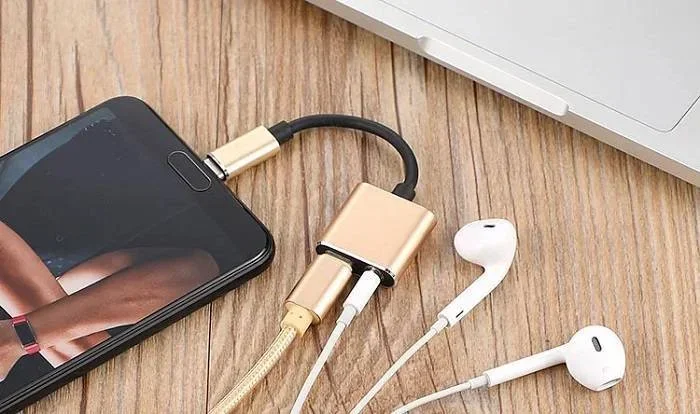
Method 2: Use a USB C to 3.5mm Adapter
Do you have a pair of regular wired headphones with a 3.5mm plug? No problem. You can still use them with a USB C device. All you need is a simple adapter, also called a dongle.
These adapters are small and cheap. You plug the adapter into your device’s USB C port. Then you plug your regular headphones into the adapter. It is a great option if you already own a good pair of wired headphones and do not want to buy new ones.
Quick tips for using adapters:
- Buy a quality adapter: cheap adapters can cause crackling or poor sound.
- Check for a built-in DAC: some adapters include their own digital-to-analog converter for better audio.
- Keep it short: longer adapter cables can weaken the signal.
Method 3: Use a USB C DAC
A DAC is a digital-to-analog converter. It is a small box that turns digital audio into analog sound. Audiophiles love DACs because they produce the best possible audio quality from a USB C device.
You connect the DAC to your phone or laptop using a USB C cable. Then you plug your headphones into the DAC. This setup is popular with music producers, podcasters, and anyone who wants the absolute best sound.
DACs range from small, pocket-sized units to larger desktop models. Some popular options include the USB C headphone dongle from well-known audio brands. They are not cheap, but the sound improvement is noticeable.
USB C Headphones vs. Traditional Headphones
So, how do USB C headphones stack up against traditional ones? Let us compare them side by side.
| Feature | USB C Headphones | Traditional 3.5mm Headphones |
|---|---|---|
| Connection Type | USB C digital plug | 3.5mm analog plug |
| Sound Quality | High, with built-in DAC | Good, but depends on device |
| Compatibility | Works on USB C devices | Works on almost everything |
| Charging | Some models charge the device | No charging capability |
| Cable Replacement | Often built-in, not replaceable | Cables are usually replaceable |
| Price Range | Mid-range to premium | Budget to premium |
| Portability | Slightly bulkier | Very lightweight |
Both types of headphones have their strengths. USB C headphones win on sound quality and modern features. Traditional headphones win on universal compatibility and price. Your choice depends on what matters most to you.
Quick Tips: Choosing Between USB C and Traditional
- Pick USB C headphones if your device has no headphone jack and you want the best sound.
- Pick traditional headphones if you use multiple devices and want one pair that works everywhere.
- Pick a USB C adapter if you already love your wired headphones and just need a simple solution.
Best USB C Headphones You Can Buy
The market for USB C headphones has grown fast. There are now great options at every price point. Here are some of the best choices you can consider right now.
Budget-Friendly USB C Earbuds
If you are on a tight budget, there are still great USB C earbuds that sound surprisingly good. Brands like Anker, JLab, and Skullcandy offer affordable options that connect directly through USB C. These are perfect for commuting, workouts, or casual listening.
Mid-Range USB C Headphones
For a step up in sound quality, look at mid-range USB C headphones from brands like Sony, Sennheiser, and Audio-Technica. These often include noise cancellation, comfortable padding, and a rechargeable battery. They are great for long listening sessions and travel.
Premium USB C Audiophile Options
If you are an audio enthusiast, premium USB C headphones with built-in high-end DACs are worth the investment. These deliver studio-quality sound and are often used by music producers and sound engineers. They can be pricey, but the audio experience is unmatched.
Quick Tips: Buying USB C Headphones
- Check compatibility first: make sure the headphones work with your specific device.
- Read reviews: sound quality opinions vary from person to person.
- Try before you buy: if possible, test the headphones in a store.
- Look for warranty: good brands offer at least a one-year warranty.
Common Problems When Connecting Headphones Via USB C
Even though connecting headphones via USB C is usually easy, problems can happen. Here are the most common issues and how to fix them.
No Sound After Plugging In
This is the most common complaint. If you plug in USB C headphones and hear nothing, try these steps:
- Check that the headphones are fully plugged in.
- Make sure your device volume is turned up.
- Go to your device audio settings and select USB C as the output.
- Try unplugging and plugging the headphones back in.
- Restart your device if nothing else works.
Intermittent Sound or Crackling
If the sound cuts in and out or makes a crackling noise, the problem is often the cable or adapter. A loose connection can cause this. Try a different cable or a higher-quality adapter. Dirt or lint in the USB C port can also cause issues. Blow out the port gently or use a soft brush to clean it.
Headphones Not Recognized by Device
Some devices need a driver or software update to recognize USB C headphones. On Windows laptops, check for driver updates in the device manager. On Android phones, make sure your operating system is up to date. On iPhones and iPads, USB C headphones should work without extra setup.
Common Mistakes to Avoid
- Using a cheap, uncertified adapter: this can damage your device or cause poor audio.
- Forcing the plug in: USB C is reversible. If it does not fit, flip it and try again.
- Ignoring firmware updates: some headphones need firmware updates for full compatibility.
- Assuming all USB C headphones are the same: quality and features vary widely between brands.
Expert Insights
Audio engineers often say that USB C audio is the future. The digital signal path eliminates many of the problems that plague analog connections. However, the quality of the DAC inside your headphones or adapter makes a huge difference. A good DAC can make budget headphones sound far better than expected. A bad DAC can make expensive headphones sound mediocre.
When in doubt, invest in a reputable brand. The audio quality is worth it, and you will avoid many of the common connection problems.
The Future of USB C Audio
The shift toward USB C audio is not slowing down. More devices are dropping the 3.5mm jack every year. Even Apple, which was one of the last holdouts, now uses USB C on its newer iPad and Mac models. The European Union has also pushed for USB C as a universal standard, which means even more devices will adopt it.
Here is what we can expect in the near future:
- Better USB C audio codecs: new codecs will deliver even higher resolution audio over USB C.
- More affordable USB C headphones: as demand grows, prices will continue to drop.
- Smarter headphone features: USB C allows for features like firmware updates, EQ customization, and low-latency audio for gaming and video.
- Universal compatibility: with USB C becoming the standard, one pair of headphones could work across phones, laptops, tablets, and more.
The transition from the 3.5mm jack to USB C is not perfect. But the benefits are clear. Better sound, fewer cables, and a more unified tech ecosystem. If you have not made the switch to USB C headphones yet, now is a great time to start.
Key Takeaways
- USB C audio is here to stay: it is becoming the standard across all devices.
- Adapters make it easy: you can still use your old headphones with a simple dongle.
- Sound quality improves: digital audio through USB C is cleaner and more detailed.
- More options every day: the market for USB C headphones is growing rapidly.
Conclusion
So, can you connect headphones via USB C? Absolutely. Whether you plug in a pair of USB C headphones directly, use a simple adapter, or invest in a dedicated DAC, the options are plentiful and the audio quality is excellent. The shift to USB C audio is one of the best things to happen to personal listening in recent years.
You do not need to be a tech expert to make it work. With the right headphones or adapter, you can enjoy better sound on your phone, laptop, or tablet today. The key is understanding your options and choosing what fits your needs and budget.
Start by checking your device. Does it have a USB C port? If yes, you are ready to explore the world of USB C headphones. Try a pair of budget earbuds first if you are unsure. See how the sound compares to what you are used to. Once you hear the difference, you may never go back.
The future of audio is digital, and it runs through USB C. Embrace it, and you will enjoy a cleaner, better, and more connected listening experience every single day.
Frequently Asked Questions
Do USB C headphones work on all devices?
Most modern devices with a USB C port will work with USB C headphones. This includes Android phones, Windows laptops, tablets, and some cameras. However, some older devices or certain brands may need a driver or software update. Always check compatibility before buying.
Can I use my old wired headphones with a USB C phone?
Yes, you can. You just need a USB C to 3.5mm adapter. These adapters are small, affordable, and easy to find. Some adapters include a built-in DAC for better sound quality. This is the simplest way to keep using your favorite wired headphones.
Is USB C audio better than Bluetooth?
USB C audio can be better because it sends a digital signal directly to your headphones with no compression. Bluetooth uses wireless compression, which can reduce audio quality. However, high-end Bluetooth codecs like aptX and LDAC have closed the gap significantly. For pure sound quality, USB C has the edge.
Do USB C headphones charge my phone?
Some USB C headphones can pass power through to your device while you listen. This feature depends on the headphone model. Check the product specifications to confirm if your headphones support pass-through charging. Not all USB C headphones have this capability.
Why does my USB C headphone sound muffled?
A muffled sound can be caused by a dirty USB C port, a low-quality adapter, or outdated drivers. Try cleaning the port with compressed air. If you are using an adapter, swap it for a better one. On computers, check for audio driver updates. These steps usually fix the problem.
Are USB C headphones worth the extra cost?
For many people, yes. USB C headphones often deliver better sound quality, longer cable life, and extra features like pass-through charging. If you use your headphones daily with a USB C device, the investment pays off. Budget options are also available if you do not want to spend a lot.
=== META DESCRIPTION ===
Discover if you can connect headphones via USB C. We cover adapters, sound quality, best USB C headphones, and tips for all devices.
=== URL SLUG ===
/connect-headphones-via-usb-c
=== SEO TITLE ===
Can You Connect Headphones Via USB C
=== META TITLE ===
Can You Connect Headphones Via USB C? Full Guide
=== META DESCRIPTION ===
Discover if you can connect headphones via USB C. We cover adapters, sound quality, best USB C headphones, and tips for all devices.