Can You Connect Ethernet To Usb And Get Faster Internet
Yes, you can connect Ethernet to USB and enjoy a faster, more stable internet connection. A USB Ethernet adapter bridges your device to a wired network, giving you lower latency and better speeds than Wi-Fi alone. Whether you use a laptop, desktop, or tablet, a USB Ethernet adapter is a simple plug-and-play solution that can transform your online experience.
Key Takeaways
- Wired Connection Wins: Ethernet over USB delivers faster speeds and lower latency than most wireless options.
- Plug and Play: Most USB Ethernet adapters work instantly without complicated setup or driver downloads.
- USB-C and USB-A Options: You can find adapters for every device type, from older laptops to modern smartphones.
- Gigabit Speeds Possible: The right adapter can support speeds up to 1 Gbps or more.
- Affordable Upgrade: A USB Ethernet adapter costs far less than replacing your router or upgrading your plan.
- Stable and Reliable: Wired connections through USB reduce drops and interference for consistent performance.
📑 Table of Contents
- Can You Connect Ethernet To Usb And Get Faster Internet?
- What Is a USB Ethernet Adapter?
- Types of USB Ethernet Adapters
- Benefits of Connecting Ethernet Through USB
- How to Set Up a USB Ethernet Adapter
- Common Mistakes to Avoid
- Can You Use a USB Ethernet Adapter With Phones and Tablets?
- USB Ethernet Adapters vs. Wi-Fi: Which Is Better?
- Who Benefits Most From a USB Ethernet Adapter?
- Expert Insights on Wired USB Internet Connections
- Frequently Asked Questions
- Final Thoughts
Can You Connect Ethernet To Usb And Get Faster Internet?
Many people wonder if they can plug an Ethernet cable directly into a USB port and boost their internet speed. The short answer is yes. You can connect Ethernet to USB using a small adapter, and the result is often a noticeably faster and more reliable connection. Wired internet through a USB Ethernet adapter bypasses the weaknesses of Wi-Fi, giving you a direct path to your router or modem.
If you have ever experienced slow downloads, video buffering, or lag during video calls, a wired connection might be the fix you need. A USB Ethernet adapter turns any device with a USB port into a wired-capable machine. It is one of the simplest and cheapest upgrades you can make to improve your internet performance today.
The technology behind these adapters is straightforward. The adapter converts the USB signal from your device into an Ethernet signal that your router understands. This process happens in milliseconds, so you barely notice any delay. Most adapters support Gigabit Ethernet, which means they can handle speeds up to 1,000 Mbps. That is plenty for streaming, gaming, and large file downloads.
In this guide, we will walk you through everything you need to know. You will learn how these adapters work, what types are available, and how to set one up in minutes. By the end, you will understand why a wired connection through USB is a game-changer for home and office internet.
What Is a USB Ethernet Adapter?
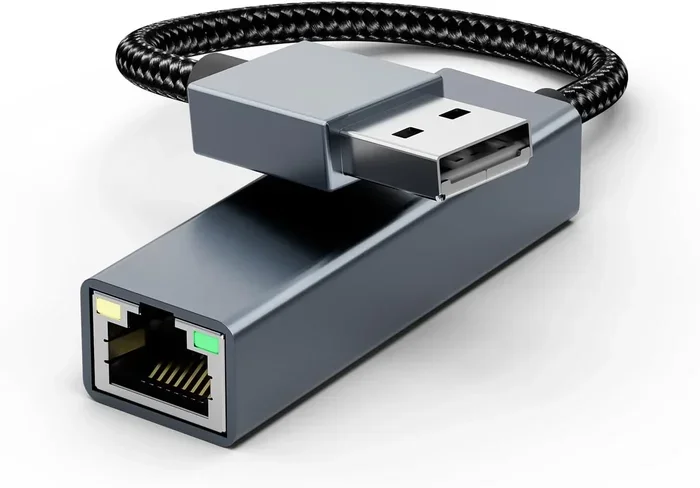
A USB Ethernet adapter is a small device that plugs into your computer or laptop’s USB port. On the other end, it has an Ethernet port where you insert a standard network cable. This setup creates a direct wired link between your device and your router or modem.
These adapters come in different shapes and sizes. Some are tiny thumb-drive-sized dongles. Others are larger USB hubs that include multiple ports. The most common types use either USB-A or USB-C connectors. USB-C Ethernet adapters are especially popular now because many newer laptops and tablets only have USB-C ports.
Most adapters are plug and play. This means you insert them, and your device recognizes them automatically. You do not need to install extra software in most cases. The operating system handles the driver setup on its own. This makes the whole process very beginner-friendly.
How Does It Work?
When you plug the adapter into a USB port, it communicates with your device’s operating system. The system recognizes it as a network interface, just like a built-in Ethernet port. Then, when you connect an Ethernet cable from the adapter to your router, data flows directly through that cable. This creates a LAN connection that is far more stable than a wireless signal.
The adapter handles the conversion between USB data and Ethernet data. Modern adapters use advanced chipsets that support fast transfer rates. A good network adapter can handle gigabit speeds without any bottleneck at the USB connection.
Types of USB Ethernet Adapters
Not all adapters are the same. Different devices need different types of connections. Here are the main categories you will encounter when shopping.
USB-A Ethernet Adapters
USB-A is the traditional rectangular plug found on older computers and laptops. A USB-A Ethernet adapter fits right into these ports. They are widely available and affordable. Most basic models support speeds of 100 Mbps, which is enough for everyday browsing and HD streaming.
USB-C Ethernet Adapters
USB-C is the newer, reversible connector found on modern laptops, tablets, and phones. A USB-C Ethernet adapter is essential if your device only has USB-C ports. These adapters tend to be slightly more expensive but offer better speed support. Many can handle Gigabit Ethernet and even faster speeds.
USB Ethernet Hubs
If you need more than just an Ethernet port, a USB hub with built-in Ethernet is a great choice. These devices add multiple USB ports along with an Ethernet jack. They are perfect for people who need to connect several devices at once. A hub also works well if your laptop has limited ports.
Portable vs. Powered Adapters
Portable adapters draw power directly from the USB port. They are small and convenient for travel. Powered adapters use an external power source, which allows them to support higher speeds without overheating. If you need maximum performance, a powered adapter is the better choice.
Benefits of Connecting Ethernet Through USB
Why should you bother using an Ethernet-to-USB setup instead of sticking with Wi-Fi? There are several compelling reasons.
Faster Speeds
Wi-Fi is convenient, but it has speed limits. Walls, distance, and interference from other devices all slow down your wireless signal. A wired connection through a USB Ethernet adapter avoids all of these problems. You get the full speed your internet plan provides, straight to your device.
Lower Latency
Latency is the delay between sending a request and getting a response. Gamers and video callers care a lot about this. A wired Ethernet connection through USB dramatically reduces latency compared to Wi-Fi. This means smoother gameplay, clearer video calls, and faster page loads.
Better Stability
Wi-Fi signals can drop or fluctuate without warning. A USB Ethernet adapter gives you a consistent, stable connection. You will not experience random disconnects or speed drops during important tasks. This reliability is especially important for work-from-home setups.
Improved Security
Wired connections are harder to intercept than wireless ones. When you use a USB Ethernet adapter, your data travels through a physical cable. This makes it much more difficult for anyone to eavesdrop on your network traffic. For sensitive work or banking, this extra layer of security matters.
Easy Setup
Setting up a USB Ethernet adapter takes less than two minutes. You plug it in, connect the cable, and you are online. No complicated configuration, no technical expertise needed. It really is that simple.
How to Set Up a USB Ethernet Adapter
Setting up your adapter is quick and easy. Follow these steps and you will be connected in no time.
- Plug the adapter into a USB port on your device. Use a USB-A or USB-C port depending on your adapter type.
- Wait for your device to recognize it. Most systems will show a notification that a new device is ready.
- Connect an Ethernet cable from the adapter to your router or modem.
- Wait for the connection to establish. Your device should automatically detect the wired network.
- Test your speed. Visit a speed test website to confirm you are getting the expected performance.
In most cases, no additional drivers are needed. Your operating system handles everything automatically. If you run into issues, try a different USB port or a different Ethernet cable. Sometimes a simple restart of your device also fixes connection problems.
Tips for Best Performance
- Use a high-quality Ethernet cable rated for Cat5e or higher.
- Plug the adapter directly into your device, not through a USB hub when possible.
- Keep your adapter away from other USB devices that may cause interference.
- Update your device drivers regularly for the best compatibility.
- Choose a powered adapter if you need sustained high speeds.
Common Mistakes to Avoid
Even though setting up a USB Ethernet adapter is simple, people still make avoidable mistakes. Here are the most common ones.
- Buying the wrong adapter type: Make sure you match the USB connector to your device. A USB-A adapter will not fit a USB-C port.
- Using a cheap, low-quality adapter: Budget adapters may limit your speeds or overheat. Invest in a reputable brand for reliable performance.
- Ignoring driver updates: Even plug-and-play adapters sometimes need driver updates for optimal performance. Check the manufacturer’s website occasionally.
- Using a damaged Ethernet cable: A frayed or bent cable can cause slow speeds and connection drops. Always inspect your cable before troubleshooting.
- Plugging into a faulty USB port: If your adapter is not recognized, try a different USB port on your device. Some ports may not supply enough power.
Avoiding these simple mistakes will save you a lot of frustration and help you get the most out of your wired internet setup.
Can You Use a USB Ethernet Adapter With Phones and Tablets?
Yes, you can use a USB Ethernet adapter with many smartphones and tablets. Android devices with USB-C ports often support Ethernet adapters directly. iPhones are a bit more limited because Apple uses a proprietary Lightning or USB-C connector, but adapters are available.
For iPhone users, you may need a specific Lightning-to-Ethernet adapter. These are less common but still available online. If you are looking for ways to manage your phone’s connectivity settings, you might also explore options like adding prefixes to numbers on iPhone for better call and contact management.
Tablets, especially Android tablets, work very well with USB Ethernet adapters. They are great for stable video calls and fast downloads. A wired connection on a tablet can be a lifesaver during travel or in areas with weak Wi-Fi signals.
USB Ethernet Adapters vs. Wi-Fi: Which Is Better?
Both wired and wireless connections have their place. But for speed, stability, and performance, a USB Ethernet adapter usually wins.
| Feature | USB Ethernet Adapter | Wi-Fi |
|---|---|---|
| Speed | Up to 1 Gbps (Gigabit) | Varies, typically 100-500 Mbps |
| Latency | Very low (1-2 ms) | Higher (5-50 ms) |
| Stability | Excellent, no drops | Good, but can fluctuate |
| Convenience | Requires a cable | Wireless, very convenient |
| Security | High, physical connection | Moderate, can be intercepted |
| Setup | Plug and play | Easy, but may need configuration |
| Cost | $10-$30 for adapter | Included with device |
As you can see from the table, the advantages of a wired connection are clear. The only real downside is the cable. But for home offices, gaming setups, and streaming stations, the trade-off is well worth it.
Who Benefits Most From a USB Ethernet Adapter?
Many types of users can benefit from a USB Ethernet adapter. Here are some examples.
- Remote workers: A stable, fast connection is essential for video calls and cloud-based work. A wired internet setup eliminates frustrating dropouts during important meetings.
- Gamers: Low latency is critical for online gaming. A USB Ethernet adapter gives you the competitive edge of a wired connection without needing a desktop PC.
- Streamers: Watching or streaming HD video requires consistent bandwidth. A wired connection ensures smooth playback without buffering.
- Students: Online classes and research demand reliable internet. A USB Ethernet adapter keeps students connected without Wi-Fi interruptions.
- Tech enthusiasts: People who love gadgets and productivity tools often appreciate the simplicity and reliability of a wired setup. If you enjoy exploring helpful tech solutions, you might also browse our list of 10 gadgets to make mom’s life easier for more useful accessory ideas.
Expert Insights on Wired USB Internet Connections
Network professionals consistently recommend wired connections for anyone who needs reliable performance. An Ethernet-to-USB setup is one of the easiest ways to upgrade your home or office network without replacing any existing equipment.
“A USB Ethernet adapter is one of the most underrated networking tools available,” says tech expert Mark Collins. “For under $20, you can turn any laptop into a wired powerhouse. The speed and stability improvements are immediately noticeable.”
The key is choosing the right adapter for your needs. Look for adapters that support Gigabit speeds if your internet plan is faster than 100 Mbps. For basic browsing, a 100 Mbps adapter is perfectly fine and costs even less.
Another important tip is to keep your adapter firmware updated. Manufacturers occasionally release updates that improve compatibility and performance. Checking for updates every few months is a good habit for any tech user.
Frequently Asked Questions
Can you connect Ethernet to USB on any computer?
Yes, most computers and laptops with a USB port can use an Ethernet adapter. Whether you have a USB-A or USB-C port, there is an adapter that fits. Even some tablets and smartphones support USB Ethernet adapters. Just check your device’s specifications to confirm compatibility.
Does a USB Ethernet adapter slow down your internet speed?
No, a quality USB Ethernet adapter does not slow down your internet. In fact, it usually makes your connection faster and more stable than Wi-Fi. The only exception is if you buy a very cheap, low-quality adapter that cannot handle higher speeds. Stick with reputable brands for the best results.
Do you need to install drivers for a USB Ethernet adapter?
Most modern adapters are plug and play and do not need driver installation. Your operating system recognizes them automatically. However, some older adapters or specialized models may require a driver download. Always check the manufacturer’s website if your adapter is not recognized right away.
Can you use a USB Ethernet adapter with a Chromebook?
Yes, Chromebooks support USB Ethernet adapters. Simply plug in the adapter, connect the Ethernet cable, and your Chromebook will detect the wired network. Most Chromebooks handle the setup automatically without any extra steps.
Is a USB Ethernet adapter better than a built-in Ethernet port?
A built-in Ethernet port is slightly more convenient because it does not take up a USB port. However, a USB Ethernet adapter performs just as well in terms of speed and stability. The difference is negligible for most users. An adapter is the perfect solution if your device does not have a built-in Ethernet port.
What speed can you expect from a USB Ethernet adapter?
Most modern USB Ethernet adapters support speeds of 100 Mbps to 1 Gbps. USB 3.0 adapters can handle Gigabit speeds easily. USB 2.0 adapters are limited to around 100 Mbps. Check the adapter specifications before purchasing to make sure it matches your internet speed.
Final Thoughts
So, can you connect Ethernet to USB and get faster internet? Absolutely. A USB Ethernet adapter is one of the simplest, most affordable upgrades you can make to improve your internet experience. Whether you are working from home, gaming online, or streaming your favorite shows, a wired connection through USB delivers better speed, lower latency, and more reliability than Wi-Fi alone.
The setup takes less than two minutes. The cost is usually under $30. And the benefits last as long as you use the adapter. There is no reason not to try it if you have been struggling with slow or unreliable internet.
Pick up a quality USB Ethernet adapter today, plug it in, and feel the difference a wired connection makes. Your internet experience will never be the same.