Can Hdmi 2 1 Handle 4k 144hz and Deliver Smooth Gaming
HDMI 2.1 can absolutely handle 4K 144Hz gaming. With its massive 48 Gbps bandwidth, the latest HDMI standard delivers the ultra high definition resolution and super smooth refresh rates that modern gamers demand. Whether you are using a PlayStation 5, Xbox Series X, or a powerful PC graphics card, understanding HDMI 2.1 helps you unlock the best gaming experience possible.
If you are a gamer, you have probably heard the buzz around HDMI 2.1 and 4K 144Hz. These two terms show up everywhere in gaming discussions. But here is the real question: can your setup actually handle both at the same time?
The short answer is yes. HDMI 2.1 was designed to do exactly this. It brings the bandwidth and features needed to push ultra HD resolution at incredibly smooth refresh rates. But there is more to it than just plugging in a cable.
In this guide, we will break down everything you need to know. We will cover how HDMI 2.1 works, what 4K 144Hz really means, and whether your current setup is ready. By the end, you will know exactly what to look for in your gaming monitor or TV and which HDMI cable to buy.
Key Takeaways
- HDMI 2.1 fully supports 4K 144Hz: Its 48 Gbps bandwidth handles the data load with ease.
- You need an Ultra High Speed HDMI cable: Standard cables will not cut it for 4K 144Hz signals.
- VRR and ALLM features reduce screen tearing: These HDMI 2.1 technologies make gameplay buttery smooth.
- Not every monitor or TV supports 4K 144Hz over HDMI: Always check the display specs before buying.
- HDMI 2.1 also supports HDR and higher resolutions: It is future-proof for 8K and beyond.
- Your graphics card matters too: A powerful GPU is needed to push 4K 144Hz frames.
📑 Table of Contents
- What Is HDMI 2.1 and Why Does It Matter for Gaming
- Understanding 4K 144Hz: What the Numbers Mean
- Can HDMI 2.1 Actually Handle 4K 144Hz
- HDMI 2.1 Features That Boost Your Gaming Setup
- Do You Need HDMI 2.1 for Your Setup
- Common Mistakes and How to Avoid Them
- Expert Insights: The Future of HDMI and 4K Gaming
- Conclusion
What Is HDMI 2.1 and Why Does It Matter for Gaming
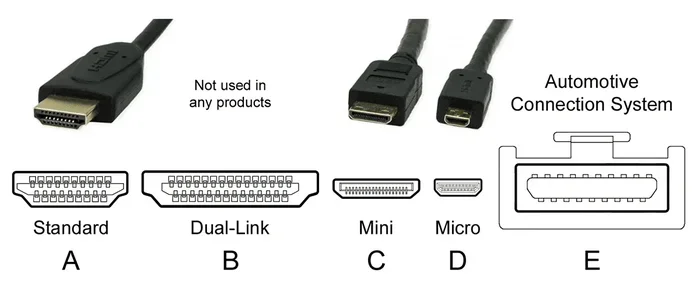
HDMI 2.1 is the newest version of the High Definition Multimedia Interface standard. Think of it as the highway that carries video and audio from your console or PC to your display. The newer the version, the wider that highway is.
HDMI 2.1 brought a huge upgrade to the table. It increased the maximum bandwidth from 18 Gbps in HDMI 2.0 to a massive 48 Gbps. That is more than double the previous standard. This extra bandwidth opens the door to higher resolutions, faster refresh rates, and better picture quality.
Key Features of HDMI 2.1
Here are the standout features that make HDMI 2.1 a game changer:
- 48 Gbps bandwidth: Enough to handle 4K 120Hz, 4K 144Hz, and even 8K 60Hz.
- Variable Refresh Rate (VRR): This reduces screen tearing and stuttering during fast-paced next-gen gaming.
- Auto Low Latency Mode (ALLM): Automatically switches your display to low-latency mode for smoother gameplay.
- Quick Frame Transport (QFT): Reduces the delay between sending and receiving frames.
- Enhanced Audio Return Channel (eARC): Supports high-quality audio formats for a more immersive experience.
- Dynamic HDR: Delivers high dynamic range content frame by frame for better contrast and color.
These features are not just nice to have. For serious 4K gaming, they make a noticeable difference. VRR alone can transform a choppy experience into something buttery smooth.
Understanding 4K 144Hz: What the Numbers Mean
Before we go further, let us quickly break down what 4K 144Hz actually means. The “4K” part refers to the resolution. It is roughly 3840 by 2160 pixels. That is four times the pixel count of standard 1080p Full HD. More pixels mean sharper, more detailed images.
The “144Hz” part refers to the refresh rate. This is how many times per second the display updates the image. A 144Hz gaming monitor refreshes the picture 144 times every second. Compare that to a standard 60Hz screen, which only updates 60 times per second.
Why does this matter for smooth gaming? Higher refresh rates mean smoother motion. When you are playing a fast-paced shooter or racing game, every extra frame counts. You see movement more clearly. Your reactions feel faster. It is a huge competitive advantage.
4K 144Hz vs 4K 120Hz vs 4K 60Hz
Not all ultra HD setups are created equal. Here is a quick comparison:
| Resolution and Refresh Rate | Bandwidth Needed | HDMI Version Required | Best For |
|---|---|---|---|
| 4K 60Hz | ~18 Gbps | HDMI 2.0 | Casual gaming, movie watching |
| 4K 120Hz | ~32 Gbps | HDMI 2.1 | Console gaming, VR |
| 4K 144Hz | ~48 Gbps | HDMI 2.1 | High-end PC gaming, competitive play |
| 8K 60Hz | ~48 Gbps | HDMI 2.1 | Future-proof setups |
As you can see, 4K 144Hz demands the most bandwidth. That is exactly why HDMI 2.1 was created. Older versions simply cannot push that much data reliably.
Can HDMI 2.1 Actually Handle 4K 144Hz
This is the big question, and the answer is a clear yes. HDMI 2.1 was built to handle 4K 144Hz without breaking a sweat. The 48 Gbps bandwidth provides more than enough headroom for this resolution and refresh rate combination.
But here is where it gets tricky. Just having an HDMI 2.1 port on your device is not enough. You also need a compatible display and the right cable. Let us look at each piece of the puzzle.
What You Need for 4K 144Hz Over HDMI 2.1
To get 4K 144Hz working through HDMI 2.1, you need three things:
- An HDMI 2.1 source device: This could be a PC with a compatible graphics card, a PlayStation 5, or an Xbox Series X.
- An HDMI 2.1 display: Your gaming monitor or TV must support 4K 144Hz input over HDMI.
- An Ultra High Speed HDMI cable: This is the official cable rated for HDMI 2.1 and the 48 Gbps bandwidth it requires.
Skip any one of these, and you will not get the full 4K 144Hz experience. A cheap or old cable will bottleneck your setup, no matter how good your other gear is.
Bandwidth Explained Simply
Think of bandwidth like a water pipe. The wider the pipe, the more water (or data) it can carry at once. HDMI 2.0 is like a narrow pipe. It can handle 4K 60Hz just fine. But when you try to push more data through it for 4K 144Hz, it gets clogged.
HDMI 2.1 is like a wide-open fire hose. It can carry all that data without any bottlenecks. This is why bandwidth is the single most important factor in whether HDMI 2.1 can deliver 4K 144Hz.
HDMI 2.1 Features That Boost Your Gaming Setup
HDMI 2.1 does more than just carry a high-resolution signal. It comes packed with features that directly improve your gaming experience. Let us look at the ones that matter most.
Variable Refresh Rate (VRR)
VRR is one of the most important features for gamers. It synchronizes the display’s refresh rate with the frame rate output by your graphics card or console. The result? No more screen tearing or stuttering.
When your game runs at 120 frames per second one moment and drops to 90 the next, VRR adjusts the display in real time. You get a seamless, smooth gaming experience. Both PlayStation 5 and Xbox Series X support VRR over HDMI 2.1.
Auto Low Latency Mode (ALLM)
ALLM automatically switches your display to its lowest-latency mode when you start a game. You do not have to dig through settings menus. The HDMI 2.1 connection handles it for you.
Lower latency means less delay between your input and what happens on screen. For competitive 4K gaming, this can be the difference between winning and losing a match.
Quick Frame Transport (QFT)
QFT reduces the time it takes for frames to travel from your source device to your display. Less travel time means lower input lag. While this sounds technical, the practical benefit is simple: your controls feel more responsive.
Dynamic HDR Support
HDMI 2.1 supports dynamic HDR, which adjusts brightness, contrast, and color on a scene-by-scene or even frame-by-frame basis. This makes games look more vibrant and realistic compared to static HDR formats.
Do You Need HDMI 2.1 for Your Setup
This depends on your gaming goals and current hardware. Let us walk through a few scenarios to help you decide.
When HDMI 2.1 Is a Must
You should invest in HDMI 2.1 if any of these apply to you:
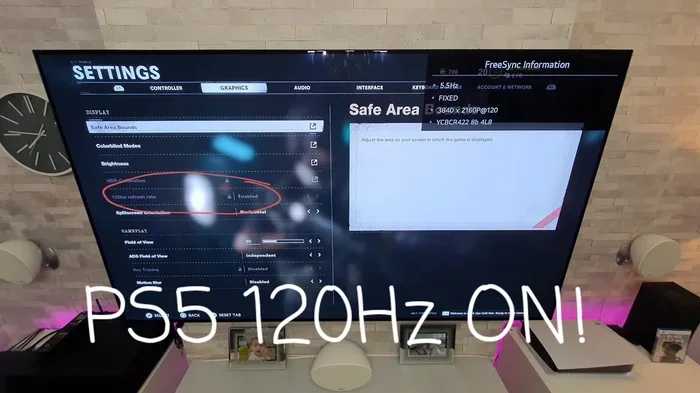
- You own a PlayStation 5 or Xbox Series X and want to use 4K 120Hz or 4K 144Hz.
- You have a gaming monitor that supports 4K 144Hz over HDMI.
- You are building a PC with a high-end graphics card like an NVIDIA RTX 40-series or AMD Radeon RX 7000-series.
- You want VRR, ALLM, and other HDMI 2.1 features for the best gaming experience.
- You plan to future-proof your setup for 8K or higher refresh rates down the road.
When HDMI 2.0 Might Be Enough
You might not need HDMI 2.1 right now if:
- You game at 1080p or 1440p and are happy with 60Hz.
- Your current gaming monitor or TV only supports 4K 60Hz.
- You are on a tight budget and do not plan to upgrade your display soon.
- You mostly play single-player story games where frame rate is less critical.
The good news is that HDMI 2.1 is backward compatible. You can use an HDMI 2.1 cable with older devices. It just will not unlock the full 4K 144Hz potential unless all your gear supports it.
Common Mistakes and How to Avoid Them
Even with HDMI 2.1 hardware, mistakes can hold back your 4K 144Hz experience. Here are the most common pitfalls and how to avoid them.
Using the Wrong Cable
This is the number one mistake. Not all cables labeled “HDMI” are created equal. A standard HDMI cable or even a Premium High Speed HDMI cable cannot handle the full 48 Gbps of HDMI 2.1. You need an Ultra High Speed HDMI cable that is officially certified for HDMI 2.1.
Quick Tip: Look for the Ultra High Speed HDMI certification label on the cable packaging. This guarantees it supports 4K 144Hz and HDMI 2.1 features.
Assuming All 4K Monitors Support 144Hz Over HDMI
Many 4K monitors only support 4K 120Hz or even 4K 60Hz over HDMI. Some require DisplayPort to reach 4K 144Hz. Always check the exact specs of your display before assuming it will work.
Ignoring Your Graphics Card’s Capabilities
Even with the best HDMI 2.1 setup, your graphics card needs to be powerful enough to actually render 4K 144Hz frames. A mid-range GPU will struggle to hit that mark in demanding games. Make sure your GPU can keep up with your display.
Overlooking Display Settings
Sometimes the problem is simply that VRR or ALLM is not enabled in your display or console settings. Double-check these settings to make sure you are getting the full benefit of your HDMI 2.1 connection.
Expert Insights: The Future of HDMI and 4K Gaming
HDMI 2.1 is not just about today’s 4K 144Hz gaming. It is also about preparing for what comes next. The ultra HD ecosystem is evolving fast, and HDMI 2.1 gives you a solid foundation.
Manufacturers are already pushing toward 4K 240Hz and even 8K 120Hz displays. These would be impossible without the bandwidth that HDMI 2.1 provides. By investing in HDMI 2.1 gear now, you are setting yourself up for years of smooth gaming without needing to replace your cables or ports.
Expert Tip: When shopping for a gaming monitor or TV, look for displays that explicitly list HDMI 2.1 support with 4K 144Hz input. Not all brands are consistent with their labeling, so always check the detailed specifications.
The next-gen gaming era is here. Consoles like the PlayStation 5 and Xbox Series X are designed to take full advantage of HDMI 2.1. PC gamers with modern graphics cards can also push the limits of 4K resolution and high refresh rates. HDMI 2.1 is the bridge that connects your hardware to the best possible visual experience.
Conclusion
HDMI 2.1 handles 4K 144Hz with confidence and room to spare. Its 48 Gbps bandwidth, combined with features like VRR, ALLM, and dynamic HDR, makes it the gold standard for smooth gaming today.
Whether you are a console gamer with a PlayStation 5, an Xbox owner, or a PC enthusiast with a powerful graphics card, HDMI 2.1 unlocks the full potential of ultra HD gaming. The key is making sure every piece of your setup supports it, from the cable to the display.
Do not let an outdated cable or the wrong settings hold you back. Upgrade to HDMI 2.1, grab an Ultra High Speed HDMI cable, and enjoy the smoothest, most detailed 4K gaming experience available right now.
Frequently Asked Questions
Can I use a regular HDMI cable for 4K 144Hz?
No, a regular HDMI cable cannot handle the bandwidth required for 4K 144Hz. You need an Ultra High Speed HDMI cable certified for HDMI 2.1 to support this resolution and refresh rate combination reliably.
Does HDMI 2.1 work with PlayStation 5 and Xbox Series X?
Yes, both the PlayStation 5 and Xbox Series X support HDMI 2.1. They can output 4K 120Hz and 4K 144Hz signals when connected to a compatible display with the right HDMI cable.
What is the difference between HDMI 2.0 and HDMI 2.1 for gaming?
HDMI 2.0 maxes out at 18 Gbps bandwidth, which supports 4K 60Hz. HDMI 2.1 doubles that to 48 Gbps, enabling 4K 120Hz, 4K 144Hz, and even 8K 60Hz. It also adds features like VRR and ALLM that greatly improve the gaming experience.
Do I need a special graphics card for 4K 144Hz over HDMI 2.1?
Yes, your graphics card needs to be powerful enough to render games at 4K resolution with high frame rates. Cards like the NVIDIA RTX 4080, RTX 4090, or AMD Radeon RX 7900 XTX are well-suited for this task. A weaker GPU will struggle to reach 4K 144Hz in most modern games.
Can I get 4K 144Hz through DisplayPort instead of HDMI 2.1?
Yes, DisplayPort 1.4 and DisplayPort 2.1 can also deliver 4K 144Hz. However, if your gaming monitor or TV only has HDMI ports, then HDMI 2.1 is your best and often only option for 4K 144Hz connectivity.
Is HDMI 2.1 backward compatible with older devices?
Yes, HDMI 2.1 is fully backward compatible. You can plug an HDMI 2.1 cable into older devices and it will work. However, you will only get the full 4K 144Hz benefits when both the source device and the display support HDMI 2.1.