Can Usb Act As Ethernet Heres What You Need to Know
Yes, a USB can act as Ethernet using a USB to Ethernet adapter. This small device lets you plug a cable into your laptop or desktop and get a wired internet connection. Whether you have USB-A or USB-C, there is an adapter that fits your needs. USB Ethernet adapters are affordable, portable, and easy to set up. They are perfect for desktops without Ethernet ports, ultrabooks, and anyone who needs a stable wired connection on the go.
This is a comprehensive guide about Can Usb Act As Ethernet.
Key Takeaways
- USB to Ethernet adapters work on most laptops and desktops: They turn a USB port into a network connection quickly.
- USB-C and USB-A adapters are both available: Choose the one that matches your device port.
- Wired connections are more stable than Wi-Fi: USB Ethernet gives you lower latency and fewer dropouts.
- Speed depends on the adapter and USB version: USB 3.0 adapters can reach Gigabit Ethernet speeds.
- Drivers may be needed: Most modern adapters are plug and play, but some require manual setup.
- These adapters are affordable: You can get a reliable one for under $20.
- They are great for travel and office use: Compact and easy to carry anywhere.
[FEATURED_IMAGE_PLACEHOLDER]
Have you ever plugged in your laptop at a hotel or office and realized there is no Ethernet port in sight? You are not alone. Many modern laptops and tablets have ditched the traditional network jack altogether. This leaves people wondering whether they can still get a wired internet connection. The answer is simple. Can USB act as Ethernet? Yes, absolutely. With a small adapter, your USB port can become a full Ethernet port. This opens up a world of reliable, fast, and stable internet access.
In this guide, we will walk through everything you need to know about using a USB to Ethernet adapter. We will cover how these adapters work, the different types available, speed expectations, and who benefits most from them. Whether you are a student, a remote worker, or a gamer who needs the lowest possible ping, this article has you covered.
The topic of USB Ethernet connectivity is broader than most people think. There are nuances around USB versions, driver support, and real-world performance that can make or break your experience. By the end of this article, you will know exactly what to look for and how to set one up in minutes.
What Is a USB to Ethernet Adapter?
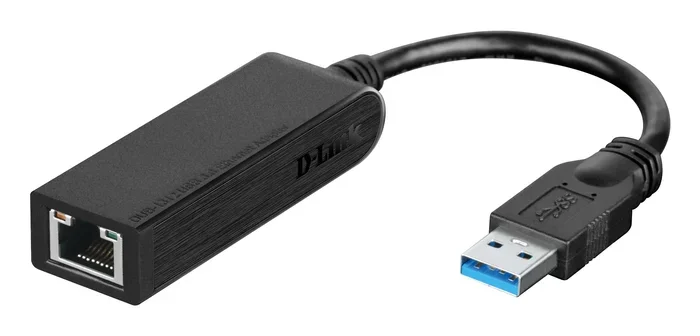
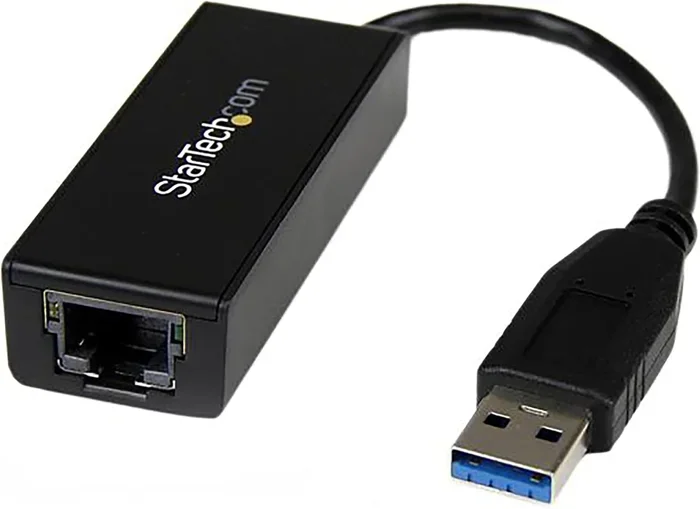
A USB to Ethernet adapter is a small hardware device that bridges your USB port and an Ethernet cable. It acts as a network interface card (NIC) without taking up an internal slot. You plug the adapter into your USB port, connect an Ethernet cable, and your device gains a wired network connection. That is really all there is to it.
These adapters come in different shapes and sizes. Some are tiny and pocket-sized. Others are bulkier but offer better performance. They support various Ethernet speeds, from 100 Mbps to 1000 Mbps (Gigabit Ethernet). The type you need depends on your device and your internet speed plan.
How Does It Work?
When you plug a USB Ethernet adapter into your computer, the operating system recognizes it as a new network device. Windows, macOS, and most Linux distributions support these adapters out of the box. The adapter handles the conversion between USB data signals and Ethernet network signals. This process happens almost instantly in most cases.
The adapter contains a small chip that manages the network protocol communication. This chip translates the data from your USB connection into the format needed for a wired LAN connection. It also handles the physical layer, meaning the actual electrical signals that travel through the Ethernet cable.
How Does USB Act as Ethernet?
The idea of a USB acting as Ethernet might sound technical, but the concept is straightforward. Your USB port can carry network data just like it carries files or charges your phone. The adapter does the heavy lifting by converting the data format.
Here is a simple way to think about it. Your USB port is like a highway. The USB to Ethernet adapter is like a bridge that connects that highway to a different road system, which is the Ethernet network. Once the bridge is in place, data flows freely between your computer and the internet through the wired connection.
USB Versions and Their Impact on Ethernet Speed
The speed of your USB Ethernet connection depends heavily on the USB version your device supports. Not all USB ports are created equal, and this directly affects how fast your wired internet will be.
- USB 2.0: Maximum theoretical speed of 480 Mbps. This is enough for most internet plans, which rarely exceed 100 Mbps. However, you will not get the full benefit of Gigabit Ethernet.
- USB 3.0 (also called USB 3.2 Gen 1): Maximum speed of 5 Gbps. This easily supports Gigabit Ethernet at 1000 Mbps. This is the sweet spot for most users.
- USB 3.1 and USB 3.2 Gen 2: Speeds up to 10 Gbps. These can handle even the fastest Ethernet connections and are ideal for power users.
- USB-C (with USB 3.1 or higher): Offers the best combination of speed and versatility. A USB-C to Ethernet adapter is the go-to choice for modern laptops.
Does the Operating System Matter?
Most modern operating systems have built-in support for USB network adapters. Windows 10 and 11 recognize the vast majority of adapters immediately. macOS also has excellent native support, especially for popular adapter brands. Linux users may need to install drivers in some cases, but most adapters work without extra steps.
Types of USB to Ethernet Adapters
Not all USB Ethernet adapters are the same. They differ in port type, speed, build quality, and features. Choosing the right one depends on your device and what you plan to do with it.
USB-A to Ethernet Adapters
This is the most common type. It has a standard rectangular USB-A plug on one end and an Ethernet jack on the other. These adapters work with almost any desktop computer, older laptop, or USB hub. They are widely available and very affordable. Most cost between $5 and $15.
USB-C to Ethernet Adapters
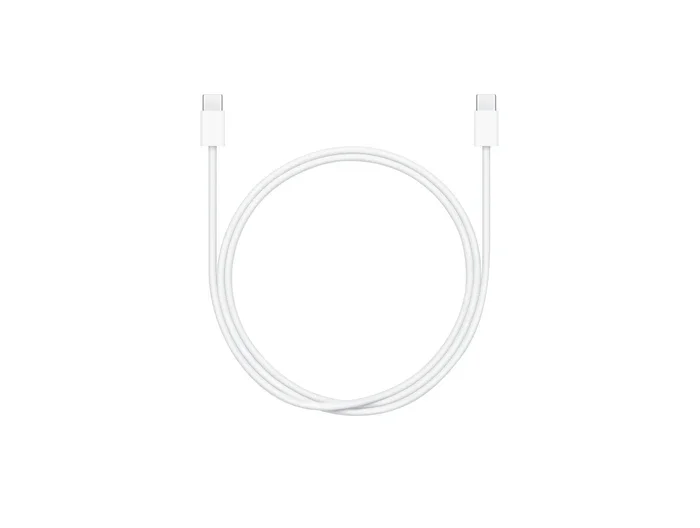
If you have a newer laptop, tablet, or smartphone with a USB-C port, you need a USB-C adapter. These are slightly more expensive but offer better speeds thanks to the USB 3.0 or higher standard. Many professionals and travelers prefer USB-C adapters because they are compact and fit easily into a laptop bag.
USB Ethernet Adapters with Built-in Hubs
Some adapters come with extra USB ports built in. This is a great option if you need to connect multiple devices. For example, you can plug the adapter into one USB port and use the extra ports for a flash drive or a mouse. These combo devices save desk space and reduce cable clutter.
Comparison Table: USB-A vs USB-C Ethernet Adapters
| Feature | USB-A Adapter | USB-C Adapter |
|---|---|---|
| Port Type | Standard USB-A | USB-C |
| Typical Speed | Up to 1000 Mbps (with USB 3.0) | Up to 1000 Mbps (often USB 3.1) |
| Best For | Desktops, older laptops | Modern laptops, tablets |
| Price Range | $5 – $15 | $10 – $25 |
| Portability | Medium | High |
| Driver Support | Excellent on all OS | Excellent on all OS |
Benefits of Using USB as Ethernet
There are many reasons to use a USB to Ethernet adapter instead of relying on Wi-Fi. Let us look at the biggest advantages.
1. More Stable Connection
Wi-Fi signals can be weak or interrupted by walls, other devices, and even microwaves. A wired Ethernet connection through a USB adapter gives you a direct, stable link to your router. You will experience fewer dropouts and a more consistent connection.
2. Lower Latency
For gamers and video callers, latency matters. Wi-Fi introduces extra delay because the signal travels through the air. A USB Ethernet adapter reduces this delay significantly. You will notice smoother gameplay and clearer video calls.
3. Better Security
Wired connections are inherently more secure than wireless ones. It is much harder for someone to intercept data over an Ethernet cable than over a Wi-Fi signal. If you work with sensitive information, a wired USB Ethernet setup adds an extra layer of protection.
4. Portability and Convenience
These adapters are tiny and light. You can keep one in your laptop bag and use it at hotels, offices, or classrooms. They are a lifesaver when the Wi-Fi is terrible or not available at all.
5. No Need for Internal Hardware
Not every computer has an Ethernet port built in. Instead of opening your device and installing a network card, a USB Ethernet adapter gives you the same capability from the outside. This is especially useful for slim laptops and tablets.
Common Problems and How to Fix Them
Using a USB to Ethernet adapter is usually smooth, but sometimes issues pop up. Here are the most common problems and simple fixes.
Adapter Not Recognized
If your computer does not detect the adapter, try plugging it into a different USB port. Avoid using USB hubs for the initial setup. Plug it directly into your computer. If that does not work, restart your computer. Most of the time, a simple reboot solves the problem.
Slow Speeds
If your internet feels slow through the adapter, check your USB version. A USB 2.0 adapter on a USB 2.0 port will cap your speed. Make sure you are using a USB 3.0 or USB-C port for the best results. Also, check that your Ethernet cable is not damaged.
Driver Issues
Most adapters work without extra software. However, some cheaper models need a driver update. Visit the manufacturer’s website and download the latest driver for your operating system. This usually resolves any connection problems.
Intermittent Disconnects
If your connection drops randomly, the adapter may be overheating. Make sure it has enough airflow. Also, check your power settings. Some computers turn off USB ports to save energy, which can disconnect your adapter. Go to your power settings and disable USB selective suspend.
No Internet Access After Connecting
This usually means your adapter has a connection but is not getting an IP address. Try releasing and renewing your IP address through the command line. On Windows, open Command Prompt and type ipconfig /release followed by ipconfig /renew. This forces your computer to grab a fresh network address.
Who Should Use a USB to Ethernet Adapter?
A USB Ethernet adapter is not just for tech experts. Many types of users can benefit from one. Here are the groups that get the most value out of this simple device.
Remote Workers
If you work from home and your Wi-Fi is unreliable, a USB to Ethernet adapter can be a game changer. Video conferences, file uploads, and cloud apps all perform better on a wired connection. You will experience fewer frozen screens and dropped calls.
Gamers
Online gaming demands a fast and stable connection. Wi-Fi is convenient but not always dependable. A USB Ethernet adapter gives you the low latency and consistent speeds that competitive gaming requires. You will notice fewer lag spikes and smoother gameplay.
Students
College dorms and libraries often have poor Wi-Fi coverage. A compact USB-C Ethernet adapter lets students plug directly into the dorm network for faster downloads and more reliable study sessions.
Travelers
Hotel rooms and airport lounges sometimes only offer wired internet. A small USB Ethernet adapter in your carry-on bag means you can always get online, no matter where you are.
Owners of Port-Limited Devices
Many modern laptops, Chromebooks, and tablets do not include an Ethernet port. If your device falls into this category, a USB to Ethernet adapter is the simplest and cheapest way to add one.
How to Choose the Right USB Ethernet Adapter
Not all adapters are created equal. Here is what to look for when buying one.
- Check your USB port type: Do you have USB-A or USB-C? Buy the matching adapter.
- Look for USB 3.0 or higher: This ensures you can reach Gigabit Ethernet speeds.
- Check the rated Ethernet speed: 100 Mbps adapters are fine for basic browsing. 1000 Mbps (Gigabit) adapters are better for fast internet plans.
- Brand reputation matters: Stick with well-known brands like TP-Link, UGREEN, or Sabrent. They offer better reliability and driver support.
- Size and portability: If you travel often, pick a compact adapter that fits in your bag easily.
- Extra features: Some adapters include SD card readers or extra USB ports. These can add value if you need them.
A good rule of thumb is to spend between $10 and $20 for a reliable USB Ethernet adapter. Avoid the cheapest options under $5, as they often have poor build quality and slower speeds.
Expert Insights on USB Ethernet Performance
Network professionals often recommend USB to Ethernet adapters for situations where Wi-Fi is not an option. The performance gap between a built-in Ethernet port and a quality USB adapter is minimal for most everyday tasks. You will see the biggest differences in high-bandwidth activities like large file transfers or 4K streaming.
One thing to keep in mind is that USB adapters share bandwidth with other USB devices on the same controller. If you are using a USB hub with many devices connected, your Ethernet speed may take a hit. For the best results, plug the adapter directly into your computer.
Another expert tip is to always use a Cat5e or Cat6 Ethernet cable with your adapter. The cable quality matters just as much as the adapter itself. A cheap or damaged cable can bottleneck your speeds regardless of how good the adapter is.
Quick Tips for Best Results
- Always use a USB 3.0 port or higher for maximum speed.
- Keep your adapter drivers up to date.
- Use a short, high-quality Ethernet cable.
- Avoid using USB hubs when possible for the adapter.
- Restart your adapter if you experience connectivity issues.
- Check your power management settings to prevent USB port sleep mode.
Conclusion
The answer to the question can USB act as Ethernet is a clear and definitive yes. A USB to Ethernet adapter gives you a reliable, fast, and stable wired internet connection using just a USB port. These adapters are affordable, portable, and compatible with almost any device.
Whether you need a USB Ethernet connection for work, gaming, or travel, there is an adapter that fits your needs. The key is choosing the right type, keeping your drivers updated, and using quality cables. With these simple steps, you can enjoy all the benefits of a wired LAN connection without opening your computer.
Do not let the lack of an Ethernet port hold you back. Grab a USB to Ethernet adapter and experience the difference a wired connection can make. Your internet will be faster, more stable, and more secure. It is one of the easiest and most cost-effective upgrades you can make to your setup.
Frequently Asked Questions
Do I need to install drivers for a USB Ethernet adapter?
Most modern adapters are plug and play and do not require driver installation. Windows, macOS, and Linux recognize them automatically. However, some budget adapters may need a driver download from the manufacturer’s website. Always check the product description before purchasing.
Can I use a USB Ethernet adapter on a smart TV or gaming console?
Yes, many smart TVs and gaming consoles like the Steam Deck support USB Ethernet adapters. This is a great way to get a wired connection on devices that only have Wi-Fi built in. Just make sure the adapter is compatible with your specific device before buying.
Does a USB Ethernet adapter reduce internet speed?
A quality USB 3.0 adapter should not reduce your speed noticeably. However, a USB 2.0 adapter may limit your speed to around 100 Mbps even if your internet plan is faster. Always match the adapter speed to your internet plan for the best results.
Are USB Ethernet adapters safe to use?
Yes, they are completely safe. These adapters do not damage your device or compromise your data. They simply create a bridge between your USB port and an Ethernet cable. Always buy from reputable brands to ensure quality and safety.
Can I use a USB Ethernet adapter with a USB hub?
Yes, but it is not always recommended. Using a USB hub can sometimes cause speed drops or connection instability. For the best performance, plug the adapter directly into your computer’s USB port. If you must use a hub, choose a powered hub with its own power supply.
What is the difference between a USB Ethernet adapter and a USB-C docking station?
A USB Ethernet adapter is a small device that adds only an Ethernet port. A docking station is a larger device that adds multiple ports like USB, HDMI, and Ethernet. If you only need a wired internet connection, a simple adapter is all you need and costs much less.
Frequently Asked Questions
What is Can Usb Act As Ethernet?
Can Usb Act As Ethernet is an important topic with many practical applications.