Can I Charge My Hp Laptop Without A Charger At Home
Yes, you can charge your HP laptop without a charger using USB-C ports, portable power banks, car adapters, and universal chargers. This guide walks you through every safe alternative charging method so your HP laptop stays powered at home or on the go. You will learn which methods work best for different HP models and how to protect your battery health.
Have you ever been in a situation where your HP laptop charger is missing, broken, or just not working? It is a frustrating experience, especially when you need your laptop for work, school, or entertainment. The good news is that you can charge your HP laptop without a charger using several practical methods. This guide covers every safe and effective alternative you can try right at home.
Whether your HP Pavilion, HP Envy, or HP Omen laptop needs a power boost, you have more options than you might think. From USB-C cables to portable power banks, these methods can keep your device running when you need it most. Let us walk through each option step by step so you can choose the best one for your situation.
Before we dive in, it is important to understand that not every HP laptop supports all charging methods. The options available to you depend on your laptop model, its charging port type, and the power requirements of your device. With that said, let us explore the most popular ways to charge an HP laptop without the original charger.
Key Takeaways
- USB-C Charging: Many modern HP laptops support USB-C charging, making it easy to use a compatible cable and power source.
- Power Banks: High-wattage portable power banks can charge your HP laptop anywhere without a wall outlet.
- Car Charging: You can use a car adapter or inverter to charge your HP laptop from your vehicle.
- Universal Adapters: A universal laptop charger can serve as a reliable backup when your original HP charger is lost or damaged.
- Battery Health Matters: Using safe charging methods and maintaining good habits keeps your HP laptop battery healthy longer.
- Know Your Model: Not all HP laptops support every alternative charging method, so check your specific model first.
📑 Table of Contents
- Why You Might Need to Charge Your HP Laptop Without a Charger
- Methods to Charge Your HP Laptop Without a Charger
- Is It Safe to Charge Your HP Laptop Without the Original Charger?
- Tips to Maintain Your HP Laptop Battery Health
- When to Replace Your HP Laptop Charger
- Comparing Alternative Charging Methods for HP Laptops
- Quick Tips for Charging Your HP Laptop Without a Charger
- Common Mistakes to Avoid When Charging Without the Original Charger
- Expert Insights on HP Laptop Charging Alternatives
- Final Thoughts on Charging Your HP Laptop Without a Charger
Why You Might Need to Charge Your HP Laptop Without a Charger
There are many reasons why you might find yourself without your HP laptop charger. Understanding these scenarios can help you prepare for the future and avoid being caught off guard.
Common Scenarios Where You Need an Alternative
- Lost or misplaced charger: Chargers can disappear quickly, especially in busy households or shared offices.
- Damaged charger cable: Frayed or broken cables are one of the most common reasons people search for alternatives.
- Traveling or on the go: Forgetting your charger while traveling is more common than you think.
- Charger not compatible: Sometimes you borrow a charger that does not match your HP laptop’s power requirements.
- Power outlet issues: A faulty outlet or a tripped breaker can leave you without a way to plug in your original charger.
No matter the reason, knowing your options gives you peace of mind. You do not have to wait days for a replacement charger to arrive. With the right tools and a little knowledge, you can keep your HP laptop powered up and ready to go.
Methods to Charge Your HP Laptop Without a Charger
Several alternative charging methods work well for HP laptops. Each method has its own benefits and limitations. Let us look at the most reliable options you can try at home.
Using a USB-C Cable to Charge Your HP Laptop
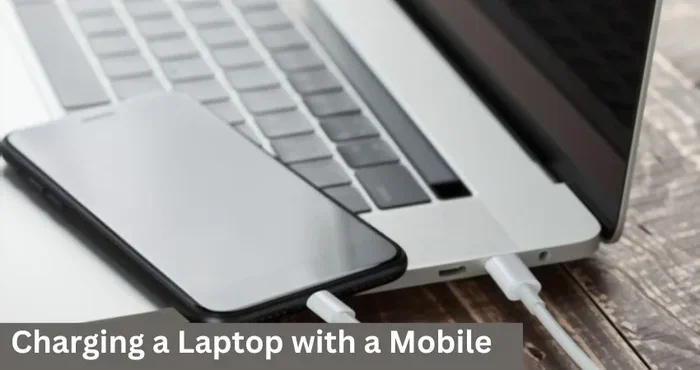
Many modern HP laptops come with a USB-C charging port. This is one of the easiest and most convenient ways to charge your HP laptop without a charger. USB-C cables are widely available, and you can plug them into a variety of power sources.
Here is what you need to know about USB-C charging:
- Check your HP laptop model to confirm it has a USB-C charging port. Not all models support this feature.
- Use a USB-C cable that supports power delivery (PD). Standard USB-C cables may not provide enough wattage.
- A USB-C wall adapter, monitor, or docking station can serve as your power source.
- USB-C charging typically works well for HP laptops that require 45 watts to 100 watts of power.
If you have a USB-C wall adapter at home, you can use it to charge your HP laptop just like you would charge a phone. This method is simple, fast, and works great for everyday use. Just make sure the adapter delivers enough power for your specific HP model.
Using a Portable Power Bank
A portable power bank is one of the best alternatives when you do not have your HP laptop charger. Power banks designed for laptops can store enough energy to give your laptop a full charge or at least several hours of extra runtime.
Here are some tips for using a power bank with your HP laptop:
- Look for a power bank with a USB-C PD output of at least 45 watts.
- Choose a power bank with a capacity of 20,000 mAh or higher for meaningful charging.
- Some power banks come with multiple ports, so you can charge your laptop and phone at the same time.
- Keep the power bank fully charged at home so it is ready when you need it.
Power banks are especially useful during travel, outdoor work sessions, or power outages. They are compact, lightweight, and easy to carry in your laptop bag. Just remember that a power bank will not charge your laptop as fast as the original charger, but it will get the job done.
Charging Your HP Laptop Using a Car Battery
If you have access to a vehicle, you can charge your HP laptop using a car adapter or inverter. This method is perfect for road trips, commutes, or situations where you need to work in your car.
Here is how car charging works for HP laptops:
- Car USB-C adapter: Plugs into your car’s USB port and delivers power through a USB-C cable.
- Car inverter: Converts your car’s DC power to AC power, allowing you to use your original HP charger in the vehicle.
- DC car charger: A direct DC adapter that connects to your car’s cigarette lighter socket.
Using a car inverter is often the most reliable method because it lets you use your original HP charger. A USB-C car adapter works well too, but make sure it provides enough wattage. Most HP laptops need at least 45 watts, so check the adapter specifications before you buy one.
Using a Universal Laptop Charger
A universal laptop charger is a versatile option that works with many laptop brands, including HP. These chargers come with multiple interchangeable tips and adjustable voltage settings to match different laptop models.
When choosing a universal charger for your HP laptop, keep these points in mind:
- Make sure the charger supports the correct voltage and wattage for your HP laptop model.
- Check that the charger includes a tip that fits your HP laptop’s charging port.
- Universal chargers are affordable and widely available online and in electronics stores.
- They work great as a backup charger, but they may not charge your laptop as quickly as the original HP charger.
A universal charger is a smart investment if you frequently misplace your charger or share devices with family members. It gives you a reliable backup option without the need to buy a brand-specific replacement right away.
Charging With a Compatible External Battery Pack
Some third-party manufacturers make external battery packs specifically designed for laptops. These packs connect to your HP laptop through USB-C or a proprietary connector and provide supplemental power.
These external battery packs are different from standard power banks because they are built to handle higher wattage demands. They can be a great solution if you regularly work away from wall outlets. Just make sure the pack is compatible with your HP laptop model and meets its power requirements.
Is It Safe to Charge Your HP Laptop Without the Original Charger?
This is one of the most common questions people ask when they explore alternative charging methods. The short answer is yes, it is generally safe, as long as you follow a few important guidelines.
Here are some safety tips to keep in mind:
- Use compatible power sources: Always check that the voltage and wattage match your HP laptop’s requirements. Using the wrong power output can damage your battery or internal components.
- Avoid cheap, uncertified chargers: Low-quality chargers may not provide stable power, which can harm your HP laptop over time.
- Monitor your laptop temperature: If your laptop feels unusually hot while charging from an alternative source, unplug it and let it cool down.
- Check your HP laptop’s charging light: Most HP laptops have an LED indicator that shows when charging is active. If the light does not turn on, the power source may not be compatible.
Using a USB-C cable from a reputable brand or a certified universal charger is perfectly safe for your HP laptop. The key is to avoid unknown or uncertified power sources that could deliver unstable voltage. When in doubt, stick with trusted brands and verified products.
It is also worth noting that if you are working on a line that won’t delete in Microsoft Excel and your charger dies, a USB-C cable from your phone charger can be a quick lifesaver for light tasks. Just be mindful that intensive spreadsheet work drains battery faster, so keep an eye on your power levels.
Tips to Maintain Your HP Laptop Battery Health
Once you find a working alternative charging method, you want to make sure your HP laptop battery stays healthy for the long term. Good battery habits can extend the life of your laptop significantly.
Best Practices for HP Laptop Battery Care
- Avoid letting your battery drop to zero percent too often. Try to keep it between 20% and 80% for optimal health.
- Unplug your laptop when it reaches 100%. Keeping it plugged in all the time can reduce battery capacity over time.
- Use HP Battery Care tools if your laptop model includes them. These tools help manage charging cycles and protect battery longevity.
- Keep your laptop in a cool, dry place. Heat is one of the biggest enemies of laptop batteries.
- Calibrate your battery periodically by fully charging it, then fully draining it, and then charging it back to 100%.
Following these simple tips will help your HP laptop battery hold a charge longer and perform better over time. Whether you charge with the original charger or an alternative method, these habits apply across the board.
How Alternative Charging Affects Battery Lifespan
Using alternative charging methods like USB-C or power banks does not inherently harm your HP laptop battery. The key factor is the consistency and stability of the power delivery. A good-quality USB-C charger or a certified power bank delivers clean, stable power that is safe for your battery.
On the other hand, a low-quality or incompatible charger might deliver fluctuating power, which can stress the battery and reduce its overall lifespan. This is why it is so important to choose reliable charging accessories and avoid knockoff products.
When to Replace Your HP Laptop Charger
While alternative charging methods are great for temporary situations, nothing beats having a working original HP charger. If your charger is damaged or lost, it is best to replace it as soon as possible.
Here are some signs that it is time to replace your HP laptop charger:
- The charger cable is visibly frayed, cut, or damaged.
- The charging tip is bent, broken, or does not fit snugly into your HP laptop.
- Your laptop takes much longer to charge than it used to.
- The charger gets excessively hot during use.
- Your HP laptop battery icon shows a charging error or does not recognize the charger.
When replacing your charger, always choose an HP-approved charger or a certified third-party option that matches your laptop’s wattage and connector type. Using the right charger ensures safe, efficient charging and protects your HP laptop’s battery health.
Comparing Alternative Charging Methods for HP Laptops
Not all alternative charging methods are created equal. Here is a quick comparison to help you decide which option works best for your needs.
| Method | Speed | Convenience | Cost | Best For |
|---|---|---|---|---|
| USB-C Cable | Fast | High | Low | Home or office use with a USB-C adapter |
| Portable Power Bank | Moderate | Very High | Medium | Travel and outdoor work |
| Car Adapter | Moderate | Medium | Low | Commuting and road trips |
| Universal Charger | Fast | Medium | Low | Backup charging at home |
| External Battery Pack | Moderate | High | Medium-High | Extended use away from outlets |
Each method has its place depending on your situation. For everyday home use, a USB-C cable or universal charger works great. For travel and on-the-go needs, a power bank or car adapter is the way to go. Choose the method that best fits your lifestyle and HP laptop model.
Quick Tips for Charging Your HP Laptop Without a Charger
- Always carry a spare USB-C cable in your laptop bag for emergencies.
- Invest in a high-quality power bank with at least 65 watts of USB-C PD output.
- Label your charger and keep it in a dedicated spot at home to avoid losing it.
- Check your HP laptop manual or HP Support website to confirm compatible charging methods.
- Keep a car charger in your vehicle if you commute or travel frequently.
- Use HP’s built-in battery health tools to monitor charging status and battery condition.
Common Mistakes to Avoid When Charging Without the Original Charger
When you are trying to charge your HP laptop without the original charger, it is easy to make mistakes that could damage your device. Here are some common pitfalls to avoid:
- Using a charger with the wrong voltage: This can fry your laptop’s internal components. Always match the voltage requirements.
- Ignoring wattage requirements: A charger with too low wattage may not charge your laptop at all, or it may charge very slowly.
- Using damaged cables: Frayed or exposed cables are a fire hazard and can cause inconsistent charging.
- Charging in wet or humid conditions: Water and electricity do not mix. Keep your charging setup dry.
- Leaving your laptop plugged in 24/7: This puts unnecessary stress on the battery and reduces its long-term capacity.
Avoiding these mistakes will keep your HP laptop safe and your battery healthy, no matter which charging method you choose.
Expert Insights on HP Laptop Charging Alternatives
According to HP’s official support guidelines, USB-C charging is a safe and supported method for many HP laptop models released in recent years. HP designs its laptops with power management features that regulate charging from different sources, which means you can use alternative methods without worrying about damaging your device.
Tech experts also recommend keeping a backup charger or a quality power bank as part of your regular tech kit. Having a backup plan means you never have to worry about a dead laptop when you need it most. Whether you are a student, a professional, or a casual user, these alternatives give you flexibility and confidence.
One thing experts emphasize is the importance of using certified charging accessories. Cheap, uncertified chargers may save you money upfront but can cause long-term damage to your HP laptop. Spending a little extra on a reliable charger or power bank is always worth it in the long run.
Final Thoughts on Charging Your HP Laptop Without a Charger
Charging your HP laptop without a charger is not only possible, it is also quite easy once you know your options. Whether you use a USB-C cable, a portable power bank, a car adapter, or a universal charger, each method has its own advantages. The key is to choose a method that matches your HP laptop model and power needs.
Always prioritize safety by using certified, compatible charging accessories. And remember to take care of your HP laptop battery with good charging habits. These simple steps will keep your laptop powered up and running smoothly for years to come.
Now that you know how to charge your HP laptop without a charger at home, you are prepared for any situation. Keep a backup charging option handy, and you will never have to worry about a dead battery again.
Frequently Asked Questions
Can I charge my HP laptop with a phone charger?
It depends on your HP laptop model. If your laptop has a USB-C charging port and supports USB-C power delivery, you can use a phone charger with sufficient wattage. However, most phone chargers deliver 10 to 20 watts, which may charge your HP laptop very slowly or not at all if it requires more power.
How long does it take to charge an HP laptop with a power bank?
Charging time varies based on the power bank capacity and your HP laptop’s battery size. A 20,000 mAh power bank with 45 watts of output can typically give an HP laptop a 50 to 70 percent charge in about 2 to 3 hours. A full charge may take longer depending on the power bank’s wattage.
Is USB-C charging safe for all HP laptops?
No, not all HP laptops support USB-C charging. Only newer HP laptop models with a USB-C charging port can be charged this way. Check your HP laptop’s specifications or user manual to confirm whether USB-C charging is supported before you try it.
What wattage do I need for an HP laptop charger replacement?
The wattage you need depends on your HP laptop model. Most HP laptops require between 45 watts and 130 watts. Check the label on your original charger or visit HP’s support website to find the exact wattage and voltage requirements for your specific model.
Can I damage my HP laptop battery by using alternative charging methods?
If you use a certified, compatible power source with the correct voltage and wattage, you should not damage your HP laptop battery. The risk comes from using uncertified or incompatible chargers that deliver unstable power. Always choose reliable accessories and avoid cheap knockoff products.
How do I know if my HP laptop supports USB-C charging?
Check your HP laptop’s user manual or visit HP’s official support website and enter your laptop model number. Look for specifications that mention USB-C charging or USB-C Power Delivery. You can also inspect the charging port on your laptop to see if it is a USB-C port labeled for power delivery.