Can Coaxial Cable Carry Video Here Are The Surprising Facts
Yes, coaxial cable can carry video signals, and the results may surprise you. From analog composite feeds to high-definition digital transmissions, coaxial cable video technology has come a long way. Whether you are setting up a home entertainment system or a professional broadcast rig, understanding how coaxial cables handle video can save you time, money, and frustration.
You might think coaxial cables are only good for cable TV. But here is something that catches a lot of people off guard. Coaxial cable can carry video, and it does so in more ways than one. Whether you are running wires behind a wall, setting up a security camera, or building a home theater, the humble coaxial cable has some tricks up its sleeve. In this article, we will walk through everything you need to know about coaxial cable video transmission. We will cover the technical side, the practical side, and yes, some surprising facts that might change how you think about this classic cable type.
The short answer is yes. Coaxial cable carries video signals reliably and has done so for decades. But the full picture is more interesting than a simple yes or no. Different cable types, connectors, and signal formats all play a role. By the end of this guide, you will understand exactly how coaxial cables handle video, which type to choose, and how to avoid common pitfalls. Let us dive in.
Key Takeaways
- Coaxial cables can carry video signals: They support both analog and digital video formats over long distances.
- Different coaxial types matter: RG6 and RG59 cables each serve specific video transmission needs.
- Connectors affect performance: F connectors and BNC connectors play a big role in signal quality.
- Coaxial vs HDMI: Each has unique strengths for different setups and environments.
- Signal loss is real: Cable length and quality directly impact video output.
- Surprising uses exist: Coaxial cables work for SDI video, cable modem data, and more.
- Setup is straightforward: With the right tools and knowledge, anyone can wire a coaxial video system.
📑 Table of Contents
- What Is a Coaxial Cable and How Does It Work
- Can Coaxial Cable Carry Video – The Technical Answer
- Types of Coaxial Cables for Video Transmission
- How to Set Up Coaxial Video Connections
- Coaxial Cable vs HDMI for Video – Key Differences
- Common Problems and How to Fix Them
- Surprising Facts About Coaxial Cable and Video
- Expert Insights on Coaxial Video Setup
- Key Takeaways
- Conclusion
What Is a Coaxial Cable and How Does It Work
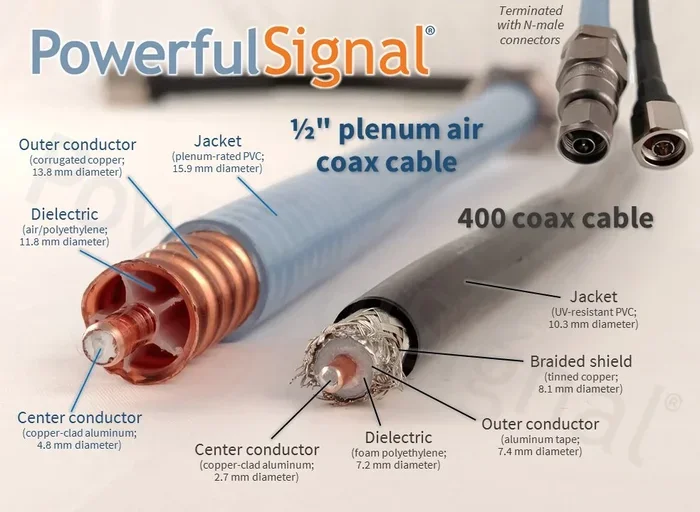
A coaxial cable is a type of electrical cable that transmits signals from one point to another. It gets its name from the design. The inner conductor, insulation, shielding, and outer jacket all share a common axis. This layered structure is what gives coaxial cable its excellent noise rejection and signal integrity.
Here is how the layers work together. The center copper wire carries the signal. Around it is a dielectric insulator that keeps the inner conductor separated from the outer shield. The braided metal shield blocks electromagnetic interference. And the outer plastic jacket protects everything from physical damage. This design makes coaxial cable video transmission very reliable, especially over longer runs.
The key to understanding coaxial cable video capability lies in bandwidth. Coaxial cables can handle a wide range of frequencies. This means they can carry not just one signal but many signals at once. That is why cable companies have used them for decades. The coaxial cable bandwidth supports everything from standard definition to high definition and beyond.
The Role of Impedance in Video Signals
Impedance is a word that sounds technical but is simple to understand. It is the resistance a cable presents to a signal. Most coaxial cables for video are designed with 75-ohm impedance. This is the standard for video applications. When you match the impedance of your cable, connectors, and devices, you get the best possible signal transfer. Mismatched impedance causes signal reflections, which lead to picture quality problems.
Can Coaxial Cable Carry Video – The Technical Answer
The answer is a definitive yes, but with some important nuances. Coaxial cable video transmission works through analog and digital formats. Let us break down what is actually happening inside that cable when a video signal travels through it.
In analog systems, the video signal is a continuous electrical waveform that mirrors the light and color information of the original image. The coaxial cable carries this waveform with minimal distortion. In digital systems, the video is encoded into binary data packets. The coaxial cable transmits these packets as electrical pulses. Both methods work well because of the cable’s shielding and frequency handling capabilities.
Here is something surprising. Many people do not realize that coaxial cable can carry high-definition video. Standards like SDI (Serial Digital Interface) use coaxial cable to transmit uncompressed HD and even 4K video in professional environments. So the idea that coaxial is outdated is simply not true. It remains a strong choice for video distribution in many scenarios.
Analog vs Digital Video Over Coaxial
Analog video over coaxial is the older approach. Think of composite video or component video setups. These use analog video signals that travel through the copper core. The quality is decent but can degrade over long cable runs. Interference from nearby power lines or electronics can introduce noise into the picture.
Digital video over coaxial is a different beast entirely. Formats like SDI and QAM encode video data digitally. This means the signal is much more resistant to interference. As long as the digital signal is strong enough, the video quality remains pristine. There is no gradual degradation like you see with analog. It is either perfect or it does not work at all. This makes digital video coaxial setups very reliable for professional use.
Types of Coaxial Cables for Video Transmission
Not all coaxial cables are the same. Different types serve different purposes in coaxial cable video applications. Choosing the right one makes a big difference in performance and reliability.
RG6 Coaxial Cable
RG6 is the most common coaxial cable used for video and satellite installations. It has a thicker copper conductor and heavier shielding than older cable types. This gives it better signal quality and less loss over distance. If you are running a cable TV signal or setting up a satellite dish, RG6 is the go-to choice.
RG6 handles frequencies up to 3 GHz. This is more than enough for HD and even some 4K video formats. It is also relatively affordable and widely available. Most home installations use RG6 for video distribution throughout the house.
RG59 Coaxial Cable
RG59 is a thinner, more flexible coaxial cable. It was the standard for many years in analog video installations. Security cameras, older cable TV hookups, and short-run video connections often use RG59. It works well for runs under 100 feet. Beyond that, signal loss becomes a real problem.
The thinner shielding in RG59 means it is more susceptible to interference. For short distances in clean environments, it works fine. But for longer runs or noisy electrical environments, RG6 is the better choice. Think of RG59 as the lightweight option and RG6 as the heavy-duty workhorse for coaxial cable video needs.
RG11 Coaxial Cable
RG11 is the thickest and most capable coaxial cable for video. It has the largest conductor and the most shielding. This makes it ideal for long-distance runs where signal loss must be minimized. Commercial installations and large property setups often rely on RG11.
The trade-off is flexibility. RG11 is stiff and harder to route through walls and conduits. It is also more expensive. But for runs over 200 feet, RG11 can deliver coaxial cable video quality that thinner cables simply cannot match.
How to Set Up Coaxial Video Connections
Setting up a coaxial cable video system is easier than most people think. With the right tools and a little patience, you can have a clean, reliable setup. Here is a step-by-step guide that covers the essentials.
Step 1: Choose the Right Cable
Start by assessing your needs. How far does the signal need to travel? What video quality do you need? For most home setups, RG6 is the right choice. For security cameras or short analog runs, RG59 works fine. For long commercial runs, consider RG11. Always buy quality cable from reputable brands. Cheap cables with thin shielding lead to signal problems.
Step 2: Select the Proper Connector
Connectors matter just as much as the cable itself. The most common connectors for coaxial cable video are F connectors and BNC connectors.
- F connectors: These are the screw-on connectors you see on cable TV boxes and antennas. They are affordable and easy to install. They work well for RG6 and RG59 cables.
- BNC connectors: These are bayonet-style connectors used in professional video equipment. They provide a secure, locked connection. They are common in surveillance systems and broadcast setups.
Make sure your connectors match your cable type. Using the wrong connector leads to poor connections and signal loss. A coaxial cable connector kit with crimping tools makes the job much easier at home.
Step 3: Run the Cable Properly
When running coaxial cable, avoid sharp bends. The minimum bend radius is usually about four times the cable diameter. Sharp bends can damage the inner conductor and degrade the signal. Also, keep the cable away from power lines and electrical devices that cause interference. If you must cross power lines, do so at a 90-degree angle to minimize coupling.
Step 4: Test Your Setup
Once everything is connected, test the video signal. Check for clear picture quality on all connected devices. Look for any flickering, ghosting, or color distortion. These are signs of signal problems that can usually be fixed by checking connections or replacing a damaged cable section.
Quick Tips for Best Results
- Always use compression connectors for permanent installations.
- Label both ends of every cable run for easy troubleshooting.
- Use cable testers to verify signal strength before finalizing the setup.
- Keep excess cable coiled loosely to avoid kinks and signal interference.
- Apply weatherproofing for any outdoor cable runs.
Coaxial Cable vs HDMI for Video – Key Differences
When people think about video connections today, HDMI is what usually comes to mind. But coaxial cable video still holds its own in many situations. Understanding the differences helps you choose the right cable for the right job.
Distance and Signal Loss
One of the biggest advantages of coaxial cable over HDMI is distance. A standard HDMI cable starts to lose signal quality beyond about 50 feet. Active HDMI cables with boosters can extend this, but they add cost and complexity. Coaxial cable, especially RG6 or RG11, can carry video signals over 100 to 300 feet with minimal loss. This makes coaxial the clear winner for long cable runs.
Signal Interference and Shielding
Coaxial cable has built-in shielding that protects the video signal from interference. HDMI cables are more vulnerable to electromagnetic interference, especially in environments with lots of electronics. For setups near power panels, motors, or industrial equipment, coaxial cable video connections tend to be more stable.
Audio and Video Combined
HDMI carries both audio and video in a single cable. Traditional coaxial video cables carry only the video signal. You will need a separate audio connection. However, some modern coaxial setups use paired cables or specialized cables that carry both. The trade-off is worth it for the distance and reliability benefits.
Cost and Availability
Coaxial cables are generally cheaper than quality HDMI cables, especially for longer lengths. They are also available at almost every hardware store. This makes them a practical choice for budget-conscious projects or large-scale installations where you need many cable runs.
Comparison Table: Coaxial vs HDMI
| Feature | Coaxial Cable | HDMI Cable |
|---|---|---|
| Max Distance (without boosters) | 100-300 feet | Up to 50 feet |
| Signal Interference Resistance | Excellent | Moderate |
| Carries Audio | No (separate needed) | Yes |
| Video Quality Support | SD, HD, 4K (SDI) | SD, HD, 4K, 8K |
| Cost per Foot | Lower | Higher |
| Common Use Cases | Security cameras, cable TV, broadcast | Home theater, gaming, monitors |
| Connector Types | F connector, BNC | Standard HDMI, Mini HDMI |
Common Problems and How to Fix Them
Even with the best setup, coaxial cable video systems can run into issues. Most problems are easy to diagnose and fix once you know what to look for.
Signal Loss Over Long Distances
The most common issue is signal degradation over long cable runs. As the coaxial cable length increases, the signal weakens. You may notice a faded picture, reduced color saturation, or intermittent signal. The fix is usually to add a signal amplifier or use a thicker cable like RG11 for long runs.
Interference and Noise in the Picture
Ghosting, bars, or static in the video picture often point to interference. This happens when the cable shielding is damaged or when the cable runs too close to power sources. Check the cable for any cuts, kinks, or exposed sections. Replace damaged cable and reroute away from electrical interference sources.
Loose or Corroded Connectors
A loose connector is one of the simplest problems and one of the most common. Over time, F connectors can loosen, and BNC connectors can wear out. Check all connections by gently tugging on them. If a connector feels wobbly, re-crimp or replace it. Corrosion on connectors can also cause signal problems, especially in outdoor or humid environments. Clean connectors with a contact cleaner or replace them entirely.
Wrong Cable Type for the Application
Using RG59 for a long digital video run is a recipe for poor performance. Always match the cable type to your application. For digital HD video over coaxial, use RG6 or better. For short analog runs, RG59 is fine. Using the wrong cable is a mistake that is easy to avoid with a little planning.
Surprising Facts About Coaxial Cable and Video
Here are some facts that might surprise you about coaxial cable video technology.
- Coaxial cables were used in early television broadcasting. The technology dates back to the 1930s and has been a backbone of video transmission ever since.
- SDI over coaxial can carry 4K video. Professional broadcast equipment uses coaxial cables to transmit uncompressed 4K video signals with zero compression artifacts.
- Your cable modem uses the same coaxial infrastructure. The same cable that delivers your TV signal can also deliver high-speed internet through a cable modem. This is called broadband over coax.
- Coaxial cable can carry multiple video signals at once. With proper multiplexing equipment, a single coaxial cable can carry several video channels simultaneously. This is how cable TV companies deliver hundreds of channels through one line.
- Coaxial cables last a very long time. A quality coaxial cable can last 20 years or more with proper installation. This makes it a durable investment for any video setup.
Expert Insights on Coaxial Video Setup
Professional installers and broadcast engineers have a few rules of thumb that make a huge difference in coaxial cable video performance. First, always measure your cable runs before purchasing. Buy a little extra length but avoid excessive slack that can create handling noise and storage problems. Second, invest in quality connectors. A great cable with a cheap connector will underperform. Third, use a signal modulator when splitting video to multiple displays. This keeps each output strong and clean.
Another expert tip is to think about future-proofing. Even if your current setup only needs analog video, running RG6 cable gives you the flexibility to upgrade to digital formats later without re-wiring. It is a small upfront investment that pays off in the long run.
Key Takeaways
- Coaxial cables can carry video signals: They support both analog and digital video formats over long distances.
- Different coaxial types matter: RG6 and RG59 cables each serve specific video transmission needs.
- Connectors affect performance: F connectors and BNC connectors play a big role in signal quality.
- Coaxial vs HDMI: Each has unique strengths for different setups and environments.
- Signal loss is real: Cable length and quality directly impact video output.
- Surprising uses exist: Coaxial cables work for SDI video, cable modem data, and more.
- Setup is straightforward: With the right tools and knowledge, anyone can wire a coaxial video system.
Conclusion
The question “can coaxial cable carry video” has a clear and resounding answer. Yes, it can, and it has been doing so for decades. From the classic composite video connections of the past to modern SDI professional broadcast systems, coaxial cable video transmission remains relevant and reliable. The surprising facts we covered show that this technology is far from obsolete. It continues to evolve and serve important roles in home entertainment, security systems, professional broadcasting, and broadband internet.
Whether you choose RG6, RG59, or RG11, the key is to match your cable and connectors to your specific needs. Understanding coaxial cable bandwidth, signal loss, and interference resistance helps you make smart decisions. With the right setup, your coaxial cable video system will deliver clean, stable picture quality for years to come.
So the next time you see a coaxial cable, do not underestimate it. It is a versatile, durable, and surprisingly capable piece of technology. Put this knowledge to work, and you will get the best possible results from your video setup.
Frequently Asked Questions
Can coaxial cable carry HD video?
Yes, coaxial cable can carry HD video signals. RG6 cable in particular handles high-definition video very well. For professional HD and 4K applications, SDI over coaxial is a standard in the broadcast industry.
How far can coaxial cable carry a video signal?
A standard RG6 coaxial cable can carry a video signal up to 300 feet with minimal loss. RG59 works well for shorter runs under 100 feet. For longer distances, RG11 or signal amplifiers are recommended.
Is coaxial cable better than HDMI for video?
It depends on your needs. Coaxial cable is better for long-distance runs and interference-heavy environments. HDMI is better for short runs and when you need combined audio and video in one cable. Both have their strengths.
What connector do I need for coaxial video?
F connectors are the most common for home video installations. BNC connectors are used in professional and security camera setups. Make sure the connector matches your cable type for the best signal quality.
Can old coaxial cables still carry video?
Yes, older coaxial cables can still carry video, but performance depends on the cable condition and type. If the shielding is intact and the connectors are clean, older cables like RG59 will work for short analog video runs.
Does coaxial cable quality affect video performance?
Absolutely. Better quality coaxial cables with thicker conductors and denser shielding deliver cleaner video signals. Cheap cables with poor shielding can introduce noise and signal loss, especially over longer runs.