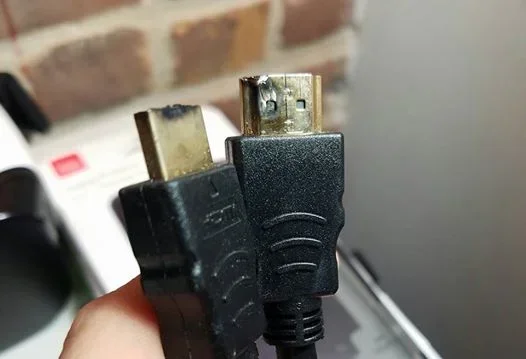
Can A Bad Hdmi Cable Cause No Signal On Your Television
Yes, a bad HDMI cable can absolutely cause a no-signal problem on your television. Damaged, loosely connected, or low-quality HDMI cables are among the most common reasons your TV shows a blank screen. In this guide, we walk you through the symptoms, causes, and simple fixes to get your display back up and running.
Key Takeaways
- A faulty HDMI cable is one of the top reasons for no signal on your TV.
- Physical damage, loose connections, and cable age can all interrupt the digital signal.
- Simple fixes like re-seating the cable or trying a different port often solve the problem.
- Replacing a bad HDMI cable is usually inexpensive and quick.
- Testing with another cable is the fastest way to confirm the issue.
- HDMI handshake failures can mimic cable problems but have different causes.
📑 Table of Contents
- Can A Bad Hdmi Cable Cause No Signal On Your Television
- How HDMI Cables Work and Why They Fail
- Signs Your HDMI Cable Is Causing the No Signal Problem
- Quick Fixes for a No Signal Problem
- When to Replace Your HDMI Cable
- HDMI Cable Damage vs. Other No Signal Causes
- Preventing HDMI Cable Problems in the Future
- Expert Insights on HDMI Signal Problems
- Quick Tips for Solving HDMI No Signal Issues Fast
- Common Mistakes People Make When Troubleshooting No Signal
- Final Thoughts
Can A Bad Hdmi Cable Cause No Signal On Your Television
You sit down to watch your favorite show. You turn on the TV. And then… nothing. A black screen stares back at you. The first thought that pops into your head? Maybe the HDMI cable is the problem. And honestly? You might be right.
A bad HDMI cable can definitely cause a no signal issue on your television. This is one of the most common and frustrating problems people face with their home entertainment setups. The good news is that it is also one of the easiest to fix. In this article, we will break down exactly how a damaged cable causes signal loss, what signs to look for, and the simple steps you can take to solve the problem fast.
Whether you are dealing with a black TV screen, flickering display, or complete audio and video loss, the culprit might be simpler than you think. Let us dive in.
How HDMI Cables Work and Why They Fail
HDMI cables carry both audio and video signals from your source device to your television. They transmit digital data in a very specific format. When everything works correctly, you get a crisp picture and clear sound. But when something goes wrong with the cable, that digital signal path gets interrupted.
What Happens Inside an HDMI Cable
Inside every HDMI cable, there are multiple tiny copper conductors. Each one handles a different part of the signal. Some carry video data. Others carry audio. Some manage the control signals that tell your TV and source device how to communicate.
When one or more of these conductors gets damaged, the communication breaks down. Your television simply cannot receive the information it needs to display an image. This is why a faulty HDMI cable often results in a no signal message or a blank screen.
Common Reasons HDMI Cables Go Bad
HDMI cables fail for several reasons. Understanding these can help you prevent problems before they start.
- Physical damage: Bent connectors, crushed cables, and frayed ends all break the internal wiring.
- Wear and tear: Over time, the insulation wears thin and the signal quality degrades.
- Loose connections: A cable that is not fully seated in the port will not transmit data properly.
- Cheap construction: Low-quality cables may not meet the standards needed for high-resolution signals.
- Heat damage: Cables placed near heat sources can degrade faster than expected.
- Moisture exposure: Water or humidity can corrode the internal pins and conductors.
Signs Your HDMI Cable Is Causing the No Signal Problem
Not every screen issue comes from a bad cable. But there are clear signs that point directly to a cable problem. Watch for these symptoms.
Complete Black Screen
If your TV shows a completely black screen with a no signal or no input message, a bad cable is a likely cause. The TV is receiving no data at all from the source device.
Flickering or Intermittent Signal
Does the picture come and go? Do you see the screen flash on and off repeatedly? This often means the cable has a partial break inside. The connection works sometimes but fails at other times.
Distorted or Pixelated Image
A cable that is starting to fail might not cause a total loss of signal. Instead, you might see a grainy, pixelated, or distorted picture. This happens when some of the data gets through but not all of it.
No Audio Even Though Video Works
HDMI cables carry both audio and video. If you can see the picture but hear no sound, the cable might be damaged in a way that only affects the audio conductors.
TV Does Not Recognize the Input Source
Sometimes your TV will not even detect that a device is connected. This input source problem can happen when the cable cannot establish a proper HDMI handshake between devices.
Quick Fixes for a No Signal Problem
Before you rush out to buy a new cable, try these simple fixes first. Many HDMI connection troubleshooting steps take just a few minutes.
1. Unplug and Reconnect the Cable
This sounds too simple, but it works more often than you would think. Unplug the HDMI cable from both ends. Check the ports for dust or debris. Then plug it back in firmly. Make sure you hear or feel the click when it seats properly.
2. Try a Different HDMI Port on Your TV
Sometimes the problem is not the cable but the port. Switch to another HDMI input on your television and see if the signal returns. This quick test helps you narrow down the cause.
3. Test with a Different Cable
This is the fastest way to confirm whether your cable is the problem. Borrow a known-working HDMI cable and swap it in. If the signal comes back, you have your answer.
4. Check the Source Device
Make sure your Blu-ray player, gaming console, or streaming device is turned on and set to the correct output. A problem with the source device can look exactly like a cable issue.
5. Power Cycle Everything
Turn off your TV and source device. Unplug both from power. Wait 30 seconds. Plug them back in and turn them on. This resets the HDMI handshake and clears temporary glitches.
When to Replace Your HDMI Cable
If the quick fixes above do not work, it is time to consider replacing your cable. But how do you know which cable to buy? And when is replacement really necessary?
How to Choose the Right Replacement Cable
Not all HDMI cables are created equal. Here are a few things to keep in mind when shopping for a new one.
- Cable version: Look for HDMI 2.0 or HDMI 2.1 cables if you need 4K or 8K support.
- Cable length: Longer cables can lose signal quality. Keep cables as short as possible for best results.
- Build quality: Choose cables with braided shielding and gold-plated connectors for durability.
- Brand reputation: Stick with trusted brands known for reliable cable quality.
How Often Should You Replace an HDMI Cable?
There is no set schedule. A well-made HDMI cable can last for many years. However, if you notice any of the symptoms mentioned earlier, do not hesitate to replace it. A new cable costs very little compared to the frustration of a blank screen.
Interestingly, cable issues are not limited to just entertainment setups. Even in office environments, connectivity problems can be surprisingly common. For instance, some people encounter strange issues in spreadsheet software, like a line that just wont delete in Microsoft Excel, which can be just as puzzling as a no-signal TV problem. Both remind us how small components can cause big headaches.
HDMI Cable Damage vs. Other No Signal Causes
A bad cable is not the only reason you might see a no signal message on your TV. It is important to rule out other possibilities.
| Cause | Likelihood | Easy to Fix? |
|---|---|---|
| Faulty HDMI cable | Very High | Yes — replace the cable |
| Loose connection | High | Yes — reseat the cable |
| Wrong input selected on TV | High | Yes — select correct input |
| Source device turned off | Medium | Yes — turn device on |
| HDMI port failure on TV | Medium | No — may need repair |
| Source device output failure | Low | Depends on the device |
| HDCP authentication error | Low | Sometimes — restart devices |
As you can see, cable and connection issues account for the majority of no signal problems. Always check the simplest explanations first before moving on to more complex troubleshooting.
Preventing HDMI Cable Problems in the Future
The best way to deal with a no signal issue is to prevent it from happening in the first place. Here are some tips to keep your HDMI cables in great shape.
- Avoid bending cables at sharp angles. This stresses the internal wiring and connectors.
- Do not run cables under heavy furniture. The weight can crush and damage the cable over time.
- Keep cables away from heat sources. Hot radiators and direct sunlight can degrade the insulation.
- Store extra cables properly. Coil them loosely and store them in a cool, dry place.
- Inspect cables regularly. Look for fraying, bent pins, or discoloration on the connectors.
- Use cable management clips. These keep cables secure and prevent accidental pulls or disconnections.
Expert Insights on HDMI Signal Problems
Television repair professionals and AV technicians see cable-related signal issues every day. Here is what the experts want you to know.
“The number one cause of no signal problems is a loose or poorly seated HDMI cable,” says a senior AV technician with over 15 years of experience. “People often push the connector in without feeling it click into place. A cable that is even slightly loose will not maintain a stable digital connection.”
Experts also recommend avoiding extremely long HDMI cables without a signal booster. Signals can degrade over distances longer than 15 feet, especially with older cable versions. If you need a longer run, consider an active HDMI cable or a signal extender.
Another common expert tip: do not mix and match cable versions. If your source device outputs a 4K signal, you need a cable that supports 4K. Using an older standard cable with a modern device can cause resolution problems or complete signal failure.
Quick Tips for Solving HDMI No Signal Issues Fast
Keep this list handy the next time your screen goes dark.
- Check that the cable is firmly connected at both ends.
- Switch to a different HDMI port on your TV.
- Try a different HDMI cable if you have one available.
- Power cycle your TV and source device.
- Make sure your source device is set to output through HDMI.
- Check for physical damage on the cable and connectors.
- Replace the cable if none of the above steps work.
Following these steps in order will solve most HDMI signal loss problems quickly and without any cost.
Common Mistakes People Make When Troubleshooting No Signal
Avoid these common errors that waste time and make the problem worse.
- Assuming the TV is broken: Most of the time, the problem is the cable or the connection, not the television itself.
- Buying the most expensive cable first: A mid-range cable from a reputable brand usually works perfectly fine.
- Ignoring the source device: Always verify that your Blu-ray player, console, or streaming stick is working properly.
- Using adapters without checking compatibility: Some HDMI adapters can cause signal loss or handshake failures.
- Forcing the connector: If the cable does not fit easily, do not force it. Check for bent pins or debris in the port.
Final Thoughts
A bad HDMI cable can absolutely cause a no signal problem on your television. It is one of the most common and easily fixable reasons for a blank screen. By understanding the symptoms, trying simple fixes, and knowing when to replace the cable, you can save yourself a lot of frustration and time.
Remember to check your connections first. Try a different port. Swap in a known-working cable. And if all else fails, a replacement cable is a small investment that pays off quickly. Keep your cables in good condition, and your television display will thank you for it.
Next time your screen goes dark, do not panic. Follow the steps in this guide, and you will likely have your picture back in just a few minutes. Happy viewing!
Frequently Asked Questions
Can a damaged HDMI cable cause no signal on any TV?
Yes, a damaged HDMI cable can cause a no signal issue on any television. The cable carries the digital signal from your source device to the TV. When the cable is broken or damaged, that signal path is interrupted, and the TV cannot display any image or sound.
How do I know if my HDMI cable is bad?
Look for signs like a black screen, flickering picture, no audio, or a no signal message. The easiest test is to swap in a different known-working cable. If the problem goes away, your original cable was the issue.
Can a loose HDMI cable cause no signal?
Absolutely. A loose HDMI cable is one of the most common causes of no signal. The cable must be fully seated in the port to maintain a stable digital connection. Always push the connector in until you feel or hear it click into place.
How much does a replacement HDMI cable cost?
A good quality HDMI cable typically costs between $5 and $20. You do not need to spend a lot of money to get a reliable cable. Look for cables from reputable brands that support the resolution you need.
Can an old HDMI cable stop working even if it looks fine?
Yes, HDMI cables can degrade over time even if they look okay on the outside. Internal wiring can weaken, and connectors can lose their tension. If you are experiencing signal issues, it is worth trying a new cable regardless of the cable’s age.
What is an HDMI handshake failure and how is it different from a bad cable?
An HDMI handshake failure happens when two connected devices cannot agree on a communication protocol. It can look the same as a cable problem with a no signal display. However, it is often caused by software or firmware issues rather than physical cable damage. Restarting both devices usually fixes a handshake failure.