Are USB A And USB C Cables The Same Or Are They Different
USB A and USB C cables are not the same. They differ in shape, speed, power delivery, and compatibility. USB Type-C is the newer, faster, and reversible connector that is replacing the older rectangular USB Type-A. Understanding these differences helps you choose the right cable for your devices and avoid frustration.
You have probably held a USB cable in your hand a hundred times. But have you ever stopped to wonder whether all USB cables are created equal? The truth is, USB A and USB C cables are not the same. They look different, they work differently, and they serve different purposes. If you have ever plugged in a cable the wrong way and flipped it over three times, you already know the frustration this topic can cause.
This guide breaks down everything you need to know about USB A vs USB C cables. We will cover their shapes, speeds, power capabilities, and where each one fits in your tech life. By the end, you will never mix them up again. Let us dive in.
Key Takeaways
- Different Shapes: USB A is the classic rectangular plug, while USB C is small, oval, and reversible.
- Speed Matters: USB C supports much faster data transfer speeds than USB A in most cases.
- Power Delivery: USB C can deliver significantly more power, making it ideal for charging laptops and tablets.
- Compatibility: USB C is becoming the universal standard, but USB A is still widely used in older devices.
- Not Interchangeable: You cannot plug a USB A cable into a USB C port without an adapter.
- Future-Proofing: USB C is the direction the industry is heading, so investing in USB C cables makes sense.
📑 Table of Contents
- What Is a USB A Cable?
- What Is a USB C Cable?
- USB A vs USB C: Head-to-Head Comparison
- Data Transfer Speed Differences
- Power Delivery and Charging Capabilities
- Compatibility and Adapters
- Which Cable Should You Choose?
- The Future of USB Connectors
- Common Mistakes People Make with USB Cables
- Expert Insights on USB Cable Evolution
- Final Thoughts
What Is a USB A Cable?
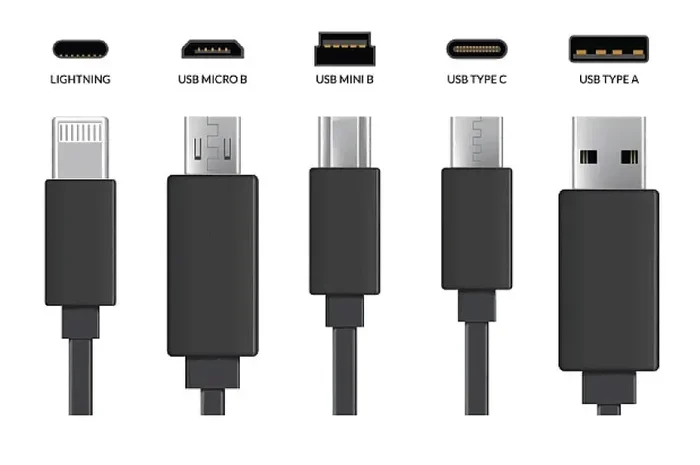
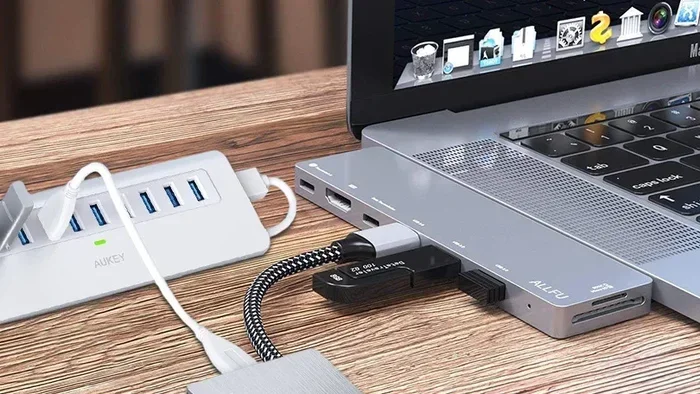
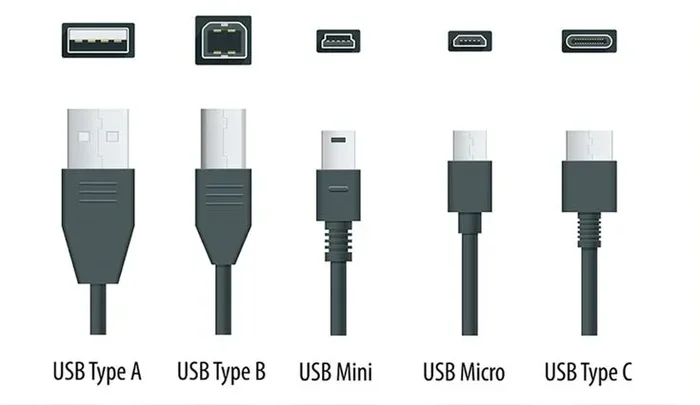
The USB Type-A connector is the classic rectangular plug that has been around for decades. It is the one you see on the back of your computer, on wall chargers, and on almost every USB hub. USB A cables have a flat, wide connector that only fits in one direction. This is why you often find yourself flipping it over before it finally plugs in.
USB A was introduced in the mid-1990s and became the standard connector for USB 1.0, USB 2.0, USB 3.0, and USB 3.1 Gen 1. It is still extremely common today, even though newer devices are moving toward different connectors. The USB A port is designed for host devices, meaning the device that provides power and data, like a computer or a charging brick.
Common Devices That Use USB A
You will find USB A ports on a wide range of devices. Here are some examples:
- Desktop computers and laptops
- USB hubs and docking stations
- Older printers and scanners
- Game consoles
- Wall chargers and power banks
- External hard drives
Even though USB A is older, it remains reliable and widely supported. Many accessories still ship with USB A cables because of this broad compatibility. If you are setting up a home office or managing a fleet of devices, you will likely encounter USB A connections every day.
What Is a USB C Cable?
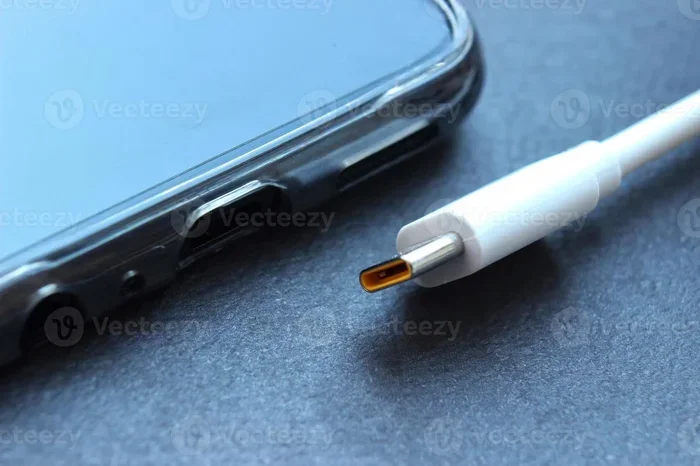
The USB Type-C connector is the modern replacement for many older USB standards. It is small, oval-shaped, and reversible, which means you can plug it in either way. No more flipping. No more frustration. This alone makes USB C a huge upgrade over USB A for daily use.
USB C was introduced around 2014 and has rapidly become the go-to connector for smartphones, tablets, and laptops. It supports the latest USB standards, including USB 3.1, USB 3.2, and USB 4.0. This means faster data transfer and more power delivery through a single small cable.
Why USB C Is Different
USB C is not just about its shape. The entire design philosophy behind it is more advanced. Here is what sets it apart:
- Reversible connector: Plug it in either way, every time.
- Higher power delivery: USB C can deliver up to 240 watts with USB Power Delivery.
- Faster data speeds: USB 4.0 over USB C can reach speeds up to 40 Gbps.
- Alt Mode support: USB C can carry video signals, so you can connect directly to displays.
- Smaller form factor: The compact size fits thin laptops, phones, and tablets perfectly.
If you have a modern smartphone or a newer laptop, chances are it uses USB C. This connector is quickly becoming the universal standard across the tech industry. Even accessories and peripherals are shifting toward USB C because of its versatility.
USB A vs USB C: Head-to-Head Comparison
Let us put these two connectors side by side. The table below gives you a clear picture of how they stack up against each other.
Key Differences at a Glance
- Shape: USB A is a flat rectangle. USB C is a small oval.
- Reversibility: USB A only fits one way. USB C works either way.
- Data Speed: USB A maxes out around 10 Gbps (USB 3.1 Gen 2). USB C can reach 40 Gbps (USB 4.0).
- Power Delivery: USB A typically provides up to 15 watts. USB C can deliver up to 240 watts with USB PD.
- Port Size: USB A is larger. USB C is compact and fits slim devices.
- Longevity: USB C cables are rated for 10,000 plug cycles. USB A cables are rated for 1,500 cycles.
The comparison makes it clear that USB C is the superior connector in almost every way. However, USB A still holds its ground because of its widespread use in older equipment. Many people keep both types of cables in their bag for different situations.
Quick Comparison Table
Here is a simple breakdown of the two connector types:
- USB A: Rectangular, one-way plug, up to 10 Gbps, up to 15W, widely used in older devices.
- USB C: Oval, reversible plug, up to 40 Gbps, up to 240W, used in modern devices.
If you are trying to decide which cables to stock up on, the answer depends on your devices. But the writing is on the wall. USB C is the future, and USB A is slowly becoming a legacy connector.
Data Transfer Speed Differences
One of the biggest reasons people ask about USB A vs USB C is speed. Data transfer matters whether you are moving large files, backing up photos, or connecting external drives. The connector type plays a big role in how fast your data moves.
USB A cables are limited by the USB standard they support. A USB 2.0 USB A cable maxes out at 480 Mbps. A USB 3.0 USB A cable can reach 5 Gbps. And the newest USB 3.1 Gen 2 USB A cables can hit 10 Gbps. These speeds are perfectly fine for everyday tasks like transferring documents or charging your phone.
USB C cables, on the other hand, open up much higher speeds. USB 3.1 Gen 2 over USB C delivers 10 Gbps. USB 3.2 Gen 2×2 pushes that to 20 Gbps. And USB 4.0 over USB C reaches an incredible 40 Gbps. This means you can transfer a 4K movie in seconds instead of minutes.
But here is the catch. Not all USB C cables are created equal. A cheap USB C cable might only support USB 2.0 speeds, which is just 480 Mbps. That is the same speed as an old USB A cable. Always check the USB standard your cable supports, regardless of the connector type.
Power Delivery and Charging Capabilities
Charging speed is another area where USB A and USB C differ significantly. USB Power Delivery, often called USB PD, is a protocol that allows devices to draw more power through the cable. USB C fully supports USB PD, while USB A does not.
With a standard USB A cable, you typically get about 2.5 watts of power. A USB A port on a wall charger might push up to 7.5 or 15 watts. This is fine for small devices like flash drives or older keyboards. But for larger devices like laptops or tablets, USB A just cannot keep up.
USB C changes the game entirely. It can deliver up to 100 watts with USB PD 3.0 and up to 240 watts with the latest USB PD 3.1 standard. This means a single USB C cable can charge your phone, tablet, and laptop. Many people have already switched to USB C charging because it reduces the number of cables they need to carry.
Real-World Charging Examples
Here is how the two compare in everyday charging scenarios:
- Smartphone charging: USB C charges most phones in about 30 minutes to an hour. USB A takes longer, especially for phones with larger batteries.
- Laptop charging: Many modern laptops use USB C for charging. A USB A cable simply cannot provide enough power for most laptops.
- Tablet charging: USB C tablets like the iPad Pro charge fast with the right cable. USB A works but is slower.
- Power bank charging: USB C power banks can both charge quickly and discharge quickly. USB A power banks are slower in both directions.
The bottom line is simple. If fast charging matters to you, USB C is the clear winner. USB A is still usable, but it was not designed for the power demands of modern devices.
Compatibility and Adapters
One of the most common questions people have is whether USB A and USB C cables are interchangeable. The short answer is no. The connectors are physically different, so you cannot plug a USB A cable directly into a USB C port or vice versa. But that does not mean you are stuck.
Adapters and cables with mixed connectors solve this problem. You can buy a USB A to USB C cable that has a USB A plug on one end and a USB C plug on the other. These are very useful for connecting older devices to newer ones. You can also use USB C adapters to add USB A ports to a laptop that only has USB C.
If your work involves managing devices or access to systems, you might also want to look into access control systems that use USB connections for setup and configuration. Many modern security devices rely on USB ports for initial setup and data transfer.
Things to Watch Out For
Not all adapters are created equal. Cheap adapters can cause slow charging, data transfer issues, or even damage your devices. Here are some tips to keep in mind:
- Buy adapters from reputable brands.
- Check that the adapter supports the USB standard you need.
- Avoid adapters that feel loose or poorly built.
- Make sure the adapter supports USB PD if you need fast charging.
Using the right adapter ensures you get the full benefits of your USB C or USB A devices. Do not let a cheap adapter become the bottleneck in your setup.
Which Cable Should You Choose?
Choosing between USB A and USB C depends on your devices and your needs. There is no single right answer for everyone. But here are some guidelines to help you decide.
If you mostly use older devices like desktop computers, printers, or older external drives, USB A cables will work just fine for you. They are affordable, widely available, and reliable. You probably already have several USB A cables lying around your house.
If you use modern smartphones, newer laptops, or tablets, you should go with USB C cables. The faster speeds, higher power delivery, and reversible design make them worth the investment. Plus, the industry is clearly moving toward USB C as the standard connector. Buying USB C cables now means you will be ready for future devices.
For many people, the best approach is to have both. Keep a few USB A cables for older devices and a few USB C cables for everything else. This way, you are prepared for any situation. If you are looking to organize your tech setup, you might also explore tools that help you manage your digital life, like apps for finding dog walkers or other productivity tools that keep your day running smoothly.
Quick Tips for Cable Shopping
Here are some fast tips to keep in mind when buying cables:
- Always check the USB standard printed on the cable or packaging.
- Look for USB C cables that support USB PD and at least USB 3.1 speeds.
- Buy the length you need. Longer cables can sometimes mean slower charging.
- Avoid ultra-cheap cables from unknown brands. They may not meet safety standards.
- If you need data transfer, make sure the cable supports it. Some USB C cables are charge-only.
Taking a few extra minutes to choose the right cable saves you from headaches later. A good cable lasts longer, charges faster, and transfers data more reliably.
The Future of USB Connectors
The technology world is moving fast, and USB connectors are evolving along with it. USB C is quickly becoming the one connector to rule them all. Major companies like Apple, Google, and Samsung have already adopted USB C as their standard charging and data port. The European Union has even passed regulations requiring USB C as the standard for mobile devices.
USB A will not disappear overnight. Millions of older devices still use it, and it will take years for the transition to fully complete. But the trend is clear. New devices are increasingly shipping with USB C, and fewer devices include USB A ports each year.
Looking ahead, the next generation of USB standards will continue to build on the USB C foundation. USB 4.0 and beyond promise even faster speeds and smarter power management. All of these new standards use the USB C connector. So if you are investing in cables today, USB C is the smart choice for long-term compatibility.
Even something as simple as transferring data from an old spreadsheet might involve a USB connection. For instance, if you have ever struggled with a line that will not delete in Microsoft Excel and needed to move files via USB, you know how important having the right cable and connector can be for smooth workflows.
The writing is on the wall. USB C is here to stay, and USB A is on its way out. Embracing USB C now means you stay ahead of the curve and avoid the hassle of carrying multiple cable types.
Common Mistakes People Make with USB Cables
Even tech-savvy people make mistakes when it comes to USB cables. Here are some common errors you should avoid:
- Assuming all USB C cables are the same: Some only support charging, while others support fast data transfer. Always check the specs.
- Using a USB A cable for fast charging: USB A cannot deliver the power that USB C can. You will charge much slower.
- Buying cheap cables: Bargain cables might not have the right wiring inside. This can lead to slow speeds or even safety risks.
- Forcing a connector: If a cable does not fit, do not force it. You might damage the port or the cable.
- Ignoring cable length: Longer USB C cables can sometimes reduce charging speed. Stick to shorter cables for fast charging when possible.
Avoiding these mistakes helps you get the most out of your cables and keeps your devices safe. A small bit of knowledge goes a long way.
Expert Insights on USB Cable Evolution
The shift from USB A to USB C represents more than just a change in shape. It reflects the growing demands of modern technology. Devices are thinner, faster, and more powerful than ever before. The old USB A connector simply could not keep up with these demands.
USB C was designed from the ground up to handle higher speeds, more power, and versatile uses like video output. It is a true all-in-one connector. Industry experts agree that USB C will eventually replace every other USB connector type, including USB B and USB Mini.
The reversible design alone has changed how people interact with their devices. It is a small detail that makes a big difference in daily use. No more fumbling in the dark or flipping the cable three times. Plug it in, and it works. That kind of simplicity is what modern users expect.
Final Thoughts
USB A and USB C cables are definitely not the same. They differ in shape, speed, power delivery, and compatibility. USB A is the older, reliable standard that still works well for many devices. USB C is the modern, versatile connector that is shaping the future of tech.
If you want the best performance, faster charging, and future-proof compatibility, USB C is the way to go. But do not throw away your USB A cables just yet. They still have a place in most households and offices. The smartest approach is to have both and use each one where it fits best.
Take a moment today to check the cables in your setup. Are you using the right type for each device? Making the switch to USB C where possible can improve your daily tech experience in a meaningful way. You will notice faster transfers, quicker charging, and fewer frustrating moments. The small investment in the right cables pays off every single day.
Frequently Asked Questions
Can I plug a USB A cable into a USB C port?
No, you cannot plug a USB A cable directly into a USB C port. The shapes are completely different. However, you can use a USB A to USB C adapter or a USB A to USB C cable to bridge the gap between the two connector types.
Is USB C faster than USB A?
Yes, USB C is generally faster than USB A. USB C supports the latest USB standards like USB 3.1, USB 3.2, and USB 4.0, which offer much higher data transfer speeds. However, the actual speed depends on the specific USB standard the cable supports, not just the connector type.
Can USB C charge devices faster than USB A?
Absolutely. USB C supports USB Power Delivery, which allows for much higher wattage charging. USB A is limited to lower power output, so USB C charges most devices significantly faster, especially laptops and tablets.
Are all USB C cables the same?
No, not all USB C cables are the same. Some only support basic charging, while others support fast data transfer and high-power delivery. Always check the specifications of a USB C cable to make sure it meets your needs for speed and power.
Will USB A ever become obsolete?
USB A is slowly becoming less common in new devices, but it is not obsolete yet. Many older computers, printers, and peripherals still use USB A ports. It will likely take several more years before USB A is completely phased out.
Do I need a special cable to get USB C speeds?
Yes, you need a USB C cable that supports the USB standard you want. A basic USB C cable might only support USB 2.0 speeds. To get the fastest speeds, look for cables rated for USB 3.1 or higher and check the packaging for the specific standard.
=== CONCLUSION ===
Are USB A and USB C cables the same? No, they are different in almost every way. From shape and reversibility to speed and power delivery, USB C is the clear winner for modern devices. USB A still has its place in older equipment, but the industry is firmly moving toward USB C as the universal standard.
Understanding the differences helps you make smarter choices about the cables you buy and use every day. Whether you are charging your phone, transferring files, or setting up a new laptop, choosing the right cable makes everything smoother. Invest in USB C cables for your modern devices, keep a few USB A cables for older gear, and you will be prepared for anything the tech world throws at you.