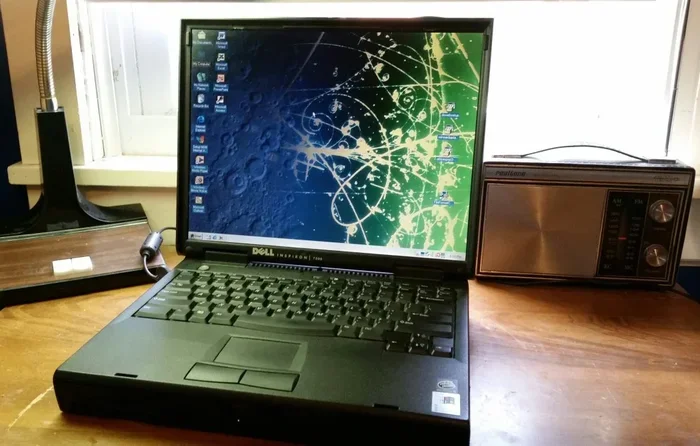
Can A Laptop Last For 10 Years And Still Run Smoothly
Can a laptop last for 10 years and still run smoothly? The short answer is yes, but it depends on several key factors. Build quality, hardware upgrades, and proper maintenance play a huge role in determining whether your machine survives the decade mark. This guide breaks down everything you need to know about making your laptop last.
Key Takeaways
- Laptops can last 10 years: With the right care, upgrades, and usage habits, many laptops survive well beyond the average lifespan.
- Build quality matters most: Premium laptops with sturdy materials tend to outlast budget models by several years.
- Hardware upgrades extend life: Adding RAM, swapping in an SSD, or replacing the battery can breathe new life into an old machine.
- Software maintenance is critical: Keeping your operating system and apps updated prevents slowdowns and security issues.
- Thermal management prevents failure: Regular cleaning and proper ventilation stop overheating, which is a top killer of laptop components.
- Know when to replace: Even with the best care, some laptops reach a point where replacement is more practical than repair.
📑 Table of Contents
- Can A Laptop Last For 10 Years? Here Is What You Need to Know
- What Determines a Laptop’s Lifespan?
- Can Budget Laptops Survive 10 Years?
- How to Make Your Laptop Last Longer
- When Should You Replace Your Laptop?
- Real-World Examples of 10-Year Laptops
- Common Mistakes That Shorten Laptop Life
- Final Thoughts
Can A Laptop Last For 10 Years? Here Is What You Need to Know
Most people assume a laptop becomes outdated after three or four years. But the truth is different. Can a laptop last for 10 years and still run smoothly? Absolutely. Many users have pushed their machines well past the ten-year mark. The key lies in understanding what makes a laptop age and how to slow that process down.
Laptop lifespan depends on several factors. Build quality, usage habits, and maintenance routines all play a role. A well-built laptop with proper care can easily serve you for a decade. On the other hand, a cheap budget model that gets abused might give up after three years. The difference is not magic. It is about how you treat your machine.
In this article, we will explore every aspect of laptop longevity. We will look at what determines how long a laptop lasts. We will share practical tips to extend your machine’s life. And we will answer the big question: is it worth keeping an old laptop or should you buy a new one?
Whether you are a student, a professional, or a casual user, this guide has something for you. Let us dive in and find out what it takes to make can a laptop last for 10 years a reality for you.
The Average Laptop Lifespan
Most laptops are designed to last between four and seven years. This is the industry standard. But that number does not tell the whole story. Some laptops push well beyond that range with the right care.
The average lifespan depends on the type of laptop you own. A premium business laptop often lasts longer than a budget consumer model. Gaming laptops tend to age faster because of the heavy processing demands. Ultrabooks and lightweight machines can go the distance if you keep them maintained.
Here are the general lifespan ranges by category:
- Budget laptops: 3 to 5 years
- Mid-range laptops: 5 to 7 years
- Premium laptops: 7 to 10+ years
- Business-grade laptops: 7 to 10+ years
- Gaming laptops: 3 to 6 years
Notice that premium and business laptops dominate the longer lifespan range. This is not a coincidence. They use better materials, more durable components, and stronger cooling systems. When asking yourself can a laptop last for 10 years, the build quality of your machine is the first thing to consider.
What Happens After 5 Years of Use?
After five years, you will likely notice some changes. The laptop might feel slower when opening apps. The battery may not hold a charge as long. The fan might run louder than it used to. These are all normal signs of aging.
But here is the good news. None of these issues mean your laptop is dead. They just mean it needs attention. A battery replacement can restore hours of unplugged use. Adding more RAM can speed up multitasking. Swapping to a solid-state drive can make an old machine feel brand new.
The real question is not whether a laptop slows down after five years. The question is whether you are willing to invest a little effort to keep it running. For many people, the answer is yes. A five-year-old laptop that costs a fraction of a new one can still handle everyday tasks with ease.
What Determines a Laptop’s Lifespan?
Understanding what affects laptop longevity helps you make smarter choices. Several factors work together to determine how long your machine will last. Let us break them down one by one.
Build Quality and Materials
The materials used in your laptop matter more than you might think. A plastic chassis scratches and cracks over time. A metal or aluminum body holds up much better. Hinges made with metal last longer than plastic ones. Keyboard keys on premium laptops withstand millions of presses.
When manufacturers invest in build quality, the laptop shows it. Think about brands known for durability. Companies like Lenovo ThinkPad, Dell Latitude, and Apple MacBook have strong track records for longevity. Their machines are built to survive daily wear and tear.
Can a laptop last for 10 years? Build quality is the foundation. Without a solid chassis and durable components, even the best software maintenance cannot save a flimsy machine.
Processor and Performance
The processor is the brain of your laptop. Older processors eventually struggle with modern software demands. Apps become heavier every year. Operating systems add new features that require more power.
However, this does not mean your laptop becomes useless. Many everyday tasks do not need the latest chip. Web browsing, document editing, email, and video streaming all run fine on older processors. The slowdown becomes noticeable mainly with demanding tasks like video editing or modern gaming.
Here is an important distinction: processor age does not equal laptop death. It just means your machine has a specific purpose window. A ten-year-old laptop with an older processor can still be a perfect machine for basic computing needs.
Battery Degradation Over Time
Battery degradation is the most common reason people think their laptop is dead. After a few years, the battery holds less charge. Some laptops last only 30 minutes unplugged after three years of use.
But here is what many people do not know. You can replace a laptop battery. It is one of the easiest and cheapest upgrades. A new battery can turn a sluggish, plugged-in-only machine back into a portable device.
Battery replacement costs vary. Some batteries cost as little as $30 to $50. Others, especially for premium models, can run $80 to $150. Either way, it is far cheaper than buying a new laptop. And it is one of the best ways to answer the question of can a laptop last for 10 years.
Thermal Management and Cooling
Heat is the silent killer of laptop components. Over time, dust builds up inside the machine. The thermal paste between the processor and the heatsink dries out. Fans work harder and wear down faster.
When a laptop overheats, it throttles performance. The processor slows down to prevent damage. The fan spins louder. The whole machine feels hot to the touch. In extreme cases, overheating can cause permanent hardware failure.
Regular cleaning prevents most thermal issues. Using a can of compressed air to blow out dust every few months makes a huge difference. You can also use a laptop cooling pad for extra airflow. These small habits add years to your machine’s life.
Can Budget Laptops Survive 10 Years?
This is a common question. The short answer is: it is possible, but harder. Budget laptops use cheaper components. They have less robust cooling. The plastic chassis wears out faster. The battery degrades more quickly.
But budget laptops also have an advantage. They are simple. There are fewer complex parts that can break. A basic laptop with a solid-state drive and sufficient RAM can run lightweight operating systems for many years. The key is managing expectations.
A budget laptop from 2015 might struggle with Windows 11 in 2024. But it can run Linux or a lightweight version of ChromeOS perfectly fine. The machine might not be fast for heavy tasks. But for basic web browsing and document work, it can still serve you well.
Cheap vs Expensive Laptops: Longevity Comparison
| Factor | Budget Laptop | Premium Laptop |
|---|---|---|
| Average Lifespan | 3 to 5 years | 7 to 10+ years |
| Build Material | Plastic | Aluminum / Magnesium |
| Battery Replacement | Easy and cheap | Moderate cost |
| Upgrade Options | Limited | Often expandable |
| Repair Availability | Moderate | Good parts support |
| Performance at 5 Years | Noticeably slow | Still usable for most tasks |
| Performance at 10 Years | Very limited | Functional for basic tasks |
As you can see from the table, premium laptops have a clear advantage in longevity. But budget laptops are not hopeless. With upgrades and maintenance, a budget machine can surprise you.
When Budget Laptops Outlast Expectations
There is a secret to budget laptop longevity. Keep it simple. Avoid heavy software. Stick to lightweight applications. Use a browser-based workflow when possible. These habits reduce strain on older hardware.
Many users report that their budget laptops from 8 to 10 years ago still work for email, browsing, and light document editing. The machine is not fast by modern standards. But it still works. And for many people, that is all they need.
So when you wonder can a laptop last for 10 years, remember that budget models need more care. But they are not automatically disqualified from the decade club.
How to Make Your Laptop Last Longer
Maintenance is the single biggest factor in laptop longevity. A well-maintained laptop ages gracefully. A neglected one falls apart quickly. The good news is that proper maintenance does not require expert skills. Anyone can do it.
Keep It Clean and Cool
Dust is the enemy of laptop longevity. It clogs fans. It blocks vents. It insulates heat inside the chassis. Over months and years, this buildup causes thermal throttling and component wear.
Here is what you should do:
- Use compressed air to clean vents every 2 to 3 months
- Elevate the laptop on a stand for better airflow
- Avoid using the laptop on soft surfaces like beds or couches
- Replace thermal paste every 2 to 3 years if you are comfortable opening the laptop
- Use a cooling pad during heavy workloads
These steps take minutes. But they prevent overheating, which is one of the top causes of laptop failure.
Upgrade Your Hardware
One of the best ways to extend laptop life is through hardware upgrades. Many people do not realize that older laptops can accept new components. The upgrade potential depends on your model, but here are the most impactful changes you can make:
- Add an SSD: If your laptop still has a hard drive, swapping in a solid-state drive is the single biggest performance boost you can get. Boot times drop from minutes to seconds. Apps open instantly.
- Increase RAM: 4 GB of RAM was fine in 2010. Today, 8 GB is the minimum for smooth multitasking. Many older laptops can be upgraded to 16 GB.
- Replace the battery: A fresh battery restores portability. You do not need to be tethered to a desk.
- Clean the internal components: Removing dust and reapplying thermal paste keeps the processor running cool and fast.
These upgrades are affordable. An SSD costs around $40 to $60. RAM sticks are similarly priced. A new battery might run $30 to $80. Compared to the cost of a new laptop, these upgrades are a steal.
Maintain Software Health
Hardware is only half the equation. Software health matters too. An old laptop running bloated software will feel slow no matter how good the hardware is.
Here are some software maintenance practices:
- Keep your operating system updated for security patches
- Uninstall programs you no longer use
- Disable startup programs that slow down boot time
- Run disk cleanup or storage management tools regularly
- Consider switching to a lightweight operating system like Linux or ChromeOS for older machines
- Use a lightweight antivirus to avoid resource drain
These steps keep your software lean and efficient. They prevent the slow decline that makes old laptops feel unusable.
When Should You Replace Your Laptop?
Even with the best care, every laptop reaches a point where replacement makes more sense than repair. Knowing when that point is saves you money and frustration. Here are the signs that your laptop has reached the end of its useful life.
Signs Your Laptop Is Dying
Not every problem means your laptop is done. But certain signs point to serious trouble:
- Frequent crashes and blue screens: If your laptop crashes regularly, the motherboard or processor may be failing.
- Persistent overheating: If cleaning and thermal paste do not fix the heat problem, the cooling system may be worn out.
- Screen damage: A cracked or flickering screen can be expensive to replace, sometimes costing more than half the price of a new laptop.
- Incompatible software: If your operating system no longer supports updates, your machine becomes a security risk.
- Repair costs exceed replacement: If a single repair costs more than a new budget laptop, it is time to move on.
Repair vs Replace Decision
This decision comes down to a simple calculation. Compare the repair cost to the price of a replacement. If the repair costs less than half the price of a new laptop, go for it. If it costs more, consider replacing.
Also consider the age of the laptop. A 3-year-old laptop with a broken hinge is worth fixing. A 9-year-old laptop with a failing motherboard probably is not. The remaining useful life matters as much as the repair cost.
And remember: can a laptop last for 10 years does not mean every laptop will. Some machines simply wear out. Recognizing when to let go is part of being a smart laptop owner.
Real-World Examples of 10-Year Laptops
Theoretical discussions are helpful. But real-world examples bring the topic to life. Let us look at some actual cases of laptops that have survived the decade mark.
Laptops That Defied the Odds
Many users online report using laptops from 2012 or 2013 in 2024. These machines are not just turning on. They are performing useful work. Some common examples include:
- ThinkPad T-series models from 2013 still used in offices for email and document work
- MacBook Air models from 2014 running lightweight tasks after a fresh operating system install
- Dell Latitude business laptops from 2012 that received battery and SSD upgrades
- HP ProBook models used as home media centers and lightweight work machines
These examples share common traits. They were well-built machines. They received regular maintenance. And their owners were willing to upgrade components when needed. None of them survived 10 years by accident.
What Can You Do With an Old Laptop?
If your laptop has reached 10 years but still works, do not throw it away. There are many great uses for an old machine:
- Home media center: Install Kodi or a streaming app and use it as a Netflix or YouTube machine
- Dedicated work station: Use it for a single task like email, photo backup, or document editing
- Kid’s computer: Install parental controls and let your children learn on it
- Retro gaming machine: Install lightweight games or emulators for classic titles
- Donate or recycle: Many organizations accept old laptops and refurbish them for those in need
An old laptop still has value. Do not assume it is useless just because it is a decade old.
Common Mistakes That Shorten Laptop Life
Knowing what to do is only half the battle. Avoiding common mistakes is equally important. Here are the habits that shorten laptop lifespan and what you should do instead.
Mistake 1: Never Cleaning the Interior
Dust buildup causes overheating. Overheating degrades components faster. Yet most laptop owners never open their machine to clean it. A simple cleaning every few months can prevent this entirely.
Mistake 2: Keeping the Battery at 100% All the Time
Lithium-ion batteries degrade faster when kept at full charge constantly. Ideally, you should keep the charge between 20% and 80%. This one habit alone can significantly extend battery health over the years.
Mistake 3: Ignoring Software Updates
Outdated software creates security vulnerabilities and performance issues. Even if your laptop is old, keep the operating system and applications updated as long as support is available.
Mistake 4: Overloading the Laptop
Running too many heavy programs at once strains the processor and memory. On an older laptop, this kind of workload causes excessive heat and wear. Be mindful of what you run simultaneously.
Mistake 5: Skipping Maintenance Until Something Breaks
Reactive maintenance is expensive. Proactive maintenance is cheap. Regular checkups, software cleanups, and hardware inspections catch small problems before they become big ones.
Final Thoughts
So, can a laptop last for 10 years and still run smoothly? The answer is a resounding yes. But it is not guaranteed. It requires the right machine, the right habits, and the right willingness to invest a little time and money into maintenance.
Build quality sets the foundation. Hardware upgrades keep the machine relevant. Software maintenance prevents slowdowns. And simple care habits prevent physical degradation. Together, these factors create a laptop that can serve you for a full decade or more.
Do not feel pressured to buy a new laptop every few years. A well-maintained machine is worth keeping. And when the time does come to replace it, you will have saved a significant amount of money and reduced electronic waste.
The next time someone asks you, can a laptop last for 10 years, you will have the knowledge and confidence to say yes. And more importantly, you will know exactly how to make it happen.
Frequently Asked Questions
Is it worth repairing a 10-year-old laptop?
It depends on the repair cost and what you need the laptop for. If the repair costs less than $100 and the machine handles your basic tasks, it is usually worth fixing. But if the repair is expensive and the laptop struggles with modern software, it might be better to invest in a new machine.
What is the best laptop brand for longevity?
ThinkPad, MacBook, and Dell Latitude are widely regarded as the most durable brands. They use high-quality materials and offer strong build quality. However, any well-maintained laptop from any brand can last a long time with proper care.
Can I upgrade a 10-year-old laptop to run modern software?
You can improve performance significantly with upgrades like an SSD and more RAM. But a 10-year-old processor will still struggle with the latest heavy applications. Upgrades help, but they cannot completely overcome outdated hardware.
How often should I clean my laptop to extend its lifespan?
You should clean the exterior weekly and the interior (fans and vents) every 2 to 3 months. If you use your laptop in a dusty environment, clean it more frequently. Regular cleaning prevents overheating and keeps components running smoothly.
Does using a laptop on a bed damage it?
Yes, using a laptop on soft surfaces like beds or couches blocks the ventilation vents. This causes overheating over time. Always use your laptop on a hard, flat surface or use a laptop stand to ensure proper airflow.
What operating system is best for an old laptop?
Linux distributions like Linux Mint or Lubuntu are excellent for old laptops. They are lightweight and run well on limited hardware. ChromeOS is another great option for basic web-based tasks. These systems can breathe new life into aging machines.