Are All HDMI Wires The Same Here Is What You Need To Know
No, not all HDMI wires are the same. Different HDMI cables support different resolutions, speeds, and features. Choosing the right HDMI cable can make a huge difference in your viewing experience, from 4K streaming to gaming.
You plug in an HDMI cable, and you expect it to work. Right? Well, here is the thing. Not every HDMI cable is built the same. Some handle 4K video like a champ. Others struggle with basic 1080p. And some are just plain old outdated. If you have ever bought a new TV or a gaming console and wondered why your picture looks fuzzy, the cable might be the culprit.
In this guide, we will break down everything you need to know about HDMI cables. We will cover the different types, versions, and what really matters when you are shopping. By the end, you will know exactly which HDMI wire to buy and why it makes a difference.
Key Takeaways
- HDMI cables are not all equal: They vary by version, speed, and capability.
- HDMI versions matter: HDMI 2.0 and HDMI 2.1 offer different features for 4K and 8K content.
- Cable type affects performance: Standard, High Speed, Premium High Speed, and Ultra High Speed cables serve different needs.
- Price does not always mean quality: A cheap cable can perform just as well as an expensive one if it meets the right standard.
- Match your cable to your devices: Consider resolution, refresh rate, and features like ARC and Ethernet.
- Cable length can impact signal: Longer runs may require active cables or signal boosters.
📑 Table of Contents
- What Makes HDMI Cables Different From Each Other
- Understanding HDMI Versions and Standards
- Types of HDMI Cables Explained
- Do Expensive HDMI Cables Make a Difference
- How to Choose the Right HDMI Cable for Your Setup
- Common HDMI Cable Myths Debunked
- Quick Tips for Getting the Most Out of Your HDMI Setup
- The Future of HDMI: What to Expect
- Conclusion
What Makes HDMI Cables Different From Each Other
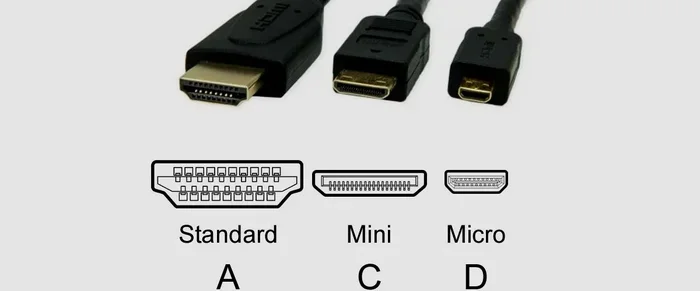
It is easy to assume that all HDMI cables look the same and do the same job. They all have the same rectangular plug on each end, after all. But underneath that familiar shape, there is a lot of variation. The differences come down to three main things: the version standard, the bandwidth capacity, and the features supported.
HDMI bandwidth is the amount of data a cable can carry at one time. Think of it like a highway. A wider highway allows more cars to pass through at once. A higher bandwidth cable can carry more video and audio data. This directly affects the resolution and refresh rate you can get.
Another factor is the HDMI version. Each new version brings improvements. HDMI 1.4 came out in 2009 and introduced 4K support at 30Hz. HDMI 2.0 arrived in 2013 and pushed that to 4K at 60Hz. And HDMI 2.1, released in 2017, took things even further with support for 8K and 10K resolutions, along with higher refresh rates.
The physical cable also matters. Some cables have thicker shielding. Some use better connectors. These small details can affect signal quality, especially over longer distances. A gold-plated HDMI connector, for example, resists corrosion better than a standard one. This helps maintain a clean connection over time.
Why Cable Version and Version Number Matter
When you shop for cables, you will see numbers like “HDMI 2.0” or “HDMI 2.1” printed on the packaging. These are not just marketing tricks. They tell you exactly what the cable can handle. A cable labeled HDMI 2.1 supports features that an older cable simply cannot. This includes things like Variable Refresh Rate (VRR) and Auto Low Latency Mode (ALLM), which are important for gamers.
Here is a simple way to think about it. If your TV supports 4K at 120Hz, you need an HDMI 2.1 cable. An older HDMI 1.4 cable will not be able to carry that much data. You will either get a lower resolution or a stuttering picture.
Understanding HDMI Versions and Standards
The HDMI standards have evolved a lot over the years. Each version brought new capabilities. Let us walk through them so you know what to look for.
HDMI 1.4
HDMI 1.4 was a big step forward when it came out. It was the first version to support 4K resolution, though only at 30Hz. It also introduced the HDMI ARC feature, which lets audio travel back from your TV to your soundbar or receiver. This means you only need one cable for both video and audio. HDMI 1.4 also added support for 3D content and an Ethernet channel built into the cable.
HDMI 2.0
HDMI 2.0 doubled the bandwidth compared to version 1.4. This allowed for 4K resolution at 60Hz, which made smooth motion possible for sports and gaming. It also expanded the color range, supporting deeper and richer colors. If you have a 4K TV that does not support 120Hz, an HDMI 2.0 cable will work great for most uses.
HDMI 2.1
HDMI 2.1 is the latest standard, and it is a game changer. It supports bandwidth up to 48 Gbps. This means 8K resolution at 60Hz or 4K at 120Hz. It also brings features like eARC (enhanced Audio Return Channel), which supports advanced audio formats like Dolby Atmos. For serious gamers and home theater fans, HDMI 2.1 is the way to go.
| Version | Bandwidth | Max Resolution | Key Feature |
|---|---|---|---|
| HDMI 1.4 | 10.2 Gbps | 4K at 30Hz | ARC, 3D support |
| HDMI 2.0 | 18 Gbps | 4K at 60Hz | Deeper color, 4K 60Hz |
| HDMI 2.1 | 48 Gbps | 8K at 60Hz | VRR, ALLM, eARC |
Types of HDMI Cables Explained
The HDMI Licensing Organization created cable categories to help consumers choose the right one. Here are the main types you will encounter.
Standard HDMI Cable
A standard HDMI cable supports up to 1080p resolution. It is fine for older TVs, Blu-ray players, and basic setups. If you are connecting a cable box to an older monitor, this will do the job. But do not expect it to handle 4K content.
High Speed HDMI Cable
High Speed HDMI cables support resolutions up to 4K at 30Hz. They are the most common type you will find in stores. They work well for most home entertainment setups. If you have a 4K TV but do not need 120Hz refresh rates, a High Speed cable is a solid choice.
Premium High Speed HDMI Cable
A Premium High Speed HDMI cable handles 4K at 60Hz and supports HDR (High Dynamic Range). These cables are tested to ensure they deliver consistent performance. They are ideal for most modern home theater setups. If you watch a lot of Netflix or Disney+ in 4K HDR, this is the cable you want.
Ultra High Speed HDMI Cable
Ultra High Speed HDMI cables are the top tier. They support bandwidth up to 48 Gbps and handle 4K at 120Hz, 8K, and even 10K. They also support HDR, eARC, and all the latest features. If you have a gaming console like the PS5 or Xbox Series X, or a top-tier home theater setup, this is the cable to get.
Do Expensive HDMI Cables Make a Difference
This is one of the most common questions people ask. And the answer might surprise you. In most cases, an expensive HDMI cable does not perform better than a cheap one. If both cables meet the same standard, they will deliver the same picture and sound quality.
HDMI signals are digital. That means the data either arrives intact or it does not. There is no in-between. A digital signal does not degrade gradually like an analog signal does. So a $200 cable will not give you a “better” picture than a $10 cable, as long as both are certified for the same resolution and bandwidth.
Where price can matter is in build quality. A more expensive cable might have better shielding, thicker insulation, or more durable connectors. This can help with signal integrity over long cable runs. If you need a cable that runs across a room, investing in a well-built one makes sense. But for a short connection behind your TV, a budget cable works just fine.
When You Should Spend More on a Cable
There are a few situations where spending a bit more is worth it:
- Long cable runs: Cables over 15 feet may need better shielding to avoid signal loss.
- Outdoor use: If you are running a cable outside, look for one rated for outdoor conditions.
- Frequent plugging and unplugging: A cable with reinforced connectors will last longer.
- Ultra High Speed needs: These cables cost more because of the advanced technology inside.
How to Choose the Right HDMI Cable for Your Setup
Choosing the right HDMI cable is simpler than it seems. You just need to know what your devices can do and what you want to achieve. Here is a step-by-step approach.
Step 1: Check Your Devices
Look at the ports on your TV, gaming console, or streaming device. What resolutions and refresh rates do they support? If your TV is a 4K model with 120Hz support, you need an HDMI 2.1 cable. If it is a 1080p TV, a standard or High Speed cable will work.
Step 2: Decide What You Want to Watch
Think about the content you watch most. Do you stream 4K movies? Do you play competitive games? Do you use HDR? Each of these requires a different level of cable performance. For casual viewing, a Premium High Speed cable is usually enough. For gaming or home theater, go Ultra High Speed.
Step 3: Consider Cable Length
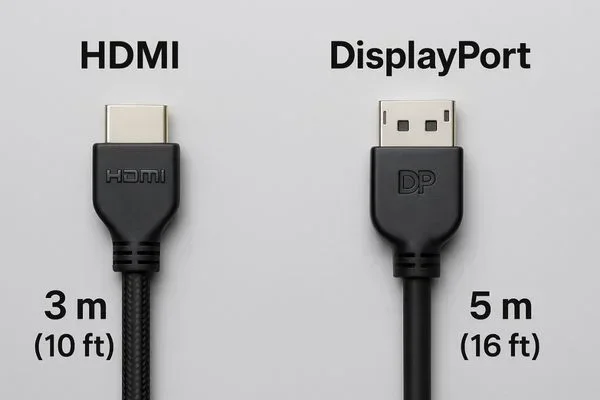
Cable length matters more than most people think. A longer cable can lose signal strength. For runs under 10 feet, any quality cable will work. For runs between 10 and 25 feet, look for a cable with good shielding. For anything over 25 feet, consider an active HDMI cable with a built-in signal booster.
Step 4: Look for Certification
Always buy cables that are HDMI Certified. This means they have been tested to meet the standards printed on the packaging. Avoid cables that make vague claims like “supports 8K” without any certification. Stick with reputable brands and trusted retailers.
Common HDMI Cable Myths Debunked
There is a lot of misinformation out there about HDMI cables. Let us clear up some of the most common myths.
Myth 1: Thicker Cables Are Always Better
Not true. Cable thickness does not determine performance. What matters is the internal construction and the standard it meets. A thin cable that meets the Ultra High Speed standard will outperform a thick cable that only meets the Standard specification.
Myth 2: Gold-Plated Connectors Improve Picture Quality
Gold plating helps prevent corrosion and ensures a reliable connection over time. But it does not change the picture or sound quality. The signal is the same whether the connector is gold-plated or not.
Myth 3: All 4K Cables Are the Same
This is far from true. Some 4K cables only support 30Hz, while others support 60Hz or even 120Hz. Always check the version and bandwidth of the cable. A cable that supports 4K at 30Hz will not give you the smooth motion you get from a 4K 60Hz or 120Hz connection.
Myth 4: You Need an Expensive Cable for Gaming
If you are a casual gamer, a Premium High Speed cable will handle most games just fine. Only competitive gamers who need 120Hz refresh rates or features like VRR need an Ultra High Speed HDMI 2.1 cable.
Quick Tips for Getting the Most Out of Your HDMI Setup
Here are some practical tips to help you get the best experience from your HDMI connections:
- Label your cables. If you have multiple HDMI devices, label each cable so you know which one goes where.
- Use an HDMI switch if you run out of ports. A good switch lets you connect multiple devices to one TV port.
- Check for firmware updates. Sometimes TV or console firmware updates improve HDMI compatibility.
- Avoid bending or pinching cables. This can damage the internal wires and cause signal issues.
- Use an HDMI adapter carefully. Adapters can sometimes cause signal loss. Choose high-quality ones from trusted brands.
- Test your setup before mounting. Always test the connection with the TV on the stand before wall-mounting it.
The Future of HDMI: What to Expect
HDMI technology continues to evolve. The HDMI 2.1 standard already supports incredible resolutions and features. As TVs move toward higher resolutions and refresh rates, the demand for better cables will only grow. Manufacturers are already working on cables that can handle even more data.
One exciting development is the push for dynamic HDR support across all HDMI standards. This means every scene in a movie can have its own unique brightness and color settings, creating a more vivid and realistic picture. Another trend is the integration of smarter cable authentication, making it easier for consumers to verify that a cable meets its claimed specifications.
For now, the best approach is to buy based on your current needs. If you are setting up a home theater today, an HDMI 2.1 Ultra High Speed cable will serve you well for years to come. It is future-proof and ready for whatever comes next.
Conclusion
The answer to the question “Are all HDMI wires the same” is a clear no. HDMI cables vary widely in their capabilities, from basic Standard cables to cutting-edge Ultra High Speed options. The right choice depends on your devices, the content you watch, and your setup requirements.
Understanding HDMI versions and cable categories takes the guesswork out of shopping. You no longer have to pay extra for features you do not need, and you can avoid the frustration of a cable that cannot handle your setup. Whether you are connecting a simple streaming stick or a full-blown home theater system, there is an HDMI cable that fits your needs perfectly.
Take a few minutes to check your devices, understand what you need, and choose accordingly. A little knowledge goes a long way. And with the right HDMI cable in hand, you will enjoy crisp video, rich audio, and a seamless viewing experience every time.
Frequently Asked Questions
Can I use an older HDMI cable with a new 4K TV?
It depends on the cable version. An older HDMI 1.4 cable can output 4K, but only at 30Hz. This may result in a less smooth picture. For the best 4K experience, use an HDMI 2.0 or HDMI 2.1 cable. Check the cable specifications on the packaging to be sure.
Do I need an Ultra High Speed HDMI cable for gaming?
If you play on a console like the PS5 or Xbox Series X and want to take advantage of 4K at 120Hz, VRR, and ALLM, then yes. An Ultra High Speed HDMI 2.1 cable is essential for unlocking these features. For casual gaming at 4K 60Hz, a Premium High Speed cable will work fine.
Does HDMI cable length affect quality?
Cable length can affect signal strength, especially for longer runs. For cables under 10 feet, quality is usually not an issue. For cables over 15 feet, signal loss can become a problem. In these cases, look for cables with good shielding or consider an active HDMI cable with a built-in booster.
What is the difference between HDMI ARC and eARC?
HDMI ARC (Audio Return Channel) lets your TV send audio back to a soundbar or receiver through the HDMI cable. eARC (Enhanced Audio Return Channel) is an upgraded version that supports advanced audio formats like Dolby Atmos and uncompressed audio. eARC is only available with HDMI 2.1 cables.
Is it worth paying more for a certified HDMI cable?
Yes, certified cables have been tested to meet specific standards. They are more reliable and less likely to cause issues like signal dropouts or compatibility problems. Always look for HDMI Certification on the packaging to ensure you are getting a cable that performs as advertised.
Can an HDMI cable affect my internet connection?
Some HDMI cables include an Ethernet channel, which allows devices to share an internet connection without a separate network cable. However, this feature is only available on certain HDMI versions and cable types. Most modern setups use Wi-Fi or a separate Ethernet cable for internet access.