Can You Connect 2 Bluetooth Speakers At The Same Time
Yes, you can connect to 2 Bluetooth speakers at the same time on many devices, but it depends on your phone, tablet, or laptop model and operating system. This guide walks you through every method, from native dual-speaker modes to third-party apps, so you can enjoy louder and richer wireless audio anywhere. We also cover common problems, compatibility tips, and expert tricks to get the best stereo sound from your setup.
Have you ever wanted to fill a room with richer, louder sound by connecting two Bluetooth speakers at once? Maybe you are hosting a backyard party or setting up a home theater system, and one speaker just is not cutting it. The good news is that connecting two Bluetooth speakers simultaneously is possible on many devices today. But how exactly does it work, and what do you need to know before you try?
In this guide, we will walk you through everything you need to know about dual Bluetooth speaker pairing. We will cover which devices support it, step-by-step setup methods, troubleshooting tips, and much more. Whether you use an iPhone, an Android phone, or a Windows laptop, you will find practical advice here. Let us dive in and turn your audio setup up to eleven.
Key Takeaways
- Dual speaker pairing is possible: Many modern smartphones, tablets, and laptops support connecting two Bluetooth speakers simultaneously.
- Native features vary by device: Apple, Samsung, Sony, and other brands each have their own method for linking two speakers together.
- Third-party apps can help: Apps like AmpMe and SoundSeeder fill the gap when your device lacks built-in dual-speaker support.
- Stereo mode splits audio channels: You can assign one speaker to the left channel and the other to the right for a true surround experience.
- Common issues are fixable: Lag, disconnection, and volume imbalance can usually be solved with simple troubleshooting steps.
- Compatibility matters: Not all speaker brands work together for dual pairing, so check before you buy.
📑 Table of Contents
- How Does Connecting Two Bluetooth Speakers Work?
- Which Devices Support Connecting Two Bluetooth Speakers?
- How To Pair Two Bluetooth Speakers Together
- Benefits Of Using Two Bluetooth Speakers
- Common Problems And How To Fix Them
- Expert Tips For The Best Dual Speaker Experience
- Can You Connect 2 Bluetooth Speakers At The Same Time? Final Verdict
How Does Connecting Two Bluetooth Speakers Work?
Before you start pairing, it helps to understand the basics of how Bluetooth speaker pairing actually works. Bluetooth is a short-range wireless technology that sends audio data between devices. When you connect one speaker, your phone sends a single audio stream to that speaker. When you connect two speakers, the process changes slightly depending on the method used.
Native Dual Speaker Mode
Many modern smartphones and tablets come with a built-in feature called dual speaker mode or multi-point connection. This allows your device to send audio to two Bluetooth speakers at the same time without needing any extra apps. Apple, Samsung, and several other manufacturers have adopted this feature in recent years.
For example, some Samsung Galaxy phones let you use Sound Alive technology to connect two compatible speakers. Apple devices use a feature called AirPlay to stream audio to multiple compatible speakers over Wi-Fi, which works alongside Bluetooth in some setups.
Third-Party Speaker Apps
If your device does not support native dual pairing, you can use third-party apps. Apps like AmpMe and SoundSeeder turn multiple phones or tablets into a single audio source. One device acts as the host, and the others sync up to play the same audio in real time. This is a great workaround if you want to connect two Bluetooth speakers on a device that does not natively support it.
Stereo Pair Mode
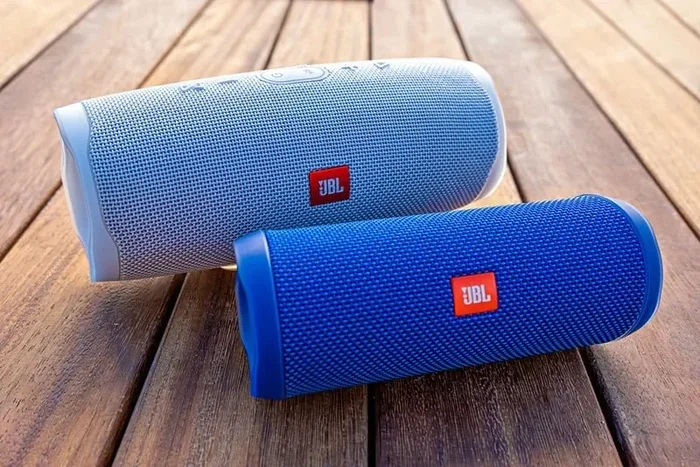
Some speaker brands offer a dedicated stereo pair mode. In this setup, one speaker acts as the left channel and the other acts as the right channel. This creates a true stereo sound experience, which sounds much better than playing the same audio on two speakers in mono. Brands like JBL, Sony, and Bose often support this feature on their higher-end models.
Which Devices Support Connecting Two Bluetooth Speakers?
Not every device can connect to two Bluetooth speakers at the same time. Your ability to do so depends on your phone model, operating system, and even the speaker brand. Here is a breakdown of what to expect from popular devices.
iPhone and iPad
Apple devices running iOS 13 or later support a feature called AirPlay 2, which lets you stream audio to multiple compatible speakers. You do not need to use Bluetooth directly, as AirPlay works over Wi-Fi. To use this, make sure your speakers support AirPlay 2. You can also check out our guide on adding prefixes to numbers on iPhone for more iPhone tips that enhance your daily experience.
However, if you want to use two Bluetooth speakers specifically (not AirPlay speakers), iPhones do not natively support dual Bluetooth speaker output. You will need a third-party app or a speaker system that supports Bluetooth multipoint connectivity.
Android Phones
Android devices vary widely in their dual speaker support. Samsung phones running One UI often include a feature called Dual Audio or Sound Alive that lets you connect two Bluetooth speakers at once. Other Android brands like Xiaomi and OnePlus may also offer similar features, though the exact name and functionality differ.
To check if your Android phone supports this, go to your Bluetooth settings and look for an option like “Dual Audio” or “Multi-device connection.” If you do not see it, your phone may not support native dual pairing.
Windows Laptops and PCs
Windows 10 and 11 have a feature called Bluetooth Stereo that sometimes allows you to connect to multiple audio output devices. However, this is not always reliable. You may need to use software like Voicemeeter or Virtual Audio Cable to route audio to two Bluetooth speakers simultaneously.
Mac Computers
Macs running macOS Monterey and later support Aggregate Devices in the Audio MIDI Setup utility. This lets you combine multiple audio output devices, including two Bluetooth speakers. It is a powerful feature, but it requires a bit of setup. The benefit is that you get true multi-speaker audio without any third-party apps.
How To Pair Two Bluetooth Speakers Together
Now that you know what your device supports, let us walk through the actual pairing process. The steps vary depending on your device, so we have broken them down by method below.
Method 1: Using Native Dual Audio (Samsung and Select Android Phones)
Here is how to pair two Bluetooth speakers using the native dual audio feature on a Samsung phone:
- Turn on both Bluetooth speakers and put them in pairing mode.
- Open the Settings app on your phone and go to Connections.
- Tap on Bluetooth and make sure it is turned on.
- Tap the three dots in the top right corner and select Settings.
- Turn on the Dual Audio toggle switch.
- Now, pair the first speaker by tapping its name in the list of available devices.
- Pair the second speaker the same way. Both speakers should connect simultaneously.
Once both speakers are connected, your audio will play through both of them. You can adjust the volume from your phone, and both speakers will respond equally.
Method 2: Using AirPlay 2 on iPhone and iPad
If you have AirPlay 2-compatible speakers, here is how to set them up:
- Make sure both speakers are connected to the same Wi-Fi network.
- Open the Control Center on your iPhone or iPad.
- Tap the Music control widget.
- Tap the AirPlay icon (the triangle with circles above it).
- Select both speakers from the list. You can also choose to create a stereo pair.
- Start playing your music, and it will stream to both speakers.
This method delivers excellent sound quality because it uses Wi-Fi instead of Bluetooth, which means less compression and better audio fidelity.
Method 3: Using a Third-Party App
If your device does not support native dual pairing, a third-party app is your best bet. Here is how AmpMe works:
- Download AmpMe on your phone or tablet from the App Store or Google Play.
- Open the app and create a new party.
- Invite your friends to join the party (they also need the app).
- Each person with the app can connect their own Bluetooth speaker.
- The host selects the music, and everyone plays it in sync.
This method is perfect for parties because everyone can contribute a speaker. The trade-off is that audio sync is not always perfect, and you need multiple devices to make it work.
Method 4: Using Stereo Pair Mode (Brand-Specific Speakers)
Some speaker systems are designed to work as a pair right out of the box. Here is how to set up a stereo pair with matching speakers:
- Buy two speakers from the same brand and model that support stereo pairing.
- Turn on both speakers and put them in pairing mode.
- Use the manufacturer’s app (such as the JBL Portable app or Sony Music Center) to link the two speakers together.
- Select the stereo pair option in the app.
- Connect your phone to the stereo pair as a single Bluetooth device.
The result is a wide, immersive soundstage with clear left and right channels. This is the best method for serious audio quality.
Benefits Of Using Two Bluetooth Speakers
Why bother connecting two speakers instead of just using one? There are several compelling reasons that make dual-speaker setups worth the effort.
Louder Volume
The most obvious benefit is increased volume. Two speakers playing at the same time produce significantly more sound than one. This is ideal for outdoor gatherings, large rooms, or any situation where a single speaker is not loud enough.
Better Sound Quality
When you use two speakers in stereo mode, you get a wider soundstage. The music feels like it is coming from different directions, which makes it more immersive. Stereo pairing also reduces the strain on a single speaker, which can improve clarity and reduce distortion at higher volumes.
Cover Larger Areas
If you are hosting a party or entertaining guests outdoors, one speaker simply cannot cover the entire space. Two speakers placed in different corners of the room or yard ensure that everyone hears the music clearly, no matter where they are standing.
Shared Listening Experience
Connecting two speakers makes it easy to share music with friends and family. Instead of huddling around one speaker, everyone can enjoy the music from a comfortable distance. This is especially useful for picnics, barbecues, and beach outings.
Flexibility and Portability
Most portable Bluetooth speakers are lightweight and battery-powered. You can carry two of them to any location and set them up in minutes. This flexibility makes dual-speaker setups popular for camping trips, tailgating, and other outdoor adventures.
If you are looking for more ways to enhance your outdoor entertainment setup, check out our article on 10 gadgets to make moms life easier for some great portable audio and lifestyle gadgets.
Common Problems And How To Fix Them
Connecting two Bluetooth speakers is not always smooth sailing. Here are the most common issues people run into and how to solve them.
Audio Lag or Delay
One speaker might play slightly ahead of the other, creating an annoying echo effect. This happens because Bluetooth has inherent latency, and different speakers may process audio at slightly different speeds.
Fix: Use speakers from the same brand and model, as they are designed to sync together. If you are using a third-party app, look for a “sync delay” or “latency correction” setting in the app. Placing both speakers close to each other can also reduce the delay.
One Speaker Keeps Disconnecting
Bluetooth connections can be unstable, especially when two speakers are competing for the same connection. One speaker may drop out randomly.
Fix: Make sure both speakers are fully charged. Move closer to both speakers, as Bluetooth range is typically about 30 feet. Also, reduce interference from other wireless devices like Wi-Fi routers and microwaves. If your phone supports it, try forgetting both speakers and pairing them again from scratch.
Volume Imbalance Between Speakers
One speaker might be louder than the other, which ruins the stereo effect. This can happen if one speaker is older, has a lower battery, or is placed farther from your listening position.
Fix: Place both speakers at the same distance from your listening area. Check the individual volume levels on each speaker and adjust them to match. Some speaker apps allow you to fine-tune the balance between connected speakers.
Your Device Does Not Support Dual Bluetooth
As mentioned earlier, not every phone or tablet can connect to two Bluetooth speakers natively. If your device lacks this feature, you will need to rely on third-party apps or a stereo pair setup.
Fix: Download a reliable app like AmpMe or SoundSeeder. Alternatively, consider buying a speaker system that supports native dual pairing. Before purchasing any speaker, always check the product description for dual speaker compatibility.
Poor Sound Quality
Bluetooth audio is compressed, which can result in lower quality compared to wired connections. When you add two Bluetooth speakers to the mix, the compression can become more noticeable.
Fix: Use speakers that support high-quality Bluetooth codecs like aptX or LDAC. Keep your speakers close to the source device for a stronger signal. For the best possible quality, consider using Wi-Fi-based streaming (like AirPlay 2) instead of Bluetooth.
Expert Tips For The Best Dual Speaker Experience
Want to get the most out of your two Bluetooth speakers? Here are some pro tips that make a real difference.
- Match your speakers: Use two speakers of the same brand and model for the best sync and sound quality.
- Place speakers strategically: Position them at roughly 45-degree angles from your listening spot for the widest stereo image.
- Keep them close: The closer both speakers are to the source device, the stronger and more stable the connection will be.
- Update firmware: Always keep your speakers updated with the latest firmware. Manufacturers often release updates that improve Bluetooth stability and audio quality.
- Use a dedicated app: Many speaker brands have companion apps that unlock advanced features like stereo pairing, EQ adjustments, and firmware updates.
- Manage your Bluetooth connections: Disconnect other Bluetooth devices that are not in use. Too many connected devices can cause interference and reduce audio quality.
- Charge fully before use: Bluetooth speakers tend to lose power faster when connected to two devices simultaneously. Make sure both are fully charged before your event.
These tips apply whether you are using native dual audio, a stereo pair setup, or a third-party app. Following them will help you get the most out of every session.
Can You Connect 2 Bluetooth Speakers At The Same Time? Final Verdict
The short answer is yes, you can connect two Bluetooth speakers at the same time in most cases. The method you use depends on your device, your speakers, and your desired audio experience. If you have a Samsung phone, use the built-in Dual Audio feature. If you have an iPhone, try AirPlay 2 with compatible speakers. For everything else, a third-party app or a brand-specific stereo pair setup will get the job done.
Connecting two Bluetooth speakers opens up a world of possibilities for richer, louder, and more immersive sound. Whether you are throwing a party, enjoying a quiet evening at home, or taking your music on the go, a dual-speaker setup delivers an experience that a single speaker simply cannot match. The key is to choose compatible devices, follow the right setup steps, and troubleshoot any issues that come up along the way.
Now that you have all the information you need, it is time to grab your speakers, fire up your favorite playlist, and enjoy the music the way it was meant to be heard. Happy listening!
Frequently Asked Questions
Can I connect two different brand Bluetooth speakers together?
Yes, in most cases you can connect two different brand Bluetooth speakers using a third-party app like AmpMe or SoundSeeder. However, native dual speaker features like Samsung’s Dual Audio typically work best with speakers from the same brand. For the best results, use matching speakers when possible.
Does connecting two Bluetooth speakers reduce battery life?
Yes, connecting two speakers drains battery faster than using one. Both speakers need power to receive and play audio, and the source device also uses more energy to maintain two Bluetooth connections. Keep both speakers fully charged and consider keeping them plugged in during long listening sessions.
Can I use two Bluetooth speakers with one iPhone?
iPhones do not natively support connecting two Bluetooth speakers directly. However, you can use AirPlay 2 to stream audio to multiple AirPlay-compatible speakers over Wi-Fi. For two standard Bluetooth speakers, you will need a third-party app or a speaker system that supports Bluetooth multipoint.
Is there a lag when using two Bluetooth speakers at once?
Some audio lag is common when using two Bluetooth speakers, especially if they are different models or brands. This happens because Bluetooth has inherent latency. Using speakers from the same brand and model, keeping them close to the source device, and using latency correction features in apps can help minimize the delay significantly.
What is the best app for connecting two Bluetooth speakers?
AmpMe and SoundSeeder are two of the most popular apps for connecting multiple Bluetooth speakers. AmpMe is free and supports both iOS and Android. SoundSeeder offers similar functionality and works well for party settings. Both apps let you sync multiple speakers to play the same audio in real time.
Can I connect more than two Bluetooth speakers at the same time?
Yes, some apps like AmpMe and SoundSeeder allow you to connect more than two speakers to a single audio source. The exact number depends on the app and your device’s processing power. Keep in mind that adding more speakers can increase audio lag and reduce overall sound quality. For the best experience, stick to two or three speakers maximum.
=== CONCLUSION ===
Connecting two Bluetooth speakers at the same time is a fantastic way to upgrade your audio experience. Whether you use native features like Samsung’s Dual Audio or Apple’s AirPlay 2, or rely on third-party apps like AmpMe, the process is easier than most people think. The key is understanding your device’s capabilities, choosing compatible speakers, and following the right setup steps.
With the tips and troubleshooting advice in this guide, you are well-equipped to create a powerful dual-speaker setup for any occasion. From backyard parties to quiet evenings at home, two Bluetooth speakers can transform the way you listen to music. So go ahead, pair up those speakers, and enjoy the immersive sound you deserve.