Can You Add Bluetooth To A Mixer And Stream Wirelessly
Yes, you can add Bluetooth to a mixer and stream audio wirelessly with the right adapter or built-in module. Whether you are a DJ, podcaster, or home studio enthusiast, adding Bluetooth connectivity opens up a world of wireless music streaming possibilities. This guide walks you through every method, product recommendation, and pro tip you need to get started.
Imagine this. You are at a party, and someone hands you the aux cord. You plug it in, fumble with your phone, and suddenly everyone is waiting while the music starts. Now picture this instead. You tap a button on your mixer, your phone connects instantly, and the music flows through the speakers without a single wire. That is the magic of adding Bluetooth to a mixer. It changes everything about how you share and mix audio.
Bluetooth technology has come a long way in recent years. What used to be a gimmick for phone headsets is now a powerful tool for audio professionals and casual users alike. Whether you are a DJ spinning tracks at a wedding, a podcaster recording episodes, or just someone who loves playing music at home, wireless audio streaming from your mixer can make your life so much easier.
But here is the thing. Not all mixers come with Bluetooth built in. And even if yours does, you might wonder whether the connection is reliable, whether the sound quality holds up, and whether there is an easier way to get the same result. This guide answers all of those questions and more. We will walk you through every method, every product option, and every pitfall to avoid. By the end, you will know exactly how to stream wirelessly from your mixer like a pro.
Key Takeaways
- Bluetooth adapters are the easiest way to add wireless streaming to any existing mixer without permanent modifications.
- Built-in Bluetooth mixers save you time and money if you are purchasing a new mixer from scratch.
- Audio latency can be a real issue with Bluetooth, so choosing the right codec and adapter matters a lot.
- Multiple connection methods exist, including Bluetooth transmitters, receivers, and hybrid mixer setups.
- Sound quality varies depending on the Bluetooth version and codec you use, so pick wisely for your needs.
- Wireless streaming works great for casual use, but professionals may still want wired connections for critical listening.
📑 Table of Contents
- What Is a Mixer and Why Add Bluetooth?
- How to Add Bluetooth to a Mixer
- Best Bluetooth Adapters for Mixers
- Bluetooth Mixer vs Wired Mixer: Which Is Right for You?
- Tips for Getting the Best Bluetooth Audio Quality
- Common Bluetooth Mixer Problems and How to Fix Them
- Final Thoughts on Adding Bluetooth to Your Mixer
What Is a Mixer and Why Add Bluetooth?
A mixer, also called a mixing console, is a device that combines, routes, and adjusts audio signals from multiple sources. Think of it as the control center for sound. You plug in microphones, instruments, phones, and other audio sources, and the mixer lets you balance levels, add effects, and send the final output to speakers or recording equipment.
Traditionally, mixers rely on physical cables for every connection. You need aux cords, XLR cables, RCA cables, and USB cables. This works fine, but it can be limiting. You are tied to a desk. You cannot move around freely. And if you want to play music from your phone, you are always searching for the right cable or adapter.
This is where Bluetooth connectivity comes in. Adding Bluetooth to a mixer removes the cable barrier. You can stream music directly from your phone, tablet, or laptop without any wires. It is perfect for situations where you need quick, flexible audio input. Whether you are hosting an event, recording a podcast, or just jamming in your garage, wireless streaming gives you freedom and convenience.
Some modern mixers already include Bluetooth. But many older or budget models do not. The good news is that you do not need to buy a brand new mixer just to get wireless capability. There are several affordable and effective ways to add Bluetooth to almost any mixer. We will cover all of them in detail.
How to Add Bluetooth to a Mixer
There are three main methods for adding Bluetooth to a mixer. Each has its pros and cons, and the right choice depends on your mixer, your budget, and what you plan to do with it. Let us break them down.
Method 1: Use a Bluetooth Adapter
The simplest and most popular way to add Bluetooth to a mixer is by using a Bluetooth adapter. This is a small device that plugs into your mixer and creates a wireless connection to your phone or other device. You do not need to open up your mixer or make any permanent changes.
Here is how it works. You plug the Bluetooth adapter into the mixer’s audio input, usually an aux port or a 3.5mm jack. Then you pair your phone with the adapter. Once connected, any audio from your phone streams wirelessly through the mixer and out to your speakers.
Bluetooth adapters come in different shapes and sizes. Some are tiny dongles. Others are larger units with better antennas and stronger signals. The key thing to look for is Bluetooth version support. Newer versions like Bluetooth 5.0 and 5.3 offer better range, lower latency, and improved sound quality. If you can, grab an adapter that supports at least Bluetooth 5.0.
One thing to keep in mind. Some Bluetooth adapters are designed for receiving only. They let you stream audio TO the mixer. Others can transmit as well. Make sure you check the specs before you buy. For most mixer setups, a receiver-only adapter is exactly what you need.
Method 2: Use a Bluetooth Transmitter
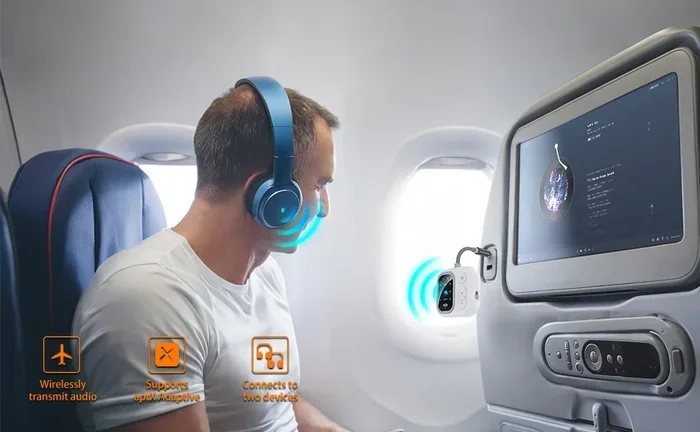
A Bluetooth transmitter works in the opposite direction. Instead of receiving audio, it sends audio from your mixer to a Bluetooth speaker or headphones. This is useful if your mixer does not have Bluetooth output but you want to listen wirelessly.
You plug the transmitter into your mixer’s output, pair it with your Bluetooth speaker or headphones, and you are good to go. This method is great for personal monitoring. If you are mixing tracks and do not want to bother with cables going to your headphones, a transmitter can be a lifesaver.
Some mixers already have a headphone output that works perfectly with a transmitter. Just plug it in, pair your device, and you can listen from across the room. It is a simple upgrade that makes a big difference in your workflow.
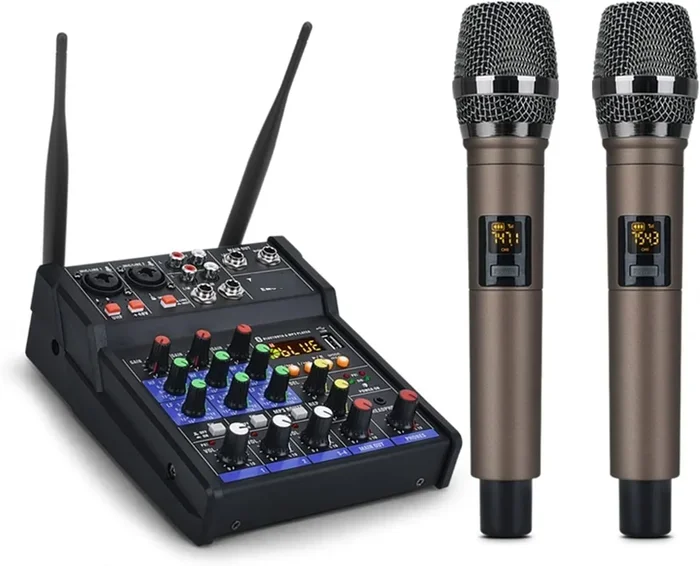
Method 3: Upgrade to a Mixer with Built-In Bluetooth
If your current mixer is old or lacks the features you need, it might be time to upgrade. Many modern mixers now come with built-in Bluetooth as a standard feature. This means you do not need any extra adapters or cables. You just pair your device and start streaming.
Built-in Bluetooth mixers range from budget-friendly options to professional-grade units. Popular brands like Yamaha, Behringer, and Mackie all offer models with wireless connectivity. These mixers often include additional features like USB recording, built-in effects, and multiple input channels.
The advantage of a built-in solution is simplicity. There is no extra device to power, no additional cables to manage, and no extra point of failure. Everything works seamlessly right out of the box. If you are in the market for a new mixer, this is definitely the way to go.
You might also want to check out some cool gadgets that make life easier for tech lovers, since many of these Bluetooth adapters and wireless devices fall into the same category of handy, time-saving tech tools.
Best Bluetooth Adapters for Mixers
Not all Bluetooth adapters are created equal. Some deliver crystal-clear audio with almost no delay. Others suffer from lag, static, or weak connections. Choosing the right adapter can make or break your wireless streaming experience. Here are some of the best options available right now.
1. TaoTronics Bluetooth 5.0 Transmitter. This is a solid, affordable option that works well with most mixers. It supports aptX and aptX Low Latency codecs, which means better sound quality and less delay. The range is about 50 feet, which is plenty for most indoor setups.
2. 1Mii Bluetooth 5.0 Receiver. This compact receiver is easy to use and pairs quickly with any device. It has a range of up to 164 feet and supports multiple codecs. It is a great choice if you want something small and unobtrusive that just works.
3. Avantree DG40S. This is a step up in terms of quality and features. It supports aptX HD and aptX Low Latency, giving you near-lossless audio quality with minimal delay. It is ideal for musicians and podcasters who need reliable, high-quality wireless audio.
4. Saramonic BlinkLink. Designed specifically for audio professionals, this wireless system offers studio-grade sound quality and ultra-low latency. It is more expensive than consumer options, but it is worth it if you are doing live events or professional recordings.
When choosing an adapter, pay attention to three things. First, check the Bluetooth version. Version 5.0 or higher is ideal. Second, look for codec support. aptX and aptX Low Latency are the best for audio. Third, consider the range. If you need to move around a lot, go for a longer range option.
Bluetooth Mixer vs Wired Mixer: Which Is Right for You?
Bluetooth mixers and wired mixers each have their strengths. Understanding the differences helps you make the best choice for your situation. Let us compare them side by side.
| Feature | Bluetooth Mixer | Wired Mixer |
|---|---|---|
| Convenience | Very high | Moderate |
| Sound Quality | Good to excellent | Excellent |
| Latency | Low to moderate | None |
| Portability | Very portable | Less portable |
| Setup Time | Quick pairing | Cable management |
| Price Range | Mid to high | Budget to high |
| Reliability | Good | Excellent |
| Cable Clutter | Minimal | Can be significant |
As you can see, Bluetooth mixers win on convenience and portability. Wired mixers win on sound quality and reliability. For most casual users, the difference in sound quality is negligible. But for professional audio engineers who need every last bit of fidelity, a wired connection is still the gold standard.
Here is a practical tip. Many experienced users use both. They rely on Bluetooth for quick setups and casual use, and they switch to wired cables when they need the absolute best sound quality. This hybrid approach gives you the best of both worlds.
It is also worth noting that wireless technology keeps improving fast. Bluetooth codecs like aptX and LDAC are closing the gap between wireless and wired audio every year. What was noticeable lag and compression five years ago is barely perceptible today. If you have not tried a Bluetooth mixer recently, it is worth giving it another look.
Sometimes troubleshooting tech issues can be frustrating, especially when a simple fix like checking your cable connections solves the problem, similar to how a stubborn line in Excel won’t delete until you find the right method to remove it. The same patience applies to setting up Bluetooth audio equipment.
Tips for Getting the Best Bluetooth Audio Quality
Bluetooth audio quality depends on several factors. If you set things up correctly, you can get excellent sound from your wireless mixer. Here are some tips to help you get the best results.
Choose the Right Codec
Bluetooth codecs determine how audio is compressed and transmitted over a wireless connection. The most common codecs are SBC, aptX, aptX HD, aptX Low Latency, and LDAC.
SBC is the default codec for most devices. It works fine for casual listening, but it does not deliver the best sound quality. aptX offers a significant improvement in audio fidelity. aptX Low Latency reduces the delay between the audio source and the output, which is critical for live performances and video sync.
LDAC is Sony’s high-resolution codec. It can transmit audio at up to 990 kbps, which is nearly CD quality. If your devices support LDAC, use it. It makes a real difference in sound clarity and detail.
Keep Your Devices Close
Bluetooth has a limited range. Most consumer devices work well within 30 to 50 feet. Beyond that, the signal weakens and you may experience dropouts or static. Keep your phone or streaming device within a reasonable distance from your mixer for the best connection.
Walls, furniture, and other obstacles can also weaken the Bluetooth signal. If you are setting up in a large room, try to place your mixer and streaming device in the same area with a clear line of sight between them.
Minimize Interference
Bluetooth operates on the 2.4 GHz frequency band, which is shared by Wi-Fi routers, microwaves, and other wireless devices. If you notice audio dropouts or quality issues, try moving away from other wireless devices or switching your Wi-Fi to a different channel.
Some Bluetooth adapters come with external antennas that help reduce interference. If you are in a crowded environment with lots of wireless devices, investing in an adapter with a better antenna can make a big difference.
Update Your Firmware
Bluetooth technology evolves quickly. Manufacturers regularly release firmware updates that improve connection stability, reduce latency, and enhance audio quality. Check for firmware updates for your mixer, adapter, and any Bluetooth devices you use. Keeping everything up to date ensures you are getting the best performance possible.
Use a Dedicated Bluetooth Input
If your mixer has multiple inputs, dedicate one input specifically for your Bluetooth connection. This prevents you from accidentally disconnecting your Bluetooth device when you plug in something else. It also keeps your signal chain clean and organized.
Some mixers even have a dedicated Bluetooth input channel with its own volume control. This is incredibly convenient because you can adjust the Bluetooth audio level independently from your other inputs. If your mixer does not have this feature, you can use a mixer channel strip or a simple Y-cable to achieve the same result.
Common Bluetooth Mixer Problems and How to Fix Them
Bluetooth technology is reliable, but it is not perfect. Here are some common issues you might encounter and how to solve them.
Audio Delay or Latency
Latency is the delay between when the audio is sent and when it is heard. This is the most common Bluetooth complaint. If you notice a lag between your phone and the mixer output, try switching to a low-latency codec like aptX Low Latency or aptX Adaptive.
You can also reduce the buffer size on your audio settings if your mixer or adapter supports it. Lower buffer sizes reduce latency but may cause audio dropouts if your device struggles to keep up. Find the sweet spot that works for your setup.
Connection Drops
If your Bluetooth connection keeps dropping, the issue is usually signal strength or interference. Move your devices closer together, remove obstacles, and reduce the number of wireless devices in the area. You can also try unpairing and re-pairing your devices to refresh the connection.
Some older Bluetooth adapters have known connectivity issues. If you are experiencing frequent drops, it might be time to upgrade to a newer adapter with Bluetooth 5.0 or higher. The improvement in connection stability is dramatic.
Poor Sound Quality
If your audio sounds muffled or distorted, check which codec your devices are using. SBC codec can sound compressed compared to aptX or LDAC. Also, make sure your phone or source device is not limiting the audio output. Check your device’s volume settings and disable any audio enhancements that might be affecting the sound.
Another common cause is a weak Bluetooth signal. If your phone is far from the mixer, the audio quality will degrade. Move closer and see if the sound improves. If it does, you need a better adapter with a stronger signal range.
Paired but No Audio
Sometimes your devices pair successfully but no audio comes through. This usually happens because the audio is routing to the wrong output on your phone. Check your phone’s Bluetooth settings and make sure the audio output is set to the Bluetooth adapter, not the phone speaker or headphones.
You can also try restarting both devices. A simple restart often fixes connection issues that seem stubborn at first. It clears temporary glitches and refreshes the Bluetooth stack on both devices.
Final Thoughts on Adding Bluetooth to Your Mixer
Adding Bluetooth to a mixer is one of the simplest and most rewarding upgrades you can make to your audio setup. Whether you use a Bluetooth adapter, a transmitter, or invest in a new mixer with built-in wireless capability, the result is the same. You get freedom, convenience, and flexibility in how you share and mix audio.
The technology has matured to the point where Bluetooth audio quality is excellent for most use cases. Latency is manageable, sound quality is impressive, and setup is straightforward. You do not need to be a tech expert to get great results. Just follow the tips in this guide and you will be streaming wireless audio in no time.
Remember that Bluetooth is not a replacement for wired connections in every situation. For critical professional work where every detail matters, cables still have the edge. But for everyday use, events, parties, podcasts, and casual listening, wireless streaming from your mixer is more than good enough. It is fast, it is easy, and it works beautifully.
So go ahead. Pick up a Bluetooth adapter, pair your phone, and start streaming. You will wonder how you ever managed without it. Wireless audio mixing is the future, and it is here right now.
Also, if you ever need to adjust phone settings for audio routing, you might find it helpful to learn about customizing your iPhone settings for different audio scenarios, as many of these tweaks can improve how your device handles Bluetooth connections and audio outputs.
Frequently Asked Questions
Can I add Bluetooth to any mixer?
Yes, you can add Bluetooth to almost any mixer using an external adapter. If your mixer has an aux input or a 3.5mm jack, you can plug in a Bluetooth receiver and start streaming wirelessly. Some mixers may require a simple adapter cable to connect the Bluetooth device to the right input.
Does adding Bluetooth to a mixer affect sound quality?
It can, but the difference is usually small. Bluetooth compresses audio slightly compared to a wired connection. Using a Bluetooth adapter that supports aptX or aptX Low Latency minimizes this loss and delivers near-CD quality sound. For most users, the difference is barely noticeable.
What is the best Bluetooth codec for mixers?
aptX Low Latency is the best choice for most mixer setups. It provides excellent audio quality with minimal delay, making it ideal for live performances and video work. If your devices support LDAC, that is also an excellent option for high-resolution audio streaming.
Is Bluetooth latency a big problem for mixing?
Latency can be an issue, especially for live mixing where timing matters. However, modern Bluetooth codecs like aptX Low Latency reduce the delay to just a few milliseconds, which is acceptable for most applications. For critical professional work, wired connections remain the best choice.
Can I connect multiple phones to a Bluetooth mixer?
Most Bluetooth adapters can only maintain one active connection at a time. However, you can quickly switch between paired devices by disconnecting one and connecting another. Some higher-end adapters support multi-point connectivity, allowing two devices to stay connected simultaneously.
How far can Bluetooth reach from a mixer?
Standard Bluetooth range is about 30 to 50 feet for most consumer devices. Bluetooth 5.0 and newer versions can reach up to 164 feet or more under ideal conditions. Walls, furniture, and other obstacles can reduce the effective range significantly.
=== CONCLUSION ===
Adding Bluetooth to a mixer is a game-changer for anyone who works with audio. It removes the hassle of cables, lets you stream music wirelessly, and gives you more flexibility in how you set up your sound system. Whether you are a DJ, a podcaster, a musician, or just someone who loves great sound, wireless streaming opens up new possibilities.
You have several options to get started. You can use a Bluetooth adapter for a quick and affordable upgrade. You can invest in a Bluetooth transmitter for wireless monitoring. Or you can buy a new mixer with built-in Bluetooth for the simplest setup of all. Each method works well, and the best choice depends on your needs and budget.
Remember to choose the right codec, keep your devices close, and minimize interference for the best results. With the right setup, your Bluetooth mixer will deliver great sound quality and reliable connections every time. Start exploring your options today and enjoy the freedom of wireless audio mixing.