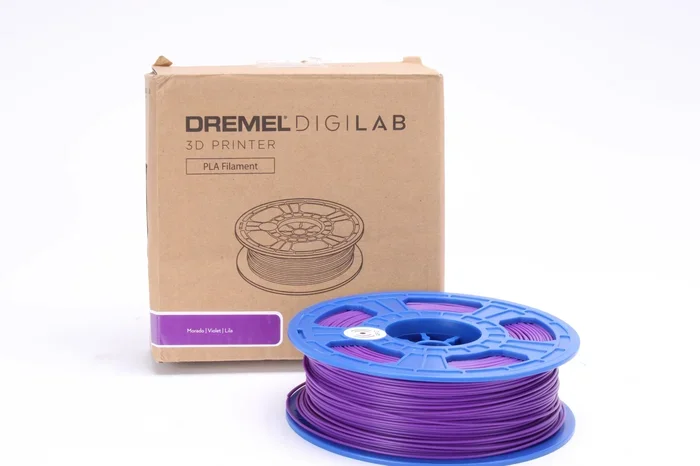
Can I Use Any Filament For Dremel 3d45 Printer Guide
The Dremel 3D45 is a versatile 3D printer, but it does not work with every filament type. You can use PLA, ABS, PETG, and nylon filaments, but you must match the right settings and temperatures for each material. Using the wrong filament can damage your printer or ruin your prints. This guide covers everything you need to know about filament compatibility with the Dremel 3D45.
If you own a Dremel 3D45 printer, you have probably wondered whether you can use any filament you find online. The short answer is no. You cannot just grab any spool of plastic and expect great results. The Dremel 3D45 works best with certain filament types, and each one needs specific settings to print well.
Many beginners make the mistake of assuming all 3D printing filaments are the same. They are not. Different materials behave differently on the print bed, at different temperatures, and with different cooling needs. Using the wrong filament can lead to warped prints, clogged nozzles, or even damage to your printer.
This guide will walk you through everything you need to know about filament compatibility with the Dremel 3D45. You will learn which materials work, which ones to avoid, and how to get the best results from every print. Let us dive in.
Key Takeaways
- Not all filaments work with the Dremel 3D45: The printer supports specific materials like PLA, ABS, PETG, and nylon, but not every filament on the market is compatible.
- Temperature settings matter a lot: Each filament type requires a different nozzle and bed temperature to print correctly.
- Avoid high-warping filaments: Materials like TPU and polycarbonate can cause issues if your printer is not set up for them.
- Filament diameter affects performance: The Dremel 3D45 works best with 1.75mm filament, so always check the specs before buying.
- Proper storage keeps filament fresh: Moisture is the enemy of good 3D prints, so store your spools in a dry place.
- Experiment with settings: Start with recommended temperatures and adjust small amounts to find the sweet spot for each filament type.
📑 Table of Contents
- What Is the Dremel 3D45 and Why Filament Matters
- Filament Types Compatible with the Dremel 3D45
- Filaments to Avoid with the Dremel 3D45
- How to Choose the Right Filament for Your Projects
- Tips for Getting the Best Results with Your Dremel 3D45
- Common Mistakes to Avoid When Choosing Filament for the Dremel 3D45
- Final Thoughts on Dremel 3D45 Filament Choices
What Is the Dremel 3D45 and Why Filament Matters
The Dremel 3D45 is a popular FDM 3D printer designed for home users, educators, and hobbyists. It uses fused deposition modeling technology, which means it melts plastic filament and deposits it layer by layer to build a 3D object. The printer has a heated build plate, a enclosed chamber, and a 1.75mm filament feed system.
Why does filament choice matter so much? Because every material has a different melting point, shrinkage rate, and adhesion behavior. If you feed a filament into your printer that needs higher temperatures than the Dremel 3D45 can provide, your print will fail. On the other hand, if you use a filament that shrinks too much, your print will warp and detach from the bed.
How the Dremel 3D45 Handles Filament
The Dremel 3D45 uses a geared extrusion system that pushes filament through a heated nozzle. The printer can reach nozzle temperatures up to 280°C and bed temperatures up to 100°C. This range covers most common filament types, but it does not cover every material available on the market.
The printer also features a closed build chamber, which helps maintain a stable temperature during printing. This is especially important for materials like ABS and nylon, which need a warm environment to avoid cracking and warping. The enclosed design gives the Dremel 3D45 an advantage over open-frame printers when it comes to printing with more demanding materials.
Filament Types Compatible with the Dremel 3D45
The Dremel 3D45 works well with several popular filament types. Below are the materials you can safely use with this printer, along with recommended settings and tips for each.
PLA Filament
PLA is the most beginner-friendly filament available. It prints at low temperatures, usually between 190°C and 220°C for the nozzle, and the bed temperature should be set around 45°C to 60°C. PLA does not warp easily, which makes it ideal for first-time users and simple projects.
PLA comes in a wide range of colors and finishes. You can find matte, glossy, wood-filled, and even glow-in-the-dark PLA filaments. The Dremel 3D45 handles PLA with ease, and prints come out clean and smooth when you use the right settings.
Quick tip: PLA is biodegradable and made from cornstarch, so it is a great eco-friendly choice. However, it is not heat-resistant, so avoid using PLA prints in hot environments.
ABS Filament
ABS is a stronger and more durable filament than PLA. It prints at higher temperatures, typically 220°C to 250°C for the nozzle, and the bed should be heated to 90°C to 110°C. ABS is commonly used for functional parts, automotive components, and objects that need to withstand impact.
ABS can be tricky to print with because it tends to warp as it cools. The enclosed chamber of the Dremel 3D45 helps a lot here. You should also avoid drafts and sudden temperature changes when printing ABS. Some users apply a thin layer of ABS slurry to the build plate to improve adhesion.
Quick tip: ABS produces fumes during printing, so always use your printer in a well-ventilated area or near an open window.
PETG Filament
PETG is a great middle ground between PLA and ABS. It offers good strength, transparency, and ease of printing. The recommended nozzle temperature for PETG is 220°C to 250°C, and the bed temperature should be set between 70°C and 85°C.
PETG adheres well to the build plate and has low warping compared to ABS. It is also more chemical-resistant and flexible than PLA, making it a popular choice for functional parts and containers. The Dremel 3D45 prints PETG reliably when you use the correct temperature settings.
Quick tip: PETG can be stringy during printing. Increase retraction settings slightly and reduce print speed to minimize strings and blobs.
Nylon Filament
Nylon is a tough and flexible filament that is perfect for mechanical parts, gears, and hinges. It requires high temperatures, usually 240°C to 260°C for the nozzle, and the bed should be heated to 70°C to 100°C. Nylon is hygroscopic, meaning it absorbs moisture from the air, so you need to dry it before printing.
The Dremel 3D45 can handle nylon thanks to its high-temperature nozzle and enclosed chamber. However, nylon is more demanding than PLA or PETG, so it is better suited for intermediate users who have some experience with 3D printing settings.
Quick tip: Store nylon filament in a sealed bag with silica gel packets. Even a small amount of moisture can cause bubbling and poor print quality.
Filaments to Avoid with the Dremel 3D45
Not every filament type is suitable for the Dremel 3D45. Some materials require higher temperatures, different extruder systems, or specialized hardware that the printer does not have. Here are the filaments you should generally avoid.
TPU and Flexible Filaments
TPU (Thermoplastic Polyurethane) is a flexible filament used for phone cases, gaskets, and rubber-like objects. While the Dremel 3D45 can technically print TPU, it is not ideal for this material. The printer’s geared extruder may struggle with the flexible nature of TPU, leading to under-extrusion and inconsistent layers.
If you really want to print with TPU, you can try, but you will need to slow down the print speed and adjust the extruder tension carefully. For best results, consider a printer designed specifically for flexible filaments.
High-Temperature Filaments
Filaments like polycarbonate, PEEK, and PEI require nozzle temperatures above 260°C and sometimes above 300°C. The Dremel 3D45 maxes out at 280°C, which is not enough for these materials. Attempting to print them can damage the hotend and produce terrible print quality.
These high-performance filaments are used in industrial applications and require specialized printers with all-metal hotends and advanced cooling systems. Stick to the compatible filament types for the best experience with your Dremel 3D45.
Filaments with Additives That Clog Nozzles
Some filament spools contain additives like wood particles, metal powders, or carbon fibers. While some of these work with the Dremel 3D45, others can wear down the nozzle or clog the extruder. Always check the manufacturer’s recommendations before printing with composite filaments.
For example, basic wood-filled PLA usually works fine, but filaments with heavy metal content or large carbon fiber particles can damage the brass nozzle over time. If you want to print with carbon fiber filaments, consider upgrading to a hardened steel nozzle.
How to Choose the Right Filament for Your Projects
Choosing the right filament depends on what you want to create. Different projects have different requirements for strength, flexibility, heat resistance, and appearance. Here is a simple guide to help you decide.
Consider the Purpose of Your Print
Are you printing decorative items, functional parts, or prototypes? For decorative objects, PLA is the best choice because it is easy to print and comes in many colors. For functional parts that need to handle stress, ABS or PETG is a better option. For flexible items, you might want to explore TPU, even though the Dremel 3D45 is not the ideal printer for it.
Think about where the printed object will be used. If it will be exposed to heat or sunlight, avoid PLA because it softens at relatively low temperatures. ABS and PETG hold up much better in hot environments.
Check Filament Diameter and Quality
The Dremel 3D45 is designed for 1.75mm filament. Always verify the diameter before you buy a spool. Filament that is too thick or too thin will cause extrusion problems and ruin your prints. High-quality filament has consistent diameter throughout the spool, which leads to more reliable prints.
Cheap filament often has inconsistent diameter and impurities that can clog your nozzle. Investing in a reputable brand may cost a bit more, but it saves you time and frustration in the long run. Look for filament that is listed as precision-ground and tightly wound on the spool.
Match Filament Color to Your Settings
Did you know that filament color can affect print settings? Dark-colored filaments, especially black, tend to absorb more heat than lighter colors. This means you may need to reduce the nozzle temperature by 5°C to 10°C when printing with dark PLA or ABS. Otherwise, the filament may overheat and produce rough, stringy prints.
White and light-colored filaments reflect heat, so they usually print well at standard temperatures. Keep this in mind when you switch between colors, and always do a small test print before committing to a full project.
Tips for Getting the Best Results with Your Dremel 3D45
Once you have chosen the right filament for your project, you still need to set up your printer correctly. Here are some practical tips to help you get the best possible prints with the Dremel 3D45.
Calibrate Your Build Plate
A level build plate is essential for good adhesion and consistent first layers. The Dremel 3D45 has a semi-automatic leveling system, but you should still check it manually before each print. If the first layer does not stick properly, your print will fail halfway through.
Use a piece of standard printer paper to check the gap between the nozzle and the bed. You should feel slight resistance when sliding the paper under the nozzle. Adjust the leveling knobs until the gap feels just right across the entire build plate.
Use the Right Build Surface
The Dremel 3D45 comes with a flexible build plate that works well with PLA and ABS. For PETG, you may want to add a thin layer of glue stick or use a PEI sheet for better adhesion. Nylon benefits from a heated bed and a glue-based adhesive as well.
Different filaments stick to different surfaces better. Experiment with a few build surface options to find what works best for each material. A well-prepared build surface can be the difference between a perfect print and a failed one.
Clean Your Nozzle Regularly
Residue builds up on the nozzle over time, especially when switching between filament types. A dirty nozzle causes inconsistent extrusion and rough surface quality. Use a brass wire brush or a nozzle cleaning needle to remove debris between prints.
For a deep clean, you can perform a cold pull using nylon filament. Heat the nozzle to 250°C, push filament through until it extrudes cleanly, then cool down to 90°C and gently pull the filament out. This removes most internal residue and keeps your printer running smoothly.
Store Filament Properly
Moisture is one of the biggest enemies of 3D printing filament. PLA, ABS, PETG, and nylon all absorb moisture from the air over time. Wet filament produces popping sounds during printing, creates poor layer adhesion, and results in bubbly, rough surface finishes.
Store your filament spools in airtight containers with desiccant packs. If you live in a humid climate, consider investing in a filament dry box. Keeping your filament dry ensures consistent print quality and extends the life of your spools.
Start with Recommended Settings and Adjust
Every filament brand has its own recommended print settings. Start with those settings and make small adjustments of 5°C at a time. If your prints are coming out too rough, try increasing the nozzle temperature slightly. If they are stringy, lower the temperature a bit.
Keep a print log where you note the filament brand, type, nozzle temperature, bed temperature, and print speed for each successful print. This log becomes a valuable reference that helps you troubleshoot problems and reproduce great results every time.
Common Mistakes to Avoid When Choosing Filament for the Dremel 3D45
Even experienced users sometimes make mistakes when selecting filament. Here are the most common errors and how to avoid them.
Assuming All 1.75mm Filament Is the Same
The diameter is only one factor. Different materials have different melting points, shrinkage rates, and printing requirements. Always check the recommended settings on the filament spool or manufacturer’s website before you print.
Ignoring Bed Temperature
Many beginners focus only on nozzle temperature and forget about the bed. The build plate temperature is just as important for adhesion and print quality. Too low, and the print peels off. Too high, and the filament may warp at the edges.
Skipping Test Prints
When you switch to a new filament brand or type, always run a small test print first. A 10-minute calibration cube tells you everything you need to know about extrusion quality, bed adhesion, and temperature settings. Skipping this step often leads to wasted filament and frustrated printing sessions.
Mixing Filament Types Without Cleaning
If you switch from ABS to PLA, clean the nozzle first. Residual ABS stuck in the hotend can contaminate your PLA print and cause imperfections. A quick cold pull or nozzle purge between filament changes keeps your prints clean and consistent.
Final Thoughts on Dremel 3D45 Filament Choices
The Dremel 3D45 is a capable printer that handles a wide range of filament types, but it is not a universal machine. You can use any filament for Dremel 3D45 only within the compatible material range. Stick with PLA, ABS, PETG, and nylon for the best results, and avoid high-temperature and highly flexible filaments unless you are willing to experiment.
Choosing the right filament is just the first step. Proper settings, good bed adhesion, and careful storage all play a role in print quality. Take the time to learn how each material behaves on your printer, and you will be rewarded with strong, clean, and professional-looking 3D prints.
Remember, 3D printing is a journey of experimentation. Do not be afraid to try new filaments and adjust your settings. Every print teaches you something new, and soon you will be able to choose the perfect filament for any project with confidence. Happy printing!
Frequently Asked Questions
Can I use TPU filament with the Dremel 3D45?
You can try, but TPU is not ideal for the Dremel 3D45. The printer’s extruder may struggle with the flexible nature of TPU, leading to under-extrusion. If you want to experiment, slow down the print speed and tighten the extruder tension carefully.
What is the best filament for beginners using the Dremel 3D45?
PLA is the best filament for beginners. It prints at low temperatures, does not warp easily, and comes in many colors. The Dremel 3D45 handles PLA effortlessly, making it the perfect starting point for new 3D printing users.
Do I need to change the nozzle for different filaments?
The standard brass nozzle that comes with the Dremel 3D45 works well for PLA, ABS, PETG, and nylon. However, if you plan to print frequently with abrasive filaments like carbon fiber composites, consider upgrading to a hardened steel nozzle to prevent wear.
Why does my filament keep curling off the build plate?
Curling usually means the bed temperature is too low or the filament is warping as it cools. For ABS and PETG, make sure the bed is heated to the recommended temperature and that the printer is in a draft-free area. Using a glue stick can also improve adhesion.
How should I store my filament spools?
Store filament in airtight containers with silica gel desiccant packs. Keep the containers in a cool, dry place away from direct sunlight. Proper storage prevents moisture absorption, which causes poor print quality and bubbling during printing.
Can I use filament from a different brand with my Dremel 3D45?
Yes, you can use filament from any brand as long as it is the correct type and diameter (1.75mm). Just make sure to check the manufacturer’s recommended print settings, as different brands may require slightly different temperatures and speeds.