Can I Connect My Bose Speaker To My Phone Wirelessly
Yes, you can easily connect your Bose speaker to your phone wirelessly using Bluetooth. This guide walks you through pairing, troubleshooting, and optimizing your wireless audio setup so you can enjoy music, podcasts, and calls with crystal-clear sound. Whether you own a SoundLink, Portable Smart Speaker, or Home Speaker, the process is simple and fast.
Key Takeaways
- Bluetooth Pairing Is Simple: Most Bose speakers connect to phones in just a few easy steps using Bluetooth.
- Multiple Connection Methods Exist: You can use Bluetooth, the Bose Connect app, or even Wi-Fi for different speaker models.
- Troubleshooting Is Straightforward: Common issues like connection drops or pairing failures have quick, fixable solutions.
- Audio Quality Stays High: Wireless connections deliver excellent sound without noticeable loss compared to wired setups.
- Multi-Device Pairing Is Supported: Many Bose speakers let you connect to more than one phone or device at a time.
📑 Table of Contents
- Can I Connect My Bose Speaker To My Phone Wirelessly?
- Understanding Bose Speaker Models and Connectivity
- Step-by-Step: How to Connect Your Bose Speaker to Your Phone
- Using the Bose Connect and Bose Music Apps
- Troubleshooting Common Connection Issues
- Tips for the Best Wireless Audio Experience
- Bose Wireless Speaker vs. Wired Connection: Which Is Better?
- Expert Insights on Bose Wireless Connectivity
- Key Takeaways
- Conclusion
Can I Connect My Bose Speaker To My Phone Wirelessly?
The short answer is absolutely yes. Connecting your Bose speaker to your phone wirelessly is one of the easiest things you can do. Whether you want to stream music in the kitchen, take calls in the office, or pump up the volume at a backyard gathering, wireless audio makes it all possible.
Bose has built its reputation on delivering premium sound, and their wireless speakers are no exception. Most modern Bose speakers use Bluetooth technology to connect seamlessly with smartphones. This means no cables, no hassle, and no fuss. You just pair once, and your devices remember each other from then on.
In this guide, we will walk you through every step of the process. We will cover different Bose speaker models, the pairing process, common issues, and pro tips to get the best sound. By the end, you will be streaming wirelessly like a pro.
Why Go Wireless with Your Bose Speaker?
Wireless connectivity frees you from the clutter of cables. You can place your Bose speaker anywhere in the room and still enjoy rich, full sound. It also means you can share music with friends without passing a phone around. Many Bose speakers also support multi-device pairing, so two phones can take turns playing music without reconnecting.
Another big advantage is convenience. You can answer phone calls through your speaker, use voice assistants, and even control playback from your phone’s lock screen. The wireless experience is simply more flexible and more enjoyable for everyday use.
Understanding Bose Speaker Models and Connectivity
Not all Bose speakers connect the same way. Different models use different wireless technologies, and knowing which one you have helps you get the best results. Let us break down the most popular Bose speaker families and how they connect to phones.
Bose SoundLink Series
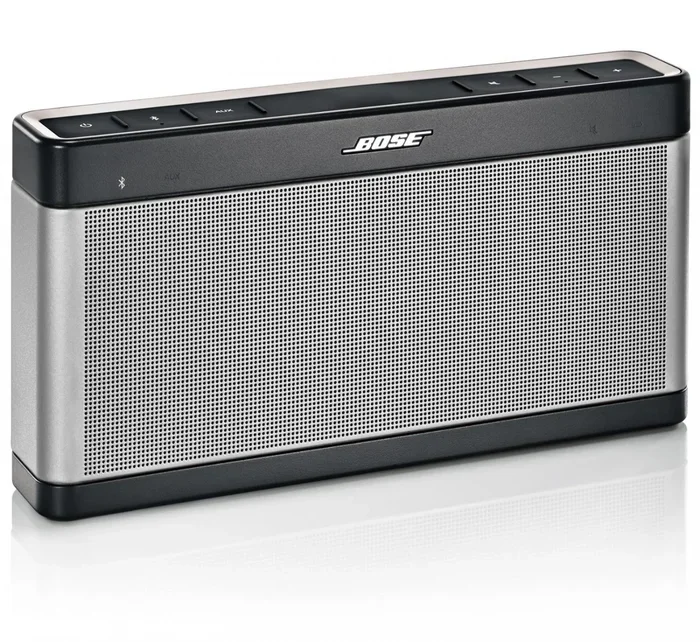
The Bose SoundLink lineup includes portable Bluetooth speakers designed for on-the-go use. Models like the SoundLink Color III and SoundLink Revolve+ connect to phones via Bluetooth 5.0 or later. These speakers offer a wireless range of up to 30 feet, which is plenty for most rooms and outdoor spaces.
SoundLink speakers also feature a simple pairing button on top. Press it, and the speaker enters pairing mode. Your phone detects it almost instantly. These speakers also support the Bose Connect app, which lets you manage paired devices and update firmware.
Bose Portable Smart Speakers
The Bose Portable Smart Speaker and Bose Portable Home Speaker use both Bluetooth and Wi-Fi for connectivity. Wi-Fi connections offer higher audio quality and support for voice assistants like Alexa and Google Assistant. You can also stream from services like Spotify and Pandora directly through the speaker using Wi-Fi.
For phone pairing, Bluetooth is still the fastest method. But if you want the best sound quality and smart features, connecting via your home Wi-Fi network is the way to go. These speakers also work with the Bose Music app for setup and control.
Bose Home Speakers
Bose Home Speakers like the Home Speaker 500 and Home Speaker 300 are designed for indoor use. They rely heavily on Wi-Fi for streaming but also include Bluetooth as a backup option. These speakers shine when you use them with the Bose Music app to set up wireless multi-room audio.
Connecting a phone to a Home Speaker is straightforward. You can use Bluetooth for quick playback or stick to Wi-Fi for the best sound quality and smart features. The Bose Music app makes managing these connections effortless.
Step-by-Step: How to Connect Your Bose Speaker to Your Phone
Now let us get into the actual pairing process. The steps are simple and work for most Bose Bluetooth speakers. Follow along, and you will be listening in no time.
Step 1: Power On Your Bose Speaker
Press the power button on your Bose speaker. Wait for the indicator light to show it is ready. Most Bose speakers flash a blue or white light when they are powered on and ready to pair. If your speaker was previously connected to another device, it may auto-connect. In that case, you may need to disconnect it first.
Step 2: Put Your Speaker in Pairing Mode
Press and hold the Bluetooth button on your speaker. On most models, the Bluetooth button has a small icon that looks like the letter “B.” Hold it for about three seconds until you hear a confirmation tone or see the light flash rapidly. This means your speaker is discoverable and ready to pair.
Step 3: Turn on Bluetooth on Your Phone
Open the Settings app on your phone and tap Bluetooth. Make sure it is turned on. Your phone will start scanning for available devices. This usually takes just a few seconds.
Step 4: Select Your Bose Speaker
Look for your Bose speaker in the list of available devices. It will show the model name, like “SoundLink Revolve” or “Bose Portable Smart Speaker.” Tap on it to initiate pairing. You may see a confirmation prompt on both your phone and the speaker. Accept it, and you are connected.
Step 5: Test the Connection
Play a song or video on your phone. The sound should come through your Bose speaker immediately. If you hear audio, congratulations, you are paired. If not, move on to the troubleshooting section below.
Using the Bose Connect and Bose Music Apps
The Bose Connect app and the Bose Music app are two free tools that make managing your Bose speaker much easier. They are available for both iOS and Android phones.
The Bose Connect app works with older SoundLink and some portable speakers. It lets you pair two phones to one speaker, toggle between devices, and update your speaker software. The Bose Music app is newer and works with smart speakers and speakers that support Wi-Fi. It offers more advanced features like multi-room setup and voice assistant integration.
To use either app, simply download it from your phone’s app store, create a Bose account, and follow the on-screen setup instructions. The apps guide you through every step, so even beginners will find them easy to use.
One great feature of these apps is the ability to update your speaker firmware. Firmware updates often fix bugs and improve Bluetooth performance. So keeping your app updated is a simple way to ensure the best wireless experience.
Troubleshooting Common Connection Issues
Sometimes things do not go smoothly. Even though Bose speakers are designed for easy pairing, you might run into issues now and then. Here are the most common problems and how to fix them.
Speaker Not Showing Up on Your Phone
If your phone does not detect the Bose speaker, first make sure the speaker is in pairing mode. The light should be flashing. Also, check that Bluetooth is turned on and your phone is not already connected to another audio device. Restarting both your phone and the speaker often solves this problem instantly.
Connection Keeps Dropping
Wireless signal interference can cause dropouts. Other Bluetooth devices, Wi-Fi routers, and even microwaves can disrupt the signal. Move closer to your speaker and remove any potential sources of interference. If you are using a Bose speaker with Bluetooth 5.0, the range and stability should be excellent in most environments.
Paired But No Sound
Sometimes your phone connects to the speaker but no sound plays. Check your phone’s volume and the speaker volume. Also, make sure the audio output is set to the Bose speaker and not the phone’s built-in speaker. On iPhones, you can swipe down from the top right and tap the audio output icon to select your speaker.
Speaker Stuck in Pairing Mode
If your speaker stays in pairing mode and will not connect, try resetting it. Most Bose speakers have a reset procedure that involves holding down specific buttons for a few seconds. Check your speaker’s user manual for the exact reset steps. After resetting, try pairing again from scratch.
Old Phone Cannot Find the Speaker
Very old phones may not support the Bluetooth version your Bose speaker uses. If you have an older device, try updating its software. If that does not work, the speaker may still work but with limited range or features. In such cases, a Bluetooth adapter can sometimes help bridge the gap.
Tips for the Best Wireless Audio Experience
Getting your Bose speaker connected is just the beginning. Here are some practical tips to make your wireless listening experience even better.
Keep Your Devices Close. Bluetooth works best within 30 feet. The closer your phone is to the speaker, the stronger and more stable the connection. Walls and obstacles can weaken the signal, so try to keep them in the same room.
Charge Both Devices. A low battery on either your phone or your speaker can cause connection problems. Make sure both are sufficiently charged before you start streaming. Most Bose speakers offer 10 to 16 hours of battery life, so they are great for all-day use.
Use the Bose App for Updates. Regular firmware updates improve performance and fix bugs. Check the Bose Connect or Bose Music app monthly for any available updates.
Explore Multi-Device Features. Many Bose speakers let you pair with two phones simultaneously. This is perfect for families or shared spaces. One person can play music, and another can take a call without disconnecting the first device.
Optimize Your Speaker Placement. Place your Bose speaker on a flat, stable surface away from corners. This helps the sound spread evenly. For portable speakers, keeping them at ear level gives the best listening experience.
For busy parents juggling a million tasks, having a wireless speaker setup that just works can be a real game-changer. Simple wireless gadgets like Bose speakers can make a huge difference in daily routines, from morning music to calming kids down. The ease of Bluetooth connectivity means less time fiddling with cords and more time enjoying the moment.
Bose Wireless Speaker vs. Wired Connection: Which Is Better?
You might wonder if a wireless connection is really as good as a wired one. Here is a quick comparison to help you decide.
| Feature | Bluetooth (Wireless) | Aux Cable (Wired) |
|---|---|---|
| Convenience | Very high | Low |
| Sound Quality | Excellent | Slightly better |
| Range | Up to 30 feet | Limited by cable length |
| Device Compatibility | Most modern phones | Requires aux port |
| Setup Time | Under 1 minute | A few seconds |
| Cable Clutter | None | Present |
| Multi-Device Support | Yes | No |
For most people, Bluetooth is the clear winner. The convenience and flexibility far outweigh the tiny difference in audio quality. Unless you are an audiophile who needs every last bit of sound fidelity, the wireless experience with a Bose speaker is more than enough.
Wireless audio streaming has come a long way in recent years. Modern Bluetooth codecs like aptX and AAC deliver high-quality sound that most listeners cannot distinguish from a wired connection. Bose speakers use advanced drivers and digital signal processing to ensure you get the best possible wireless audio.
Expert Insights on Bose Wireless Connectivity
Audio engineers at Bose design their speakers with wireless connectivity as a top priority. The Bluetooth module in a Bose speaker is carefully tuned to minimize latency and maximize range. This means you get not just good sound but also a reliable, stable connection.
One thing experts recommend is to always keep your speaker firmware updated. Bose regularly releases updates that improve Bluetooth performance and fix connectivity bugs. The Bose Music and Bose Connect apps make this process simple and automatic.
Another tip from the experts is to avoid placing your speaker near other wireless devices. While modern Bluetooth is resilient to interference, keeping some distance from routers and other Bluetooth devices helps maintain a strong, consistent connection.
For those who want the ultimate wireless experience, consider pairing your Bose speaker with a high-quality streaming service. Services like Spotify, Apple Music, and Tidal all support wireless playback through Bluetooth and Wi-Fi. The combination of a premium speaker and a great streaming service delivers an immersive audio experience right in your home.
Key Takeaways
- Bluetooth Pairing Is Simple: Most Bose speakers connect to phones in just a few easy steps using Bluetooth.
- Multiple Connection Methods Exist: You can use Bluetooth, the Bose Connect app, or even Wi-Fi for different speaker models.
- Troubleshooting Is Straightforward: Common issues like connection drops or pairing failures have quick, fixable solutions.
- Audio Quality Stays High: Wireless connections deliver excellent sound without noticeable loss compared to wired setups.
- Multi-Device Pairing Is Supported: Many Bose speakers let you connect to more than one phone or device at a time.
Conclusion
Connecting your Bose speaker to your phone wirelessly is easy, fast, and incredibly rewarding. Whether you use Bluetooth or Wi-Fi, the process is designed to be simple and user-friendly. From the initial pairing to everyday use, Bose speakers deliver a seamless wireless experience that just works.
Remember to keep your speaker and phone software updated, place your devices within range, and use the Bose apps for the best results. With these tips, you will enjoy premium wireless audio every single day.
So go ahead, power on your Bose speaker, and start streaming. The wireless world of audio is waiting for you. Once you experience the freedom of a wireless Bose speaker, you will never want to go back to cables again.
Frequently Asked Questions
Can I connect my Bose speaker to an iPhone wirelessly?
Yes, absolutely. All modern Bose speakers support Bluetooth connectivity with iPhones. Simply put your speaker in pairing mode, turn on Bluetooth on your iPhone, and select the speaker from the available devices list. The process is the same for all iPhone models running iOS 12 or later.
Why won’t my Bose speaker connect to my phone?
The most common reason is that the speaker is not in pairing mode. Make sure you press and hold the Bluetooth button until the light flashes. Also check that Bluetooth is turned on your phone and that the speaker is not already connected to another device. Restarting both devices usually fixes the issue.
Can I connect two phones to one Bose speaker at the same time?
Many Bose speakers support multi-device pairing, which allows two phones to be connected simultaneously. This feature lets you switch between devices without disconnecting. Check your specific speaker model in the Bose app to see if it supports this feature.
Does connecting wirelessly affect sound quality?
Modern Bluetooth technology has minimal impact on sound quality. Bose speakers use advanced audio codecs and processing to deliver excellent wireless sound. The difference between wired and wireless is very small and hardly noticeable in everyday listening.
How far can my phone be from my Bose speaker while connected?
Most Bose Bluetooth speakers have a range of up to 30 feet in open space. Walls and obstacles can reduce this range. For the best experience, keep your phone within the same room as your speaker.
Do I need the Bose app to connect my speaker to my phone?
No, you do not need the app for basic Bluetooth pairing. The app is optional but helpful. It lets you update firmware, manage multiple paired devices, and access advanced features like multi-room audio. For simple Bluetooth connections, you can pair directly through your phone’s settings.