Can Bluetooth Be Used As A Tracking Device for Your Items
Yes, Bluetooth can be used as a tracking device for your personal items like keys, wallets, and bags. Bluetooth tracking technology has evolved significantly, making it easier to find lost items without needing a GPS setup. This guide covers how Bluetooth tracking works, its limits, and the best tools you can use right now.
Have you ever tossed your keys somewhere and spent twenty minutes looking for them? Or maybe your wallet vanished into the couch cushions again. We have all been there. It is frustrating, time-consuming, and honestly, it wastes your whole day.
That is where the idea of using Bluetooth as a tracking device comes in. You have probably seen those little Bluetooth trackers like Tile or Apple AirTag. They promise to help you find your stuff. But can Bluetooth really be used as a tracking device? The short answer is yes. But there is a lot more to understand before you buy one.
In this article, we will walk through everything you need to know. We will cover how Bluetooth tracking works, what the limits are, which devices work best, and whether it is the right solution for you. Whether you are tracking your car keys or your luggage, this guide has you covered.
Key Takeaways
- Bluetooth tracking is real: You can absolutely use Bluetooth to locate lost or misplaced items around your home or office.
- Range is limited: Standard Bluetooth tracking works best within 30 to 100 feet, depending on the device and environment.
- BLE technology changed the game: Bluetooth Low Energy makes tracking devices last months or even years on a single battery.
- Crowd-finding networks boost accuracy: Apps like Find My and the Tile Network use millions of devices to help you locate items far beyond Bluetooth range.
- It is not a full GPS replacement: Bluetooth tracking works best for short-range item finding, not real-time global tracking.
- Multiple options exist: From Tile to AirTag and smart tags, there is a Bluetooth tracker for nearly every need and budget.
- Setup is simple: Most Bluetooth trackers pair with your phone in minutes and require minimal technical knowledge.
📑 Table of Contents
- What Is Bluetooth Tracking and How Does It Work?
- Can Bluetooth Be Used As A Tracking Device for Everyday Items?
- Bluetooth Tracker Devices: What Are Your Options?
- How Accurate Is Bluetooth Tracking?
- Setting Up a Bluetooth Tracker: A Step-by-Step Guide
- Common Mistakes People Make with Bluetooth Tracking
- Expert Insights: The Future of Bluetooth Tracking
- Key Takeaways
- Conclusion
What Is Bluetooth Tracking and How Does It Work?
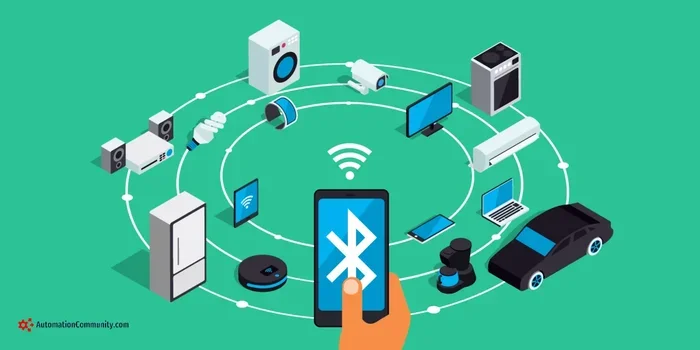
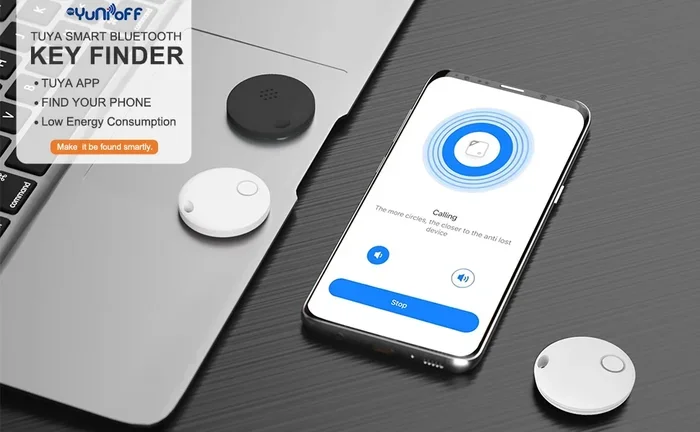
Bluetooth tracking uses wireless signals to help you locate a specific item. A small tracker device attaches to your belongings. Your phone communicates with that tracker through a Bluetooth signal. When the tracker is nearby, your phone can detect it and show you how close or far away it is.
The technology behind this is called Bluetooth Low Energy, or BLE. BLE uses very little power to send out short-range signals. This is why a Bluetooth tracker can last for months or even years without needing a new battery. It is not constantly blasting a strong signal. It sends small, low-energy pulses that your phone or a network of nearby devices can pick up.
The Role of Bluetooth Signal Strength
Your phone measures the strength of the Bluetooth signal from the tracker. This is called RSSI, or Received Signal Strength Indicator. The stronger the signal, the closer you are to the tracker. The weaker it gets, the farther away you are. Most Bluetooth tracker apps use this measurement to give you a rough distance estimate.
Some apps also show you a direction indicator. They use your phone’s compass and the signal strength from multiple antennas to point you toward the tracker. It is like a digital version of “hotter” or “colder” when you are playing hide and seek.
How BLE Differs from Regular Bluetooth
Regular Bluetooth, the kind used for headphones and speakers, uses more power and has a shorter effective range for continuous connections. BLE was designed specifically for small data transfers with minimal energy use. This makes it perfect for tracking devices that need to run for a long time on a tiny battery.
Here is a quick comparison:
- Regular Bluetooth: Higher power use, continuous connection, best for audio streaming and file transfers.
- BLE (Bluetooth Low Energy): Very low power use, short bursts of data, ideal for tracking devices and sensors.
Because of BLE, Bluetooth tracking has become practical for everyday use. You do not need to charge your tracker every week. It just works quietly in the background until you need it.
Can Bluetooth Be Used As A Tracking Device for Everyday Items?
The short answer is yes, and many people already do it every day. Bluetooth trackers are one of the fastest-growing categories in consumer electronics. People attach them to keychains, slip them into wallets, and even put them in pet collars. The goal is simple: never lose your things again.
But here is the important part. Bluetooth tracking works best for short-range finding. If you leave your keys on the kitchen counter, your phone can find them easily. If you leave them at a coffee shop across town, Bluetooth alone cannot help you. That is where the network effect comes in.
How Crowd-Finding Networks Work
Companies like Apple and Tile have built massive networks of their users’ devices. When you attach a Tile tracker to your bag and walk past another Tile user, that user’s phone can detect your tracker. It does this anonymously and automatically. The other user does not even need to know your tracker exists.
This network effect dramatically extends the range of Bluetooth tracking. Your tracker could be in a different city, and another user’s phone could still pick up its signal and send you the location. This is how Bluetooth tracking goes beyond simple short-range detection.
Apple’s Find My network works the same way with AirTags. It uses hundreds of millions of iPhones and iPads around the world to help locate lost items. This crowd-sourced approach makes Bluetooth tracking surprisingly powerful, even though the underlying Bluetooth range is limited.
Real-World Examples of Bluetooth Tracking
Let us look at some practical examples of how people use Bluetooth tracking in daily life:
- Keys and wallets: The most common use case. Attach a tracker to your keychain or slip one into your wallet. If you misplace them at home, your phone shows you the exact spot.
- Luggage: Attach a tracker to your suitcase when you travel. If it gets lost at the airport, you can see its last known location.
- Bikes and scooters: Small Bluetooth trackers hidden in bike frames or under seats help recover stolen bikes.
- Remote controls and game controllers: Those annoying moments when the TV remote disappears? A tracker solves that instantly.
- Pet collars: Attach a tracker to your pet’s collar so you can find them if they wander off in the yard or at the park.
Each of these use cases relies on Bluetooth proximity tracking. The tracker is not sending GPS coordinates. It is simply broadcasting a Bluetooth signal that your phone or a nearby device can pick up.
Bluetooth Tracker Devices: What Are Your Options?
The market for Bluetooth trackers has grown a lot in recent years. There are now many options to choose from, each with different features, prices, and ecosystems. Let us look at the most popular ones.
Apple AirTag
Apple AirTag is probably the most well-known Bluetooth tracker. It uses the Find My network and BLE technology to help you find your items. AirTags are small, water-resistant, and replaceable battery units. They last about a year before you need to swap the CR2032 battery.
AirTags work best if you are already in the Apple ecosystem. They integrate seamlessly with iPhones, iPads, and Macs. The Precision Finding feature uses ultra-wideband technology to give you very accurate directional guidance when you are close to the AirTag.
Tile Tracker
Tile was one of the first companies to popularize Bluetooth tracking. Tile offers several models, including the Tile Mate, Tile Pro, and Tile Slim. Each model has different range and battery life specifications.
Tile trackers work with both iOS and Android, which gives them a wider compatibility range. Tile also has its own network of Tile users who can help locate your lost items. The Tile app is straightforward and easy to use, making it a great choice for beginners.
Samsung SmartTag and SmartTag+
Samsung’s SmartTag and SmartTag+ work with Samsung phones through the SmartThings Find app. They use BLE and, in the case of the SmartTag+, ultra-wideband for precise finding. SmartTags integrate well with Samsung’s ecosystem and offer a good alternative for Android users.
Other Bluetooth Trackers
There are many other Bluetooth trackers on the market. Brands like Chipolo, eufy, and Orbit make solid options that work with both iOS and Android. These trackers often come at lower price points and still offer reliable Bluetooth proximity tracking.
How Accurate Is Bluetooth Tracking?
Accuracy depends on several factors. Bluetooth tracking is not like GPS tracking. It does not give you a pinpoint location on a map from anywhere in the world. Instead, it works within a limited range and gives you a proximity-based estimate.
Factors That Affect Bluetooth Tracking Accuracy
- Distance: The farther away the tracker is, the less accurate the signal becomes. Walls, furniture, and other obstacles weaken the Bluetooth signal.
- Interference: Other electronic devices, Wi-Fi routers, and even microwaves can interfere with Bluetooth signals. This can make your tracker seem farther away than it actually is.
- Battery level: A low battery on the tracker can weaken the signal, reducing accuracy.
- Environment: Open spaces give better Bluetooth range than crowded or metal-heavy environments like offices or warehouses.
Bluetooth Range: What to Expect
Most Bluetooth trackers have an effective range of about 30 to 100 feet in open spaces. In crowded indoor environments, this range can drop significantly. Walls, doors, and floors absorb Bluetooth signals and reduce the distance at which your phone can detect the tracker.
However, with crowd-finding networks, the effective range becomes almost unlimited. If another user with the same app walks past your lost item, their phone can detect the tracker and send its location to you. This is the real power of modern Bluetooth tracking technology.
Bluetooth Tracking vs GPS Tracking
It is important to understand the difference between Bluetooth tracking and GPS tracking. They serve different purposes and work in fundamentally different ways.
GPS tracking uses satellites to pinpoint the exact location of a device anywhere on Earth. It works in real time and over vast distances. GPS trackers are used for fleet management, pet tracking collars with live maps, and vehicle monitoring.
Bluetooth tracking, on the other hand, works within a short range. It tells you how close you are to the tracker, not where it is on a global map. Bluetooth is best for finding items you have misplaced nearby, not for tracking something that has traveled far away.
Here is a quick comparison table:
| Feature | Bluetooth Tracking | GPS Tracking |
|---|---|---|
| Range | 30 to 100 feet (local) | Global (satellite-based) |
| Power Use | Very low (BLE) | High (continuous satellite connection) |
| Accuracy | Proximity-based (close/far) | Precise coordinates (meters) |
| Battery Life | Months to years | Days to weeks |
| Best For | Finding lost items nearby | Real-time location tracking anywhere |
| Cost | Low ($20 to $40 per tracker) | Higher ($50 to $200+) |
| Network Needed | Crowd-finding for long range | Satellite signal only |
So when someone asks, can Bluetooth be used as a tracking device? The honest answer is: it depends on what you are tracking and how far away it is. For everyday items around your home or office, Bluetooth tracking is excellent. For real-time global tracking, you need GPS.
Setting Up a Bluetooth Tracker: A Step-by-Step Guide
Setting up a Bluetooth tracker is surprisingly easy. Most devices take less than five minutes to get started. Here is a general walkthrough that applies to most trackers like AirTag, Tile, and SmartTag.
- Charge or insert the battery. Some trackers come with rechargeable batteries. Others use replaceable coin-cell batteries. Follow the included instructions for your specific model.
- Download the companion app. Apple AirTags use the Find My app. Tile trackers use the Tile app. Samsung SmartTags use SmartThings. Download the right app for your tracker.
- Enable Bluetooth on your phone. Your phone needs Bluetooth turned on to detect and pair with the tracker. Go to your phone settings and make sure Bluetooth is on.
- Bring the tracker close to your phone. Hold the tracker near your phone. The app should detect it automatically and prompt you to pair.
- Name your tracker. Give it a label like “Keys,” “Wallet,” or “Luggage.” This makes it easier to identify later.
- Attach the tracker to your item. Use the built-in keyring hole, adhesive, or slot to secure the tracker to your belongings.
- Test it. Walk a few rooms away and use the app to make the tracker beep. Confirm that you can hear it and see the signal strength on your phone.
That is it. You are now tracking your items with Bluetooth. The whole process is designed to be simple, so you do not need any technical skills to get started.
Common Mistakes People Make with Bluetooth Tracking
Bluetooth tracking is simple, but there are a few common mistakes that can reduce its effectiveness. Avoiding these pitfalls will help you get the most out of your tracker.
1. Expecting GPS-Level Accuracy
The biggest mistake is expecting Bluetooth tracking to work like GPS. Bluetooth is a proximity tool, not a global positioning system. If you lose your backpack at an airport in another country, a Bluetooth tracker alone cannot help you. It works best for finding items within your home, office, or nearby area.
2. Ignoring Battery Replacement
Most Bluetooth trackers have non-rechargeable batteries that last about a year. People often forget to replace them. When the battery dies, the tracker stops working entirely. Set a reminder on your phone to swap the battery every 10 to 11 months.
3. Placing the Tracker in a Metal or Signal-Blocking Spot
Metal containers, thick wallets, and sealed bags can block Bluetooth signals. If you place your tracker inside a metal lunchbox or a thick leather wallet, your phone may struggle to detect it. Keep the tracker exposed or in a thin pouch for the best signal.
4. Not Enabling Crowd-Finding Features
Many people do not realize that Bluetooth trackers become far more powerful when crowd-finding is enabled. Make sure your app settings allow your device to participate in the network. This way, other users can help locate your tracker if it goes beyond Bluetooth range.
5. Using the Wrong App for Your Tracker
Not all tracker apps work with all devices. Tile’s app does not work with AirTags, and Apple’s Find My does not support Tile trackers. Make sure you download the correct app for your specific tracker brand.
Expert Insights: The Future of Bluetooth Tracking
Bluetooth tracking technology is evolving fast. Industry experts predict several exciting developments in the near future.
Bluetooth mesh networks are one of the most promising advances. In a mesh network, trackers can relay signals to each other, extending the range far beyond what a single Bluetooth connection can achieve. This could make Bluetooth tracking viable for larger spaces like warehouses, campuses, and even entire cities.
Integration with smart home systems is another trend. Imagine your Bluetooth tracker communicating with your smart speakers. You could say, “Hey Siri, where are my keys?” and get an instant answer. This kind of seamless integration is already happening with Apple’s HomePod and Find My integration.
Improved battery technology is also on the horizon. Some manufacturers are exploring rechargeable Bluetooth trackers with solar charging or kinetic energy harvesting. This could eliminate the need for battery replacements entirely.
Better precision finding using ultra-wideband combined with BLE is making trackers more accurate than ever. The gap between Bluetooth proximity tracking and true GPS-level precision is narrowing.
As Bluetooth tracking continues to improve, more people will adopt it as their go-to solution for keeping track of everyday items. It is a simple, affordable, and effective technology that fits naturally into modern life.
Key Takeaways
- Bluetooth tracking works for everyday items: Keys, wallets, bags, and more can all be tracked using Bluetooth technology.
- BLE technology makes it energy efficient: Bluetooth Low Energy allows trackers to run for months or years on a single battery.
- Crowd-finding networks extend the range: Apps like Find My and Tile use millions of devices to help locate items beyond Bluetooth range.
- Range is limited without a network: Standard Bluetooth range is 30 to 100 feet, making it best for nearby item finding.
- It is not a GPS replacement: Bluetooth tracking is a proximity tool, not a global tracking solution.
- Multiple brands offer great options: AirTag, Tile, SmartTag, and others all provide reliable Bluetooth tracking experiences.
- Setup is quick and simple: Most Bluetooth trackers pair with your phone in under five minutes.
Conclusion
So, can Bluetooth be used as a tracking device? Absolutely. Bluetooth tracking is a practical, affordable, and effective way to keep track of your everyday items. Whether you use an Apple AirTag, a Tile tracker, or a Samsung SmartTag, the technology works well for finding things you have misplaced nearby.
The key is understanding what Bluetooth tracking can and cannot do. It excels at short-range item finding and benefits enormously from crowd-finding networks. But it is not designed for real-time global tracking like GPS. For that, you need a different tool.
If you have ever lost your keys, misplaced your wallet, or wondered where your luggage ended up, a Bluetooth tracker can save you a lot of stress. The technology is mature, the devices are affordable, and the setup takes just minutes. Give it a try, and you will wonder how you ever managed without one.
Start small. Pick up a Bluetooth tracker for the item you lose most often. Once you experience how easy it is to find your things, you will want one for every bag, every keychain, and every remote control in your home. Bluetooth tracking is not just a gadget trend. It is a genuinely useful tool that fits right into your daily life.
Frequently Asked Questions
Can Bluetooth be used as a tracking device without internet?
Yes, Bluetooth tracking works without internet for short-range finding. Your phone can detect a nearby Bluetooth tracker even when you are offline. However, crowd-finding features that extend the range require an internet connection to send location data to the cloud.
How far can a Bluetooth tracker reach?
Most Bluetooth trackers have a range of 30 to 100 feet in open spaces. Walls, furniture, and other obstacles can reduce this range. With crowd-finding networks like Find My or Tile Network, the effective range becomes much larger since other users’ devices can detect your tracker.
Is Bluetooth tracking better than GPS tracking?
It depends on your needs. Bluetooth tracking is better for finding items nearby because it uses very little power and is affordable. GPS tracking is better for real-time location monitoring over long distances. Many people use both depending on the situation.
How long does a Bluetooth tracker battery last?
Most Bluetooth trackers use replaceable coin-cell batteries that last about 10 to 12 months. Some models like the Tile Pro have rechargeable batteries. The low power use of BLE technology is what makes such long battery life possible.
Can anyone see my Bluetooth tracker’s location?
No, your tracker’s location is private. Only you can see where your tracker is through your app. When crowd-finding networks help locate your tracker, the process is anonymous. Other users’ phones detect the signal but do not know whose tracker it is or who is tracking it.
What is the best Bluetooth tracker for Android users?
Tile and Samsung SmartTag are excellent choices for Android users. Tile works with both iOS and Android and has a large crowd-finding network. Samsung SmartTag integrates well with Samsung phones through the SmartThings Find app. Both options are affordable and reliable.
=== CONCLUSION ===
Bluetooth tracking is a practical, accessible solution for keeping track of your most-used items. The technology is simple, the devices are affordable, and the setup takes just minutes. Whether you choose an AirTag, Tile, SmartTag, or another Bluetooth tracker, you are adding a powerful tool to your daily routine.
Remember that Bluetooth tracking works best for short-range finding. It is not a replacement for GPS, but it does not need to be. For finding your keys on the kitchen counter or your wallet in the living room, Bluetooth tracking is unbeatable. Combine it with crowd-finding networks, and you have a surprisingly powerful system for never losing your things again.
Start today. Pick a tracker, attach it to your most frequently misplaced item, and experience the peace of mind that comes with knowing your belongings are always within reach.