Can A Projector Be As Good As A Tv For Movies And Gaming
Yes, a projector can absolutely rival a TV for both movies and gaming. Modern projectors deliver stunning 4K resolution, deep contrast, and massive screen sizes that no TV can match. The real question is which setup fits your room, budget, and viewing habits best. In this guide, we break down every factor so you can make a confident choice. You will learn about brightness, input lag, setup ease, and long-term costs.
There is nothing quite like settling in for a movie night or diving into your favorite game on a giant screen. For years, people assumed that a big screen meant a projector. But today’s TVs have gotten so good that the debate is more relevant than ever. So, can a projector be as good as a TV for movies and gaming? The short answer is yes, but with some important caveats.
This guide covers everything you need to know. We will compare image quality, brightness, gaming performance, setup, and cost. By the end, you will know exactly which option fits your home best. Whether you are a casual movie watcher or a hardcore gamer, this article has you covered.
Key Takeaways
- Projectors win on screen size: They can project images from 100 to 150 inches or more, creating a true cinema feel at home.
- TVs excel in brightness and daytime viewing: A bright TV handles ambient light far better than most projectors.
- Gaming projectors have improved dramatically: Low input lag and 4K support now make projectors viable for serious gamers.
- Setup complexity varies: Projectors need more space and calibration, while TVs plug in and go.
- Long-term costs differ: Projector lamps and screens add expenses, while TVs have lower maintenance needs.
- Both deliver excellent HDR: High Dynamic Range looks impressive on both projectors and modern TVs.
- The best choice depends on your room: Light control, wall space, and viewing distance all matter.
📑 Table of Contents
- Understanding the Core Difference Between a Projector and a TV
- Image Quality: Which Delivers a Better Picture?
- Projector vs TV for Movies: The Home Theater Experience
- Projector vs TV for Gaming: Performance Compared
- Brightness and Room Environment
- Setup, Installation, and Ease of Use
- Cost Comparison: Projector vs TV
- Expert Insights: What Professionals Recommend
- Can A Projector Be As Good As A Tv? The Final Verdict
- Conclusion
Understanding the Core Difference Between a Projector and a TV
Before we dive into comparisons, let us understand what makes these two devices different. A TV creates its own light using LEDs, OLEDs, or LCD panels. The light comes directly from the screen to your eyes. A projector, on the other hand, shines a light through a lens and onto a wall or screen. That fundamental difference affects everything from brightness to viewing angle.
When you ask, “Can a projector be as good as a TV,” the answer depends on what you value most. Some people prioritize screen size. Others care about picture sharpness or ease of use. Both devices have strengths. Let us explore them in detail.
How Projectors Create Images
Most home projectors use either DLP, LCD, or LCoS technology. DLP projectors use tiny mirrors to reflect light. LCD projectors push light through liquid crystal panels. LCoS combines elements of both. Each technology affects color accuracy, contrast, and sharpness differently.
Modern home theater projectors can produce stunning images. A quality 4K projector delivers crisp detail that rivals any high-end TV. The key is choosing the right model for your space and budget.
How TVs Create Images
TVs use self-emissating panels. OLED TVs are the gold standard because each pixel lights up independently. This means true blacks and incredible contrast. LED and QLED TVs use a backlight behind an LCD panel. They are bright and vibrant, making them great for rooms with lots of natural light.
When comparing a projector vs TV, the TV generally wins in brightness and color accuracy out of the box. But the projector wins in sheer screen size and immersion.
Image Quality: Which Delivers a Better Picture?
Image quality is the heart of this debate. Both projectors and TVs have made huge strides. But they still differ in important ways. Let us break down the key factors that affect picture quality.
Resolution and Sharpness
Both projectors and TVs now come in 4K resolution. That means roughly 8 million pixels on screen. At typical viewing distances, most people cannot tell the difference between a 4K projector and a 4K TV. Some projectors even offer 8K, but the difference is barely noticeable for most viewers.
If you sit close to a TV, you might notice pixel density differences. Projectors project onto a larger surface, so individual pixels spread out more. This can actually make the image look smoother at a distance.
Contrast and Black Levels
Contrast is where projectors traditionally struggled. Since they rely on reflected light, blacks appear gray in dark scenes. OLED TVs solve this problem with perfect per-pixel lighting. When a pixel is off, it is truly black.
However, high-end projectors with good projector contrast ratios can still impress. A quality dark-room projector can produce deep, rich blacks that feel cinematic. The trick is controlling the light in your room.
Color Accuracy and HDR
High Dynamic Range, or HDR, has become a standard feature on both projectors and TVs. HDR expands the range of colors and brightness levels your display can show. It makes highlights pop and shadows feel more detailed.
Modern projectors support HDR10 and even Dolby Vision in some cases. TVs, especially OLED models, tend to have better peak brightness for HDR content. But in a controlled dark room, a projector’s HDR can look just as stunning.
Quick Tip: If you watch movies mostly at night with the lights off, a projector will give you a more cinematic experience. If you watch TV during the day with windows open, a bright TV will perform better.
Projector vs TV for Movies: The Home Theater Experience
Nothing beats the feeling of a true home theater. When you think about movie night, what comes to mind? A giant screen, immersive sound, and a dark room. That is exactly what a projector delivers.
Why Projectors Shine for Movies
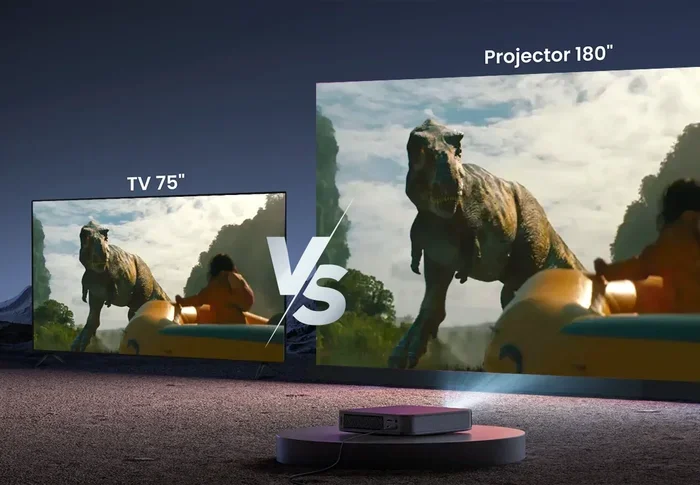
Projectors can project images from 100 to 150 inches or even larger. A screen that size transforms your living room into a personal cinema. No TV on the market comes close to that size without costing a fortune.
Here are some reasons projectors excel for movie watching:
- Massive screen size: A 120-inch image creates true immersion that fills your field of view.
- Cinematic feel: The large projection mimics the theater experience right at home.
- Wider viewing angles: Everyone in the room can see the screen clearly, even from the sides.
- Less eye strain: Projected light is softer on the eyes compared to direct LED light from a TV.
Where TVs Win for Movie Watching
TVs are not perfect for movies either. They have their own advantages that make them appealing for film lovers.
- Brighter picture: You can watch movies with some ambient light without losing visibility.
- Better contrast: OLED TVs deliver perfect blacks that make dark scenes look incredible.
- No setup hassle: A TV mounts on the wall and works instantly.
- Consistent quality: The picture looks great from almost any angle and seating position.
If you have a dedicated home theater room with light control, a projector is hard to beat for movies. If your living room gets lots of sunlight, a high-brightness TV will serve you better.
Projector vs TV for Gaming: Performance Compared
Gaming demands different things from a display. Speed, responsiveness, and image clarity all matter. Let us see how projectors and TVs stack up for gaming.
Input Lag and Response Time
Input lag is the delay between your controller input and the action on screen. For competitive gaming, low input lag is essential. Modern gaming projectors now offer input lag as low as 16 to 20 milliseconds. That is acceptable for most casual and mid-core gamers.
TVs, especially gaming models, can achieve input lag below 10 milliseconds. Some high-end gaming TVs even hit 1 millisecond. For competitive esports players, a TV still holds an edge.
But for casual and immersive gaming, a projector’s input lag is perfectly fine. You will not notice the difference in most single-player games and RPGs.
Screen Size and Immersion
Imagine playing a racing game or an open-world RPG on a 120-inch screen. The sense of immersion is unmatched. You feel like you are inside the game world. No TV can replicate that feeling at any price point.
Many modern gaming projectors support features like:
- 4K resolution at 120Hz: Smooth motion for fast-paced games.
- HDR10 and HLG support: Rich colors and detailed highlights.
- Low input lag modes: Optimized settings for gaming performance.
- HDMI 2.1 connectivity: Full compatibility with PS5 and Xbox Series X.
Brightness Challenges for Gaming
The biggest challenge for gaming on a projector is ambient light. If you game with the lights on or during the day, a projector can look washed out. TVs handle bright rooms much better thanks to their higher peak brightness.
If you have a dedicated gaming room where you can control the lighting, a projector works wonderfully. Otherwise, a bright TV is the safer choice.
Brightness and Room Environment
Brightness is one of the most important factors in this debate. It directly affects where and when you can use your display comfortably.
Understanding Projector Brightness
Projector brightness is measured in lumens. A brighter projector can overcome more ambient light. Here is a quick guide:
- 1,000 to 2,000 lumens: Best for dark rooms only. Typical for budget projectors.
- 2,000 to 3,000 lumens: Works in rooms with some light control. Good for most homes.
- 3,000+ lumens: Can handle brighter environments. Premium territory.
Even the brightest projector cannot match the raw brightness of a high-end TV. A top-tier TV can reach 1,000 to 2,000 nits of peak brightness. That is significantly brighter than most projectors in practical terms.
Managing Ambient Light
If you want a projector to look its best, controlling ambient light is key. Here are some practical tips:
- Use blackout curtains: They block outside light and dramatically improve picture quality.
- Paint your walls dark: Dark walls absorb stray light and boost contrast.
- Use a dedicated projector screen: A proper screen reflects light more efficiently than a bare wall.
- Position the projector carefully: Mount it high and aim it straight to minimize light spill.
With these steps, even a modest projector can deliver an impressive image. The projector setup does require more effort than simply mounting a TV on the wall.
Setup, Installation, and Ease of Use
One area where TVs clearly win is ease of setup. A TV comes out of the box, plugs into power, and works. A projector requires more thought and preparation.
Projector Setup Requirements
Setting up a projector involves several considerations:
- Throw distance: The distance between the projector and the screen affects image size. Short-throw projectors need less space but can still be bulky.
- Screen placement: You need a flat, white surface or a dedicated screen for the best results.
- Keystone correction: Most projectors allow you to adjust the image shape if the projector is not perfectly aligned.
- Cable management: Running HDMI cables and power cords can be tricky with a ceiling-mounted projector.
The projector price often includes a basic setup, but a truly polished installation may require professional help. This adds to the overall cost and complexity.
TV Setup Simplicity
A TV setup is straightforward. You mount it on the wall or set it on a stand. You plug in the power and connect your devices. Everything works within minutes. This simplicity appeals to many people, especially those who want a quick and reliable setup.
Maintenance and Long-Term Costs
Projectors have ongoing costs that TVs do not. The projector lamp has a limited lifespan, typically 3,000 to 10,000 hours depending on the model. Replacing a lamp can cost anywhere from 50 to 300 dollars. LED and laser projectors last much longer but come at a higher upfront projector price.
TVs generally have a longer lifespan with no replaceable parts needed. You can expect a quality TV to last 7 to 10 years or more with normal use. The TV brightness and image quality remain consistent throughout its life.
Cost Comparison: Projector vs TV
Cost plays a big role in the decision. Let us look at what you can expect to spend on each option.
| Category | Projector | TV |
|---|---|---|
| Budget Entry Point | 200 to 400 dollars | 300 to 500 dollars |
| Mid-Range 4K | 600 to 1,200 dollars | 800 to 1,500 dollars |
| Premium 4K | 1,500 to 3,000 dollars | 1,500 to 3,500 dollars |
| Screen/Surface Cost | 50 to 300 dollars | Not needed |
| Lamp Replacement | 50 to 300 dollars every 3,000-10,000 hours | Not needed |
| Installation Complexity | Moderate to high | Low |
At the entry level, projectors offer more screen size per dollar. A 300-dollar projector can throw a 100-inch image. A 300-dollar TV tops out around 50 to 55 inches. For pure value in screen size, the projector wins.
But when you factor in the screen, lamp replacements, and potential installation costs, the total cost of a projector setup can add up. A premium TV may be a better long-term investment for some buyers.
Expert Insights: What Professionals Recommend
Home theater experts generally agree that the best choice depends on your specific situation. Here is what industry professionals often advise:
For dedicated home theaters: A projector with a quality screen is the gold standard. The immersive experience is unmatched when you control the lighting completely.
For living rooms and multipurpose spaces: A bright, high-quality TV is the more practical choice. It handles varying light conditions and requires minimal setup.
For gaming setups: Consider your priorities. If immersion matters most, go with a projector. If competitive performance matters most, choose a gaming TV with low input lag and high refresh rate.
For casual viewers: A smart TV offers the easiest and most convenient experience. Stream content directly, browse apps, and enjoy a great picture with zero hassle.
Expert Insight: Many home theater designers now recommend a hybrid approach. Use a projector for movie nights and a TV for everyday viewing and gaming. This gives you the best of both worlds.
Can A Projector Be As Good As A Tv? The Final Verdict
So, can a projector be as good as a TV for movies and gaming? The answer is a qualified yes. A projector can deliver an equally compelling experience in the right circumstances. In a dark room with a large screen, a quality projector creates an immersive viewing experience that no TV can replicate.
But projectors have clear limitations. They struggle with brightness, they require more space and setup effort, and they have higher long-term costs. TVs offer convenience, reliability, and excellent performance in any lighting condition.
The best choice comes down to your priorities. If you value screen size and cinematic immersion, invest in a good projector. If you value ease of use, brightness, and consistency, a TV is the smarter pick. Many people even choose both, using each for its strengths.
Whatever you decide, make sure you do your research. Read reviews, compare models, and consider your room conditions carefully. The right display will transform your movie nights and gaming sessions for years to come.
Conclusion
The debate between a projector and a TV is not about which device is objectively better. It is about which device is better for you. Both projectors and TVs have evolved tremendously in recent years. Modern projectors deliver stunning 4K images, deep contrast, and low input lag that satisfy even demanding users. Meanwhile, TVs continue to push brightness and color boundaries with OLED and Mini-LED technology.
If you have a dedicated viewing room with light control, a projector can absolutely be as good as a TV for movies and gaming. The massive screen size and immersive experience are hard to beat. If you need a versatile display for a bright living room, a high-quality TV remains the practical choice.
Consider your room, your budget, and your viewing habits. Weigh the pros and weigh the cons. The right display is the one that brings you joy every time you sit down to watch or play. That is the ultimate measure of quality, and both projectors and TVs can deliver it.
Frequently Asked Questions
Is a projector or TV better for eye health?
Projectors are generally easier on the eyes because they use reflected light rather than direct light. This means less blue light exposure and less eye strain during long viewing sessions. However, both can cause eye fatigue if you sit too close or watch for extended periods without breaks.
Can you use a projector for daytime TV watching?
Yes, but only with a very bright projector and proper light control. A projector with 3,000 lumens or more can produce a usable image in a room with some ambient light. However, for comfortable daytime viewing, a high-brightness TV is still the better option.
What is the best projector for gaming?
Look for a projector with low input lag (under 20 milliseconds), 4K resolution support, and HDMI 2.1 connectivity. Models from brands like Epson, BenQ, and Optoma offer excellent gaming projectors in various price ranges. Always check the input lag specs before purchasing.
How long does a projector lamp last?
Most projector lamps last between 3,000 and 10,000 hours depending on usage and model. LED and laser projectors can last 20,000 hours or more. If you watch 3 hours of content daily, a lamp-based projector could last 3 to 9 years before needing a replacement.
Do I need a special screen for a projector?
A dedicated projector screen always looks better than a bare wall. It provides a uniform surface that enhances brightness, contrast, and color accuracy. However, a clean white wall can work in a pinch. For the best results, invest in a proper projection screen.
Which is better for a small room, a projector or a TV?
A TV is usually better for small rooms. A projector needs throw distance to produce a large image, which can be challenging in compact spaces. Short-throw projectors help, but a 50 to 65-inch TV fits more comfortably in a small room and delivers excellent picture quality.