Can Bluetooth 5 2 Connect To Multiple Devices Easily
Can Bluetooth 5.2 connect to multiple devices? Yes, it absolutely can! Bluetooth 5.2 brings improved wireless connectivity and multipoint pairing that lets you switch between devices without hassle. This guide covers everything you need to know about Bluetooth 5.2 multi-device connection and how it works in real life.
Can Bluetooth 5.2 connect to multiple devices? That is a question many tech users ask today. The short answer is yes. Bluetooth 5.2 brings big improvements to wireless connectivity. It lets you pair more than one device at a time. You can switch between your phone, laptop, and tablet without any hassle.
Bluetooth technology has come a long way over the years. Each new version adds better features. Bluetooth 5.2 is one of the most exciting updates yet. It brings multipoint pairing, better battery life, and stronger connections. Whether you use wireless earbuds, headphones, or speakers, Bluetooth 5.2 changes the game.
In this guide, we will break everything down. You will learn how Bluetooth 5.2 handles multiple devices. We will cover multipoint pairing, LE Audio, and device switching. You will also find tips and common fixes for Bluetooth problems. By the end, you will know exactly what Bluetooth 5.2 can do for you.
Key Takeaways
- Bluetooth 5.2 supports multi-device connections: You can pair and switch between multiple devices with ease.
- Multipoint pairing is a game-changer: Connect two devices at the same time for seamless audio streaming.
- LE Audio improves efficiency: Low Energy Bluetooth audio uses less power and delivers better sound quality.
- Not all devices support every feature: Check your device specs before expecting full Bluetooth 5.2 capabilities.
- Device switching is smoother than ever: Bluetooth 5.2 makes moving between your phone, laptop, and tablet much easier.
- Range and stability are improved: Bluetooth 5.2 offers better range and fewer dropouts compared to older versions.
📑 Table of Contents
What Is Bluetooth 5.2?
Before we dive into multi-device connections, let us understand what Bluetooth 5.2 is. Bluetooth 5.2 is the latest version of the Bluetooth wireless technology standard. It was released as part of the Bluetooth Core Specification version 5.2. This update brought several important improvements over Bluetooth 5.0 and 5.1.
The Evolution of Bluetooth
Bluetooth has been around since the late 1990s. Each version brought new capabilities. Bluetooth 4.0 introduced low energy Bluetooth. This was a big deal for battery-powered devices. Bluetooth 5.0 doubled the range and speed. Bluetooth 5.1 added better location tracking. Now Bluetooth 5.2 builds on all of these advances.
So what makes Bluetooth 5.2 special? It focuses on three main areas. First, it improves audio quality through LE Audio. Second, it supports simultaneous connections to multiple devices. Third, it uses less power overall. These improvements make Bluetooth 5.2 a top choice for wireless devices today.
What Makes Bluetooth 5.2 Different
Bluetooth 5.2 introduces the Bluetooth Low Energy Audio standard, also known as LE Audio. This is a major upgrade. LE Audio uses a new audio codec called LC3. This codec delivers better sound at lower bitrates. That means better audio quality without draining your battery.
Another big change is Bluetooth Isochronous Channels. This new feature allows for synchronized audio across multiple devices. It also supports broadcast audio. Imagine streaming audio to multiple speakers at once. That is what Bluetooth 5.2 makes possible.
Can Bluetooth 5.2 Connect to Multiple Devices?
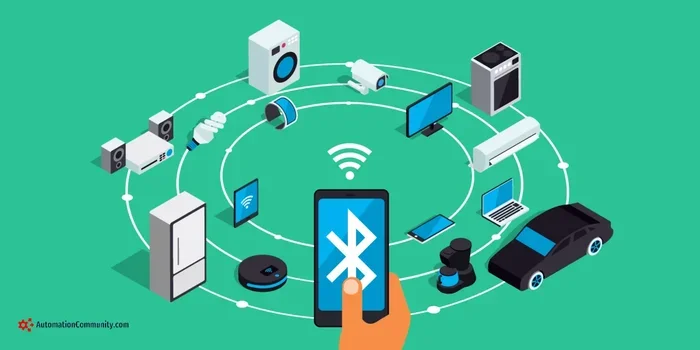
Now let us answer the big question. Can Bluetooth 5.2 connect to multiple devices? The answer is yes, and it does so in several ways. Bluetooth 5.2 supports multipoint connection, which allows a single device to stay connected to two or more source devices at the same time.
Understanding Multipoint Pairing
Multipoint pairing is one of the coolest features of Bluetooth 5.2. With multipoint, your wireless earbuds can connect to your phone and your laptop at the same time. When a call comes in on your phone, the earbuds switch over automatically. When you open a video on your laptop, they switch back. It is seamless and convenient.
This is different from older Bluetooth versions. In the past, you had to manually disconnect one device to connect to another. Bluetooth 5.2 removes that friction. The device switching happens automatically in the background. You barely even notice it.
Not all Bluetooth 5.2 devices support multipoint. It depends on the manufacturer and the specific product. Some wireless earbuds and headphones use Bluetooth 5.2 but skip the multipoint feature. Always check the product specs before buying if multi-device connection matters to you.
How Simultaneous Connections Work
Bluetooth 5.2 uses a feature called Bluetooth Isochronous Channels to manage multiple connections. This technology allows data to be sent and received in real time across several devices. It keeps the audio synced and reduces delays.
Here is how it works in simple terms. When you connect your Bluetooth earbuds to your phone, the earbuds establish a dedicated audio channel. If you also pair them with your tablet, a second channel opens. Both channels stay active at the same time. Your device decides which one gets priority based on what you are doing.
This is incredibly useful for people who work across multiple devices. You can listen to music on your laptop while taking calls on your phone. The wireless ecosystem becomes much more fluid and connected.
How Bluetooth 5.2 Handles Multiple Device Connections
Bluetooth 5.2 handles multiple device connections better than any previous version. Let us look at the specific technologies that make this possible.
The Role of LE Audio
LE Audio is the backbone of Bluetooth 5.2 multi-device support. It stands for Low Energy Audio. This new standard was designed from the ground up to handle audio more efficiently. It uses the LC3 codec, which compresses audio data better than older codecs like SBC or AAC.
LE Audio also introduces Broadcast Audio. This lets one device send audio to many receivers at once. Think of a fitness class where everyone listens to the same music through their own earbuds. One transmitter, multiple receivers. That is broadcast audio in action.
For consumers, LE Audio means better battery life and improved sound quality. Your Bluetooth earbuds and wireless headphones will last longer on a single charge. The audio will also sound clearer, even at lower volumes.
Bluetooth Mesh Networking
Another important feature of Bluetooth 5.2 is Bluetooth Mesh. Mesh networking lets devices talk to each other in a web-like structure. Instead of each device connecting directly to your phone, they can relay signals through other devices.
This is especially useful for smart home setups. You can connect multiple wireless peripherals throughout your home. Lights, speakers, and sensors can all communicate through the mesh network. It extends the Bluetooth range and creates a more stable wireless pairing experience.
While mesh networking is not the same as multipoint audio, it shows how Bluetooth 5.2 expands what wireless Bluetooth connectivity can do. It opens up new possibilities for connected devices in your home and workspace.
Comparing Bluetooth Versions for Multi-Device Support
Let us compare how different Bluetooth versions handle multiple devices. This table shows the key differences.
| Feature | Bluetooth 5.0 | Bluetooth 5.1 | Bluetooth 5.2 |
|---|---|---|---|
| Multipoint Pairing | No | No | Yes |
| LE Audio Support | No | No | Yes |
| Simultaneous Connections | Limited | Limited | Full Support |
| Device Switching | Manual | Semi-Automatic | Automatic |
| Bluetooth Mesh | No | No | Yes |
| Battery Efficiency | Good | Better | Best |
| Range | Up to 240m | Up to 240m | Up to 240m |
As you can see, Bluetooth 5.2 leads the way in multi-device support. It is the first version to offer true multipoint pairing and automatic device switching. If you want the best wireless Bluetooth technology experience, Bluetooth 5.2 is the way to go.
Best Devices That Support Bluetooth 5.2 Multipoint
Not all devices support Bluetooth 5.2 multipoint. Here are some popular categories and examples of devices that do.
- Wireless Earbuds: Many premium earbuds now support Bluetooth 5.2 with multipoint. Brands like Samsung, Apple, and Jabra lead the way. These earbuds let you stay connected to your phone and computer at the same time.
- Wireless Headphones: Over-ear headphones with Bluetooth 5.2 offer excellent multi-device switching. They are great for work-from-home setups where you switch between calls and music.
- Bluetooth Speakers: Some portable speakers now support Bluetooth 5.2. They can connect to multiple source devices and even use broadcast audio features.
- Keyboards and Mice: Wireless peripherals with Bluetooth 5.2 can connect to multiple computers. This is perfect for people who use both a desktop and a laptop.
When shopping for Bluetooth 5.2 devices, look for the term “multipoint” in the product description. Not every Bluetooth 5.2 device includes this feature. Also, if you are looking for gadgets that make your daily life easier, check out this guide to 10 Gadgets To Make Moms Life Easier for helpful ideas.
You might also find useful tips in the 10 Gadgets To Make Moms Life Easier list, which covers useful wireless devices for everyday use. And if you are shopping for gifts or personal tech, the 10 Gadgets To Make Moms Life Easier article has more recommendations for Bluetooth-enabled gadgets.
Tips for Managing Multiple Bluetooth Connections
Managing multiple Bluetooth connections can feel tricky. Here are some practical tips to make it easier.
- Keep your devices updated. Firmware updates often improve Bluetooth stability and add new features. Check for updates regularly on your phone, laptop, and peripherals.
- Turn off Bluetooth on unused devices. If you are not actively using a device, turn its Bluetooth off. This reduces interference and saves battery.
- Stay within range. Bluetooth 5.2 has a better range than older versions, but distance still matters. Keep your source devices within about 30 feet for the best experience.
- Restart devices if connections drop. A simple restart can fix most Bluetooth connection issues. It clears the cache and refreshes the wireless pairing.
- Use a dedicated Bluetooth adapter. If your laptop has trouble connecting to multiple devices, a USB Bluetooth adapter can help. Look for one that supports Bluetooth 5.2.
- Check for interference. Wi-Fi routers, microwaves, and other wireless devices can interfere with Bluetooth signals. Keep your Bluetooth devices away from these sources.
Quick Tips for Better Bluetooth Performance
- Keep your Bluetooth devices charged. Low battery can cause connection drops.
- Use the audio codec that your device supports best for the clearest sound.
- Avoid connecting too many devices at once. Stick to two or three for the smoothest experience.
- If you use earbuds with multipoint, learn the tap controls for manual switching.
- Reset your Bluetooth settings if you experience persistent connection problems.
Common Problems and How to Fix Them
Even with Bluetooth 5.2, you might run into issues. Here are some common problems and simple fixes.
Devices Won’t Pair
If a device will not pair, try turning Bluetooth off and back on. Also, make sure the device is in pairing mode. Sometimes removing old pairings and starting fresh solves the problem. Go to your Bluetooth settings and forget the device, then try pairing again.
Audio Cuts Out or Crackles
Interference is the most common cause of audio problems. Move closer to the source device. Also, check if other wireless devices are causing interference. Wi-Fi and Bluetooth both use the 2.4 GHz band, so they can clash. Switching your Wi-Fi to the 5 GHz band can help.
Device Switching Is Slow
If your Bluetooth 5.2 device switches slowly between source devices, check for firmware updates. Manufacturers often release updates that improve switching speed. Also, make sure both source devices have Bluetooth turned on and are within range.
Battery Drains Quickly
Bluetooth 5.2 is more efficient, but some devices still drain fast. Check if your device is using the latest Bluetooth codec. Also, reduce the audio volume if it is very high. High volume uses more Bluetooth bandwidth and drains battery faster.
Conclusion
So, can Bluetooth 5.2 connect to multiple devices? Absolutely. Bluetooth 5.2 is a major step forward in wireless connectivity. It brings multipoint pairing, LE Audio, and automatic device switching to the table. These features make it easier than ever to stay connected across all your devices.
Whether you use wireless earbuds, headphones, or speakers, Bluetooth 5.2 improves your experience. The audio quality is better. The battery life is longer. And switching between devices is smoother than ever before. If you are in the market for new wireless devices, look for Bluetooth 5.2 support. It is well worth it.
The future of Bluetooth connectivity looks bright. Each new version makes wireless connections faster, more reliable, and more efficient. Bluetooth 5.2 sets a strong foundation for what is to come. Embrace the technology and enjoy a more connected, wireless lifestyle.
Frequently Asked Questions
What is multipoint Bluetooth pairing?
Multipoint pairing lets your Bluetooth device connect to two or more source devices at the same time. For example, your wireless earbuds can stay connected to both your phone and your laptop. When you get a call, the earbuds switch to your phone automatically. When you open a video on your laptop, they switch back. It is a seamless way to manage multiple devices without manual reconnecting.
Is Bluetooth 5.2 backward compatible?
Yes, Bluetooth 5.2 is fully backward compatible with older Bluetooth versions. You can connect a Bluetooth 5.2 device to a phone or laptop with an older Bluetooth version. However, you will only get the full benefits of Bluetooth 5.2 when both devices support it. Older devices will still work, but they will not have access to features like LE Audio or multipoint pairing.
Does Bluetooth 5.2 use more battery than older versions?
No, Bluetooth 5.2 actually uses less battery than older versions. The LE Audio standard is designed to be more energy-efficient. The LC3 audio codec delivers better sound at lower power consumption. This means your wireless earbuds and headphones can last longer on a single charge compared to devices using older Bluetooth versions.
Can I connect more than two devices with Bluetooth 5.2?
Bluetooth 5.2 supports connecting to multiple devices, but the exact number depends on the device and manufacturer. Most multipoint devices support two simultaneous source connections. Some advanced devices may support more. However, keep in mind that connecting too many devices at once can affect performance and battery life.
Do I need special accessories for Bluetooth 5.2 multi-device connections?
No, you do not need any special accessories. You just need devices that support Bluetooth 5.2 and the multipoint feature. Make sure your earbuds, headphones, or speakers are Bluetooth 5.2 compatible. Also, keep your device software updated to ensure the best multi-device experience.
What is the difference between Bluetooth 5.2 and Bluetooth 5.3?
Bluetooth 5.3 is the newest version and builds on Bluetooth 5.2. It focuses on improving connection stability and reducing power consumption. Bluetooth 5.3 also enhances the Bluetooth protocol for better security. However, both versions support multi-device connections and LE Audio. If you already have Bluetooth 5.2 devices, you are getting a great experience already.