How Do Galaxy Projectors Work And What Makes Them Special
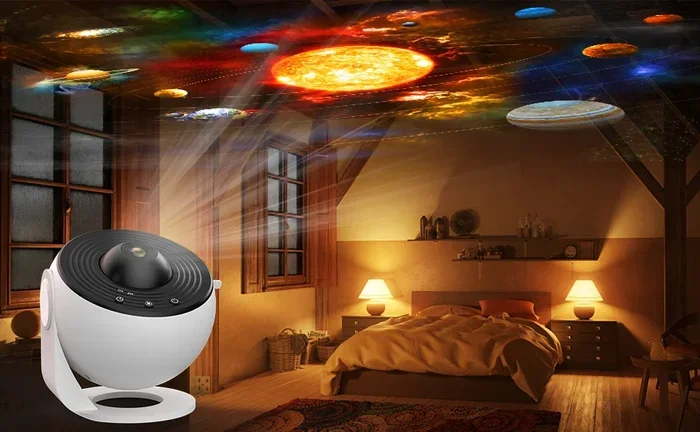
Galaxy projectors create stunning starry skies and nebula effects using LED lights, lenses, and rotating discs. They work by projecting colorful patterns onto walls and ceilings, transforming any room into an immersive galaxy experience. These devices combine light, motion, and sound to deliver a captivating ambient display that enhances home entertainment setups.
Key Takeaways
- Galaxy projectors use LED lights and rotating discs to create realistic starry sky effects.
- They rely on projection lenses and color wheels to produce vibrant nebula and galaxy patterns.
- Modern galaxy projectors offer Bluetooth, app control, and smart home integration for easy use.
- Understanding how they work helps you choose the right model for your room size and needs.
- Maintenance is simple, but knowing the internal parts helps you troubleshoot issues quickly.
How Do Galaxy Projectors Work And What Makes Them Special
Galaxy projectors have taken the world of home entertainment by storm. You have probably seen those mesmerizing videos of rooms filled with stars and colorful nebula clouds. But how do galaxy projectors work exactly? What is happening inside the device that creates such a magical experience?
The answer lies in a blend of simple yet clever technology. LED lights, rotating discs, lenses, and color wheels all come together to paint your walls and ceiling with a stunning galaxy effect. In this article, we will break down the science behind these devices. We will explore every component, every process, and every feature that makes galaxy projectors so special.
Whether you are a tech enthusiast or just someone who wants a cool ambient light for movie nights, this guide covers everything you need to know. Let us dive in and uncover the magic behind galaxy projectors.
The Basic Science Behind Galaxy Projection
At its core, a galaxy projector works like a tiny theater inside a box. It uses a light source, usually an LED, to illuminate a series of rotating elements. These elements cast patterns through a lens that projects them onto any surface. The result is a dynamic, moving display of stars, galaxies, and nebula clouds.
The technology is not as complicated as it sounds. Think of it like a old-fashioned slide projector, but much more advanced. Instead of a single static image, galaxy projectors use multiple rotating discs and color filters to create a constantly changing light show. The LED light shines through these discs, and the lens focuses the light onto your wall or ceiling.
Most galaxy projectors also include a built-in speaker or audio sync feature. This means the light show can change based on the music or sounds playing in the room. It adds another layer of immersion that makes the experience truly special.
Key Components That Make It All Work
Every galaxy projector has several essential parts working together. Understanding these parts helps you appreciate the technology and troubleshoot issues if they arise. Here are the main components you will find inside most models.
LED Light Source
The LED light is the heart of any galaxy projector. It provides the bright, energy-efficient illumination needed to project vivid colors. Most projectors use either a single high-powered LED or a combination of red, green, and blue LEDs to create a full spectrum of colors.
LEDs are perfect for this application because they produce very little heat and last for thousands of hours. This means your projector can run for hours without overheating or needing a bulb replacement. Some premium models even use laser diodes for an even brighter and more detailed projection.
Rotating Disc System
The rotating disc system is what creates the actual galaxy and star patterns. Inside the projector, there are one or more small discs with tiny holes or etched designs cut into them. As these discs spin, the LED light passes through the holes, creating the illusion of stars scattered across your ceiling.
Different discs create different effects. Some discs have tiny pinpricks for a realistic starfield. Others have swirling patterns for a nebula effect. The speed at which the discs rotate determines how fast the patterns move. Many projectors allow you to control this speed through a remote or app.
Projection Lens
The projection lens focuses the light from the rotating discs and directs it onto your wall or ceiling. It works just like a camera lens in reverse. Instead of focusing light onto a sensor, it spreads light out across a large surface area.
The quality of the lens matters a lot for image sharpness. Higher-end projectors use glass lenses that produce a clearer, more detailed image. Budget models sometimes use plastic lenses, which can still look great but may not be as crisp. The lens also controls the size of the projected area. Some lenses can project a small, focused spot, while others spread the light across an entire wall.
Color Wheel
A color wheel is a rotating disc with different colored filters. As it spins in front of the LED light, it changes the color of the projected light. This is how galaxy projectors create those beautiful shifting colors in the nebula effect.
The color wheel typically includes shades of blue, purple, pink, and green. These colors combine to create the deep, rich tones you see in a galaxy projection. Some advanced projectors use multiple color wheels or digital color mixing to achieve even more vibrant and varied hues.
Motor and Circuit Board
The motor drives the rotating discs and color wheel. It needs to be precise and quiet so that the spinning does not create distracting noise. Most galaxy projectors use small DC motors that operate at very low speeds, ensuring smooth and silent rotation.
The circuit board acts as the brain of the projector. It controls the motor speed, LED brightness, color cycling, and any built-in audio features. Modern projectors often include microcontrollers that allow for programmable light sequences and app-based control. This is where the smart features come into play.
How the Projection Process Works Step by Step
Now that you know the parts, let us walk through exactly how a galaxy projector creates its magical display. The process happens in just a few seconds and involves several steps working in harmony.
- LED lights up the interior. The LED source emits bright white or multi-colored light inside the projector housing.
- Light passes through the rotating disc. As the disc spins, light shines through the tiny holes or patterns, creating a starfield effect.
- The color wheel adds hues. Colored filters shift the light into different tones, creating the signature nebula colors.
- The lens focuses and projects. The projection lens takes the light and casts it onto your wall or ceiling at the correct size and focus.
- The motor keeps everything moving. The continuous rotation of the discs and color wheel creates a dynamic, ever-changing display.
- The circuit board manages it all. It coordinates the timing, speed, brightness, and color transitions for a seamless experience.
When all these steps happen together, you get a breathtaking galaxy effect that fills your entire room. It is like having your own personal planetarium right in your living room.
What Makes Galaxy Projectors Special
Galaxy projectors stand out from regular projectors and ambient lights for several reasons. Let us look at what makes them truly unique and why so many people love them.
Immersive Ambient Experience
Regular lights just illuminate a room. Galaxy projectors transform the entire atmosphere. They turn a plain bedroom or living room into an immersive space that feels like you are lying under the stars. This is why they are so popular for relaxation, meditation, and creating a cozy ambiance.
Unlike standard LED strips or smart bulbs, galaxy projectors create depth and movement. The stars seem to twinkle, and the nebula clouds appear to drift across the ceiling. This sense of motion and depth is what sets them apart from simple colored lights.
Smart Home Integration
Many modern galaxy projectors now offer smart home compatibility. You can control them with voice commands through Alexa or Google Assistant. Some models even sync with other smart home devices to create coordinated light shows throughout your house.
For example, if you have a Hue Sync Box set up for your entertainment system, you can pair it with your galaxy projector to create an even more immersive viewing experience. The lights react to what is happening on screen, making movies and shows feel even more alive.
Portability and Versatility
Galaxy projectors come in a wide range of sizes. Some are small and portable, perfect for taking to parties or camping trips. Others are larger and designed for permanent home theater setups. This versatility means you can enjoy the galaxy effect almost anywhere.
You can use them in bedrooms for a calming bedtime atmosphere. You can set them up in living rooms for movie nights. They even work great in game rooms or home offices for a unique ambient backdrop. The possibilities are nearly endless.
Audio Sync Features
One of the coolest features of modern galaxy projectors is audio sync. The projector listens to the sounds in the room and adjusts the light show accordingly. Bass drops trigger bright flashes, while softer music creates gentle, slow-moving patterns.
This feature makes galaxy projectors perfect for parties and music listening sessions. You do not need any extra equipment to get a synchronized light show. The projector handles it all on its own. Just connect your phone via Bluetooth and let the music guide the stars.
Types of Galaxy Projectors Available
Not all galaxy projectors are the same. Different types use different technologies and serve different purposes. Here is a quick look at the most common types you will find on the market.
Traditional Star Projectors
These are the classic galaxy projectors that focus primarily on creating a starfield effect. They use a single rotating disc with tiny holes to project dots of light that look like stars. They are simple, affordable, and perfect for beginners who want to try out the galaxy projector experience.
Nebula Projectors
Nebula projectors go a step further by adding swirling cloud effects to the starfield. They use multiple rotating discs and color wheels to create the look of a colorful nebula drifting across your ceiling. These models are more popular for their dramatic and cinematic effect.
3D Galaxy Projectors
These are the premium models that create a three-dimensional effect. They use advanced lens systems and multiple light sources to make the stars and nebula appear to float in space. Some even include a galaxy fog machine effect that adds a misty, ethereal quality to the projection.
Portable Mini Projectors
Portable galaxy projectors are small enough to fit in your hand. They run on batteries or USB power, making them perfect for travel. While they may not be as bright or detailed as larger models, they still deliver a impressive galaxy effect in a compact package.
Connecting Your Galaxy Projector to Other Devices
One of the great things about modern galaxy projectors is how easy they are to connect to other devices. Most models offer multiple connection options that let you integrate them into your existing entertainment setup.
HDMI is the most common wired connection. You can plug your projector directly into a laptop, gaming console, or streaming device. If you are wondering about running HDMI cables over longer distances, you might want to check out Can I Do HDMI Over Ethernet for tips on extending your connection without losing quality.
Bluetooth is another popular option. You can connect your phone or tablet directly to the projector and control the light show from your device. Many projectors also have built-in apps that give you access to custom presets, color settings, and scheduling features.
Some models even support Wi-Fi connectivity, allowing you to control them from anywhere in your home. This is especially useful if you want to set up the projector in a hard-to-reach spot or integrate it into a smart home routine.
Tips for Getting the Best Galaxy Projection
Getting the most out of your galaxy projector is easier than you think. Here are some practical tips to help you set up and enjoy your device to the fullest.
- Place the projector on a stable surface. A steady base prevents the projection from shaking and keeps the image sharp.
- Use it in a darker room. Galaxy effects look best in low-light conditions. Dim the lights or close the curtains for the most dramatic effect.
- Point the projector upward at a 45-degree angle. This angle spreads the light evenly across the ceiling for a more immersive starfield.
- Clean the lens regularly. Dust on the lens can blur the projection. A soft microfiber cloth works perfectly for this.
- Experiment with different settings. Try adjusting the speed, brightness, and color settings to find the combination that works best for your space.
- Use a fog machine for extra drama. Adding a light mist to the room can make the projection look more three-dimensional and atmospheric.
Common Mistakes to Avoid
Even though galaxy projectors are easy to use, there are a few common mistakes that can ruin the experience. Here is what to watch out for.
- Placing the projector too close to the wall. This makes the projection too small and can distort the image. Keep a few feet of distance for the best results.
- Using the projector in a bright room. Ambient light washes out the projection and makes it hard to see the stars and nebula effects.
- Ignoring ventilation. Galaxy projectors need airflow to stay cool. Do not place them in enclosed spaces where heat can build up.
- Using low-quality power sources. Cheap power strips or damaged cables can cause flickering or damage the projector over time.
- Not updating the firmware. If your projector has smart features, keeping the firmware updated ensures smooth performance and access to new features.
Maintenance and Care Tips
Taking care of your galaxy projector will keep it working beautifully for years. The good news is that maintenance is very simple. Most projectors require minimal upkeep.
Start by dusting the exterior regularly. A soft cloth removes dust and keeps the projector looking new. Next, clean the projection lens gently with a microfiber cloth. Avoid using any liquid cleaners directly on the lens. Instead, lightly dampen the cloth if needed.
Check the ventilation openings to make sure they are not blocked by dust or debris. Good airflow is essential for preventing overheating. If your projector has a removable filter, clean or replace it according to the manufacturer’s instructions.
Finally, store the projector properly when not in use. Keep it in a cool, dry place away from direct sunlight. If you are traveling with a portable model, use the included case to protect it from bumps and scratches.
Expert Insights on the Future of Galaxy Projectors
The galaxy projector market is evolving rapidly. New technologies are making these devices more powerful, more compact, and more affordable every year. Industry experts predict several exciting developments in the near future.
One major trend is the integration of augmented reality elements. Future galaxy projectors may be able to project interactive elements onto your walls, turning your room into an immersive educational experience. Imagine learning about constellations while lying under a realistic starfield projected in your own bedroom.
Another trend is the use of AI to customize light shows. Smart algorithms could analyze the music playing in the room and create unique light patterns in real time. This would make every session feel fresh and personalized.
Energy efficiency is also improving. New LED technologies and smart power management systems are reducing the energy consumption of galaxy projectors. This means lower electricity bills and a smaller environmental footprint without sacrificing performance.
Final Thoughts
Galaxy projectors are more than just a cool gadget. They are a window into a universe of ambient beauty and immersive entertainment. Now that you understand how they work, you can appreciate the clever engineering that goes into every device. From the LED light source to the rotating discs to the projection lens, every component plays a vital role in creating that breathtaking galaxy effect.
Whether you want to transform your bedroom into a stargazing retreat or add a unique ambient touch to your home theater, a galaxy projector delivers an experience like nothing else. The technology is accessible, the setups are simple, and the results are unforgettable.
So go ahead and explore the world of galaxy projectors. Find the right model for your space, set it up, and let the stars come to you. With the right projector, you can bring the magic of the cosmos into your home anytime you want.
Frequently Asked Questions
How long do galaxy projectors last?
Most galaxy projectors last between 20,000 and 50,000 hours depending on the LED quality. That is several years of regular use. The LED light source does not burn out like traditional projector bulbs, so you get a long lifespan with minimal maintenance.
Can I use a galaxy projector during the day?
You can, but the effect is much better in darker rooms. Ambient light during the day washes out the projection and makes the stars less visible. For the best experience, use your galaxy projector in a dim or dark room where the colors can really pop.
Are galaxy projectors safe for children?
Yes, galaxy projectors are generally safe for children. They use cool LED lights that do not produce much heat. However, you should place the projector out of reach of small children to prevent accidental damage or tampering with the device.
Do galaxy projectors need a special screen?
No, galaxy projectors work on any surface. You can project them onto walls, ceilings, or even flat surfaces. A white or light-colored surface works best for the most vivid and clear projection. You do not need a special projector screen.
Can I connect my galaxy projector to a smart TV or streaming device?
Many galaxy projectors come with HDMI inputs that let you connect them to smart TVs, streaming sticks, and gaming consoles. If you are looking for the best connection setup, you might want to explore options like HDMI over Ethernet to extend your connection cable length without signal loss.
What is the difference between a galaxy projector and a star projector?
A star projector focuses mainly on projecting a starfield effect with white or colored dots of light. A galaxy projector adds nebula clouds, color shifting, and sometimes audio sync to create a more dynamic and immersive experience. Galaxy projectors are essentially an upgraded version of traditional star projectors.
=== CONCLUSION ===
Galaxy projectors are a wonderful blend of technology and artistry. They take simple components like LEDs, rotating discs, lenses, and color wheels and turn them into an experience that feels truly magical. Now you know exactly how do galaxy projectors work and what makes each model special.
From the LED light source to the projection lens, every part has a purpose. The rotating discs create the stars, the color wheel adds the nebula hues, and the circuit board brings it all together into a seamless light show. It is a beautiful example of how simple engineering can create something truly breathtaking.
Whether you are setting up a cozy bedroom retreat, enhancing your home theater, or planning a party, a galaxy projector adds a touch of wonder that few other devices can match. They are versatile, easy to use, and more affordable than ever before.
So if you have been thinking about bringing the cosmos into your home, now is the perfect time. Pick a model that fits your needs, follow the setup tips in this guide, and get ready to enjoy the stars right from your own room. The galaxy is closer than you think.