Do All Bluetooth Transmitters Sound The Same And Why
Not all Bluetooth transmitters sound the same. Differences in codecs, Bluetooth versions, and hardware quality create big gaps in audio performance. This guide explains what causes the variation and how to choose the best one for your setup.
You bought a Bluetooth transmitter. You set it up. You hit play. And something just sounds… off. The music lacks depth. The voices sound flat. You wonder, do all Bluetooth transmitters sound the same? The short answer is no. Not even close.
Bluetooth transmitters come in all shapes, sizes, and price ranges. Some deliver rich, detailed sound. Others make your favorite tracks sound like they’re playing through a tin can. The differences come down to hardware, software, and the technology inside the device.
In this article, we break down exactly why transmitters sound different. We cover codecs, Bluetooth versions, build quality, and more. By the end, you will know exactly what to look for when shopping. Let us dive in.
Key Takeaways
- Bluetooth transmitters vary widely in audio quality, range, and codec support.
- Codec type matters a lot — aptX, LDAC, and AAC deliver different sound experiences.
- Bluetooth version affects latency and connection stability significantly.
- Cheap transmitters often compress audio, leading to noticeable quality loss.
- Your use case determines the best choice — gaming, music, or car audio each need different features.
- Signal strength and interference can degrade sound even on premium transmitters.
- Reading reviews and testing before buying helps you avoid poor-performing models.
📑 Table of Contents
- What Is a Bluetooth Transmitter?
- Do All Bluetooth Transmitters Sound the Same?
- What Factors Affect Bluetooth Transmitter Sound Quality?
- How to Choose the Right Bluetooth Transmitter
- Common Mistakes People Make with Bluetooth Transmitters
- Expert Insights on Bluetooth Transmitter Audio
- Quick Tips for Better Bluetooth Audio
- Conclusion
What Is a Bluetooth Transmitter?
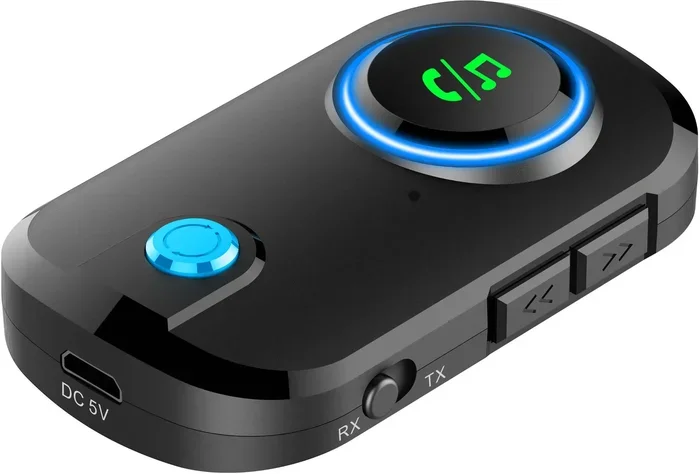
A Bluetooth transmitter sends audio wirelessly from one device to another. It connects to your TV, computer, or music player. Then it streams sound to your headphones, speakers, or car stereo. The transmitter replaces the need for wires.
Most transmitters plug into a 3.5mm jack or USB port. They pair with Bluetooth-enabled devices nearby. Simple, right? But simple does not mean all transmitters perform equally.
How Do Bluetooth Transmitters Work?
Here is how it works in plain terms. Your device sends an audio signal to the transmitter. The transmitter encodes that signal using a Bluetooth codec. Then it sends the encoded signal through the air. Your receiver or headphones decode it and play the sound.
The codec is like a language. Some codecs send more data. Some send less. More data means better sound. Less data means compressed, lower-quality audio. This is the first big reason transmitters sound different.
Do All Bluetooth Transmitters Sound the Same?
The short answer is no. Two transmitters can look identical on the outside. But inside, the sound quality can be worlds apart. Here is why.
The Role of Bluetooth Codecs
A Bluetooth codec is the method used to compress and send audio. Different codecs handle audio differently. Some preserve more detail. Others strip audio data to save bandwidth.
Here are the most common codecs you will encounter:
- SBC — The default codec for most devices. It works everywhere but offers basic sound quality.
- AAC — Common on Apple devices. It sounds better than SBC but still compresses audio.
- aptX — Offers much better quality than SBC. Popular in mid-range and premium transmitters.
- aptX HD — High-definition version of aptX. Delivers noticeably richer sound.
- LDAC — Sony’s codec. It sends nearly lossless audio over Bluetooth. Best for audiophiles.
- LC3 — The new codec built into Bluetooth 5.2. It improves efficiency and quality.
If your transmitter supports LDAC but your headphones only support SBC, you will get SBC quality. Both sides need to support the same codec for the best results. This mismatch is one reason Bluetooth audio quality varies so much between devices.
Bluetooth Version Differences
The Bluetooth version matters more than most people realize. Older versions like Bluetooth 4.0 have slower data transfer rates. Newer versions like Bluetooth 5.0 and 5.3 are faster and more stable.
Here is a quick comparison:
- Bluetooth 4.0-4.2 — Basic audio streaming. Higher latency. Limited range.
- Bluetooth 5.0 — Double the speed. Better range. Lower power use.
- Bluetooth 5.2 — Supports LE Audio and the LC3 codec. Big improvements in quality.
- Bluetooth 5.3 — Further refinements in stability and efficiency.
A transmitter with Bluetooth 5.0 or higher will generally sound better and connect more reliably than one using older versions. Wireless audio quality improves with each new version.
Hardware Quality and Build
The inside components of a transmitter matter a lot. Cheap transmitters use low-grade digital-to-analog converters, or DACs. These DACs turn digital audio into analog signals your ears can hear. A poor DAC distorts the sound.
Premium transmitters use better DACs and amplifiers. They produce cleaner, more detailed audio. The difference is especially noticeable with headphones that can resolve fine details. A good transmitter lets your headphones perform at their best.
Build quality also affects longevity. A transmitter that overheats or loses connection after a few months will frustrate you. Look for transmitters with solid build quality and good heat management.
What Factors Affect Bluetooth Transmitter Sound Quality?
Several factors determine how a transmitter sounds. Understanding these helps you make a smarter purchase.
Latency and Audio Delay
Latency is the delay between the audio source and what you hear. Some transmitters have noticeable lag. This is especially annoying for watching videos or playing games.
Gaming transmitters with low-latency codecs like aptX LL (Low Latency) reduce this delay. If you have ever wondered can I use Bluetooth headphones for gaming, the answer is yes — but only if your transmitter supports low-latency codecs.
Signal Range and Interference
Bluetooth signals can weaken over distance. Walls, furniture, and other electronics cause interference. A transmitter with strong signal strength maintains better sound quality at longer ranges.
Most transmitters work well within 30 feet. But cheaper models may lose connection or drop audio quality beyond 15 feet. If you need range, look for transmitters rated for longer distances.
Audio Compression Levels
All Bluetooth audio is compressed to some degree. The amount of compression depends on the codec. Heavy compression removes audio details. Light compression preserves more of the original sound.
Think of it like a photo. A highly compressed photo looks blurry. A lightly compressed photo looks sharp. The same idea applies to audio. Transmitters that use less aggressive compression deliver better audio fidelity.
Source Device Quality
The device sending the audio matters too. A high-quality audio file from a good source sounds better than a compressed MP3. The transmitter can only pass along what it receives. If the source is poor, the output will be poor.
How to Choose the Right Bluetooth Transmitter
Not sure where to start? Follow these tips to find the right transmitter for your needs.
Identify Your Use Case
Different situations call for different features. Ask yourself what you will use the transmitter for.
- Music listening — Prioritize codec support and audio quality. LDAC or aptX HD are ideal.
- Gaming — Look for low-latency codecs like aptX LL.
- TV watching — Choose a transmitter with a dedicated TV output and lip-sync features.
- Car audio — If you want to bring wireless audio to your vehicle, consider options for can I upgrade my car stereo to Bluetooth with a dedicated car transmitter.
- Home speakers — A versatile transmitter that works with both wired and wireless setups is best.
Check Codec Compatibility
Make sure your transmitter and receiver support matching codecs. Check both devices before buying. A mismatch means you will not get the best possible sound.
Read Reviews and Benchmarks
Do not just trust the product listing. Read real user reviews. Look for independent tests that measure audio quality and latency. A transmitter that sounds great in theory may disappoint in practice.
Consider Your Budget
Good transmitters range from $20 to $200. Budget models handle basic tasks well. Premium models offer advanced codecs and better build quality. You do not need to spend a fortune, but spending under $15 often leads to disappointing results.
Can You Upgrade Existing Equipment?
Yes! If you have wired headphones or speakers, you can add Bluetooth capability. A simple Bluetooth transmitter or adapter connects to the 3.5mm or USB port. This is a great way to make older gear wireless without replacing it.
For example, many people ask, can I make my wired headphones Bluetooth? The answer is a definite yes. A small transmitter plugged into the headphone jack transforms any wired pair into wireless headphones.
Similarly, if you have regular speakers at home, you can add Bluetooth with a simple adapter. People often search, can I turn regular speakers into Bluetooth, and the answer is yes with the right transmitter or receiver combo.
Common Mistakes People Make with Bluetooth Transmitters
Avoid these common pitfalls to get the best sound from your transmitter.
- Assuming all transmitters are equal. Price and features vary wildly. Always check codec support.
- Ignoring the receiver’s capabilities. Your transmitter is only as good as the device receiving the signal.
- Placing the transmitter too far away. Distance and obstacles degrade signal quality.
- Using outdated Bluetooth versions. Older versions lack modern codec support and stability.
- Skipping firmware updates. Some transmitters receive updates that improve performance and fix bugs.
- Overlooking interference sources. Wi-Fi routers and microwaves can disrupt Bluetooth signals.
Expert Insights on Bluetooth Transmitter Audio
Audio engineers agree that the codec and DAC are the two most important factors in sound quality. A premium transmitter with aptX or LDAC support will outperform a budget model with only SBC, even if both are brand new.
Experts also recommend testing your setup in your actual environment. A transmitter that works perfectly in a quiet room may struggle in a crowded apartment with lots of Wi-Fi networks nearby. Wireless connectivity performance depends heavily on your surroundings.
Another tip from the pros: keep your firmware updated. Manufacturers regularly improve performance through software updates. A simple update can reduce latency and improve connection stability.
If you are using Bluetooth for anything beyond casual listening, invest in a quality transmitter. The difference in audio quality is immediately noticeable. Your ears will thank you.
Quick Tips for Better Bluetooth Audio
- Keep your transmitter and receiver within 30 feet of each other.
- Remove physical obstacles between the devices.
- Turn off nearby Wi-Fi devices if you notice interference.
- Update your transmitter’s firmware regularly.
- Match your codec support on both the transmitter and receiver.
- Use lossless audio files when possible for the best results.
- Test your setup with different genres of music to hear the full range of performance.
Conclusion
Do all Bluetooth transmitters sound the same? Absolutely not. The differences come down to codecs, Bluetooth versions, hardware quality, and your specific use case. A premium transmitter with modern codecs like aptX HD or LDAC will deliver far better sound than a budget model with basic SBC support.
Your choice of transmitter directly impacts your listening experience. Whether you are streaming music, watching movies, or gaming, the right transmitter makes a noticeable difference. Take the time to research your options. Check codec compatibility. Read reviews. Invest in quality.
The world of wireless audio is getting better every year. New codecs and Bluetooth versions continue to push the boundaries of what is possible. Stay informed, choose wisely, and enjoy the music the way it was meant to be heard.
Frequently Asked Questions
Why do some Bluetooth transmitters sound better than others?
Differences in Bluetooth codecs, DAC quality, and Bluetooth versions cause sound variations. Premium transmitters support advanced codecs like aptX HD or LDAC, which deliver richer audio. Budget models often rely on basic SBC, resulting in compressed, lower-quality sound.
Can a Bluetooth transmitter improve my headphones’ sound quality?
Yes, to an extent. A good transmitter with a quality DAC and advanced codec support can bring out more detail and clarity in your headphones. However, the headphones themselves also play a big role in the final sound you hear.
Does Bluetooth version affect audio quality?
Yes. Newer Bluetooth versions support better codecs and offer lower latency and stronger connections. Bluetooth 5.0 and above provide noticeably better wireless audio performance compared to older versions like Bluetooth 4.0.
What is the best codec for Bluetooth audio?
LDAC and aptX HD are considered the best for high-quality audio. They transmit more data, preserving more of the original sound. However, both your transmitter and receiver must support the codec for it to work.
How far can a Bluetooth transmitter maintain good sound quality?
Most transmitters work well within 30 feet. Cheaper models may lose quality beyond 15 feet. Walls, furniture, and other electronics can weaken the signal and reduce audio quality at longer distances.
Is it worth paying more for an expensive Bluetooth transmitter?
For serious listeners, yes. Premium transmitters offer better codecs, superior DACs, and lower latency. If you care about audio quality for music or gaming, the investment is worthwhile. Casual listeners may find budget models perfectly adequate.