Do You Have To Pay For Security Camera Apps For Free
You do not always have to pay for security camera apps. Many excellent free security camera apps offer solid features like live streaming, motion detection, and cloud storage. However, paid plans unlock advanced tools like longer video history and person detection. This guide covers the best free and paid options so you can decide what fits your home security needs.
Do you have to pay for security camera apps? The short answer is no. Plenty of free security camera apps let you monitor your home without spending a dime. But the longer answer is more nuanced. Some free apps limit features, push you toward paid tiers, or cap your storage. Knowing what you get for free and what costs money helps you make a smart choice.
In this guide, we walk through everything you need to know about security camera apps. We cover the best free options, what paid plans actually offer, and how to pick the right one for your setup. Whether you are setting up a simple indoor cam or a full home surveillance system, this article has you covered.
We also share practical tips so you avoid common traps. Many people sign up for “free” apps only to discover they need a subscription for basic features like motion detection alerts or cloud video storage. We help you spot those pitfalls early so you get exactly what you need without overpaying.
Key Takeaways
- Free security camera apps exist: Many reputable brands offer free tiers with basic features like live viewing and motion alerts.
- Paid plans add real value: Subscribed features like extended cloud storage and AI person detection make paid apps worth it for some users.
- Your choice depends on needs: A small apartment may only need a free app, while a large property benefits from paid features.
- Hidden costs can sneak up: Some free apps push premium features hard or require paid subscriptions for full functionality.
- DIY home security is affordable: You can build a solid system without breaking the bank by mixing free apps with budget cameras.
- Compatibility matters: Always check that the app works with your specific camera brand before committing.
📑 Table of Contents
- What Are Security Camera Apps?
- Top Free Security Camera Apps You Can Use Today
- What Do Paid Security Camera Apps Offer?
- Free vs Paid Security Camera Apps: A Comparison
- How To Choose the Right Security Camera App
- Common Mistakes People Make With Security Camera Apps
- Expert Tips for Getting the Most From Your Free App
- Frequently Asked Questions
- Final Thoughts
What Are Security Camera Apps?
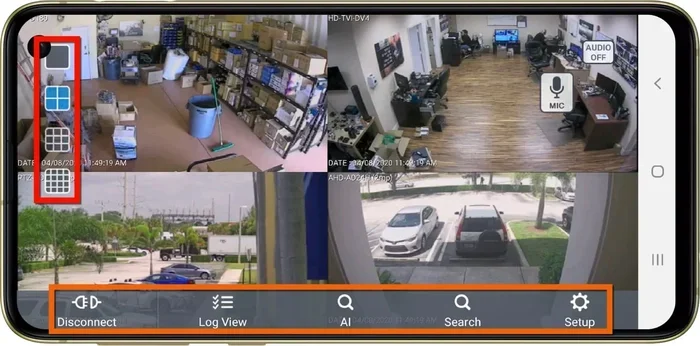
A security camera app is a mobile or desktop application that connects to your camera. It lets you view live footage, receive alerts, and manage settings right from your phone. Most modern wireless security cameras come with a companion app. Some work with third-party apps too, giving you more flexibility.
These apps handle several jobs at once. They stream live video, send push notifications when motion is detected, and store clips either locally or in the cloud. The app is basically the brain of your home security setup. Without it, most cameras are just blind devices sitting on a shelf.
Some apps work with a single camera. Others support multiple cameras across different rooms or even different locations. This matters a lot if you plan to monitor both your front door and your backyard. Always check how many cameras an app supports before you download it.
Top Free Security Camera Apps You Can Use Today
You do not need to spend money to get a working security camera setup. Several brands and third-party developers offer free security camera apps with solid features. Here are some of the best options available right now.
Brand-Specific Free Apps
Many camera manufacturers provide their own free apps. Brands like Wyze, Blink, and Ring offer apps that connect to their cameras at no cost. These apps typically include live streaming, two-way audio, and basic motion alerts. They are the easiest option if you already own a camera from that brand.
For example, the Wyze app works with Wyze cameras and gives you free live viewing and event clips. Blink’s app offers similar features with a generous free tier. Ring’s app connects to Ring cameras and doorbells, providing real-time notifications and a live feed. All of these work without a subscription, though some advanced features may require one.
Third-Party Apps That Support Multiple Brands
Third-party apps like Alfred Camera and iSpy let you use old phones as security cameras. These are fantastic DIY security camera solutions that cost nothing. You simply mount an old smartphone, download the app, and start monitoring. The free versions include basic live streaming and motion detection.
Alfred Camera is especially popular because it turns unused phones into indoor or outdoor cameras. You get a second camera view on your current phone. The app supports night vision camera mode and sends alerts when it detects movement. It is one of the best truly free options on the market.
What Free Apps Typically Include
Most free security camera apps give you the essentials. You get live streaming, motion detection alerts, two-way audio, and basic clip storage. Some free apps store clips for a limited time, like 24 to 72 hours. Others let you save clips locally on your device. Here is a quick look at what you can expect for free:
- Live video streaming from your camera in real time
- Motion detection alerts pushed to your phone
- Two-way audio so you can speak through the camera
- Basic cloud clips stored for a short period
- Local storage options using your phone or SD card
- Night vision support for low-light monitoring
What Do Paid Security Camera Apps Offer?
So what do you get when you pay? Paid security camera apps unlock features that make monitoring more powerful and convenient. They are not always necessary, but they add real value depending on your situation.
Extended Cloud Storage
This is the biggest reason people pay for security camera apps. Free tiers usually store clips for a day or three. Paid plans can extend that to 30 days or more. If you want to review footage from last week after an incident, you need that extended storage. Without it, older clips get deleted automatically.
AI-Powered Detection
Paid apps often include smart detection features. These can distinguish between a person, a pet, a car, or just a tree swaying in the wind. AI person detection cuts down on false alarms significantly. Instead of alerting you every time a raccoon walks by, the app only notifies you when a person appears. This feature alone can justify the cost for many homeowners.
Advanced Privacy Controls
Paid plans sometimes include privacy features like encrypted storage and activity logs. These tools give you more control over who sees your footage. For families or shared households, this added layer of security is reassuring. You can track exactly who accessed the feed and when.
Priority Support and Higher Resolution
Some paid apps offer higher resolution streaming and priority customer support. If you need crisp 4K footage or quick help when something goes wrong, a paid plan delivers. Free tiers usually cap resolution at 720p or 1080p, which is fine for most purposes but not always enough for identifying faces at a distance.
Free vs Paid Security Camera Apps: A Comparison
Choosing between free and paid security camera apps depends on your needs. Here is a side-by-side comparison to help you decide.
| Feature | Free Apps | Paid Apps |
|---|---|---|
| Live Streaming | Yes | Yes |
| Motion Alerts | Yes | Yes |
| Cloud Storage Duration | 24-72 hours | Up to 30+ days |
| AI Person Detection | Rare | Common |
| Two-Way Audio | Yes | Yes |
| Night Vision | Yes | Yes |
| Multi-Camera Support | Limited | Full Support |
| Resolution | Up to 1080p | Up to 4K |
| Customer Support | Community/Email | Priority Support |
The table shows that free apps cover the basics well. If you just want to peek at your front door or check on pets while traveling, a free app works great. Paid plans shine when you need longer storage, smarter alerts, and better video quality. Think about what matters most to you before you commit to a subscription.
How To Choose the Right Security Camera App
With so many options out there, picking the right app can feel overwhelming. Here are some practical tips to guide your decision.
Start With Your Camera Brand
If you already own a camera, check what app it uses. Most brands have a dedicated app that works seamlessly with their hardware. Using the official app ensures full compatibility and access to all features. You can always explore third-party options later if the official app feels limited.
Consider Your Monitoring Needs
Ask yourself what you actually need the app to do. Are you monitoring a single room or an entire property? Do you need alerts only during certain hours? Do you want to view footage on a large screen? If you plan to watch your camera feed on a TV, you might also check if you can connect your phone to TV with HDMI cable for a bigger view. This simple setup can make a big difference when reviewing footage.
Think About Storage
Storage is where free apps usually fall short. If you want to keep clips for weeks, you will likely need a paid plan. But there are workarounds. Some apps let you save clips to a local SD card or your phone’s storage. This avoids monthly fees entirely. Just make sure your storage device is large enough and backed up regularly.
Check for Hidden Costs
Some apps are free to download but lock essential features behind a paywall. They may offer free live streaming but charge for motion alerts or clip access. Read the fine print before downloading. Look for apps that genuinely provide useful features for free without constantly pushing upgrades.
Test Before You Commit
Many paid apps offer free trials. Use these to test the features you care about most. Try the motion detection speed, the video quality, and the app’s ease of use. If the trial feels clunky or slow, the paid version probably will not improve much. A trial period saves you from signing up for something you will not use.
Common Mistakes People Make With Security Camera Apps
Setting up a security camera app seems simple, but people often make avoidable mistakes. Here are the most common ones and how to skip them.
Assuming Free Means No Limitations
The word “free” can be misleading. Many free apps limit the number of cameras, reduce video quality, or delete clips after a short time. Always read the full feature list before assuming you are getting a complete solution. Some free apps work great as a starting point but lack the depth needed for serious home surveillance.
Ignoring Wi-Fi Range and Stability
Your camera is only as good as your Wi-Fi connection. A weak signal means dropped feeds and missed alerts. If your camera is far from your router, consider whether you can add a mesh router to T-Mobile home internet to extend coverage. A strong, stable connection is the foundation of any reliable security setup.
Not Securing Your App Properly
Security camera apps give access to your home’s live feed. If someone gains access to your account, they can watch everything. Use strong, unique passwords and enable two-factor authentication whenever possible. Also, keep your app updated to patch any security vulnerabilities. A hacked camera is worse than no camera at all.
Overlooking Local Storage Options
Many people jump straight to cloud storage without considering local options. An SD card or a local network video recorder can store footage without monthly fees. This approach gives you full control over your data and avoids recurring subscription costs. It is one of the best ways to keep your home surveillance budget-friendly.
Forgetting to Test Your Setup
After installing your app and camera, test everything. Check the motion detection range, the alert timing, and the video quality at night. A setup that works perfectly on day one can develop issues over time. Regular testing ensures your system stays reliable when you need it most.
Expert Tips for Getting the Most From Your Free App
Want to maximize what your free security camera app offers? These expert tips help you squeeze every bit of value from a free setup.
First, position your camera strategically. Place it at entry points like doors and windows where intruders are most likely to appear. Avoid pointing cameras directly at bright light sources, which can wash out the image. A well-placed camera catches the most useful footage with the least effort.
Second, adjust your motion detection sensitivity. Too sensitive and you get alerts from passing cars or animals. Too low and you miss real events. Most free apps let you set sensitivity levels. Spend ten minutes tuning this setting, and you will see a big difference in alert quality.
Third, use your phone’s built-in features to enhance monitoring. You can set up routines that turn on your camera feed automatically when you leave home. Some phones support browsing the internet on a tablet as well, so you can monitor from any device in your house. The more access points you have, the better informed you are.
Fourth, regularly clear old clips to keep your app running smoothly. Free apps often have limited local storage. Deleting old footage frees up space for new recordings. Set a reminder to do this every week or two to keep things running clean.
Finally, stay informed about updates. App developers regularly add new features and fix bugs. Keeping your app updated ensures you always have the latest improvements. It also keeps your system secure against newly discovered threats.
Frequently Asked Questions
Are free security camera apps safe to use?
Yes, most reputable free security camera apps are safe. They use encryption and secure servers to protect your footage. However, you should always download apps from official app stores and check reviews before installing. Avoid apps from unknown developers, as they may compromise your privacy. Using strong passwords and two-factor authentication adds an extra layer of safety.
Can I use one free app with multiple camera brands?
Some third-party apps like Alfred Camera support multiple brands and even repurpose old phones as cameras. However, brand-specific apps usually only work with their own cameras. If you mix brands, a third-party app gives you more flexibility. Just check compatibility before committing to a particular app.
Do I need Wi-Fi for a security camera app to work?
Yes, most security camera apps require a Wi-Fi connection to stream live footage and send alerts. Without Wi-Fi, your camera cannot connect to the app or upload clips to the cloud. Some cameras support local storage via SD cards, which works without internet, but you lose remote viewing and real-time alerts.
What is the best free security camera app for beginners?
Alfred Camera and the Wyze app are excellent choices for beginners. Both are easy to set up, offer solid free features, and have intuitive interfaces. Alfred is great for turning old phones into cameras, while Wyze works best with Wyze-branded cameras. Either one gives you a strong starting point without any upfront cost.
Is it worth paying for a security camera app?
It depends on your needs. If you want extended cloud storage, AI person detection, and higher resolution, a paid plan is worth it. If you only need basic live viewing and motion alerts, a free app is perfectly fine. Evaluate what features matter most to you before spending money on a subscription.
Can I view my security camera footage on a TV screen?
Yes, you can view camera footage on a TV by connecting your phone to the TV with an HDMI cable. This gives you a larger display for reviewing clips or watching live feeds. It is a simple setup that works with most phones and modern TVs. Just make sure your camera app supports screen mirroring or external display output.
Final Thoughts
So, do you have to pay for security camera apps? Not necessarily. Plenty of free options deliver reliable monitoring, live streaming, and motion alerts without costing you a cent. Paid apps step up your game with longer storage, smarter alerts, and better video quality, but they are not essential for everyone.
The key is understanding what you need. A small apartment or a single-room setup works well with a free app. A larger property with multiple cameras may benefit from a paid plan that offers extended storage and AI detection. Start with a free option, test it thoroughly, and upgrade only if you find yourself missing features.
Home security should feel empowering, not expensive. With the right security camera app, you can protect your home, your family, and your peace of mind without breaking the bank. Take your time, explore your options, and build a setup that truly works for you.